Post purchase upsell on Shopify: where, what and how much
A post purchase upsell adds an item to an order the buyer already paid. The four Shopify pages, what to offer, a 15% then 25% start, and how to judge it.
2026-11-02 — Abakira, updated 2026-11-08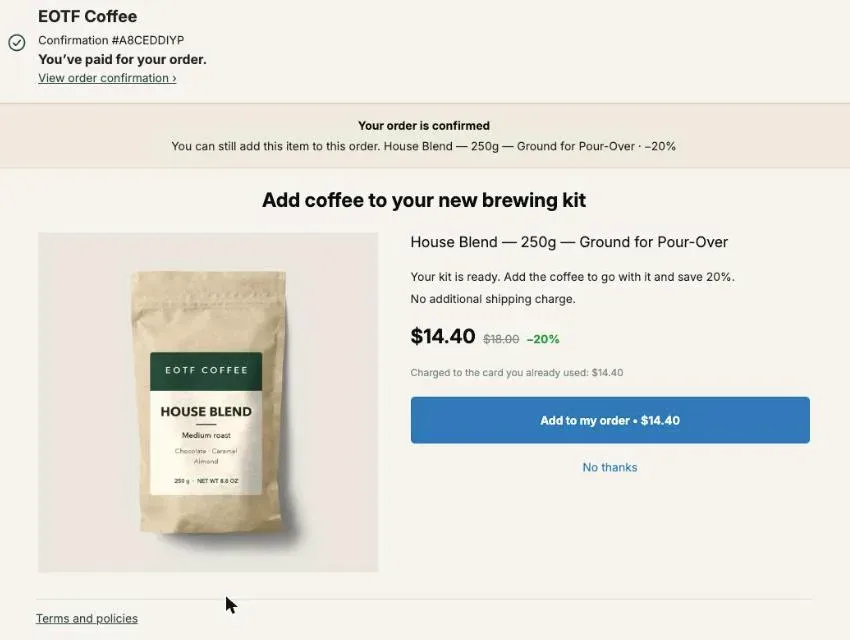
A post purchase upsell is an offer shown after the buyer has paid, which adds an item to the order they just placed. On Shopify it can appear in four places: the one-click page between payment and confirmation, the thank-you page, the order status page, and (on Shopify Plus) inside the checkout. Done well, it raises the value of an order you already won without touching your conversion rate, because the first sale is banked before the offer appears.
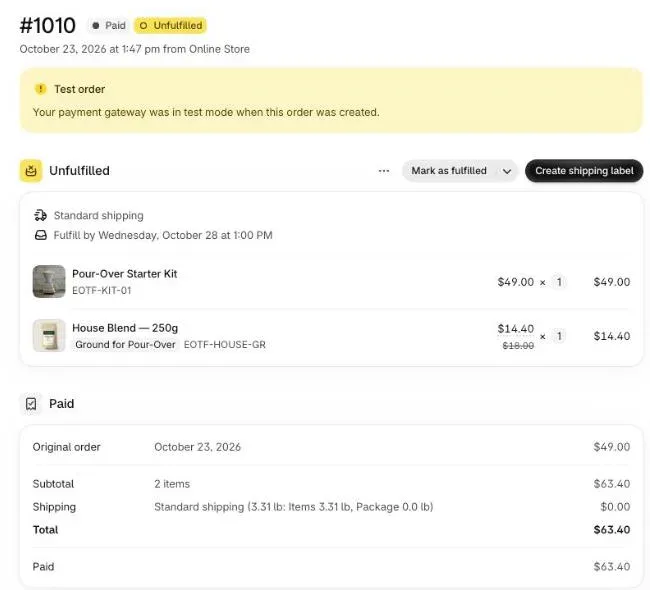
On our coffee test store, test order #1010 on October 23, 2026 went from a $49.00 pour-over kit to $63.40 with one tap: a $18.00 bag of House Blend offered at 20% off, charged to the card already used, on the same order. This guide walks through every decision behind an add-on like that, in the order you’ll face them, and points to the deeper page on each one.
What is a post purchase upsell, exactly?
A post purchase upsell is any offer made to a buyer whose payment has already gone through, where accepting adds an item to the existing order instead of starting a new purchase. Strictly, an upsell sells more or better of the same thing and a cross-sell sells a companion product. After checkout, both live in the same slot and get the same name.
Three things separate it from the offers you run before payment.
The buyer has nothing left to lose. The order is confirmed, so a “No thanks” costs you nothing, while every extra choice placed in front of a buyer before they pay is one more place to drop out. That’s the whole reason to move offers to the far side of the payment button.
There’s no second checkout. On the one-click page the card is charged again for the difference, without the buyer typing anything. On the thank-you and order status pages, a well-built offer edits the order that exists rather than opening a cart.
It ships with the rest. One order means one parcel and one shipping label, which is what makes a $14 add-on worth selling at all.
An order bump is a different tool: a checkbox inside the checkout, before payment. On Shopify that position needs Plus. Our page on order bumps on Shopify covers both versions.
Where can a post purchase upsell appear on Shopify?
A post purchase upsell on Shopify can sit on four pages, and they don’t reach the same buyers or join the order the same way. The one-click page is the most direct but skips many payment methods. The thank-you page reaches every buyer. The order status page catches buyers who come back. The checkout needs Shopify Plus.
| Page | When the buyer sees it | Who sees it | How the item joins the order |
|---|---|---|---|
| One-click post-purchase page | Between payment and confirmation | Credit card buyers on eligible orders | Charged to the same card, no form |
| Thank-you page | Right after, on the confirmation | Every buyer, whatever they paid with | Order edit; card buyers pay the difference on a payment page |
| Order status page | Whenever the buyer reopens it | Buyers who come back to check their order | Order edit, until the order has shipped (by default) |
| Checkout (Shopify Plus only) | Before payment | Every buyer in checkout | Line added to the cart |
In Post Purchase Upsell Abakira, each of these is a tab in the funnel editor: “In the checkout”, “One-click post-purchase”, “Thank-you page” and “Order status”. You set targeting and order once for the funnel, and every surface follows. If you can only build one page this week, our page on which page to build first after checkout decides it from your payment mix.
How do you find out how many of your buyers get the one-click page?
Count your card share over the last 30 days: the one-click page appears when Shopify can charge the original card again. Shopify doesn’t show it on orders paid with a wallet, an installment service or a gift card, on local delivery orders, on orders with duties and multiple currencies, on orders under $0.50, or on orders from another sales channel than the Online Store.
Count your card share, then judge every number against it. Our page on why Apple Pay, PayPal and Google Pay orders never see the offer goes through each exclusion, and the guide chapter on who will actually see your offers shows how to read your own share.
Cash on delivery is on the excluded side too. A COD store sells after checkout through the thank-you page instead, with the extra line paid at the door; the method is in how to upsell cash on delivery orders.
How do you turn the post-purchase page on?
The post-purchase page is off on every Shopify store until you pick an app for it. The setting lives in Shopify, not in the app: Settings, then Checkout, then the Post-purchase page section, where you select one app and save. Shopify allows exactly one app on that page at a time.
Our admin repeats this as the last step of setup, word for word: “Last step, in Shopify: Settings → Checkout → Post-purchase page, select this app. Shopify only shows the page once the app is selected there.” Skip it and nothing you build in any app will ever appear on that page.
Our page on the Shopify post-purchase page setting shows where it hides and how to confirm it took. If you’re replacing another app, the switch itself is this same setting; the order to do it in without a gap is in how to switch post-purchase upsell apps.
What should you offer after checkout?
The best post purchase upsell is something the buyer needs because of what they just bought, priced well below what they just spent. Five shapes cover almost every store: the companion, more of the same, a better variant, a bundle, and a free item. Subscriptions, warranties and gift wrap are narrower cases of the same idea. Ten of these offers, with the exact settings for each, are in our post purchase upsell examples.
The companion. Coffee for a brewing kit, filters for a machine, a case for a phone. The buyer isn’t reconsidering anything, only finishing a decision. That’s the offer in our screenshot above.
More of the same. The second unit of a consumable, cheaper per unit. Our app has two offer types for it, “One more, any variant” and “One more, same variant”, which re-offer whatever the buyer just paid for, so one offer covers your whole catalog. Details and discount depth are in same product upsell on Shopify.
A variant choice. A product offered with a list of flavors, colors or sizes you pick, so the buyer chooses instead of getting your guess. See how to upsell a different variant.
A bundle or a free item. A set with one piece free costs you the margin of that piece only. Our page on free gift tiers works the numbers.
A subscription or a warranty. Turning a one-time buyer into a subscriber works on the post-purchase page with a selling plan from Recharge or Loop (selling a subscription after checkout). A warranty sold right after payment, only to buyers of the products it covers, is covered in extended warranty upsells.
An offer whose shipping cost outweighs its margin loses money on every yes.
How much discount should the offer carry?
A post purchase upsell needs a discount large enough to make the add-on feel like a reason to act now, and small enough to leave margin on the second item. Start at 15% on the first offer and 25% on the downsell, then judge the result per order shown, not per acceptance.
Those two numbers are what our app uses when it builds a Starter funnel from your sales: 15% for offer 1 and for the offer after a yes, 25% for the offer after a no. It also caps the offer price at your average order over the last 60 days, because an add-on that costs more than the order just paid isn’t an impulse anymore. With no sales yet, it picks a product in stock, with a photo, priced closest to half of the median catalog price.
The price ratio matters more than the percentage. In our coffee example the add-on is $14.40 against a $49.00 order, 29% of the order. The Starter funnel caps every offer at your average order for that reason.
Then compare offers on revenue per order that saw them. A worked example with round numbers:
| Offer | Price after discount | Takers per 100 orders shown | Revenue per 100 orders shown |
|---|---|---|---|
| House Blend, 20% off | $14.40 | 12 | $172.80 |
| Brew set, one item free | $26.00 | 8 | $208.00 |
The bag wins on acceptance rate and loses on money. That’s the trap the rate sets, and why the full method in how to price a post-purchase upsell judges every offer per order. To know what a second item actually leaves you after product cost and ads, run it through contribution margin per order.
What happens after the buyer says yes, or no?
A post-purchase funnel is a small decision tree: every offer has a follow-up for a yes and another for a no. In Post Purchase Upsell Abakira the tree is three levels deep, so seven offers in total, and one buyer sees at most three of them, which is also the number of offers Shopify lets a buyer accept on that page.
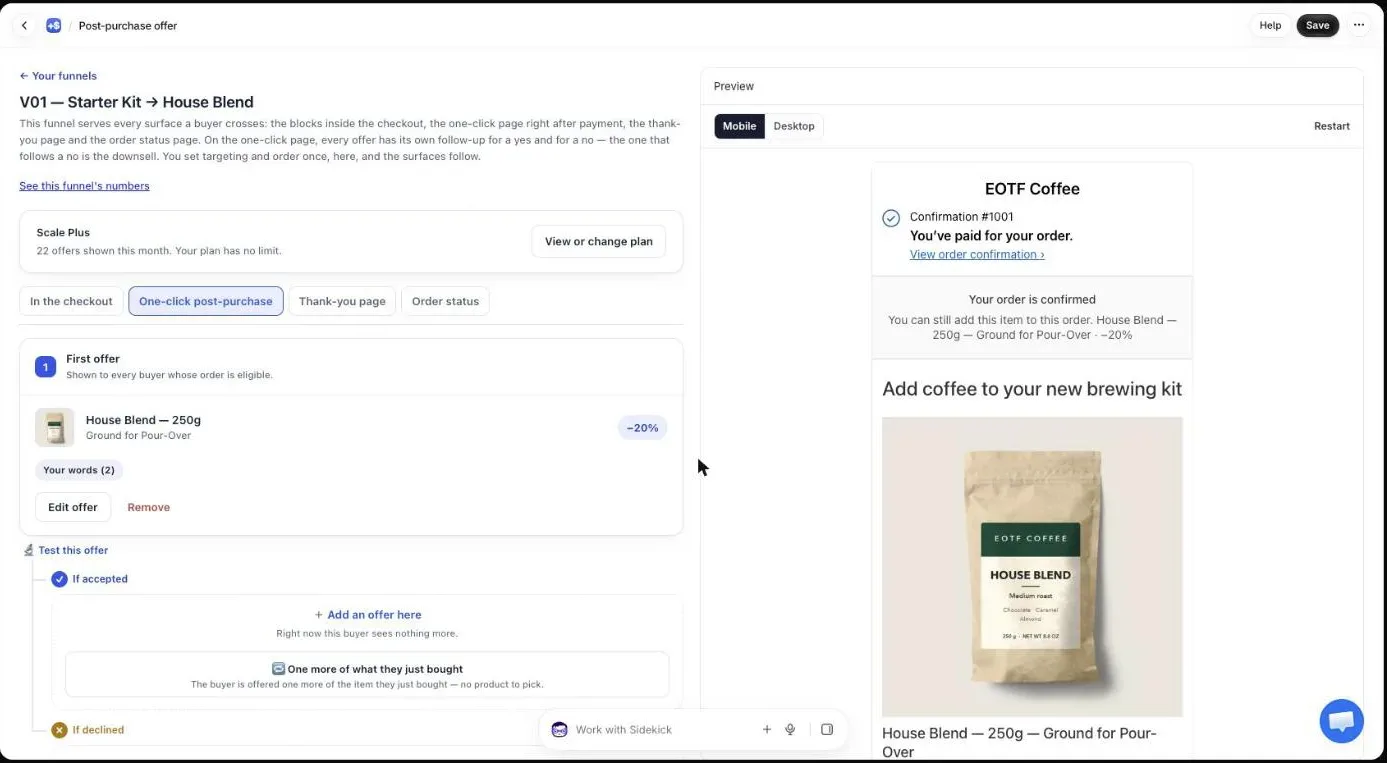
The “If declined” branch is the second ask. The buyer who said no to the bag at 15% has seen the product; the price stopped them. Offering the same item at 25% is a fair second ask, and it’s the downsell our Starter funnel puts there by default. How deep to cut, and when to strip a bundle down instead, is in downsell on Shopify.
The “If accepted” branch sells to someone who just said yes twice. A companion to the item they just added works, as does the decoy trick of putting a larger tier next to the one you want taken (decoy pricing after checkout). On our free plan, only the first offer is served; the follow-ups are saved and switch on with a paid plan.
How do you build your first funnel in five minutes?
The fastest first funnel is one built from your own sales. Post Purchase Upsell Abakira reads the last 60 days of orders when you first open it and proposes three offers from your catalog, switched off until you turn them on. The steps below take a store from install to a live, tested offer.
- Install Post Purchase Upsell Abakira and open it. While it works, the admin says: “We’re reading your products and the last 60 days of sales to pick three offers.”
- Read the three offers. Each line gives its reason, for example “your best-seller”, “often bought with offer 1” or “same product, bigger discount”.
- Click Edit offers to change anything, then Turn on this funnel. The admin is explicit: “It’s switched off: buyers see nothing until you turn it on.”
- In Shopify, select the app under Settings, then Checkout, then Post-purchase page, and save.
- Place a test order with a credit card and tap Add to my order.
- Open the order in your Shopify admin and check that the item sits on the same order, at the discounted price.
The guide chapter your first funnel in five minutes has screenshots of each screen, and one click upsell on Shopify explains what happens behind the tap.
How do you reach the buyers the one-click page misses?
The thank-you page is the post-purchase surface every buyer sees, PayPal, wallets, bank redirects and cash on delivery included. Put a second set of offers there as blocks under the order summary, and add the item to the order the buyer already placed instead of sending them into a new checkout.
Each page in our app takes up to six blocks: Text, Banner, Single product, Carousel, Bundle and Sequence. The bundle below sells three products from our coffee store as one set, with the mug free.
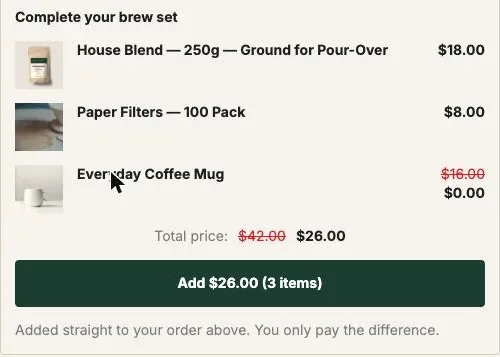
Two settings decide how that block behaves.
Show it to. By default, “Everyone”. The rule “Buyers who did not see the one-click page” exists on every plan, but on the free plan every buyer is treated as not having seen the one-click page, so that block and the blocks without a rule are shown to all buyers. From the Pro plan up, a “did not see” block reaches only the buyers the one-click page missed, and blocks can follow the outcome: “Buyers who accepted a specific offer”, “Buyers who accepted at least one offer” or “Buyers who refused everything”.
Where the purchase goes. “Same order, unless it has fully shipped” is the default, so the item joins the existing order and parcel. The other options are “Same order, only until the first parcel ships” and “Always a new checkout”. A card buyer pays only the difference; a cash on delivery buyer pays it at the door with the rest.
Our thank-you page guide is thank you page upsell on Shopify. If one offer isn’t enough, a Sequence block shows up to six offers one at a time, lets each answer pick the next, and charges once at the end: see the thank-you page upsell sequence.
Is the order status page worth an offer?
The order status page is worth a block because it takes the same blocks as the thank-you page and is seen later, once the buying moment has passed. That timing suits offers tied to the product arriving: a refill, an accessory, the next step.
The default “Where the purchase goes” setting matters most here. Once the whole order has shipped, the buyer pays in a new checkout instead, so nothing gets attached to a parcel that already left. On the Scale plan, order status blocks can also follow what the buyer bought on the thank-you page of the same order. The full method is in order status page upsell.
Do countdowns and social proof help a post purchase upsell?
A countdown helps when zero really means the offer is gone, and social proof helps when the figure is measured. Post Purchase Upsell Abakira does both that way: a timer of 30 seconds to 30 minutes that declines the offer at zero, and a “how many buyers added it” line computed from your own orders.
The admin spells out the timer rule: “The urgency is real: when it reaches zero, the offer is declined and the buyer moves on.” How long to set it, and what the buyer sees at 0:00, is covered in post purchase countdown timers.
The social proof line, “Show how many buyers added it”, stays hidden until the offer has at least 50 views and at least a 10% take rate. Below that, the number would hurt the offer more than help it, and there is no field to type one in by hand: the admin says “The figure is measured on your own orders, never typed in.”
Will the extra item ship in the same parcel?
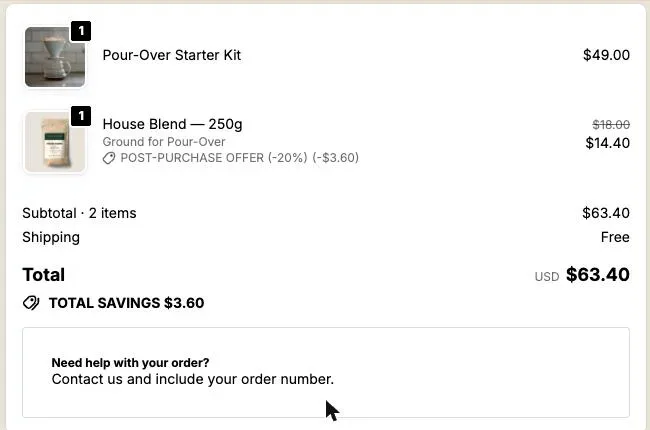
An item added on the one-click page always lands on the same Shopify order, so it ships in the same parcel as long as nothing has left your warehouse. Here is test order #1010 in our Shopify admin after the buyer tapped once: two lines, one shipment, one total paid.
The catch is a third-party warehouse. Many warehouse systems import a Shopify order seconds after payment, sometimes before the add-on is attached, and then ship the first parcel without it. Holding new orders for a few minutes, or pushing the late line to the order the warehouse already has, fixes it; both are explained in why a post-purchase upsell ships in a second parcel with a 3PL.
How do you measure whether the upsell works?
A post purchase upsell is measured on three figures per offer: how many times it was shown, how many buyers accepted, and the revenue those acceptances added at the price actually charged. Divide revenue by orders shown to compare offers, and compare against your own first offer rather than an industry average.
Our Results page reads revenue from your Shopify orders, so it matches your Shopify reports, and it counts an offer as shown only when it actually appeared on the buyer’s screen. That second point matters: a wallet buyer never sees the one-click page, so they never inflate your “shown” count and drag your rate down. The guide chapter read your numbers without fooling yourself explains each figure.
Testing beats guessing. On the Scale plan you can give one offer up to four versions, split fairly between buyers and judged on revenue. Pick three candidates when you build your first funnel, so you have something real to test against later. For everything that moves average order value before, during and after checkout, our broader page on raising average order value on Shopify puts the post-purchase slot next to the others, and the method topic page lists every guide in this series.
Post Purchase Upsell Abakira is on the Shopify App Store, with a free plan of 100 offers shown per month that runs on a live store.
Set up a post purchase upsell on Shopify
- Install a post-purchase app Install Post Purchase Upsell Abakira from the Shopify App Store and open it once. On a store with sales, it builds a Starter funnel from your last 60 days of orders.
- Read the three offers it picked Offer 1 is your best-seller at 15% off. If the buyer accepts, the next offer is a product often bought with it, at 15% off. If the buyer declines, the next offer is the same product as offer 1 at 25% off. Click Edit offers to change any of them.
- Turn the funnel on Click Turn on this funnel. The funnel is created switched off, so buyers see nothing until you do.
- Select the app for the post-purchase page In Shopify admin, go to Settings, then Checkout, then the Post-purchase page section, select Post Purchase Upsell Abakira and save.
- Place a test order with a card Buy something in your own store with a credit card, not a wallet, and tap Add to my order on the offer.
- Check the order in Shopify Open the order in your Shopify admin. The upsell item should sit on the same order, at the discounted price, with one total.
Frequently asked questions
Do I need Shopify Plus for a post purchase upsell?
No. Only offers inside the checkout steps themselves (information, shipping and payment) need Shopify Plus.
Can two post-purchase upsell apps run on the same store?
Not on the one-click page. Shopify lets one app hold that page at a time, picked under Settings, then Checkout, then Post-purchase page. Changing apps is that one setting.
Does the buyer pay shipping again when they accept?
No second checkout opens, so there is no second shipping form. On the one-click page the item joins the paid order and our default buyer text says You can still add this item to this order, without paying again. Check that the item's weight doesn't push you into a costlier shipping bracket for the parcel you pay for.
What happens to the original order if the buyer says no?
Nothing. The order was paid before the offer appeared, so a No thanks, a closed tab or a countdown that runs out leaves it exactly as it was.
Is there a free way to start?
Post Purchase Upsell Abakira has a free plan that runs on a live store: 100 offers shown per month on the one-click page, with the first offer of the funnel served, and thank-you blocks shown to every buyer. Follow-up offers, and thank-you blocks that follow what happened on the one-click page, are on the paid plans, listed on the App Store page.
Related articles
Written by Abakira. We make small software: Shopify apps, web tools and iPhone apps. This article is about Post Purchase Upsell Abakira.