Contribution margin in ecommerce: the second item math
Contribution margin per order, worked line by line: a $49 order keeps $0.48 after ads. Add a $14.40 item to the same parcel and it keeps $6.96.
2026-10-29 — Abakira, updated 2026-11-11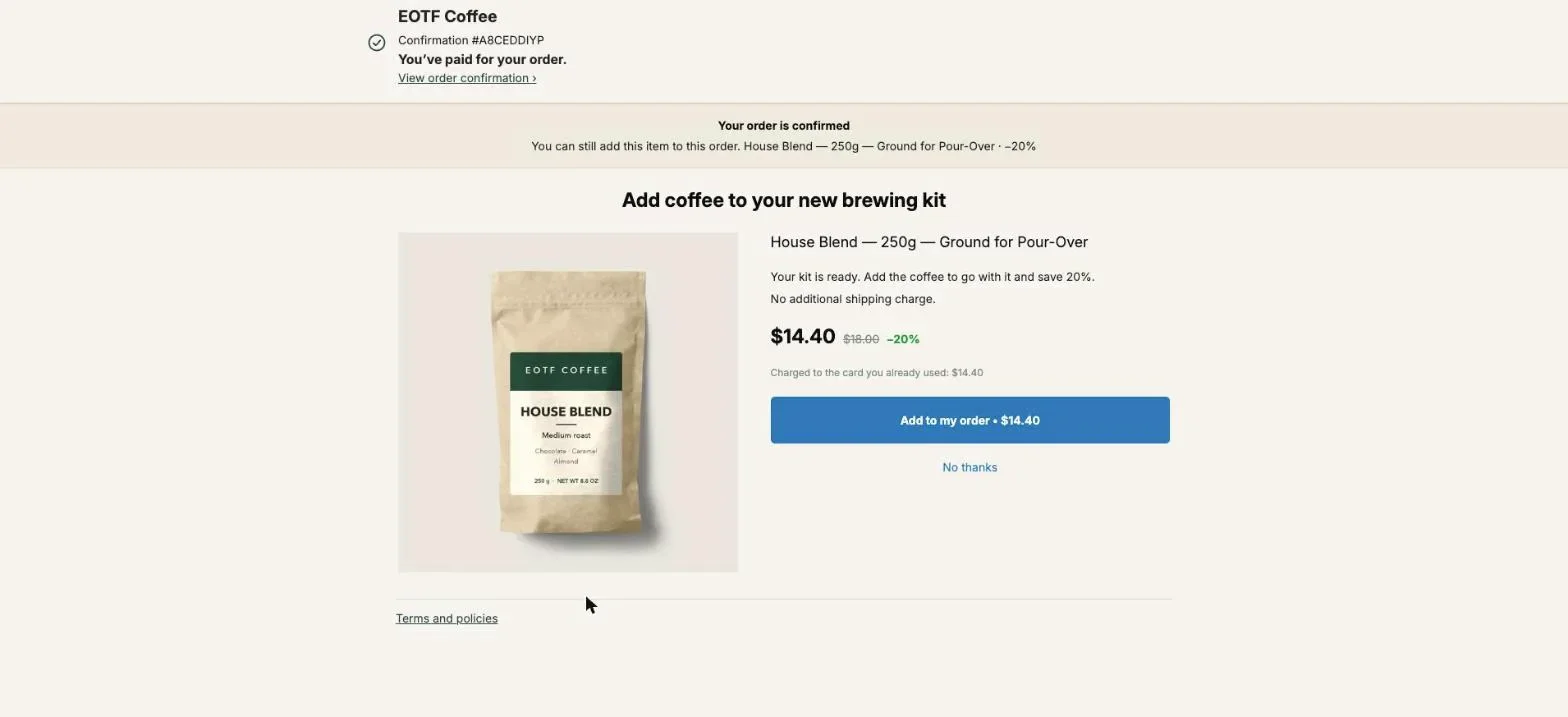
Contribution margin in ecommerce is what an order leaves you after every cost that grows with that order: the product, the payment fee, the shipping label, picking and packing, the box, and the ad that brought the buyer. On a one-item order those order-level costs swallow most of the margin. A second item added to the same paid order skips almost all of them, which is why in our worked example a $49 order keeps $0.48 after ads, and the same order plus a $14.40 bag of coffee keeps $6.96.
This page gives the formula, the three levels (CM1, CM2, CM3), a full per-order calculation, and the math of the second item: how much margin it adds, how deep a discount it can carry, and what it does to the ad cost you can afford. The products come from our coffee store. The costs are example figures; replace them with yours and the shape of the result holds.
What is contribution margin in ecommerce?
Contribution margin in ecommerce is net revenue minus all variable costs, the costs that appear once per order or once per unit. It is the money each order contributes to rent, salaries, software and profit. Gross margin only subtracts the cost of goods; contribution margin also subtracts fees, shipping, fulfillment and usually marketing.
The formula:
- Contribution margin = net revenue − variable costs
- Contribution margin ratio = contribution margin ÷ net revenue
Net revenue means what the buyer actually paid for the goods, after discounts. A product listed at $18 and sold at 20% off is $14.40 of revenue, not $18 of revenue with a $3.60 “cost”.
Fixed costs stay out: your Shopify plan, app subscriptions, salaries, the warehouse lease. They don’t move when one more order comes in, so they don’t belong in a per-order figure.
Shopify gets you part of the way. Gross profit by product subtracts the Cost per item you enter on each product from net sales, and Profit margin by order also counts the shipping costs and duties your store pays. Payment fees, packing, packaging and ad spend are not in either report.
What goes into CM1, CM2 and CM3?
CM1, CM2 and CM3 are three stops on the way from revenue to the money an order really leaves. Each level subtracts one more family of variable costs. Splitting them shows where the margin goes: into the product, into getting the parcel out the door, or into buying the customer.
| Level | Starts from | Subtracts | What it tells you |
|---|---|---|---|
| CM1 | Net revenue | Landed cost of the goods (product, inbound freight, duties) | Whether the price covers the product. Close to Shopify’s gross profit. |
| CM2 | CM1 | Payment fees, shipping label, pick and pack, packaging, expected returns | Whether a shipped order makes money before marketing. |
| CM3 | CM2 | Ad spend per order (your cost per acquisition) | Whether the order makes money at all. |
Two rules keep the numbers honest. Shipping and payment fees attach to the order, not to a product, so calculate per order. And returns go in as an expected cost: if 10% of orders come back and each return costs you $6 in labels and handling, every order carries $0.60.
How do I calculate contribution margin per order?
Contribution margin per order is calculated line by line: take what the buyer paid, subtract the landed cost of everything in the box, then every order-level cost, then the ad cost per order. Here is a single-item order on our coffee store: one Pour-Over Starter Kit at $49.
Example costs used throughout this page:
- Starter Kit landed cost: $19.60
- Card fee: 2.9% + $0.30 per charge
- Shipping label: $8.00 for the kit alone
- Pick and pack: $3.00 per order
- Box and filler: $1.20 per parcel
- Ad spend per order: $15.00
The example assumes free shipping for the buyer: the $8.00 label is a cost with no matching revenue. The $0.00 Shipping on the order screenshot below is what the buyer paid, not what the label costs you.
| Line | Amount | Running total |
|---|---|---|
| Net revenue | $49.00 | $49.00 |
| Landed cost of the kit | −$19.60 | CM1: $29.40 (60.0%) |
| Card fee (2.9% + $0.30) | −$1.72 | $27.68 |
| Shipping label | −$8.00 | $19.68 |
| Pick and pack | −$3.00 | $16.68 |
| Box and filler | −$1.20 | CM2: $15.48 (31.6%) |
| Ad spend per order | −$15.00 | CM3: $0.48 (1.0%) |
A 60% gross margin turns into a 1% contribution margin after ads. $13.92 of the order went to getting one parcel to one buyer, and $15 went to finding that buyer. Sell a thousand of these and revenue reads $49,000 while contribution after ads reads $480.
Why is the second item in the same order the most profitable one?
The second item in the same order is the most profitable one because the order already paid for the label, the packing, the box and the ad. The added item carries only its landed cost, a card fee and a little extra postage, so its margin ratio ends up far above the first item’s.
Here is the same store, with a 250 g bag of House Blend ($18 list price, $6.00 landed) offered on the one-click page right after payment at 20% off, so $14.40. We count the card fee in full on the added charge, fixed part included, and add $0.90 of postage for the heavier parcel and $0.30 of extra picking.
| Line | Kit alone | Bag added to the same order | Same bag as its own order, full price |
|---|---|---|---|
| Net revenue | $49.00 | $14.40 | $18.00 |
| Landed cost | −$19.60 | −$6.00 | −$6.00 |
| Card fee | −$1.72 | −$0.72 | −$0.82 |
| Shipping label | −$8.00 | −$0.90 (extra weight) | −$5.50 |
| Pick and pack | −$3.00 | −$0.30 | −$3.00 |
| Box and filler | −$1.20 | $0.00 | −$1.20 |
| CM2 | $15.48 (31.6%) | $6.48 (45.0%) | $1.48 (8.2%) |
| Ad spend | −$15.00 | $0.00 | depends on how the buyer comes back |
| CM3 | $0.48 | $6.48 | $1.48 at best |
Three things stand out.
The added bag, sold at a discount, keeps $6.48. The same bag at full price, shipped on its own a week later, keeps $1.48, and that is before any ad or discount code it took to bring the buyer back.
The whole order goes from $0.48 to $6.96 of contribution after ads, 14.5 times more, on $14.40 of extra revenue. The second line is the first one on the order that isn’t paying for the parcel.
And the ratio of the added line, 45.0%, is higher than the kit’s 31.6% even with a 20% discount on it.
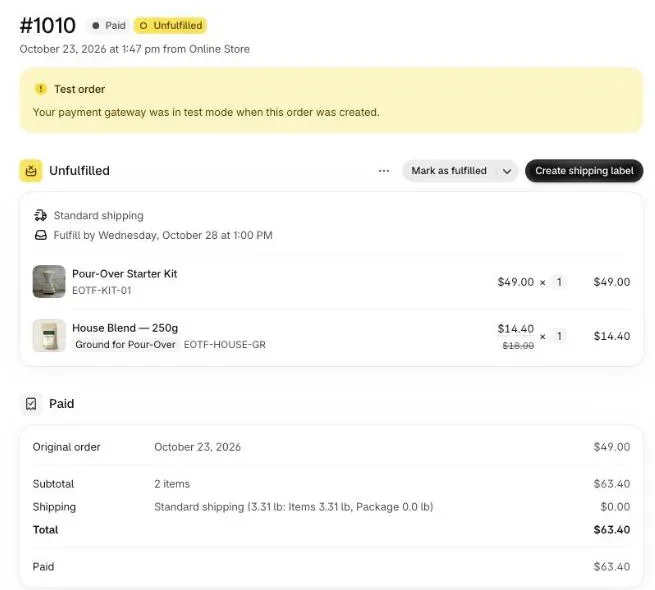
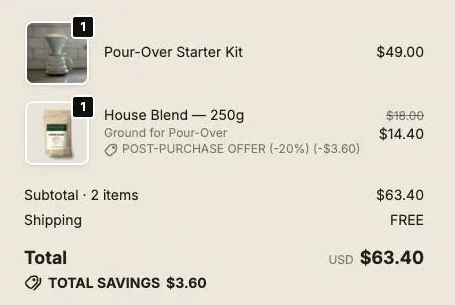
We placed that order on our coffee store on October 23, 2026: the Pour-Over Starter Kit at $49, then House Blend accepted on the one-click page at $14.40. Shopify shows one order, #1010, with both lines under a single Unfulfilled group on Standard shipping, a total of $63.40, and one Create shipping label button. One parcel, one label. That single label is where the extra margin comes from.
How much discount can the second item carry?
The second item can carry a much deeper discount than a standalone sale, because its only costs are its landed cost, the card fee and a little postage. Its break-even price is the point where those costs eat the whole price. For our House Blend bag, that point is $7.72, a 57% discount off the $18 list price.
The math, with the example costs above: margin of the added bag = price × 0.971 − $7.50 (landed cost $6.00, fixed card fee $0.30, extra postage $0.90, extra picking $0.30). It reaches zero at $7.72.
| Discount on the added bag | Price | Margin of the added line |
|---|---|---|
| 0% | $18.00 | $9.98 |
| 10% | $16.20 | $8.23 |
| 20% | $14.40 | $6.48 |
| 30% | $12.60 | $4.73 |
| 50% | $9.00 | $1.24 |
| 57% | $7.72 | $0.00 |
Compare the 50% row with the standalone order above. Half price in the same parcel keeps $1.24; full price in its own parcel keeps $1.48. A discount on a second item in the same box costs you less than a separate shipment does.
That doesn’t mean you should give 50%. It means any discount between 10 and 30% stays far from break-even on a consumable with this markup, so you can test inside that range without worrying about the margin. Work out your own break-even before you set the offer: (landed cost + fixed card fee + extra postage + extra picking) ÷ (1 − card percentage).
On a high-ticket item the math changes. A $40 accessory with a $28 landed cost breaks even around $30.40, a 24% discount. Run the formula per product.
What does a post-purchase upsell do to break-even ROAS and affordable CPA?
A post-purchase upsell raises the margin of the average order without raising its ad cost, so it raises the cost per acquisition you can afford. Break-even CPA equals average CM2 per order. Each accepted second item adds its own margin to that average, weighted by how often buyers accept.
With the kit order ($15.48 of CM2) and the bag ($6.48 of CM2 when accepted), here is the average order at different acceptance rates. These are scenarios, not benchmarks: your own rate is on the Results page of the app.
| Buyers who accept | Average revenue per order | Average CM2 = break-even CPA | CM3 at $15 ad spend |
|---|---|---|---|
| 0% | $49.00 | $15.48 | $0.48 |
| 5% | $49.72 | $15.80 | $0.80 |
| 10% | $50.44 | $16.13 | $1.13 |
| 15% | $51.16 | $16.45 | $1.45 |
At 10% acceptance, contribution after ads per order goes from $0.48 to $1.13, more than double, while revenue per order moves by 2.9%. That gap is why the margin view matters more than the revenue view for an upsell. Revenue barely moves; margin does.
Break-even ROAS follows the same logic: 1 ÷ CM2 ratio. The kit alone sits at 31.6%, so you need a ROAS of 3.17 just to break even. At 10% acceptance the ratio is $16.13 ÷ $50.44 = 32.0%, so break-even ROAS falls to 3.13. Small on paper, but it applies to every order your ads buy. For the three breakeven bars side by side, and target ROAS with a profit goal, see how upsells change breakeven ROAS.
Our article on what actually raises average order value on Shopify covers the levers before checkout. They raise revenue per order too, but most of them, like free-shipping thresholds and bundles in the cart, change what goes in the first parcel. The post-purchase offer adds to a parcel that is already paid for.
Which upsells keep the second item in the same parcel?
Upsells keep the second item in the same parcel when they add a line to the order the buyer already placed instead of opening a new checkout. On Shopify that happens on the one-click post-purchase page, and on the thank-you and order status pages when the app edits the existing order.
The one-click post-purchase page. It sits between payment and the order confirmation. A post-purchase upsell asks the buyer, after payment, to add products to the order they just placed, and Shopify lets a buyer accept up to three offers per checkout. The page shows for card payments; wallets and redirect payments skip it.
In Post Purchase Upsell Abakira, the accepted offer is sent to Shopify as a product line added to that order, and the app adds no shipping line to it (a subscription offer is the exception: it carries the shipping price you set). If you turn on Show the price summary on an offer, the buyer sees under the offer a subtotal, a Shipping line that reads “Free”, and the new total, so they know before tapping that postage won’t change. The buyer’s button reads “Add to my order • $14.40”, with “Charged to the card you already used: $14.40” just above it.
The thank-you page. Every buyer reaches it, wallet and PayPal buyers included. A product block in the app has a setting called Where the purchase goes, with three choices:
- Same order, unless it has fully shipped, the default. The item joins the order the buyer already placed, in the same parcel.
- Same order, only until the first parcel ships. Same as above until anything has left the warehouse.
- Always a new checkout. A separate order, with your usual shipping rates.
With the first two, a card buyer is taken to a Shopify payment page for the difference only, and the button note reads “Added straight to your order above. You only pay the difference.” A cash on delivery buyer pays at the door with the rest. Our article on the thank you page upsell added to the same order walks through that path.
Keep Always a new checkout for the rare product that can’t ship with the rest, like a heavy item that goes freight. For everything else it puts you back in the $1.48 column.
If a 3PL pulls your orders. A warehouse system that imports the order seconds after payment can miss a line added later, and then the item ships in a second parcel or not at all. The guide chapter on one parcel with your 3PL explains how the app, on the Scale plan with Picqer connected, holds new orders for 10 minutes and pushes a late line into the warehouse copy.
How do I set up a second-item offer in Post Purchase Upsell Abakira?
A second-item offer in Post Purchase Upsell Abakira is a first offer on the one-click page: either another unit of what the buyer just bought or a consumable that goes with it, at a discount below its break-even. The free plan runs it on a live store.
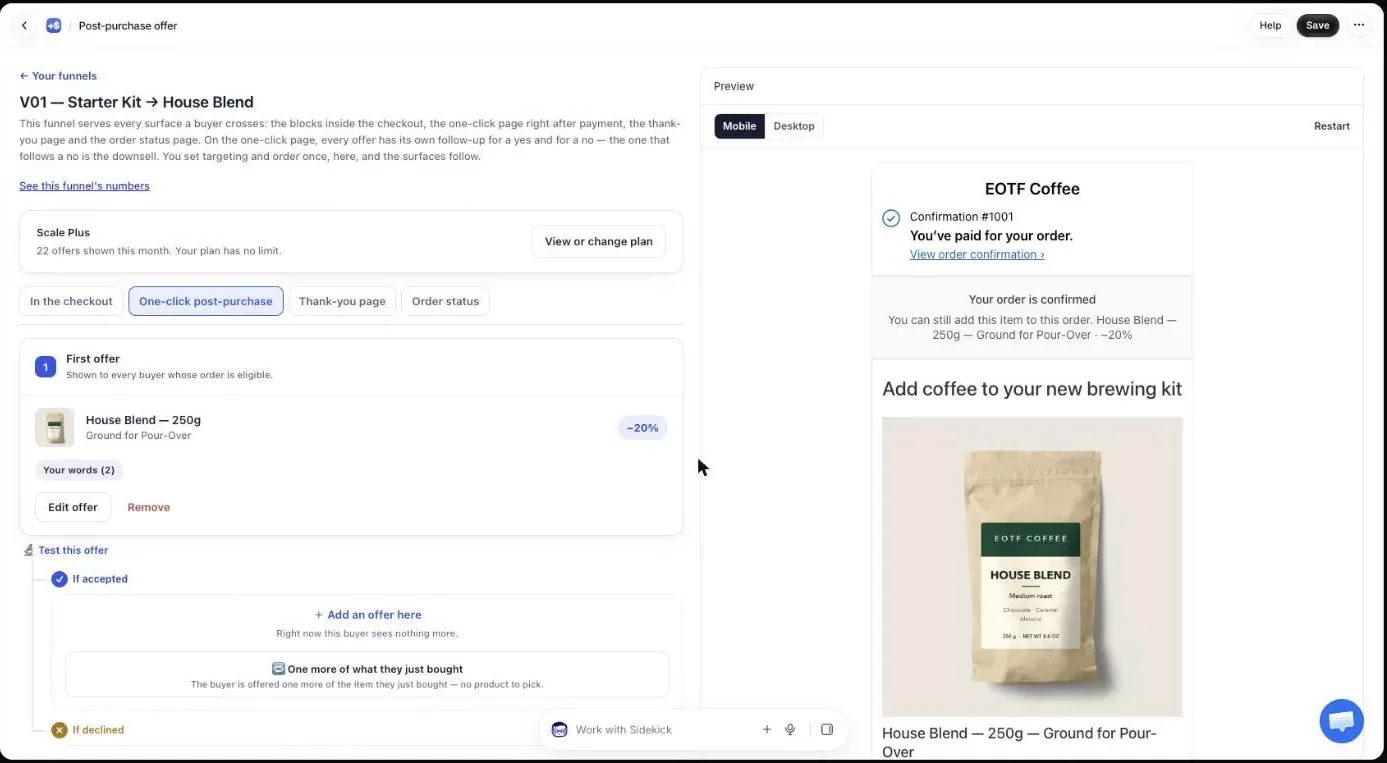
- In Shopify admin, open Settings, then Checkout, then Post-purchase page, and select Post Purchase Upsell Abakira. Without this, the one-click page never shows.
- In the app, open your funnel and go to the One-click post-purchase tab. Add a first offer.
- Under What this offer proposes, pick what you sell second. One more of the exact item they just bought works on any catalogue with nothing to choose. A product lets you pick a consumable, like coffee after a brewing kit.
- Under Discount type, choose Percentage, and set Value below the break-even you calculated. 20 is a good start on a consumable.
- Turn on Show the price summary, and add “No additional shipping charge.” to the offer text. Our coffee store’s offer reads “Your kit is ready. Add the coffee to go with it and save 20%.” followed by that line.
- Place a test order with a card on your test gateway, tap Add to my order, and open the order in Shopify admin. You should see one Unfulfilled group and one shipping method, like order #1010 above.
For multiple units, the offer has Quantity tiers: add a tier such as 2 units at 25%. Each tier adds units to the same line, so the parcel only gains the extra weight while the margin per tier grows. The app warns you if a tier with more units carries a smaller discount than the one before it.
The free plan serves one funnel and one offer per order on the one-click page, up to 100 offers shown per month. A follow-up offer after a yes or a no, more funnels and targeting need a paid plan; the App Store listing has the current plans. Our guide chapter on what to offer after checkout helps pick the second item.
How do I track the margin the upsell adds?
The margin an upsell adds is tracked by taking the revenue of accepted offers and multiplying it by the CM2 ratio of the added line, not the store’s average ratio. Post Purchase Upsell Abakira reports the revenue; your cost sheet gives the ratio. For the bag above, every $14.40 accepted is $6.48 of margin.
The Results page of the app shows, per offer, how many times it was shown, how many times it was accepted, and the revenue, at the price actually charged after the discount, read from your Shopify orders. Accepted divided by shown is your acceptance rate, the number that goes in the scenario table above. Our guide chapter on reading your numbers explains each figure and the trap in the word “shown”.
Then close the loop in a sheet, once a month:
- Note each offer’s revenue on the Results page, product by product.
- Multiply each product’s revenue by that product’s added-line CM2 ratio (45.0% for our bag at 20% off).
- Add the result to your monthly contribution margin, and divide by orders to get the new average CM2 per order.
- Use that figure as your break-even CPA when you set ad budgets.
Keep the Cost per item filled in on every product in Shopify. Shopify’s Profit margin by order report will then show the profit of the upsell orders next to the others, and you add payment fees, packing and ad spend yourself.
What mistakes make the upsell margin look better than it is?
Upsell margin looks better than it is when the second item quietly picks up costs the calculation left out: a heavier shipping band, a second parcel, a fee on each charge, or returns. Each one is easy to check before the offer goes live, and each one pulls the added line toward the “own order” column.
- The weight band. Our example adds $0.90 of postage. If the added product pushes the parcel into the next band of your carrier’s rate table, the extra postage is the gap between the two bands. Give every product its real weight in Shopify and look at the label cost on a test order.
- The second parcel. If a thank-you block is set to Always a new checkout, or a 3PL ships the late line separately, the item pays a full label and a full pick. Check the order in admin and with your warehouse.
- The fee per charge. The added amount is charged on its own, so count the fixed part of the card fee on it, as we did.
- Returns. If the second item is returned more often than the first, give it its own expected return cost.
- Revenue in place of margin. Reporting “the upsell made $1,440 this month” says nothing until you multiply by the line’s ratio. $1,440 of bags at 20% off is $648 of contribution in our example.
For more ways to pick and price the offer itself, the method articles cover gift tiers, decoy tiers and the one-click upsell setup.
Post Purchase Upsell Abakira has a free plan that runs on a live store, up to 100 offers shown per month on the one-click page. The listing has the current plans.
Set up a second-item offer on the post-purchase page
- Select the app for the post-purchase page In Shopify admin, open Settings, then Checkout, then Post-purchase page, and select Post Purchase Upsell Abakira.
- Create the first offer In the app, open your funnel, go to the One-click post-purchase tab and add a first offer. Under What this offer proposes, choose One more of the exact item they just bought, or A product to pick a consumable that goes with the main purchase.
- Set a discount the margin can carry Under Discount type choose Percentage and enter a Value below your break-even discount for that item, for example 20 when the break-even sits above 50.
- Show the buyer that shipping does not change Turn on Show the price summary so the buyer sees a Shipping line that reads Free under the offer, and write No additional shipping charge in the offer text.
- Place a test order Pay with a card on your test gateway, tap Add to my order, then open the order in Shopify admin and check that both lines sit in one Unfulfilled group with one shipping method.
Frequently asked questions
Is contribution margin the same as gross margin?
No. Gross margin subtracts only the cost of the goods. Contribution margin also subtracts every cost that grows with each order: payment fees, the shipping label, picking and packing, packaging, expected returns and, at the CM3 level, the ad spend per order. In our example the $49 order has a 60% gross margin and a 1% contribution margin after ads.
Should discounts count as a cost or as lower revenue?
Count them as lower revenue. Calculate contribution margin on what the buyer actually paid. A bag of coffee listed at $18 and sold at 20% off is $14.40 of revenue, and the percentage margin is computed on $14.40.
Does a post-purchase upsell add shipping to the order?
Not with Post Purchase Upsell Abakira. On the one-click page and on the thank-you page, the app adds the product line to the existing order and adds no shipping line, so the buyer pays no extra shipping. The exception is a subscription offer, which carries the shipping price you set on it. Your own cost can still rise slightly if the heavier parcel moves into the next weight band.
Where do I find contribution margin in Shopify?
Shopify's Gross profit by product report subtracts the Cost per item from net sales, and Profit margin by order adds the shipping costs your store pays. Payment fees, packing, packaging and ad spend are not in them, so contribution margin has to be finished in a spreadsheet with your own costs.
What acceptance rate does a second-item offer need to be worth it?
There is no threshold, because an accepted line in the same parcel carries almost no order-level cost. Each acceptance adds that line's own margin, $6.48 per bag in our example. Read your own acceptance rate on the Results page of the app and multiply accepted offers by the margin of the line.
Related articles
Written by Abakira. We make small software: Shopify apps, web tools and iPhone apps. This article is about Post Purchase Upsell Abakira.