Breakeven ROAS with upsells: what moves and by how much
A $50 order needs a 2.33 breakeven ROAS. Add a $16 post-purchase offer that 15% of buyers take and the bar on checkout revenue falls to 2.21.
2026-11-11 — Abakira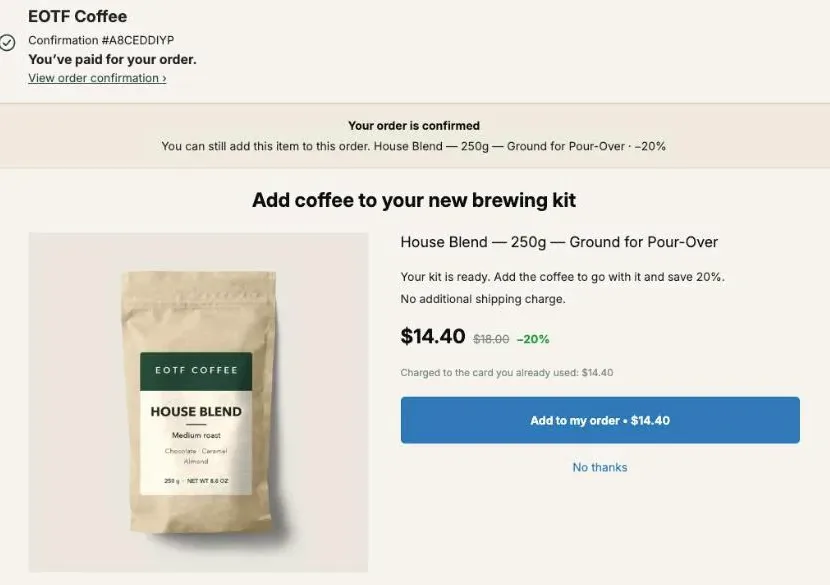
Breakeven ROAS is 1 divided by your contribution margin ratio, and an upsell changes it through the margin it adds without adding ad spend. On a $50 order with a 43% contribution margin, breakeven ROAS is 2.33. When 15% of all orders also take a $16 post-purchase offer, the margin per order rises from $21.50 to $22.68, and the ROAS you need on checkout revenue falls to 2.21.
The blended number barely moves, though: 2.33 to 2.31. That gap is the useful part of the math, and the rest of this page works it out line by line, with a table for acceptance rates, one for offer sizes, and one for target ROAS with a profit goal. All figures are an example, built from round costs. Put yours in the same rows.
What is breakeven ROAS, and why is it 1 ÷ contribution margin?
Breakeven ROAS is the return on ad spend at which an order pays for its ad and nothing more. It equals revenue divided by the margin left before ads, which is the same as 1 divided by the contribution margin ratio. A 43% margin gives 1 ÷ 0.43 = 2.33: every $1 of ads must bring back $2.33 of sales.
The reasoning is short. An order that brings in $50 and leaves $21.50 after every variable cost can absorb at most $21.50 of ad spend. That $21.50 is the breakeven CPA. Revenue divided by that CPA is $50 ÷ $21.50 = 2.33, the breakeven ROAS. Two names, one number seen from two sides: CPA in dollars per order, ROAS as a ratio.
The margin has to be contribution margin, not gross margin. Gross margin only takes out the cost of goods. Use it and you’ll read a breakeven ROAS that is too low, then run campaigns that look profitable in the ad tool and lose money in the bank. Our article on contribution margin per order splits it into CM1, CM2 and CM3 if you want each layer.
Which costs go into the margin behind breakeven ROAS?
The margin behind breakeven ROAS takes out every cost that appears once per order or once per unit: the landed cost of the product, shipping and fulfillment, payment fees and the returns you expect. Fixed costs like your Shopify plan, apps and salaries stay out, because one more order doesn’t change them.
Here is the example order used on this whole page: one $50 product, free shipping for the buyer, a 2.5% return allowance.
| One $50 order | Amount | Running total |
|---|---|---|
| Revenue | $50.00 | $50.00 |
| Cost of goods (35%) | −$17.50 | $32.50 (gross margin 65%) |
| Shipping, pick, pack and box | −$8.00 | $24.50 |
| Card fee (2.9% + $0.30) | −$1.75 | $22.75 |
| Returns allowance (2.5% of revenue) | −$1.25 | $21.50 (43.0%) |
| Breakeven CPA | $21.50 | |
| Breakeven ROAS ($50 ÷ $21.50) | 2.33 |
On gross margin alone the same order would show a breakeven ROAS of 1.54 (1 ÷ 0.65). The real bar is 2.33. A campaign running at 2.0 looks fine against the first number and loses $3.50 on every order against the second.
Returns belong in the table even when they’re small. A 2.5% allowance costs $1.25 here; at 10% the row would cost $5.00, margin would drop to $17.75 and breakeven ROAS would climb to 2.82.
How do upsells change breakeven ROAS?
Upsells change breakeven ROAS by adding margin to the average order without adding ad spend. The buyer is already acquired when a post-purchase offer appears, so the accepted line brings its own revenue and its own small costs, and no CPA. That margin raises your breakeven CPA, which lowers the ROAS you need on the original sale.
Three numbers move, and they don’t move by the same amount:
- Breakeven CPA always rises when the accepted line has a positive margin. Each acceptance adds that margin to the average order.
- Breakeven ROAS on checkout revenue always falls with it, because the checkout amount stays the same while the margin behind it grows.
- Breakeven ROAS on blended revenue, checkout plus upsell revenue, only falls if the added line has a higher margin ratio than the order it joins. If the line’s ratio is lower, the blended bar can tick up slightly while you still make more money per order.
The formula for each:
- Breakeven CPA = order margin + (share of orders taking the offer × margin of the accepted line)
- Breakeven ROAS on checkout revenue = checkout revenue per order ÷ breakeven CPA
- Breakeven ROAS on blended revenue = (checkout revenue + share × offer price) ÷ breakeven CPA
The low-AOV version of this math, where the offer is a second unit and the order is $24, is in our article on fixing a low AOV after checkout. Its costs differ, so it lands on 2.24 at 15% where this $50 order lands on 2.21. Here we stay on a mid-size order and on the ROAS bar itself.
What does a post-purchase offer do to the numbers on a $50 order?
A post-purchase offer on the $50 order adds a $16 line, a $20 bag of coffee at 20% off, on the one-click page right after payment. The line costs $6.00 in product, $0.75 of extra postage, $0.25 of extra picking, a $0.76 card fee and $0.40 of returns allowance. It keeps $7.84, a 49.0% margin ratio.
That ratio is above the order’s 43.0%. The added item rides in the parcel you were already shipping, so it skips the $8.00 of shipping and handling the first item had to carry. That’s why the second line keeps more per dollar than the first. Our contribution margin article shows the same effect on a single test order.
Now spread that line across all orders. Not every buyer takes it, so the share of orders that accept decides how far the bar moves. These are scenarios, not benchmarks.
| Orders taking the offer | Revenue per order | Margin per order = breakeven CPA | Breakeven ROAS, blended | Breakeven ROAS, checkout revenue |
|---|---|---|---|---|
| 0% | $50.00 | $21.50 | 2.33 | 2.33 |
| 5% | $50.80 | $21.89 | 2.32 | 2.28 |
| 10% | $51.60 | $22.28 | 2.32 | 2.24 |
| 15% | $52.40 | $22.68 | 2.31 | 2.21 |
| 20% | $53.20 | $23.07 | 2.31 | 2.17 |
At 15%, the breakeven CPA goes from $21.50 to $22.68 and the checkout-revenue bar from 2.33 to 2.21. Put differently: a campaign buying first orders at a $20 CPA, a 2.50 ROAS on checkout revenue, leaves $1.50 per order without the offer and $2.68 with it. Same ads, 79% more profit per order.
Why does blended breakeven ROAS barely move?
Blended breakeven ROAS barely moves because it divides total revenue by total margin, and a post-purchase offer grows both at once. The ratio between them only shifts by the gap between the added line’s margin ratio and the order’s ratio, weighted by how often buyers accept. Here, 49.0% against 43.0% at 15% acceptance moves it from 2.33 to 2.31.
So if you only watch blended ROAS against a blended breakeven, an upsell looks like it did almost nothing to your bar. What it did is make each order worth more. Your actual blended ROAS climbs, because the same ad spend now brings in $52.40 per order instead of $50.00, while the bar stays put. The gap between the two is where the profit went.
The checkout-revenue column is the one to use when you set a bid or a target in an ad tool that reports the purchase value at checkout. Check which value your ad platform records for a purchase on your store. If it’s the checkout total, the upsell revenue never reaches the platform’s ROAS, and the bar you compare it to should be the lower, checkout-based one: 2.21 at 15% acceptance instead of 2.33.
Can a deep discount on the upsell raise breakeven ROAS?
A deep discount on the upsell can raise blended breakeven ROAS while still lowering the checkout bar. If the accepted line’s margin ratio falls below the order’s, blended revenue grows faster than blended margin. At 15% acceptance, the same bag at 40% off ($12) keeps $4.05, a 33.8% ratio, and blended breakeven ROAS rises from 2.33 to 2.34.
Here is the same 15% acceptance with three different offers:
| Offer after payment | Price | Margin on the line | Line margin ratio | Breakeven CPA | Breakeven ROAS, blended | Breakeven ROAS, checkout revenue |
|---|---|---|---|---|---|---|
| None | n/a | n/a | n/a | $21.50 | 2.33 | 2.33 |
| One bag, 40% off | $12.00 | $4.05 | 33.8% | $22.11 | 2.34 | 2.26 |
| One bag, 20% off | $16.00 | $7.84 | 49.0% | $22.68 | 2.31 | 2.21 |
| Two bags, 25% off | $27.00 | $11.49 | 42.6% | $23.22 | 2.33 | 2.15 |
The two-bag line costs $12.00 in product, $1.75 in extra postage and picking, a $1.08 card fee and $0.68 of returns allowance, which leaves $11.49.
Two bags at 25% off add the most margin per order and give the lowest checkout bar, 2.15, even though their ratio is a little under the order’s. The 40% offer still beats no offer on every number that pays your bills; it only looks worse on the blended ratio.
The table assumes the same 15% for all three offers. In real life a deeper discount has to be taken by more buyers to earn its place. At $4.05 per acceptance, the 40% offer needs about 29% of orders to match the margin the 20% offer brings at 15%. Our article on pricing a post-purchase offer by revenue per order shown has the method for choosing between two prices on real orders.
How do I set a target ROAS with a profit goal once upsells run?
A target ROAS with a profit goal is revenue ÷ (margin per order − profit you want per order). With $5 of profit per order as the goal, the $50 order needs a 3.03 ROAS before upsells. With the $16 offer taken by 15% of orders, it needs 2.83 on checkout revenue.
| Orders taking the $16 offer | Margin per order | Margin after $5 profit goal | Target ROAS, checkout revenue | Target ROAS, blended |
|---|---|---|---|---|
| 0% | $21.50 | $16.50 | 3.03 | 3.03 |
| 10% | $22.28 | $17.28 | 2.89 | 2.99 |
| 15% | $22.68 | $17.68 | 2.83 | 2.96 |
| 20% | $23.07 | $18.07 | 2.77 | 2.94 |
The target falls faster than the breakeven did, in relative terms. At 15% acceptance the breakeven bar on checkout revenue drops 5%, from 2.33 to 2.21, and the target bar drops 7%, from 3.03 to 2.83. The added margin counts against a smaller remainder once the profit goal is set aside, so it weighs more.
That’s the case for re-running the target in your ad tools once an offer is live. A campaign you were about to cut for running at 2.9 against a 3.03 target is above a 2.83 one.
Which ROAS should I compare to the breakeven bar?
The ROAS to compare to the breakeven bar is the one measured on the same revenue. Platform ROAS counts what the ad tool attributes to its ads; blended ROAS or MER divides all store revenue by all ad spend. Upsell revenue sits in your Shopify orders, so MER includes it.
Platform ROAS counts whatever purchase value your pixel or API sends, so read which one it is in your ad tool. Then pair them like this:
| What you read | Revenue it counts | Bar to compare it to |
|---|---|---|
| Platform ROAS, when the recorded purchase value is the checkout total | The checkout total of attributed orders | Breakeven ROAS on checkout revenue (2.21 at 15% in our example) |
| MER (store revenue ÷ ad spend) | Every order, offers accepted after payment included | Breakeven ROAS on blended revenue (2.31 at 15%) |
| Breakeven CPA | n/a, dollars per order | Margin per order with the offer ($22.68 at 15%) |
MER also mixes in repeat orders that ads didn’t pay for, which flatters it. Keep the comparison like for like: if your MER includes returning customers, your margin should be computed on the same order mix.
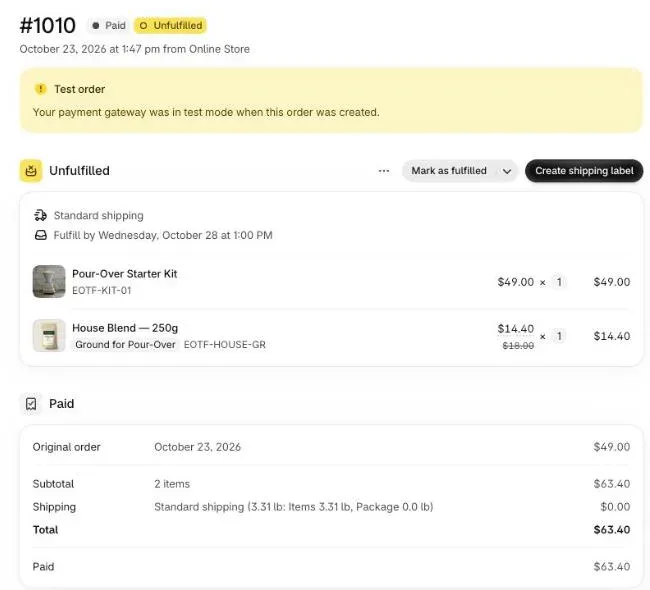
Shopify itself keeps the two revenues apart on each order. On test order #1010 above, the admin shows “Original order” at $49.00 and a total paid of $63.40. The first figure is what the checkout charged, the second includes the item added after payment.
What does our breakeven page show, and what does the AOV calculator return?
Our breakeven page for Shopify stores works one example by hand: a $45 order, 40% cost of goods ($18) and a $25 acquisition cost, leaving $2.00 per order. When one order in twenty takes a $25 add-on at a 60% margin, $0.75 of margin is added per order, and contribution goes from $2.00 to $2.75, a 37% rise.
That page shows why an add-on matters most when margin after ads is thin: a small dollar gain against a small base is a big percentage. To run your own numbers, use the calculator on our AOV page. It takes six inputs: Orders per month, Current AOV, Gross margin rate (%), Average upsell price, Margin rate on the upsell (%), and Acceptance rate you want to test (%). It returns New average order value, Added revenue per month, Added contribution margin per month and Added margin per year.
The calculator doesn’t print a breakeven ROAS, but two divisions get you there:
- Enter the price of your offer in Average upsell price and the margin rate of the accepted line (49 in our example) in Margin rate on the upsell (%). The Gross margin rate field does not feed these results, so work out your order margin yourself: Current AOV × your contribution margin rate (50 × 0.43 = $21.50).
- Divide Added contribution margin per month by Orders per month. That’s the margin the offer adds per order.
- Add it to Current AOV × your margin rate. That’s your breakeven CPA with the offer.
- Divide Current AOV by that CPA for the breakeven ROAS on checkout revenue, or New average order value by it for the blended one.
With the calculator’s default values (600 orders, $45, 60%, $25, 60%, 5%), the offer adds $450 of margin a month, $0.75 per order. At a 60% order margin, margin per order goes from $27.00 (45 × 60%) to $27.75, and breakeven ROAS on checkout revenue from 1.67 to 1.62.
Which acceptance rate should go into the calculation?
The acceptance rate that goes into a breakeven ROAS calculation is the share of all orders that took an offer, not the share of buyers who saw one. Ad spend is paid on every order, including orders paid with a method where the one-click page doesn’t show, so the denominator is every order of the period.
In Post Purchase Upsell Abakira, the Results page gives you the numerator. The panel “Orders where a buyer added something” counts the orders that took at least one offer over the last 30 days, all pages together, and an order that bought on two pages counts once there. Divide it by your total orders in Shopify for the same 30 days.

The other inputs come from the same page:
- Revenue per accepted line. The By product table lists, for each product offered, Saw it, Orders, Units, Revenue, Share and Clicks. Revenue is at the price actually charged after the discount, so Revenue ÷ Orders gives the average added revenue per order, which you multiply by your margin ratio. Revenue ÷ Units gives the average price per unit.
- Only money that reached the order. The app reads revenue back from your Shopify orders, never from what the buyer’s browser reported. If a buyer accepted but the bank refused the extra charge or the item sold out, the acceptance stays out of revenue and the page shows “Some acceptances are unconfirmed” instead.
- A 30-day window on both sides. The Results page covers 30 days, and the app keeps matching acceptances to orders over the same 30 days, so a late-confirmed sale still lands in the month you’re reading.
Our guide chapter on reading your numbers explains each figure, and the article on upsell take rate covers what counts as seen and accepted.
How do I add an offer that lifts the margin in Post Purchase Upsell Abakira?
An offer that lifts the margin in Post Purchase Upsell Abakira starts on the one-click page, right after payment, where the accepted item joins the paid order and is charged to the card already used. Pick a product whose margin ratio is at or above your order’s, and a discount the table above says the margin can carry.
- In Shopify admin, open Settings, then Checkout, then Post-purchase page, and select Post Purchase Upsell Abakira.
- In the app, open your funnel and select the One-click post-purchase tab. Add a first offer, or click Edit offer on the existing one.
- Under What this offer proposes, choose A product and pick the item. In our example it’s a bag of coffee after a brewing kit; our guide chapter on what to offer after checkout helps pick it.
- Under Discount type, choose Percentage and enter a Value your line margin can carry. In our example, 20 keeps a 49.0% ratio.
- To sell two or three units in one tap, open Quantity tiers and click Add a tier. A one-click offer takes up to five tiers, from 2 to 20 units, each with its own discount, like the two-bag row in the table above.
- Click Save, place a test order with a card, accept the offer, and open the order in Shopify admin to check that the line sits on the same order.
The thank-you page reaches every paid order, so it’s where the offer goes for buyers who skip the one-click page. Add a Single product block in the funnel’s Thank-you page tab; leave Where the purchase goes on Same order, unless it has fully shipped. On Pro and above, set Show it to to Buyers who did not see the one-click page. On the free plan, a thank-you block shows to every buyer.
The free plan runs one funnel with one offer per order on the one-click page, up to 100 offers shown per month. Follow-up offers after a yes or a no (If accepted, If declined), more funnels and targeting by order content come with paid plans; the App Store listing has the current plans.
Should repeat purchases change the breakeven ROAS I use?
Repeat purchases change the breakeven ROAS only if you decide to fund part of the first order’s ad cost from future orders. First-order breakeven, the one on this page, asks each order to pay its own ad on the day it’s placed. An LTV-based bar accepts a loss on day one and counts on the reorders to cover it.
Both are legitimate; they answer different questions. First-order breakeven tells you whether you can keep spending without waiting on cash. LTV breakeven tells you what a customer is worth once they come back. A post-purchase offer belongs in the first one, because its revenue lands on the order the ad paid for, the same day.
If you run on an LTV bar, keep the upsell margin in it too: it’s part of the first order, so it lowers the loss you’re advancing. And keep the two numbers on separate lines of your sheet, so you always know how much of your target depends on customers coming back.
For more ways to raise what each order brings in before and after checkout, see our list of what raises average order value on Shopify and the other method articles.
Post Purchase Upsell Abakira has a free plan that runs on a live store. The listing has the current plans.
Recalculate breakeven ROAS once a post-purchase offer is live
- Compute the margin of one order without the offer Take checkout revenue per order and subtract the cost of goods, shipping and fulfillment, payment fees and expected returns. Divide by revenue to get the contribution margin ratio.
- Compute the margin of the accepted line Take the price the buyer pays for the offer after its discount and subtract only what the extra item adds: its cost, the extra postage and picking, its payment fee and its expected returns.
- Find the share of all orders that take the offer Divide the orders where a buyer added something by all your orders over the same 30 days.
- Add the weighted line margin to the order margin Multiply the line margin by that share and add it to the margin of one order. The result is your breakeven CPA.
- Divide revenue by the new margin Checkout revenue divided by the new margin is the breakeven ROAS for ad tools that count the checkout value. Checkout revenue plus the weighted offer revenue, divided by the new margin, is the breakeven for blended ROAS.
Frequently asked questions
Is breakeven ROAS the same as target ROAS?
No. Breakeven ROAS is the return at which an order makes exactly zero after ads. Target ROAS adds the profit you want to keep: revenue divided by the margin left once your profit goal is set aside. In our $50 example the breakeven is 2.33 and the target for $5 of profit per order is 3.03 before upsells.
Should I use gross margin or contribution margin for breakeven ROAS?
Contribution margin. Gross margin only removes the cost of goods, so it leaves shipping, packing, payment fees and returns out and gives a breakeven ROAS that is too low. In our example a 65% gross margin turns into a 43% contribution margin, which moves breakeven ROAS from 1.54 to 2.33.
Does a post-purchase offer add ad spend to the order?
No. The offer is shown to a buyer who has already paid, so the ad that brought that buyer is already counted against the first purchase. The accepted line adds its own revenue and costs, and no acquisition cost.
Can I use the AOV calculator on your site for this?
Yes, for the added margin. Enter your offer price, the margin rate of the accepted line and the acceptance rate you want to test, then divide Added contribution margin per month by Orders per month. Add that to your current margin per order (checkout AOV × contribution margin rate) and divide your checkout AOV by the result: that is your breakeven ROAS on checkout revenue.
How often should I recalculate breakeven ROAS?
Whenever a cost line or the offer changes: a new supplier price, a carrier rate change, a new discount on the offer, or a month where the share of orders taking the offer moves. The Results page in Post Purchase Upsell Abakira covers the last 30 days, which makes a monthly check a natural rhythm.
Related articles
Written by Abakira. We make small software: Shopify apps, web tools and iPhone apps. This article is about Post Purchase Upsell Abakira.