Low AOV on Shopify: add a second unit after the buyer pays
On a $24 order, a second unit at 20% off after payment lifts the CPA you can afford from $10.28 to $12.02 when 15% accept. The math and the setup.
2026-11-07 — Abakira, updated 2026-11-11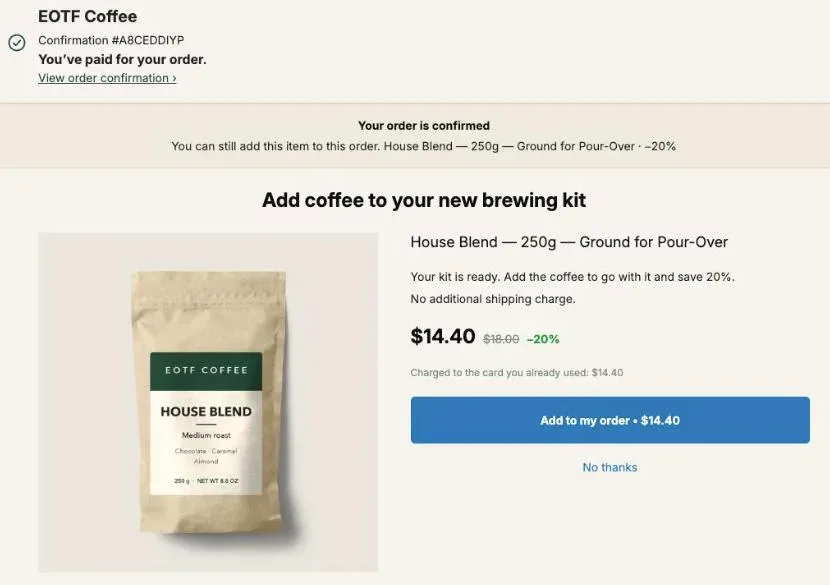
Low AOV on Shopify is a cost-per-acquisition problem before it’s a revenue problem: on a $24 order, the margin left to pay for the ad that brought the buyer is about ten dollars. The quickest fix is to offer a second unit of the same item right after payment, at a discount, added to the same order. In the example below, when 15% of buyers take a second $24 item at 20% off, the cost per acquisition you can afford goes from $10.28 to $12.02, and the checkout doesn’t change at all.
What counts as a low AOV on Shopify?
A low AOV on Shopify is an average order too small to cover the cost of winning it. In this article that means orders under about $30, where product cost, shipping and payment fees can leave around ten dollars to pay for ads. The threshold depends on your own margins, not on an industry average.
Start with the number Shopify gives you. Shopify’s average order value is gross sales minus discounts, divided by the number of orders. Since January 2023 it leaves out adjustments made to an order after it was created, and Shopify applied that definition to historical data as well, so an old screenshot and today’s report can disagree.
Low AOV hurts because some costs don’t shrink with the basket. Picking, packing and the label cost about the same for a $24 order as for one twice that size. In the example used throughout this page, $7 of fulfillment is 29% of a $24 order. Put two units in the same parcel and fulfillment becomes $8 on $43.20, or 19%.
So the useful question isn’t “is my AOV below some benchmark?” It’s “how much does one order leave me to pay for the next customer?”
How much can I pay for a customer on a low AOV order?
The most you can pay for a customer on a low AOV order is the margin that order leaves after product cost, fulfillment and payment fees. For a single $24 item that costs $6 to make, $7 to ship and 3% in fees, the ceiling is $10.28. Any ad that costs more loses money on the first order.
Here is that order line by line. The figures are an example; swap in your own.
| One $24 item, one order | Amount |
|---|---|
| Revenue | $24.00 |
| Product cost | −$6.00 |
| Fulfillment and shipping | −$7.00 |
| Payment fees (3%) | −$0.72 |
| Margin before ads = break-even CPA | $10.28 |
| Break-even ROAS ($24.00 ÷ $10.28) | 2.33 |
If your ads bring a first purchase for $12, every order loses $1.72 before anyone reorders. Repeat purchases can earn that back later, but it’s cash you advance. Our article on contribution margin per order breaks down CM1, CM2 and CM3 if you want the full version of this table.
There are two ways out: pay less per customer, or make each customer’s first order bigger. The second one is in your hands today.
What does a second unit after payment do to that ceiling?
A second unit sold after payment adds its own margin to the order without adding ad cost, because the buyer is already acquired. Sold at 20% off, the second $24 item brings $19.20 and keeps $11.62 after its product cost, $1 of extra handling and fees. An order that accepts more than doubles its margin.
The line math: $19.20 − $6.00 product − $1.00 extra handling − $0.58 fees = $11.62. It rides in the parcel you were already shipping, which is why the handling is $1 and not another $7. An order that accepts goes from $10.28 of margin to $21.90.
Not every buyer accepts, so what matters is the average across all orders. Here are four acceptance rates. They’re scenarios, not benchmarks: your own rate is in the app once buyers start seeing the offer.
| Buyers who accept | Average revenue per order | Average margin = break-even CPA | Margin left at a $12 CPA |
|---|---|---|---|
| 0% | $24.00 | $10.28 | −$1.72 |
| 10% | $25.92 | $11.44 | −$0.56 |
| 15% | $26.88 | $12.02 | +$0.02 |
| 20% | $27.84 | $12.60 | +$0.60 |
At 15% acceptance the CPA you can afford rises by 17%, from $10.28 to $12.02, while revenue per order moves from $24.00 to $26.88. The campaign that lost $1.72 on every first order now breaks even, and break-even ROAS drops from 2.33 to 2.24 ($26.88 ÷ $12.02). Why that blended figure moves less than your CPA does is worked out in breakeven ROAS with upsells.
That’s the whole case for fixing a low AOV after checkout. The offer doesn’t touch your conversion rate, because the order is placed before it appears, and every accepted unit lands on margin you’d otherwise have had to buy with ads.
Why offer the same item again instead of a new product?
The same item again is the offer that adds the most to a low AOV order, because the buyer chose that product and its price thirty seconds earlier. A new product asks for a fresh decision; a second unit only asks for more. Post Purchase Upsell Abakira reads the item from the order, so one offer covers the whole catalog.
Size matters here. Under $30, the add-on has to be about the size of the order to move your CPA ceiling. Compare a $6 accessory at 20% off ($4.80, with $1.50 of product cost, $0.50 of handling and 3% fees) with the second unit from the table:
| Offer after payment | Price | Margin on the line | Added to break-even CPA at 15% acceptance |
|---|---|---|---|
| $6 accessory, 20% off | $4.80 | $2.66 | $0.40 |
| Second $24 unit, 20% off | $19.20 | $11.62 | $1.74 |
At the same acceptance rate the second unit gives you more than four times the room. Our guide’s chapter on what to offer after checkout usually aims an offer at a quarter to a half of the order value, and names the repeat as the exception: a $22 repeat against a $24 order still gets taken, because the buyer isn’t deciding again. The same chapter describes the repeat for consumables as “Boring, and often the best performer in the shop.”
When an order holds several products, the app re-offers the line with the highest price per unit. In an order with a $24 serum and a $3 sample, that’s the serum. If two lines cost the same, the first line of the order wins.
Our article on same product upsells on Shopify goes further into the two repeat types, the wording and where the offer sits in a funnel. This page stays on the money.
How deep can the discount on the second unit go?
The discount on the second unit can go as deep as that unit’s own margin allows, since it carries no ad cost. With a $6 product cost and $1 of extra handling, a second $24 unit still keeps $9.30 at 30% off and only breaks even near 70% off. The question is how much margin you want to give away.
Every extra point of discount has to be paid for by more buyers saying yes. This table shows how many, using the same $24 item:
| Discount on the second unit | Price | Margin on the line | Added to break-even CPA at 15% acceptance | Acceptance needed to match 20% off at 15% |
|---|---|---|---|---|
| 10% | $21.60 | $13.95 | $2.09 | 12.5% |
| 20% | $19.20 | $11.62 | $1.74 | 15.0% |
| 30% | $16.80 | $9.30 | $1.39 | 18.8% |
| 40% | $14.40 | $6.97 | $1.05 | 25.0% |
Read the last column as the bar each discount has to clear. Going from 20% to 40% off only pays if it takes acceptance from 15% to above 25%. Going from 20% to 10% pays as long as acceptance stays above 12.5%.
Start at 20%. It’s a saving the buyer can read in one glance, and it leaves room to move in both directions. To choose between two prices on real orders, our article on judging an upsell by revenue per order shown has the method.
Can I sell two or three extra units instead of one?
Quantity tiers let a buyer add two or three units instead of one on the same post-purchase offer, each quantity at its own discount. In Post Purchase Upsell Abakira an offer on the one-click page takes up to five tiers, from 2 to 20 units, and the buyer picks one from a Quantity menu on the offer.
One unit is always offered at the offer’s own discount. Tiers start at two. With the $24 item, a ladder of 20%, 25% and 30% gives this:
| Buyer picks | Discount | Added to the order | Margin on the added line | Order total |
|---|---|---|---|---|
| 1 unit | 20% | $19.20 | $11.62 | $43.20 |
| 2 units | 25% | $36.00 | $20.92 | $60.00 |
| 3 units | 30% | $50.40 | $27.89 | $74.40 |
The margin column uses the same assumptions: $6 product cost and $1 of handling per unit, 3% fees. A buyer who takes three extra units turns a $24 order into $74.40 in one tap.
Two details in the admin keep the ladder honest. The tier has to match exactly: a buyer who picks three gets the price you set for three, nothing interpolated. And if a bigger quantity carries a smaller discount than the tier before it, the editor flags it with “A tier with more units has a smaller discount than the one before it. Buyers would pay more per unit for buying more.”
How do I set up a second-unit offer in Post Purchase Upsell Abakira?
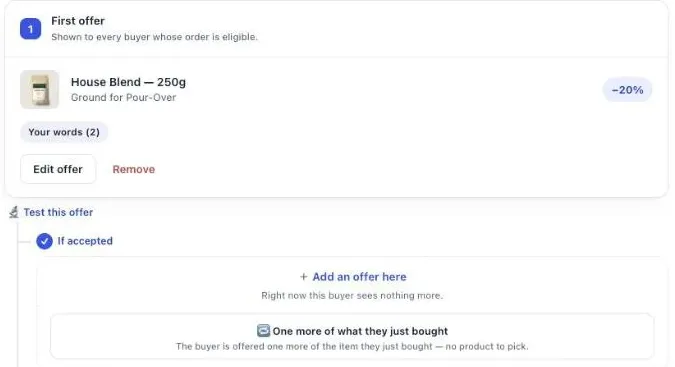
A second-unit offer in Post Purchase Upsell Abakira is a repeat offer on the one-click page: no product to pick, because the item is read from the order when the buyer pays. Both repeat types, One more, same variant and One more, any variant, work on every plan, the free plan included.
- Open your funnel and select the One-click post-purchase tab. On a funnel with no offer, the admin says “No offer is configured. Buyers currently see nothing after they pay.” Click Start with one more unit.
- On a funnel that already has an offer, click Edit offer. Under What this offer proposes, choose One more, same variant. Pick One more, any variant instead if buyers often want a different size or flavor for the second unit.
- Set the discount: Percentage, 20.
- Under Quantity tiers, click Add a tier. Enter a Quantity of 2 and a Discount for this quantity of 25. Add a second tier at 3 and 30.
- Under Your words on this page, write a headline that says what the second unit costs, for example “Add a second one for 20% less.”
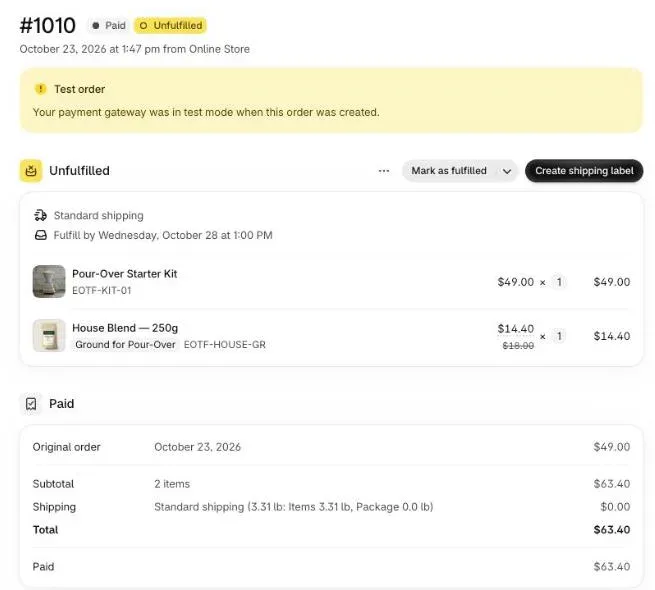
- Click Save. Place a test order with a card, accept the offer, then open the order in your Shopify admin.
The free plan runs one funnel, one offer per order on the one-click page and up to 100 offers shown per month there. Follow-up offers after a yes or a no, more funnels and targeting by order content come with paid plans.
What about buyers who never see the one-click page?
Shopify skips the one-click page for payments it cannot charge again in one tap: Apple Pay, Google Pay, PayPal, Klarna and cash on delivery orders go straight to the thank-you page. Those buyers can still get a second-unit offer there, from a Single product block with quantity tiers.
On a store where many buyers pay with a wallet, a bank redirect or cash on delivery, the thank-you page is where the second unit gets sold.
Set it up in the funnel’s Thank-you page tab:
- Add a Single product block and choose your best-selling item, the one most of your orders contain.
- Give it a discount, then open Quantity tiers. A thank-you block takes up to three tiers, each from 2 to 9 units.
- Leave Where the purchase goes on its default, Same order, unless it has fully shipped. A card buyer is taken to a Shopify payment page for the difference only; a cash on delivery buyer has the amount added to what they owe at the door.
- On Pro and above, set Show it to to Buyers who did not see the one-click page. On the free plan, thank-you blocks show to every buyer, so make this offer different from the one-click offer.
The guide chapter on the thank-you page covers each block type and who sees what.
Which other levers raise a low AOV before checkout?
The other levers that raise a low AOV act before checkout: a free shipping threshold, quantity breaks on the product page, bundles and cart add-ons. Each asks the buyer to spend more before the first sale is safe, which is the difference with an offer made after payment. They stack with it rather than replace it.
| Lever | When the buyer sees it | What it asks | What happens if they say no |
|---|---|---|---|
| Free shipping threshold | Cart and checkout | Add items to reach an amount | They pay shipping, or leave |
| Quantity breaks | Product page | Pick a bigger quantity before adding to cart | They buy one |
| Bundle | Product page or cart | Buy a set instead of one item | They buy one |
| Cart add-on | Cart drawer or cart page | Add a small item | They check out as is |
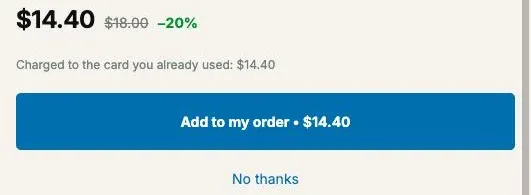
| Second unit after payment | Between payment and the order confirmation | One tap, same card | The order is already placed |
Line them up so they don’t ask for the same thing twice. If your free shipping threshold sits just above one unit, so that buyers already add a second one to reach it, offer the third unit after payment through a quantity tier, or a companion product. If quantity breaks on the product page already sell twos and threes, the repeat offer still works as a top-up on top of whatever they chose.
The full list of levers, sorted by where they happen, is in our article on what raises average order value on Shopify. If your store also sells big-ticket items, give those orders their own funnel: see upsells for high-ticket orders. For other store situations, see the situations hub.
How do I know the second unit is paying for my ads?
The second unit is paying for your ads when its acceptance rate times its margin covers the gap between your CPA and your first-order margin. Post Purchase Upsell Abakira gives the first half: the Results page shows, per funnel and step, how many buyers saw the offer, how many accepted and what it earned.
The check takes three numbers:
- Acceptance rate. On Results, under Which step converts, divide “accepted” by “saw it” for your second-unit step.
- Margin on the line. Price after discount, minus product cost, extra handling and fees. In our example, $11.62.
- The gap. Your CPA minus the margin of a one-item order. At a $12 CPA and $10.28 of margin, $1.72.
Divide the gap by the line margin: $1.72 ÷ $11.62 = 14.8%. Above that acceptance rate, the offer is covering the ad cost of your first orders. Below it, either the price or the offer needs work, and the guide chapter on reading your numbers explains what each figure counts.
Judge the offer on these numbers rather than on the store-wide AOV. Shopify’s AOV also moves with your traffic mix and your discount codes, and it leaves out adjustments made to an order after it was created.
Post Purchase Upsell Abakira has a free plan with 100 offers shown per month on the one-click page. The listing has the current plans and what each one includes.
Set up a second-unit offer after payment in Post Purchase Upsell Abakira
- Open the one-click tab Open your funnel and select the One-click post-purchase tab. On a funnel with no offer, the admin says "No offer is configured. Buyers currently see nothing after they pay." Click Start with one more unit.
- Choose the repeat type On a funnel that already has an offer, click Edit offer. Under What this offer proposes, choose One more, same variant. Pick One more, any variant instead if buyers often want a different size or flavor for the second unit.
- Set the discount Set the discount: Percentage, 20.
- Add quantity tiers Under Quantity tiers, click Add a tier. Enter a Quantity of 2 and a Discount for this quantity of 25. Add a second tier at 3 and 30.
- Write the offer Under Your words on this page, write a headline that says what the second unit costs, for example "Add a second one for 20% less."
- Save and test Click Save. Place a test order with a card, accept the offer, then open the order in your Shopify admin.
Frequently asked questions
Does a post-purchase offer cost me checkout conversions?
No. The one-click page appears after the buyer has paid, so the first order is already placed whatever they answer. A buyer who taps No thanks goes on to the order confirmation.
Which item is re-offered when the order has two different products?
Post Purchase Upsell Abakira re-offers the line with the highest price per unit. When two lines have the same unit price, the first line of the order is used.
Can the buyer pick another size or flavor for the second unit?
Yes, with the One more, any variant type. The buyer can switch to another variant of the product they bought. A variant of a different product is refused on the server.
Is the second unit shipped in a separate parcel?
No. The accepted item is added as a new line on the order the buyer just placed, in the same shipment, so your warehouse picks one order.
How does Shopify calculate average order value?
Shopify divides gross sales minus discounts by the number of orders. Since January 2023 the figure leaves out adjustments made to an order after it was created, and the same definition is applied to historical data.
What does the free plan include for this setup?
One funnel, one offer per order on the one-click page and up to 100 offers shown per month there. Both repeat types are on it. Follow-up offers after a yes or a no need a paid plan; the app listing has the current plans.
Related articles
Written by Abakira. We make small software: Shopify apps, web tools and iPhone apps. This article is about Post Purchase Upsell Abakira.