Jewelry upsell ideas: matching pieces, gift boxes, care kits
Jewelry upsells after checkout: the matching earrings, a second band in another metal, a free gift box in the same bundle, a care kit and a warranty.
2026-11-08 — Abakira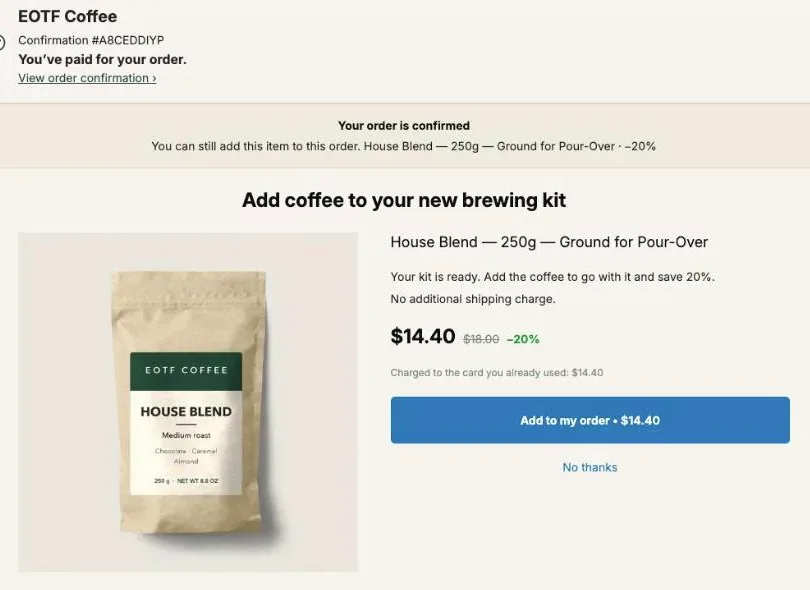
Jewelry upsell ideas that work after checkout are the matching piece (earrings for the necklace, a second band for the ring), a gift box, a care kit and a warranty, each added to the order the buyer just paid. The page after payment is where the buyer has already chosen the piece, so the offer only has to complete it.
Take a $120 pendant necklace. The matching earrings at 15% off cost $55.25, and the order goes from $120 to $175.25 in one tap. With Post Purchase Upsell Abakira, the earrings and a gift box at 100% off can sit in the same bundle card, which Shopify counts as a single accepted offer. Below, each idea comes with the exact setting and the page it belongs on.
Which jewelry upsells fit the page after checkout?
Jewelry upsells that fit the page after checkout are the pieces and services that complete what the buyer just chose: the matching earrings, a stacking band, a gift box, a polishing cloth or cleaner, and a store-backed warranty. Each one is a Shopify product with a price and a SKU, so it lands on the order as its own line.
A Shopify store has three pages after payment. A jewelry store can give each one a job:
| Page | Who sees it | Jewelry offer that fits |
|---|---|---|
| One-click post-purchase page | Card buyers, between payment and the confirmation | The matching piece, a stacking band with a size menu, a bundle card with a free gift box |
| Thank-you page | Every buyer, any payment method | The same offer for PayPal and wallet buyers, a care kit, a Bundle block |
| Order status page | Buyers who open the tracking link | The gift box until the parcel leaves, a polishing cloth |
Here is a map to start from, purchase by purchase:
| They bought | First offer | If they decline |
|---|---|---|
| Pendant necklace, $120 | Matching earrings, 15% off: $55.25 | Polishing cloth, $6 |
| Stacking ring, $95 | A second band in another metal, 20% off: $76 | Ring cleaner, $14 |
| Tennis bracelet, $250 | 2-year warranty, $19, with a free gift box | Gift box alone |
| Hoop earrings, $60 | The same hoops in another metal, 20% off: $48 | Earring backs pack, $5 |
Our guide chapter on what to offer after checkout explains how to pick a first offer in any catalog. In jewelry, start from the piece you sell most and its natural partner.
How do I sell the matching earrings for a necklace?
The matching earrings for a necklace are sold with a one-click offer set to A product under What this offer proposes, pointing at the earrings from the same collection. Set a Percentage discount, write a headline that names the set, and the buyer adds the pair to the paid order with Add to my order.
The steps in Post Purchase Upsell Abakira:
- Open your funnel, select the One-click post-purchase tab and click Add an offer here, or Edit offer on an existing one.
- Under What this offer proposes, choose A product and pick the earrings.
- If the earrings come in several metals, tick each one: the buyer gets a “Choose an option” menu with one entry per variant.
- Set Discount type to Percentage and enter 15 as the Value.
- Under Your words on this page, write a Selling headline such as “The earrings from the same set, 15% off on this page.”
- Click Save, then place a card test order to see the page as a buyer does.
The discount is required on this page. The app refuses to save a one-click offer without one and says “The discount must be a number greater than zero.” A small one is enough when the piece itself is the reason to say yes.
Each matching pair needs its own funnel, with Who sees this offer set to Order contains and the necklace picked. Targeting and several funnels come with the paid plans. On the free plan, one funnel runs for every card buyer, so point it at the partner of your best seller.
How do I let the buyer pick a ring size or a metal in the offer?
A ring size or a metal is picked in the offer itself when you tick several variants of the product in Shopify’s picker. The buyer sees a dropdown labeled “Choose an option”, with the Shopify variant names such as “Gold / 7”. Picking one updates the price, the photo when the variant has one, and the amount on the button.
That is what makes a ring offer possible after checkout. An offer fixed to size 7 sells only to buyers who wear a 7; an offer with the size menu lets the buyer answer the question the store can’t.
An offer holds up to 25 variants. A ring in 3 metals and 9 sizes has 27, so the editor shows “This product has many variants. The first 25 are offered.” Tick them yourself instead of letting Shopify’s order decide:
| Product | Variants in Shopify | What to tick | Options in the menu |
|---|---|---|---|
| Stacking band, 3 metals × 9 sizes | 27 | All 9 sizes in your 2 best metals | 18 |
| Signet ring, 2 metals × 10 sizes | 20 | Everything | 20 |
| Hoop earrings, 3 metals × 2 sizes | 6 | Everything | 6 |
| Chain, 2 metals × 4 lengths | 8 | Everything | 8 |
What you tick is the whole list. When you reopen the admin, the app refreshes prices, stock and photos for those variants, and it doesn’t add variants you left out. Sold-out sizes leave the menu on their own; if one sells out after that and a buyer picks it, Shopify refuses the addition and the buyer reads “This item just sold out. Your original order remains confirmed and paid.”
Keep the discount a Percentage when metals are priced differently: 20% stays 20% on silver and on gold. The full mechanics of the size menu, with screenshots, are in our article on letting the buyer pick the variant.
How do I sell a second stacking ring in another metal?
A second stacking ring in another metal is offered with One more, any variant, which the admin describes as “The product is decided at checkout, and the buyer can pick another variant of it.” One offer covers every ring in the catalog: it reads the product from the paid order and shows a menu of that product’s variants in stock.
The menu opens on what the buyer just bought. Someone who paid for the band in Silver / 7 sees Silver / 7 preselected, switches to Gold / 7 and keeps their size without hunting for it. When the order holds several items, the offer re-proposes the most expensive one, so a $95 ring wins over a $14 cleaner in the same order.
| Order | Offer | Buyer pays | New order total |
|---|---|---|---|
| Stacking band, $95 | Same band, another metal, 20% off | $76.00 | $171.00 |
| Hoop earrings, $60 | Same hoops, another metal, 20% off | $48.00 | $108.00 |
| Charm bracelet, $80 | Same bracelet, another finish, 15% off | $68.00 | $148.00 |
The other choice, One more, same variant, re-offers the exact item with no menu. For stacking, the “any variant” version is the one that lets the buyer change metal. Our article on the same product upsell compares both.
How do I add a free gift box to the matching piece?
A free gift box goes into the same bundle card as the matching piece, in the Grid of a one-click offer. The admin describes the grid as “Up to 6 extra products shown under the main offer, each with its own discount and its own button.” A bundle card holds 2 to 4 products, each line with its own discount.
Click Add a bundle card to the grid and tick the earrings, then the gift box. The hint under the button says it: “In the picker, tick 2 to 4 products: the first one carries the card.” Each line of the card has a Discount field. Put 15% on the earrings and 100% on the box, and the box is free. A line left at 0 shows “Bundle rate” and takes the discount of the first product.
| Line | Regular price | Discount | Buyer pays |
|---|---|---|---|
| Matching earrings (first product) | $65.00 | 15% | $55.25 |
| Gift box | $8.00 | 100% | $0.00 |
| Card total | $73.00 | $55.25 |
On the post-purchase page, the card sits under the heading “You may also like” with a button that reads “Add • $55.25 (2 items)”. The buyer can tap Decline this offer on a card, which hides that card and leaves the rest of the page as it was. Fill in Bundle title to put a line above the card’s products, such as “Earrings to match, gift-boxed.”
Two rules of the grid matter here. A card has to save the buyer something, otherwise the editor says “No discount: this card saves the buyer nothing and cannot be saved. Give it a discount.” And Shopify allows at most 3 accepted post-purchase offers per checkout, where a bundle card counts as one whatever its number of lines. Putting the box in the same card as the earrings keeps both in one acceptance.
If you’d rather show only cards, tick Show only these cards: “The page skips the main offer and shows just the cards below, each with its own button.” That turns the page into a small set of choices: earrings with a box, a care kit, a chain extender.
How do I sell a gift box on its own?
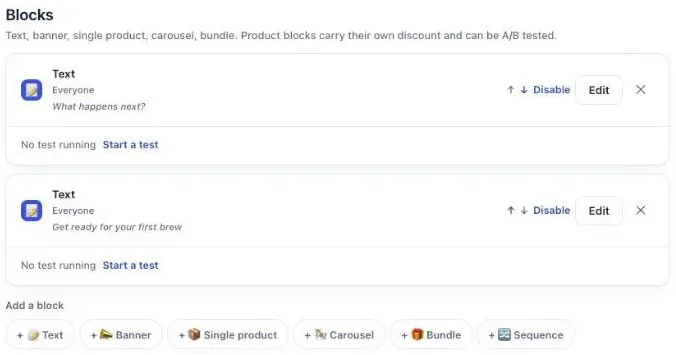
A gift box sold on its own is a normal Shopify product with a price, a photo and a SKU, placed as a one-click offer, or in a Single product block on the thank-you page. For the block, set Where the purchase goes to Same order, only until the first parcel ships, so the box joins the parcel it is meant to hold.
The three options for where a thank-you or order status purchase goes:
| Option | What happens |
|---|---|
| Same order, unless it has fully shipped | Added to the order unless everything has shipped |
| Same order, only until the first parcel ships | Added while nothing has left; after that, a new checkout |
| Always a new checkout | A separate order |
An $8 box on a $120 necklace adds 6.7% to the order. The box lands as its own line, with its SKU, so the packing team sees it next to the piece. Name the product the way the buyer reads it (“Gift box with ribbon”), because “Shopify requires the product to keep the title it has in your store.” Our gift wrapping upsell guide covers the product setup, the price and how to collect the card message in the cart. For offers aimed at people buying for someone else, see how to sell more to gift buyers.
How do I sell a jewelry care kit after checkout?
A jewelry care kit sells after checkout as one product (a polishing cloth and a cleaner packed together) or as a Bundle block on the thank-you page. The Bundle block holds 2 to 4 products, each with its own discount from 0 to 100%, and one button adds them all to the order.
Two setups:
- One kit product. Create “Silver care kit” at $18 with its own SKU, and offer it as a Single product block. Simple to pack and to read on the order.
- A Bundle block. Put the cloth ($6) and the cleaner ($14) in one block with 10% off each: $18 for both. The admin’s help text for a 100 value says “100 means the item is free — that is a decision, so say it here”, which lets you give the cloth away with the cleaner.
Cloths and cleaners also suit Quantity tiers on a product block: up to 3 tiers, each from 2 to 9 units, such as 2 cloths at 10% off and 3 at 15% off. On the one-click page, Quantity tiers go up to 5 tiers, each from 2 to 20 units.
A care kit is a natural If declined offer: at $18, it costs a fraction of a $120 necklace. That slot shows an offer “Shown only to buyers who just declined — this is your downsell.” A funnel holds up to 7 offers on 3 levels, and the levels after the first come with the Pro plan. The guide chapter on the accept and decline tree shows how branches are built.
How do I sell a warranty on fine jewelry?
A warranty on fine jewelry is a store-backed product, such as “2-year jewelry warranty” at $19, offered only to buyers of the pieces it covers. Give its funnel Order contains with those pieces, or Order total is at least with a minimum amount such as 150, and the offer stays away from small orders.
Write the terms on the warranty’s product page before you sell it: what is covered, what isn’t, when coverage starts and how to claim. The full setup, with pricing for 1-year, 3-year and lifetime plans, is in our article on the extended warranty upsell.
On a $250 bracelet, a bundle card with the warranty at 10% off ($17.10) and the gift box at 100% gives the buyer two things in one tap and adds 6.8% to the order.
What do PayPal and wallet buyers see?
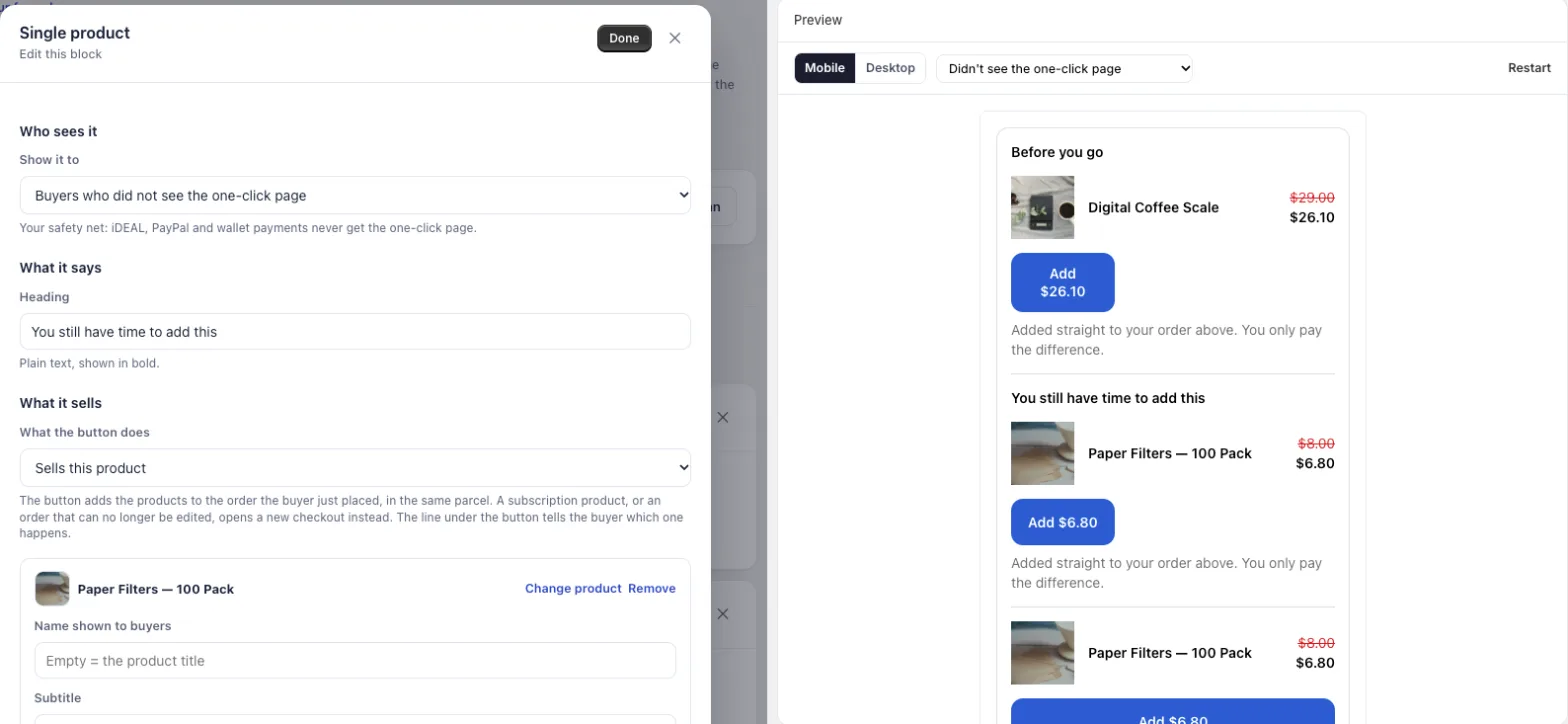
PayPal and wallet buyers skip the one-click page and land on the thank-you page. A Single product block with Show it to set to Buyers who did not see the one-click page gives them the offer card buyers got, one page later. The admin calls it “Your safety net: iDEAL, PayPal and wallet payments never get the one-click page.”
That rule comes with the Pro plan and above; on the free plan, a thank-you block shows to every buyer. Put the same piece and the same discount as your one-click offer in that block, with every metal and size ticked, and the buyer picks from the “Option” menu.
The block’s button adds the item to the order the buyer just placed, in the same parcel, and the line under the button tells the buyer which case applies. Our guide chapter on the thank-you page has every block option.
How do I show different offers to ring buyers and necklace buyers?
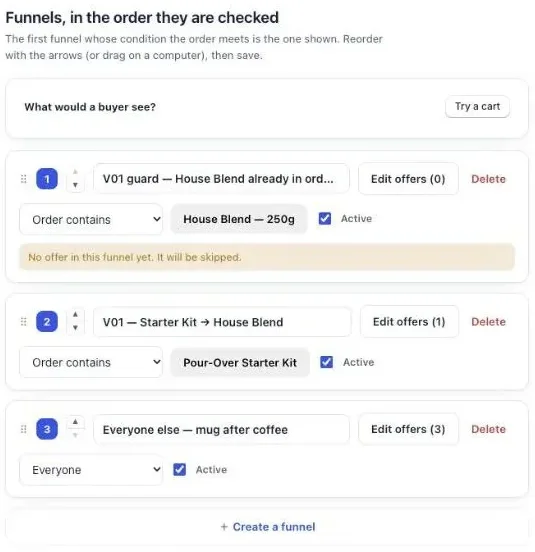
Different offers for ring buyers and necklace buyers come from one funnel per product line, each with Who sees this offer set to Order contains. Funnels are checked in the order of the list, and the first one whose condition matches the order wins. A condition can target a whole product or only some of its variants.
A jewelry store’s list can look like this, from top to bottom:
- Order contains the pendant necklace: the matching earrings, with a free gift box in the same card.
- Order contains the bracelets: the 2-year warranty, with a gift box.
- Order total is at least 150: the care kit.
- Everyone: One more, any variant, for the same piece in another metal.
Before going live, click Try a cart on the funnel list: it shows which funnel a given order would reach. Several funnels and targeting come with the paid plans. The guide chapter on different offers for different carts explains the ordering.
How do I word a jewelry upsell?
A jewelry upsell is worded around the set and the price: name the piece it goes with and say what the buyer saves. “The earrings from the same set, 15% off on this page” answers both. In Post Purchase Upsell Abakira, the text sits under Your words on this page, with a Selling headline above the product name.
Lines that fit each offer:
- Matching piece: “The earrings that go with your necklace.”
- Another metal: “Same band in gold. Your size is already selected.”
- Bundle card: “Earrings to match, gift-boxed.”
- Care kit: “Cloth and cleaner for your new piece.”
- Warranty: “Two years of repairs on this bracelet.”
Describe the set, the size and the box. Leave claims about value, purity or materials to the product page, where your own specifications already are. Shopify adds one rule on the one-click page, and the editor enforces it: “Shopify does not allow exclamation marks on this page.” Our buyer wording chapter has more examples.
How do I know which jewelry upsell earns the most?
The jewelry upsell that earns the most has the highest revenue per buyer who saw it, not the most yeses. A $55.25 pair of earrings taken by fewer buyers can beat a $6 cloth taken by more. The Results screen of Post Purchase Upsell Abakira shows extra revenue by page and by funnel.
Its By product table goes down to each item, with the columns Saw it, Orders, Units, Revenue, Share and Clicks. A bundle stays one line there, so the earrings-with-box card reads as one result.
To compare two offers head to head, click Test this offer under a one-click offer. Up to 4 versions run at once, on the Scale plan. You can put “the matching earrings” against “the same piece in another metal” and set the goal to Net revenue per view. The guide chapter on A/B testing an offer covers how long to wait before trusting a result.
Check one order by hand after setup: the added line shows the variant the buyer picked and its SKU, in the same shipment as the first piece.
Other stores built on the same pattern: clothing store upsell ideas sell sizes and sets, and skincare upsell ideas follow a routine. Upsells before checkout, on the product page and in the cart, are in what raises average order value on Shopify, and other store types are on our situations page.
Post Purchase Upsell Abakira lets buyers pick the ring size and the metal on every plan, including the free plan with 100 offers shown a month. The listing has the current plans.
Sell matching earrings and a free gift box as one bundle card after checkout
- Open the one-click offer In Post Purchase Upsell Abakira, open your funnel, select the One-click post-purchase tab and click Edit offer.
- Add a bundle card In the Grid section, click Add a bundle card to the grid. In Shopify's picker, tick 2 to 4 products: the first one carries the card, for example the matching earrings, then the gift box.
- Name the bundle Fill in Bundle title, the line shown above its products, for example Earrings to match, gift-boxed.
- Set a discount on each line Give the earrings their own discount, for example 15%, and set the gift box to 100% so it is free. A line left at 0 takes the bundle rate.
- Save and test Click Save, place a card test order, tap the card's Add button on the post-purchase page, and check in your Shopify admin that the earrings and the box are on the same order.
Frequently asked questions
Can I run jewelry upsells on the free plan?
Yes. The free plan of Post Purchase Upsell Abakira runs one funnel with one offer level on the one-click page and shows up to 100 offers a month. Letting the buyer pick a ring size or a metal works on it. Targeting by product, several funnels and the If accepted and If declined levels come with the paid plans.
Can the buyer pick a ring size inside the offer?
Yes. Tick the sizes and metals you want to offer in Shopify's product picker, up to 25 variants per offer, and the buyer chooses one in a menu labeled Choose an option before tapping Add to my order. The price and the button follow the variant they pick.
Can a gift box be free inside a bundle?
Yes. In a bundle card on the one-click page, each product has its own discount, and a percentage of 100 makes that item free. On the thank-you page, the Bundle block accepts a discount from 0 to 100 on each product too.
Can I offer engraving after checkout?
An offer adds a product to the order; it doesn't collect a text from the buyer. Keep engraving on the product page, where the buyer types the text before paying, and use the page after checkout for the gift box, the care kit or the matching piece.
Can the earrings and a gift box be added in one tap?
Yes. A bundle card holds up to 4 products and counts as one accepted offer, so a necklace's matching earrings and a gift box added together use one of the 3 acceptances Shopify allows per checkout.
Related articles
Written by Abakira. We make small software: Shopify apps, web tools and iPhone apps. This article is about Post Purchase Upsell Abakira.