Upsell a different variant on Shopify: let the buyer pick
Offer a product after payment and let the buyer choose the flavor, color or size from a list you set. Up to 25 options, one price per variant, same order.
2026-11-01 — Abakira, updated 2026-11-08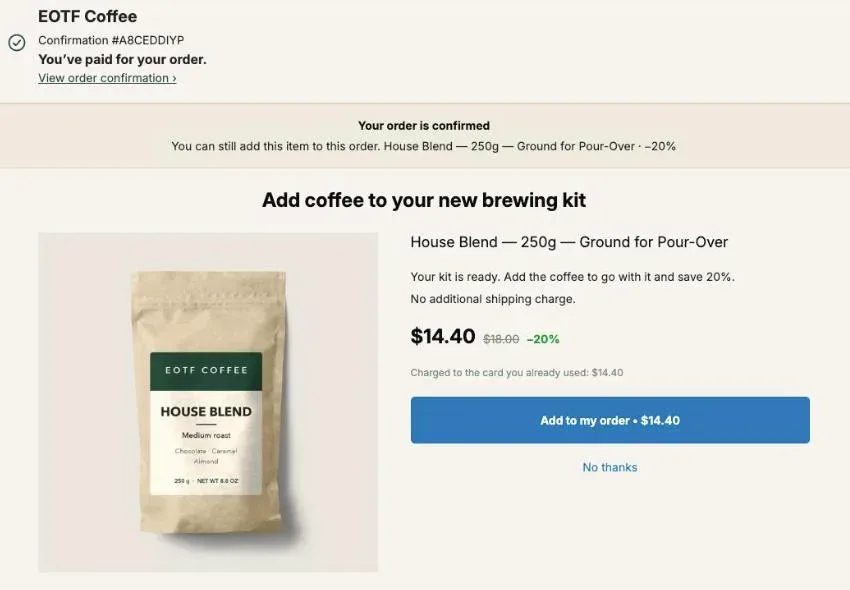
To upsell a different variant on Shopify after checkout, offer the product on the one-click post-purchase page and let the buyer choose the flavor, color or size from a short list you control. The buyer picks in a menu, the price and photo follow the pick, and the item joins the order they just paid for. In Post Purchase Upsell Abakira that list holds up to 25 variants, and any variant outside it is refused by the server.
This is the “try a new flavor” offer. A buyer who just bought a medium roast gets offered the dark roast, someone who bought a black hoodie sees the same hoodie in grey, a parent buying socks for one child picks a second size for the other. Letting the buyer pick a new flavor beats a single fixed add-on after checkout, and the reason is plain: the buyer says which one, so a wrong guess on your side doesn’t cost you the sale. The other offers a roaster can show after payment are in coffee shop upsell ideas.
This page covers how the choice works on Shopify’s post-purchase page, which variants to put in the list, how to price variants that cost different amounts, the setup step by step, and how to test a menu against a single fixed variant.
What is a variant choice upsell on Shopify?
A variant choice upsell on Shopify is a post-purchase offer for one product where the buyer, not the merchant, picks the variant. The merchant chooses the product and the variants allowed; the buyer chooses among them in a menu before accepting. It differs from a fixed offer, where the merchant bets on one size or flavor.
A fixed offer works fine for products with one variant, like a mug or a pack of filters. It breaks down the moment the product comes in sizes or flavors. Offer a size M sweater to everyone and every buyer who wears an L declines, however good the price. Offer the medium roast to someone who just bought the medium roast and you’ve made a same product upsell, which is a different play (more on that below).
There are three ways a post-purchase offer can relate to the variant:
| Offer | Who picks the variant | Typical use | Name in Post Purchase Upsell Abakira |
|---|---|---|---|
| A product, one variant | The merchant, once | Single-variant add-ons: filters, a mug, a care kit | A product, one variant ticked |
| A product, several variants | The buyer, from the merchant's list | Another flavor, another color, a size for someone else | A product, several variants ticked |
| More of what was just bought | Read from the order | A second unit of the same item, or of the same product | One more, same variant / One more, any variant |
This article is about the middle row. The third row has its own page: the same product upsell, one more after payment.
How does the buyer choose a variant on the post-purchase page?
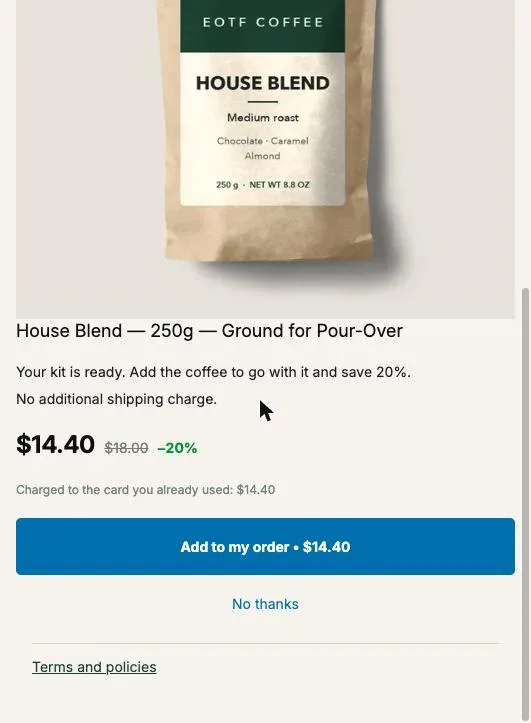
The buyer chooses a variant on the post-purchase page through a dropdown labeled “Choose an option”, shown on the offer as soon as it has two or more variants to pick from. Changing the option changes the product line, the price, the photo when the variant has one, and the amount on the “Add to my order” button.
Here is what happens on screen, in order, with Post Purchase Upsell Abakira:
- The page opens with one variant preselected: the offer’s default variant, or the first one in stock if that one is sold out.
- The product line reads the product name followed by the variant name, as in “House Blend — 250g — Ground for Pour-Over”. A product with no options never shows Shopify’s placeholder “Default Title”.
- The buyer opens “Choose an option” and picks another variant.
- The app asks Shopify to recalculate the offer for that variant. The price shown is the one Shopify returns for that variant’s line, with your discount applied, and the button updates to match, for example “Add to my order • $14.40”.
- The buyer taps the button. The server checks that the variant they picked is in your list before it signs the change, then Shopify adds it to the order and charges the card already used.
Step 4 matters more than it looks. If two variants have different prices, a page that kept showing the first variant’s price after the buyer switched would show a number they won’t pay. The price on screen is always Shopify’s figure for the variant on screen.
Which variants should I let the buyer choose from?
The variants to offer are the ones a buyer of this order would plausibly want next: a flavor or scent they haven’t tried, a color that goes with what they bought, a size for another person. Keep the list short enough to scan in a few seconds.
A few patterns that hold up:
- Coffee, tea, supplements, snacks. Offer the other flavors or roasts of the product they bought, or of your best seller. If the product has a grind or format option (Whole Bean, Ground for Pour-Over), leave both in: the buyer knows what their machine needs and you don’t.
- Apparel. Offer every size of the item, in one or two colors. A size you remove is a buyer you lose. If the product has a lot of colors, pick the ones that sell best rather than all of them. The full set of offers for a fashion catalog is in clothing store upsell ideas.
- Gifts and family products. Socks, pajamas, kids’ clothing: keep all sizes, since the second unit is often for someone else.
- Candles, skincare, refills. Offer scents or formulas other than the one bought, so the offer reads as “try another” rather than “buy the same again”.
What to leave out: variants that are much more expensive than the order (a premium edition at three times the price turns a quick yes into a new decision), and variants you’re about to discontinue. Our chapter on what to offer after checkout has the price ratio that works best against the order the buyer just placed.
How long should the variant list be?
Keep the list to the few variants a buyer of this order would weigh in a few seconds; Post Purchase Upsell Abakira accepts up to 25 per offer. If you pick a product with more, the admin says so: “This product has many variants. The first 25 are offered.” A dropdown of a hundred entries between payment and the order confirmation is an obstacle, not a choice, and the list has to travel to the buyer’s browser.
If your product has 60 color-size combinations, tick the sizes of your two best-selling colors and leave the rest out.
How do I keep buyers to the variants I chose?
You keep buyers to your chosen variants by ticking only those variants in Shopify’s product picker when you set up the offer. What you tick is the list. Post Purchase Upsell Abakira never widens it on its own, and its server refuses any variant that isn’t in it, whatever the buyer’s browser sends.
That second part is the safety net. Everything the buyer’s browser sends can be tampered with, so the variant they request is checked against your saved list before the change is signed. A variant outside the list gets a refusal, never a quiet substitute: swapping in your default variant would put something on the order the buyer didn’t pick, which is worse than no sale.
Two more rules work in your favor:
- The discount comes from the offer, never from the variant. Choosing a variant can change which item is added, never how much it’s discounted. A buyer switching from one option to another can’t move your margin by a cent beyond the price difference you set in Shopify.
- Refreshing never widens. When you reopen the admin, the app re-reads prices, stock and images for the variants already in your list. It doesn’t add the variants you left out, and it doesn’t add new ones you create later in Shopify. To include a new flavor, open the offer and tick it.
Sold-out variants are taken out of the menu based on the stock read the last time you opened the admin. If every variant you ticked is sold out, the offer falls back to its default variant rather than showing a product with nothing to pick, and Shopify has the last word when the buyer accepts: an item it can’t add is refused at that moment.
How do I price variants that cost different amounts?
Price a variant choice offer with a percentage discount. Each variant keeps its own price in Shopify, and the percentage is applied to whichever one the buyer picks, so the cut stays in proportion: 20% off is $3.60 on an $18 bag and $6.40 on a $32 bag. A fixed amount would be a deep cut on the cheap variant and a token one on the expensive variant.
Here is the same 20% offer on a product with three variants at different prices:
| Variant picked | Regular price | 20% off | Buyer pays |
|---|---|---|---|
| 250g bag | $18.00 | $3.60 | $14.40 |
| 500g bag | $32.00 | $6.40 | $25.60 |
| 1kg bag | $58.00 | $11.60 | $46.40 |
The 250g line is our demo store’s real offer (House Blend at $18, 20% off, $14.40 on the buyer’s page). The two bigger bags show the arithmetic.
If you do want a fixed amount, Post Purchase Upsell Abakira checks it against the lowest-priced variant in your list, sold-out ones included, because a variant can come back in stock without you reopening the admin. A fixed discount higher than that price is blocked with this message: “Higher than this product’s lowest price ($18.00). The buyer would pay nothing. A percentage never has this problem.” (with your lowest price in place of $18.00) A fixed amount equal to the price is allowed, which is how you give a variant away as a gift.
Before you settle on a depth, run the numbers on your cheapest variant, since that’s where the margin is thinnest. Our contribution margin math for the second item walks through it.
How do I sell a bigger size after payment?
Sell the bigger size as an extra item: “Make it a 1kg: add the big bag at 25% off”, next to the 250g the buyer already bought. The buyer can’t swap a purchased item for another variant on the one-click page: an accepted offer adds a line and the original stays.
After payment, the original line stays and the new one is added next to it. Write the offer for that reality: “add” and “stock up”, not “upgrade your size”.
For subscriptions, the picture is different. A buyer who just subscribed can move to a bigger plan on the same subscription with a subscription upgrade offer, covered in upgrading a subscription right after purchase.
How do I set up a variant choice offer in Post Purchase Upsell Abakira?
You set up a variant choice offer in Post Purchase Upsell Abakira by choosing A product as the offer type and ticking several variants in Shopify’s product picker. Variant choice is on every plan, the free plan included, and needs no setting beyond the variants you tick.
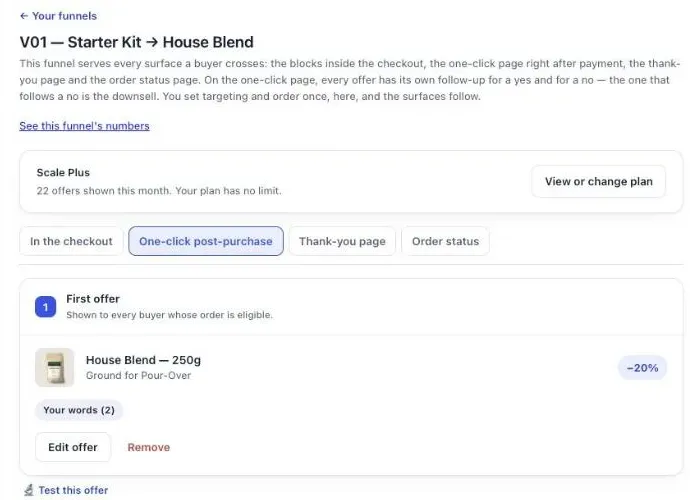
- Open your funnel and select the One-click post-purchase tab.
- Click Edit offer on the offer you want to change, or Add an offer here to create one.
- Under What this offer proposes, choose A product. Shopify’s product picker opens.
- Tick the product to offer all its variants, or open it and tick only the ones you want. Back in the editor, the line under the product reads, for example, “3 options the buyer can choose from”.
- Set Discount type to Percentage and enter the Value.
- Write the offer text under Your words on this page (next section).
- Click Save. Place a test order with a card, pick a variant in the “Choose an option” menu, accept, and open the order in your Shopify admin.
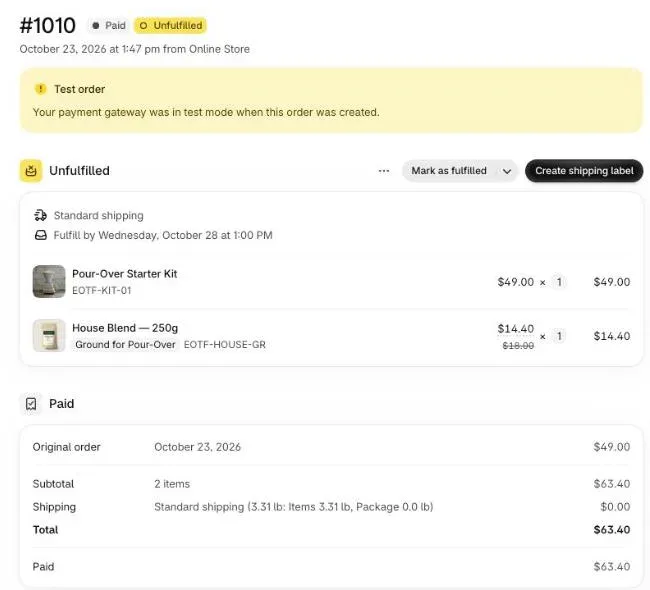
In the order, check two things: the added line shows the variant the buyer picked, with its own SKU, and it sits in the same shipment as the original items. On our demo store, the accepted House Blend arrives as “Ground for Pour-Over”, SKU EOTF-HOUSE-GR, at $14.40 with $18.00 crossed out, under the $49 kit, for a $63.40 order.
To make the variant matter to the funnel too, add a funnel per product family. The Order contains condition can target a whole product or only some of its variants, so buyers of the medium roast can get a funnel that offers the dark and light roasts, and buyers of the dark roast get one that offers the other two. Several funnels and conditions are on a paid plan; our chapter on multiple funnels and targeting explains how the app picks which funnel an order gets.
How do I word an offer where the buyer picks the variant?
Word a variant choice offer around the choice itself: say that the buyer picks, and say what the options have in common. “Pick your second roast” tells the buyer there’s a decision they control. A headline that names one flavor fights the menu right under it.
In Post Purchase Upsell Abakira the text lives under Your words on this page:
- Selling headline, up to 90 characters, shown above the product name. The product name itself always stays visible.
- Promise line, up to 140 characters, at the top of the page.
- Your argument, up to 6 lines. A line starting with a dash becomes a bullet.
Use the tokens instead of hard-coded prices, since the price depends on the variant: {product} for the product name, {amount} for the price after your discount, {price} for the regular price and {save} for the saving. Lines that work:
- Headline: “Try another roast: pick one, {save} off”
- Argument: ”- Choose your flavor in the menu below”
- Argument: ”- Ships in the same box, no extra shipping”
One Shopify rule applies on this page: no exclamation marks. The editor refuses them with “Shopify does not allow exclamation marks on this page.” More examples, with the reasons behind each, are in our buyer wording chapter.
Should I test a variant menu against a single fixed variant?
Test a variant menu against a single fixed variant when you have one best seller that most buyers would take anyway. The fixed version shows one item and one button, with nothing to decide; the menu version catches the buyers the best seller doesn’t suit. Only your orders can say which earns more per view.
In Post Purchase Upsell Abakira, open the offer and click Test this offer. Each version can be its own product with its own list of variants, so version A can be the menu with every roast and version B the best seller alone, at the same discount. Set the goal to Net revenue per view: a menu can raise acceptance while pushing buyers toward cheaper variants, and revenue per view catches that.
Two things a test version can’t be: a bundle or a subscription. A version can be A product, One more, any variant or One more, same variant, which is enough to compare a menu, a fixed variant and a repeat of what the buyer bought. A/B testing is on the Scale plan, with up to four versions per offer; A/B testing an offer covers how long to wait before trusting a verdict.
To see where variant choice sits among the other ways to lift order value, browse the other upsell methods on this blog, or read what raises average order value on Shopify.
Post Purchase Upsell Abakira lets buyers pick the variant on every plan, including the free plan with up to 100 offers shown a month. The listing has the current plans.
Let buyers choose a variant in a post-purchase offer with Post Purchase Upsell Abakira
- Open the offer Open your funnel, select the One-click post-purchase tab and click Edit offer on the offer you want to change, or Add an offer here to create one.
- Choose A product Under What this offer proposes, choose A product. Shopify's product picker opens.
- Tick the variants buyers may pick Tick the whole product to offer all its variants, or open it and tick only the ones you want. The line under the product then reads, for example, 3 options the buyer can choose from.
- Set a percentage discount Set Discount type to Percentage and enter the Value. A percentage keeps the cut in proportion when variants have different prices.
- Save and test Click Save, place a test order with a card, pick a variant in the Choose an option menu, accept, and check that the order in your Shopify admin shows that variant and its SKU.
Frequently asked questions
Can the buyer swap the item they already bought for another variant?
Not on the one-click page. An accepted offer adds a new line to the order and the original line stays. Sell the other variant as an extra item instead.
What happens if a variant sells out between my setup and the buyer's visit?
Post Purchase Upsell Abakira drops sold-out variants from the menu using the stock it read the last time you opened the admin. If a variant runs out after that and a buyer picks it anyway, Shopify refuses the addition when the buyer accepts.
Can I offer different variants of two different products in one offer?
No. One offer is one product and the variants you tick inside it. To offer a second product, add it as another offer in the funnel, or use the Grid section of the offer, which shows up to 6 extra products under the main one, each with its own discount and button.
Does letting buyers choose a variant cost extra?
No. Variant choice is available on every plan, including the free plan, which shows up to 100 offers a month. A/B testing a version with a menu against a version without one needs the Scale plan.
Can I combine the variant menu with quantity tiers?
Yes. When an offer has several variants and quantity tiers, the buyer sees two menus: Choose an option for the variant and Quantity for the tier, each tier showing its own discount. The tier discount applies to whichever variant is picked.
Related articles
Written by Abakira. We make small software: Shopify apps, web tools and iPhone apps. This article is about Post Purchase Upsell Abakira.