Coffee shop upsell ideas: what to offer after checkout
Upsells for an online coffee shop: coffee with a brewing kit, filters and a scale, a second bag, another roast, a subscription. Real screens, exact settings.
2026-11-05 — Abakira, updated 2026-11-08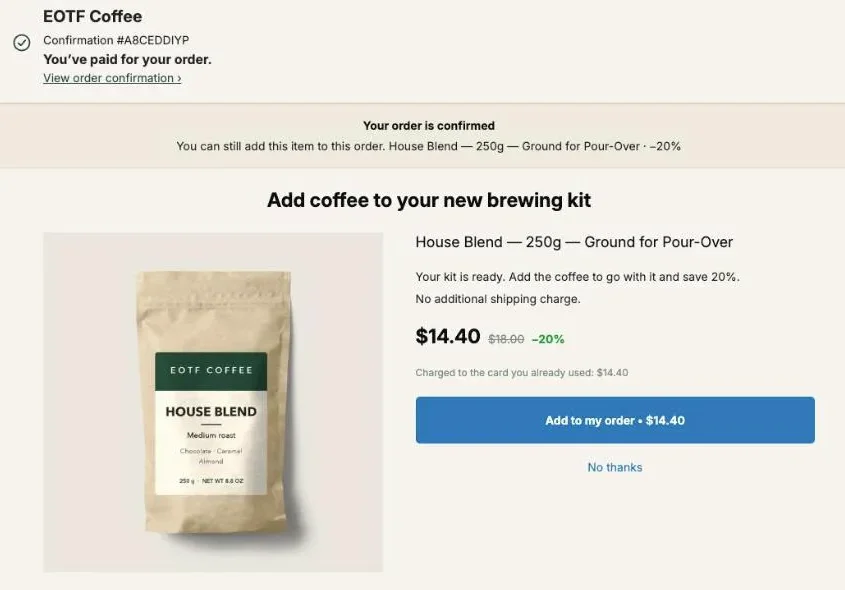
The coffee shop upsell ideas that work online are the ones tied to what the buyer just bought: coffee for someone who bought a brewer, filters and a scale for a pour-over kit, a second bag at a lower price, another roast or grind, and a subscription for the bag they will finish. Shown on the page right after payment, each one joins the order already paid, in the same parcel.
Take a $49 pour-over kit and a bag of House Blend at 20% off: the buyer adds $14.40 with one tap and the order comes to $63.40. The rest of this page goes through each idea with the real screens of our demo store, the settings we used, and how to keep the offers from tripping over each other.
What is the demo store in these screenshots?
The demo store in these screenshots is EOTF Coffee, a Shopify development store we built to show Post Purchase Upsell Abakira on a real catalog. It runs Shopify’s Dawn theme and the test payment gateway. Every order and figure on these screens comes from test orders, not from a merchant.
The catalog is small on purpose: six products, two of them coffees sold whole bean or ground.
| Product | Price | Role in the upsells below |
|---|---|---|
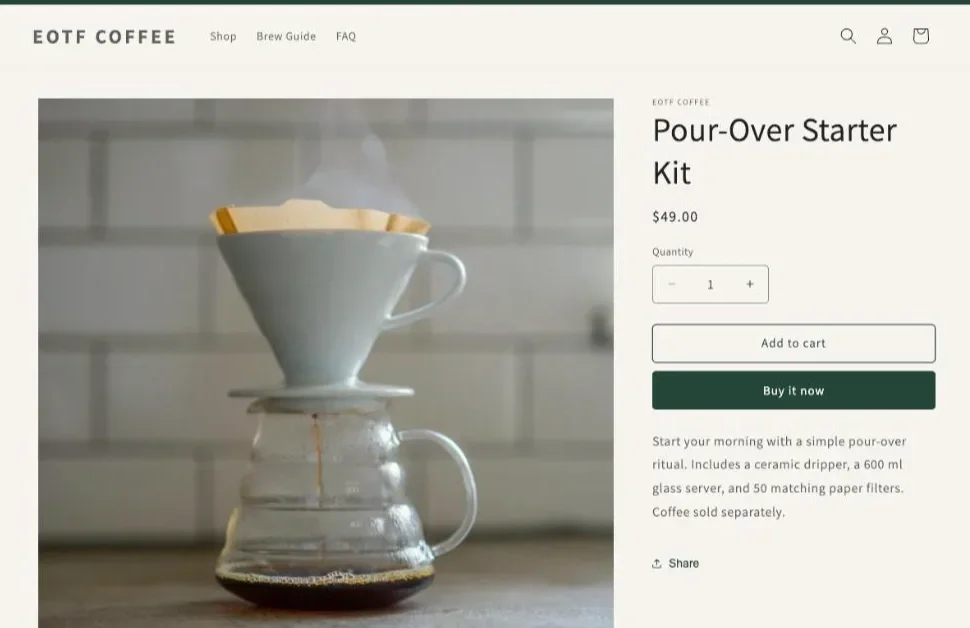
| Pour-Over Starter Kit | $49 | The main purchase that opens most offers |
| House Blend 250g (whole bean or ground) | $18 | Coffee for the kit, the second bag |
| Dark Roast 250g (whole bean or ground) | $20 | The other roast |
| Paper Filters (100 pack) | $8 | Consumable companion |
| Everyday Coffee Mug | $16 | Small add-on, the free item in a set |
| Digital Coffee Scale | $29 | The gear upgrade |
Three kinds of products, then: gear bought once, coffee that runs out, and small accessories. Most coffee upsells are a move from one of those groups to another.
Why upsell coffee after checkout instead of in the cart?
Coffee upsells sell after checkout because the buyer has already decided and paid, so the offer only asks one small question about something that goes with the purchase. On the one-click post-purchase page there is no new form and no new shipping charge: the item is charged to the card already used and added to the same order.
After payment the buyer has already made the main decision, so the offer asks one small question about something that goes with it. A buyer who just paid for a pour-over kit has a brewer and, unless you sell them coffee, nothing to put in it.
Shopify gives you three pages after payment, and a coffee store can use all three:
| Page | Who sees it | Good coffee offer there |
|---|---|---|
| One-click post-purchase page | Card buyers, before the confirmation | The first and strongest offer: coffee for the kit, a second bag |
| Thank-you page | Every buyer, any payment method | A set, a fallback offer for PayPal and wallet buyers |
| Order status page | Buyers who come back to track the parcel | A last call before the box leaves |
If you are still deciding which page to build first, our article on which page after checkout to start with works from your payment mix.
What should I offer someone who just bought a brewer or a kit?
Someone who just bought a brewer or a kit should be offered the coffee to brew in it, in a grind that matches the device. It is the most direct companion a coffee store has: the kit can’t brew anything without it.
This is the funnel our demo store puts first after its guard (more on that below). It is called “V01 — Starter Kit → House Blend”, and this is how it was set for test order #1010 on October 23, 2026:
- Who sees this offer: Order contains, set to Pour-Over Starter Kit.
- What this offer proposes: A product, House Blend in the ground-for-pour-over variant.
- Discount: 20%, so $14.40 instead of $18.
- Selling headline: “Add coffee to your new brewing kit”.
The buyer sees the bag, the struck-through price and a button that reads “Add to my order • $14.40”. Under the price, the page says “Charged to the card you already used: $14.40”. Nothing to type.
Why the grind matters: the kit holds a dripper and a server, no grinder, so whole beans would be unusable until the buyer owns one. If you sell grinders, flip it: whole beans plus a grinder is a stronger pair. If you don’t, pick the ground variant for the kit buyer and save the grind choice for the second-bag offer below.
The price follows a rule from our guide: aim for an offer between a quarter and half of what the buyer just spent. $14.40 against a $49 kit is 29%, comfortably inside. The full reasoning is in our chapter on what to offer after checkout.
Should I offer filters or a scale with a pour-over kit?
Filters and a scale are both good add-ons for a pour-over kit, at very different prices. Paper Filters (100 pack) at $8 are the refill, since the kit already comes with 50 filters, and they are 16% of a $49 kit. A $29 scale is 59% of the kit at full price, above the half-of-the-order line, so it needs a discount or a place after the coffee to sell.
Three ways to place them on the one-click page:
- As the next offer after the coffee. In the funnel editor, the slot under If accepted takes a second offer. A buyer who said yes to the coffee gets the scale next. Branches after the first offer need a paid plan.
- In a grid under the coffee. The Grid section of an offer shows “Up to 6 extra products shown under the main offer, each with its own discount and its own button.” Filters and a scale under the bag, each with its own button.
- As a bundle. A bundle sells the main product with one or two others at one Bundle discount (%), from 0 to 90. Coffee plus filters at 15% is one tap.
For the scale, the arithmetic decides the discount. At 20% off, the $29 scale is $23.20, or 47% of the kit. That puts it back under half the order. At 30% off it would be $20.30, or 41%.
Shopify lets a buyer accept at most three offers on the one-click page. Kit buyer, coffee, then scale, then filters is the full run. A funnel is at most three levels deep, so the run ends after the third offer.
How do I sell a second bag to someone who bought coffee?
A second bag sells to a coffee buyer as “one more” at a lower price per bag, on the page after payment. In Post Purchase Upsell Abakira, the offer types One more, same variant and One more, any variant read the bag from the paid order, so one offer covers every coffee in the shop.
The numbers on an $18 bag: a second one at 25% off is $13.50, and the order goes from $18 to $31.50. Add Quantity tiers to the same offer (up to 5 tiers, each from 2 to 20 units) and the buyer can take two or three more at a deeper cut.
Which of the two to pick for coffee:
- One more, same variant offers the exact bag and grind. The admin describes it as “The item is decided at checkout. No choice to make: they already picked it.”
- One more, any variant keeps the coffee but lets the buyer switch variant, which on a coffee with whole bean and ground variants means switching grind.
One trap on a coffee store: on a mixed order, the repeat offer picks the line with the highest price per unit. In a kit-plus-bag order, that’s the $49 kit, not the bag. That is why the kit gets its own funnel with A product set to the coffee, placed above the “one more” funnel. Depth of discount, wording and branches are covered in our article on the same product upsell after payment.
How do I offer another roast or another grind?
Another roast or grind is offered with A product, set to the roast you want to introduce, with several variants ticked so the buyer picks one in a “Choose an option” menu. On our demo store that is Dark Roast at $20, in whole bean or ground, shown to someone who just bought House Blend.
The buyer already trusts your beans enough to pay for a bag. The offer asks them to try a second one, at a price that makes the trial cheap.
Two settings matter here:
- Tick only the variants you want. Tick the whole product to offer every variant, or open it and tick the ones you want. Leave out a grind you are short on.
- Use a percentage, not a fixed amount. When variants have different prices, a percentage keeps the cut proportional.
If you run several roasts, give each one its own funnel targeting buyers of the others, or keep a single “try another roast” offer for everyone on the free plan. The variant menu is on every plan. The full setup, including how the price and photo follow the pick, is in letting the buyer choose the variant after checkout.
Can I sell a coffee subscription right after checkout?
A coffee subscription can be sold right after checkout on the one-click page, as an offer that carries a selling plan from your subscription app. In Post Purchase Upsell Abakira the setting is Sell as a subscription, and it lists “the subscription plans your subscription app already created for this product”. It is available on every plan.
Three rules decide how it behaves:
- The app never creates the plan and never bills a renewal. The plan comes from your subscription app, such as Recharge or Loop.
- On the one-click page, the admin warns: “Buyers who already have a subscription in their order will not see this offer.” A buyer who subscribed at checkout is skipped.
- On the thank-you page, the offer can’t join the existing order: “A subscription always opens a new checkout.”
A buyer who just paid for one bag is the person to ask. They know the coffee now, and the subscription offer turns that bag into a repeat order. Our article on selling a subscription after checkout with Recharge or Loop covers what Shopify allows on that page, and upgrading a subscription right after purchase covers buyers who subscribed at checkout.
What can a coffee store show on the thank-you page?
A coffee store can show a set on the thank-you page, built from what the buyer still needs: coffee, filters and a mug for a kit buyer. The Bundle block there holds 2 to 4 products, each with its own Discount (%) from 0 to 100, so one item can be free. Every buyer reaches this page, whatever they paid with.
On our demo store, the thank-you page of the kit funnel carries a Bundle block titled “Complete your brew set”:
- House Blend, ground for pour-over: $18, no discount
- Paper Filters: $8, no discount
- Everyday Coffee Mug: $16, at 100%, shown as $0.00
The total line shows $42 struck through and $26, and the button reads “Add $26.00 (3 items)”. Under it: “Added straight to your order above. You only pay the difference.”
Free mug or free filters? The mug at 100% is a 38% saving on the set, which looks generous and costs you. Making the filters free instead is 19% off, $34 for the set. Our Black Friday bundle ideas work the margin of both on this exact set, and the rule holds all year: free the cheapest item, ideally a consumable.
The thank-you page also catches the buyers the one-click page never sees. Set a block’s Show it to to “Buyers who did not see the one-click page” and the admin explains why: “Your safety net: iDEAL, PayPal and wallet payments never get the one-click page.” That rule comes with the Pro plan and above; on the free plan, a thank-you block shows to every buyer, card payers included. The full list of payments the one-click page skips is worth reading if many of your buyers pay with wallets.
Where does the extra coffee go once the buyer accepts?
The extra coffee goes into the order the buyer already placed. Shopify recalculates the total, the new line sits next to the original items, and both ship in one parcel. On a card order paid on the one-click page, the added item is charged to the same card with no form to fill in.
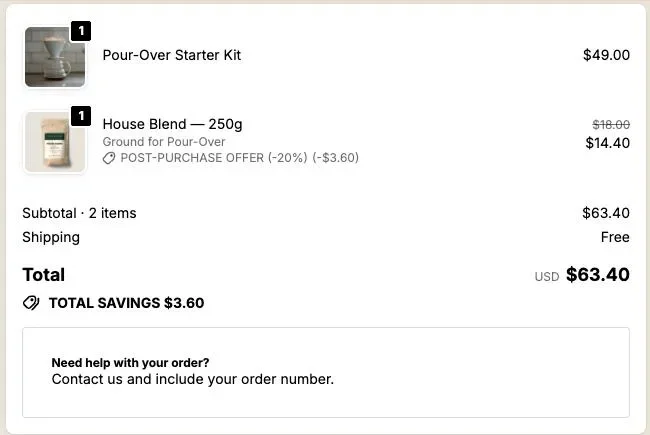
Here is test order #1010 from the demo store in the Shopify admin: the kit at $49 and the House Blend at $14.40 with $18.00 struck through, one shipment, total $63.40.
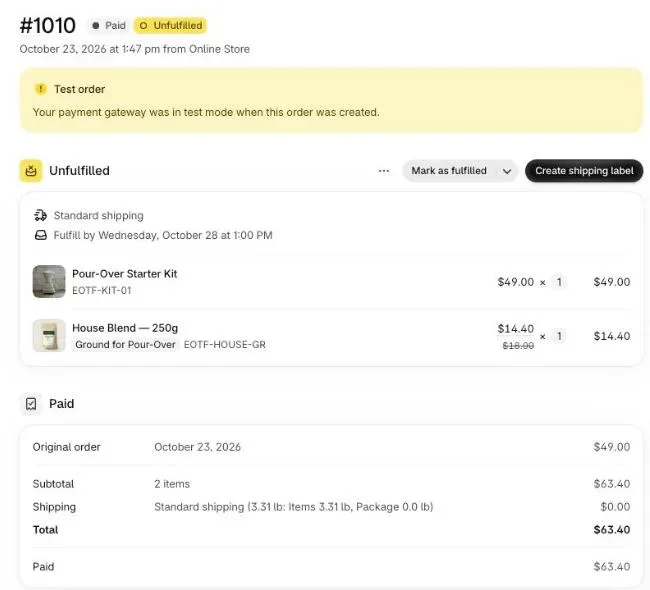
For a coffee store, the weight is the thing to check. The added item travels without a second shipping charge, so a heavy item can cost you more to ship than it earns. A 250g bag or a pack of filters adds little. A 1kg bag or a glass carafe deserves a look at your shipping rates before you make it an offer.
On the thank-you and order status pages, Where the purchase goes decides the same thing for blocks. The default is “Same order, unless it has fully shipped”. If you roast to order and ship within hours, “Same order, only until the first parcel ships” is the safer choice.
How do I keep the offers from clashing?
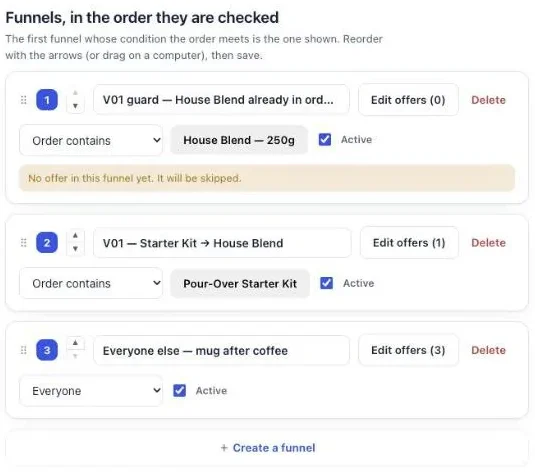
Offers on a coffee store stop clashing when each buyer reaches only one funnel, in the order you set. Post Purchase Upsell Abakira checks funnels from top to bottom and shows the first one whose condition the order meets. A funnel set to Everyone goes last, because it matches every order.
Our demo store runs three funnels, in this order:
- V01 guard, set to Order contains House Blend, with no offer.
- V01 — Starter Kit → House Blend, set to Order contains Pour-Over Starter Kit.
- Everyone else — mug after coffee, set to Everyone, with three offers.
The first one is an exclusion. A buyer who put the kit and a bag of House Blend in the same cart already has the coffee, so offering it again is wasted space. The guard catches that order first. The admin shows a yellow notice on this funnel because it holds no offer; for a guard, that is the point. The order matches the guard, so the buyer sees nothing, and the funnels below are not tried for that order. We placed test order #1003 with the kit and a bag of House Blend: no post-purchase page appeared, and the order was $67 for the two items.
Before going live, click Try a cart on the funnel list. It shows which funnel a cart would reach, without placing an order. Several funnels and the Order contains condition come with the paid plans; on the free plan the single funnel goes to everyone. Our guide chapter on running different offers for different carts explains the order rule in detail.
How do I word a coffee upsell?
A coffee upsell is worded around the purchase it completes, in one plain line: “Add coffee to your new brewing kit” says what the item is and why it’s there. In Post Purchase Upsell Abakira the text sits under Your words on this page, with a Selling headline and a few lines under Your argument.
The wording on our demo offer, as the buyer sees it:
- Headline: “Add coffee to your new brewing kit”
- Argument: “Your kit is ready. Add the coffee to go with it and save 20%.” and “No additional shipping charge.”
The same pattern for the other ideas:
- Scale after coffee: “Weigh your first brew. The scale is 20% off on this page only.”
- Second bag: “Another bag of the same coffee, {save} cheaper than the first.”
- Another roast: “Try our Dark Roast with this order, in the grind you want.”
Two rules come from Shopify. The editor refuses exclamation marks with “Shopify does not allow exclamation marks on this page.”, and the product’s real name stays visible next to your headline.
A countdown adds a deadline to the offer. On the one-click page it runs from 30 seconds to 30 minutes, and at zero the offer is declined and the buyer moves on. On thank-you and order status blocks it runs up to 72 hours, counted from the order.
What can I offer when the buyer comes back to track the parcel?
A buyer who comes back to track the parcel lands on the order status page, which takes the same blocks as the thank-you page. A coffee store can put a small add-on there, such as filters or a mug, added to the order as long as it hasn’t fully shipped.
On the demo store, the order status page of order #1010 shows both lines, the total with “TOTAL SAVINGS $3.60”, and a text block under the total. Any block type can sit in that slot.
Make it a different offer from the thank-you page. Our article on the order status page upsell covers what to show there and what happens once the parcel has left.
How do I know which coffee upsell works?
The coffee upsell that works is the one that earns the most per order that saw it, not the one with the most yeses. A $26 set taken by fewer buyers can beat a $14.40 bag taken by more. The Results screen of Post Purchase Upsell Abakira shows the extra revenue, broken down by page and by funnel.
Start with two or three offers, the ones with the best margin, and run each one for a few weeks before you change it. On the Scale plan you can A/B test two offers in the same slot, for instance the coffee at 15% against the coffee at 25%. The method for judging them is in how to price an upsell, per order and not per yes.
For upsells before checkout as well, product page and cart included, see what raises average order value on Shopify. If many of your orders are presents, the gift ideas are in selling more to gift buyers and gift wrapping after checkout. Stores that sell consumables by the bottle can use the same ladder; see supplement upsell ideas, and stores that sell a routine of products can follow skincare upsell ideas. Stores that sell an accessory and the refill it needs can follow the same path; see pet store upsell ideas. Other store situations are grouped on our situations page.
Post Purchase Upsell Abakira has a free plan that shows 100 offers a month on a live store. The listing has the current plans and what each one includes.
Offer coffee to buyers of a brewing kit right after payment
- Create a funnel for kit buyers In Post Purchase Upsell Abakira, click Create a funnel. Under Who sees this offer, choose Order contains and pick your brewing kit. This condition comes with the paid plans.
- Add the coffee as the first offer Open the One-click post-purchase tab. Under What this offer proposes, choose A product and pick the coffee in the grind that suits the kit.
- Set the discount Set a percentage discount. On our demo store, 20% takes an $18 bag to $14.40.
- Write the offer Under Your words on this page, write a Selling headline that names the kit, for example Add coffee to your new brewing kit.
- Exclude buyers who already have the coffee Create a second funnel with Order contains set to the same coffee and no offer, and move it above the kit funnel. Buyers whose order already holds that coffee are skipped.
- Check the order of your funnels and test Click Save, then use Try a cart on the funnel list to see which funnel a given cart reaches. Place a test order with a card and check that the coffee is a new line on the same order.
Frequently asked questions
Can I run coffee upsells on the free plan?
Yes. The free plan of Post Purchase Upsell Abakira runs one funnel with one offer on the one-click page and shows up to 100 offers a month. Every buyer who reaches the one-click page sees that same offer, because targeting by what the order contains comes with the paid plans.
Do buyers who pay with PayPal or Apple Pay see the coffee offer?
Not on the one-click page, which Shopify only shows after a card payment. They do reach the thank-you page and the order status page, where a block set to Buyers who did not see the one-click page shows them an offer of their own.
Does the extra bag ship in a separate parcel?
No. An offer accepted on the one-click page is added to the order the buyer just paid, so it is picked and packed with the rest. On the thank-you and order status pages, the default setting adds the item to the same order unless that order has fully shipped.
What happens when a roast I offer sells out?
The offer is hidden instead of being sold. On the thank-you page, a Bundle block disappears as soon as one of its products reads as sold out and comes back when the stock does.
Can I offer whole bean or ground in the same offer?
Yes. Choose A product, tick both grind variants, and the buyer gets a Choose an option menu on the offer. One more, any variant does the same thing for the bag they just bought.
Related articles
Written by Abakira. We make small software: Shopify apps, web tools and iPhone apps. This article is about Post Purchase Upsell Abakira.