Skincare upsell ideas: next routine step, minis, refills
Skincare upsells after checkout: the next routine step, a mini for buyers who say no, a set on the thank-you page, a refill on the order status page.
2026-11-07 — Abakira, updated 2026-11-08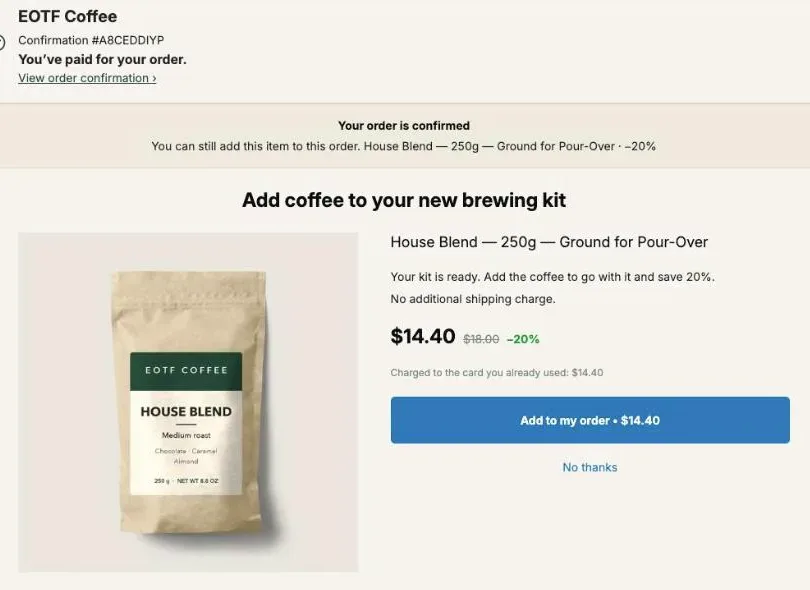
Skincare upsell ideas after checkout follow the routine. Offer the next step to someone who just bought one product (a moisturizer after a serum, a toner after a cleanser), drop to a mini size if they say no, offer the full set on the thank-you page, and put the refill on the order status page they open to track the parcel. Each of those offers joins the order the buyer already paid.
Take a $38 serum. A $32 moisturizer at 20% off is $25.60, and the order goes from $38 to $63.60 with one tap. A buyer who declines and takes a $14 mini at 15% off instead still adds $11.90. This page goes through each idea with the exact settings in Post Purchase Upsell Abakira, the prices at each step, and the page each offer belongs on.
Why does a skincare routine make a good upsell sequence?
A skincare routine makes a good upsell sequence because it is already an order of products: cleanse, tone, treat, moisturize, protect. A buyer who just paid for one step can be offered the step right before or right after it. The product sits next to the one they chose in the same routine.
Shopify gives a store three pages after payment, and a skincare brand can give each one a different job:
| Page | Who sees it | Skincare offer that fits |
|---|---|---|
| One-click post-purchase page | Card buyers, between payment and the confirmation | The next routine step, then a mini if they say no |
| Thank-you page | Every buyer, any payment method | A routine set, or the next step for PayPal and wallet buyers |
| Order status page | Buyers who come back to track the parcel | The refill, a travel size, a second unit |
The one-click page comes first: the buyer adds a product between payment and the confirmation, with one tap and no card to retype. In Post Purchase Upsell Abakira, the offer shows the price, the struck-through regular price and the line “Charged to the card you already used”, then Add to my order and No thanks. That’s why the main routine offer goes there and the rest go on the two pages that every buyer reaches.
Our guide chapter on what to offer after checkout explains how to choose the first offer for any catalog. In a skincare catalog, start from the order of your own routine card.
What should the first skincare upsell be?
The first skincare upsell should be the step next to the product just bought, at a discount offered only on this page. It comes from the same line as the product the buyer just paid for, at a discount that applies on this page.
Here is a map you can copy, with each purchase and the offer that follows it:
| They bought | First offer | Why it’s the next step |
|---|---|---|
| Cleanser | Toner or moisturizer | The step that follows cleansing |
| Serum | Moisturizer | The step after the serum in that same order |
| Moisturizer | Cleanser | The step that comes before it |
| Day cream | SPF | The morning routine’s last step |
| Night cream | Eye cream | Used in the same evening routine |
| Lip treatment | Lip balm or a second shade | Same use, different moment of the day |
In the funnel editor, set What this offer proposes to A product and pick the item. Give it a percentage discount and write a Selling headline that names the routine, for example “The next step after your serum.” The headline sits above the product name, which stays visible.
If you sell several hero products, each one needs its own next step. That means one funnel per product, each with Who sees this offer set to Order contains. Targeting and several funnels come with the paid plans. On the free plan you run one funnel and every card buyer sees its offer, so pick the step that follows your best-selling product.
How do I offer a mini size when the buyer says no?
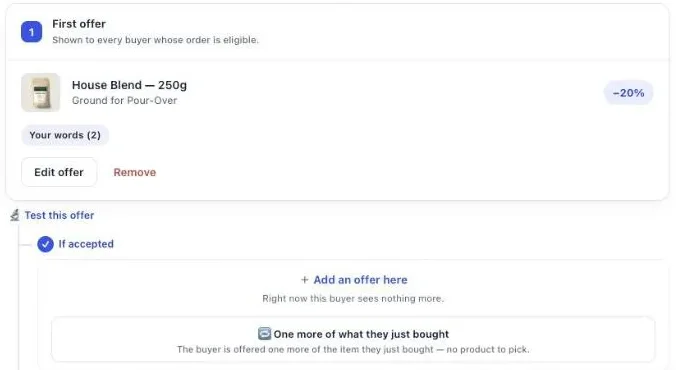
A mini size is offered to a buyer who said no by placing it in the If declined slot of the funnel, which the editor describes as “Shown only to buyers who just declined — this is your downsell.” After a no to a $25.60 moisturizer, the 15 ml jar at $11.90 asks a smaller question.
The mini is the same product as the offer just declined, at less than half the price. The size has numbers behind it too: in an A/B test of the mini against the full size as the post-purchase offer, the mini got three times the acceptances and twice the revenue.
Here is a full three-level funnel for the $38 serum:
| Step | Shown to | Offer | Price |
|---|---|---|---|
| 1 | Every card buyer of the serum | Moisturizer, 50 ml, 20% off | $25.60 |
| 2 (If accepted) | Took the moisturizer | SPF, 15% off | Your price minus 15% |
| 2 (If declined) | Said no to the moisturizer | Moisturizer mini, 15 ml, 15% off | $11.90 |
| 3 (If declined, then declined) | Said no twice | Cleanser travel size | Your price |
| 3 (If declined, then accepted) | Took the mini | Eye cream mini | Your price |
A funnel holds at most 3 levels and 7 offers, and a buyer sees 3 of them at most, one per level. The best-case order on this tree is $38 + $25.60 + the SPF. The smallest order that still converts is $38 + $11.90 = $49.90.
The levels after the first come with the Pro plan. The guide chapter on the accept and decline tree shows how branches are built, and our article on downsells after checkout goes deeper into how far to drop the price on the declined path.
Should I test the mini against the full size?
Testing the mini against the full size is the quickest way to know which one earns more on your own store. In Post Purchase Upsell Abakira, click Test this offer under any offer of the one-click funnel, then Add a version. Up to four versions of the same offer run at once, and A/B testing comes with the Scale plan.
Each test has a Goal, the number the winner is picked on. The three choices are Net revenue per view, Acceptance rate and Total revenue. For a mini-against-full test, pick Net revenue per view: a cheaper mini can collect more yeses and still bring in less money, and this goal settles that question in dollars. The admin always shows net revenue per view, whatever goal you pick.
Two tests worth running on a skincare funnel:
- Mini or full size as the first offer. Version A is the 50 ml moisturizer at 20%, version B the 15 ml at 15%.
- Discount depth on the next step. Version A at 15%, version B at 25%, same product.
The method for setting up and reading a test is in the guide chapter on A/B testing an offer, and our A/B test article has the screens from start to verdict.
How do I sell a full routine set after checkout?
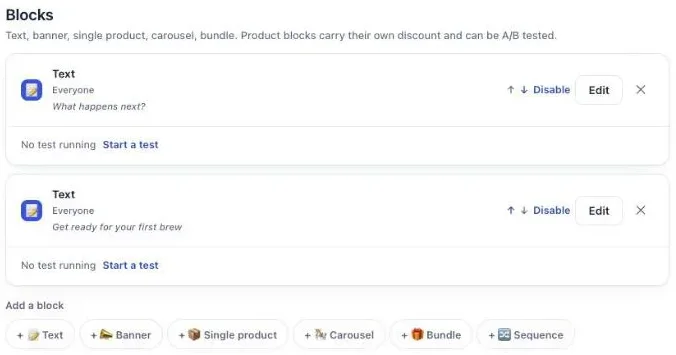
A full routine set is sold after checkout with a bundle, on the one-click page or the thank-you page. On the one-click page, the offer’s Bundle section “sells the main product together with 1-2 more, in a single purchase at the bundle rate.” The thank-you Bundle block holds 2 to 4 products.
The thank-you Bundle block is the better home for a set built around the routine card. Each product has a discount from 0 to 100%, and the admin explains the top of that range: “100 means the item is free — that is a decision, so say it here.” That lets you build a set where the cheapest piece is a gift:
| Product in the set | Regular price | Discount in the block | Buyer pays |
|---|---|---|---|
| Toner, 150 ml | $24 | 0% | $24.00 |
| Moisturizer, 50 ml | $32 | 0% | $32.00 |
| Cleanser, travel size | $9 | 100% | $0.00 |
| Set | $65 | $56.00 |
The block shows the total struck through next to the set price and adds the whole set to the order the buyer just placed with one button.
On the one-click page, the Grid section is the other option: “Up to 6 extra products shown under the main offer, each with its own discount and its own button.” Put the moisturizer as the main offer and two minis in the grid, and the buyer picks what they want from the same screen.
How do I sell a second unit of the same product?
A second unit of the same product is sold with One more, same variant, which the admin describes as “The item is decided at checkout. No choice to make: they already picked it.” It reads the product from the paid order, so one offer covers every serum, cream and cleanser in the store.
Add Quantity tiers to turn it into a stock-up. On the one-click page, an offer takes up to 5 tiers, each from 2 to 20 units. With a $22 cleanser:
| Menu line | Units added | Price | Per unit |
|---|---|---|---|
| 1 unit, 10% off | 1 | $19.80 | $19.80 |
| 2 units, 15% off | 2 | $37.40 | $18.70 |
| 3 units, 20% off | 3 | $52.80 | $17.60 |
Keep the discount rising with the quantity. If it doesn’t, the admin warns you: “A tier with more units has a smaller discount than the one before it. Buyers would pay more per unit for buying more.”
Product blocks on the thank-you and order status pages have their own Quantity breaks: up to 3 tiers, each from 2 to 9 units. That’s enough for a “2 for the bathroom, 1 for the gym bag” offer on a cleanser. When the buyer bought a shade or a scent, use One more, any variant instead, and they can pick another one from a “Choose an option” menu. Our article on selling the same product again after checkout covers both offers in detail.
What can buyers who pay with PayPal or a wallet see?
PayPal and wallet buyers skip the one-click page. A thank-you page block with Show it to set to Buyers who did not see the one-click page gives them their own offer. The admin calls that block “Your safety net: iDEAL, PayPal and wallet payments never get the one-click page.” This rule comes with the Pro plan.
For a skincare store, put the next routine step in that block, with the same product and discount as the one-click offer. A wallet buyer then gets the same deal as a card buyer, one page later. On the free plan, thank-you blocks are shown to every buyer, so a card buyer who declined the one-click offer sees it once more there. The block’s button adds the product to the order the buyer just placed, in the same parcel, and the line under the button tells the buyer what happens.
The full list of payments that skip the one-click page is in our article on Apple Pay, PayPal and the post-purchase page.
How do I sell the refill on the order status page?
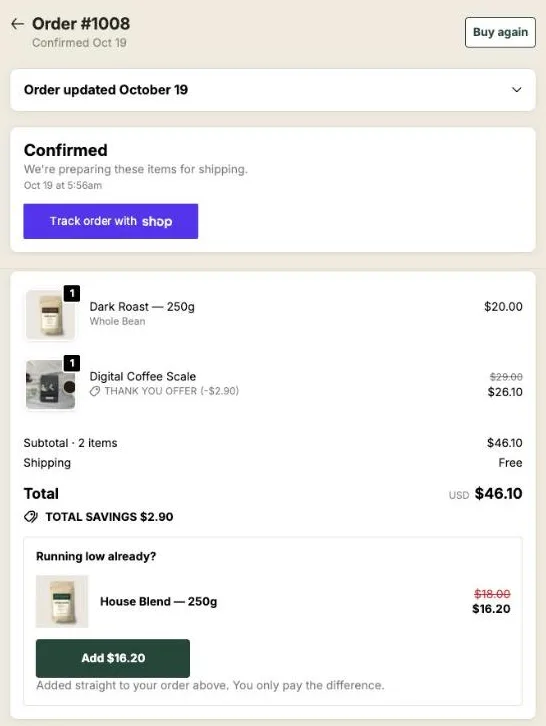
The refill is sold on the order status page with a product block in the funnel’s Order status tab. It is the page behind the link in the confirmation email, opened to check where the parcel is, sometimes days later. A block there shows a product, its price and an Add button under the order total.
Here is what that looks like on our demo store, with a headline that fits any refillable product:
To set it up:
- In your checkout editor, switch to the Order status page and add the Order status page offer block. Shopify only shows the app where you place it, so this step comes first.
- In the funnel, open the Order status tab and add a Single product block with the refill.
- Pick where the purchase goes. With the default, Same order, unless it has fully shipped, the refill joins the order. With Same order, only until the first parcel ships, a buyer who comes back after part of the order left pays in a new checkout instead.
- Add a countdown if you want one. It counts from the moment the order was placed, up to 72 hours. At zero the block disappears, unless you choose to keep it at full price or show a message.
On the Scale plan, Show it to on this page can target buyers by what they bought on the thank-you page, for instance Buyers who bought nothing on the thank-you page. The guide chapter on the order status page has every option, and our article on order status page upsells shows more examples.
Can I sell a skincare subscription right after checkout?
A skincare subscription can be sold right after checkout with an offer set to A product that carries a plan under Sell as a subscription. The list shows “the subscription plans your subscription app already created for this product.” The app never bills a renewal; your subscription app does. It works on every plan.
Two rules shape where the subscription goes:
- On the one-click page, “Buyers who already have a subscription in their order will not see this offer. Shopify does not allow adding a subscription to an order that already contains one.” Keep it for one-time buyers.
- On the thank-you and order status pages, “A subscription product always opens a new checkout: Shopify cannot add a subscription to an order that is already placed.”
A cleanser or moisturizer that runs out on a regular schedule fits a subscription. Offer it at the end of the declined path, or as the refill on the order status page. The discount on the offer applies to the first charge only, and renewals are billed at the price set by the plan in your subscription app. The setup, consent box and shipping fields are covered in selling a subscription after checkout with Recharge or Loop.
How do I word a skincare upsell without making claims?
A skincare upsell is worded around the routine and the price, never around what the product does to the skin. “The next step after your serum” and “$25.60 instead of $32” give the buyer everything needed to decide. In Post Purchase Upsell Abakira the text sits under Your words on this page, with a Selling headline above the product name.
Lines that fit each offer:
- Next step: “The next step after your serum. 20% off on this page.”
- Mini: “Try it in the 15 ml size first.”
- Set: “Complete the routine. The travel cleanser is on us.”
- Second unit: “One for home, one for your bag.”
- Refill: “Running low already?”
Keep claims about results out of the offer. They don’t belong in a one-line headline, and the product page already carries the description you’ve written for it. Shopify adds a rule of its own on the one-click page: the editor refuses exclamation marks with “Shopify does not allow exclamation marks on this page.”
How do I keep offers for different products apart?
Offers for different products are kept apart with one funnel per hero product, each with Who sees this offer set to Order contains. Funnels are checked in the order of the list, and the first one whose condition matches the order wins. A serum buyer lands in the serum funnel, a cleanser buyer in the cleanser funnel.
Put the most specific funnels at the top and a funnel for Everyone at the bottom to catch the rest. Before going live, use Try a cart on the funnel list: it shows which funnel a given order would reach. The guide chapter on different offers for different carts explains the ordering, and coffee store upsell ideas shows a guard funnel that stops a product from being offered to someone who just bought it.
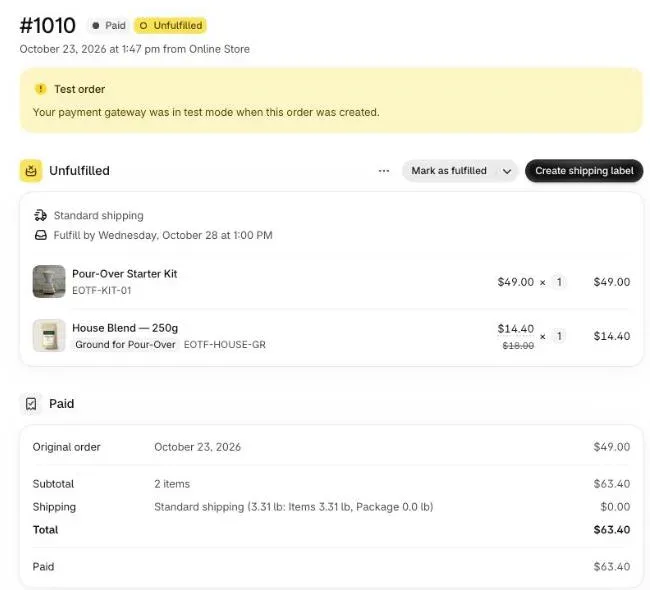
Accepted offers end up on the same order in the Shopify admin, as one more line with its regular price struck through, and ship in the same parcel:
How do I know which skincare upsell earns the most?
The skincare upsell that earns the most has the highest revenue per order that saw it, not the most yeses. A $25.60 moisturizer taken by fewer buyers can beat an $11.90 mini taken by more. The Results screen of Post Purchase Upsell Abakira shows extra revenue by page and funnel, and who saw and accepted each step.
Its By product table goes one level down: paid orders over the last 30 days, product by product, across every page, with a Clicks column next to the views. That’s where you see whether the toner in the set sells on its own, or whether the mini only sells as a downsell.
Run each offer for a few weeks before you change a price. The method for comparing them is in how to price an upsell, per order and not per yes. Stores that sell consumables by the bottle can use the same tree; see supplement upsell ideas. Clothing stores use the same funnel with a size menu; see clothing store upsell ideas. Upsells before checkout, on the product page and in the cart, are in what raises average order value on Shopify, and other store types are on our situations page.
Post Purchase Upsell Abakira has a free plan that shows 100 offers a month on a live store. The listing has the current plans and what each one includes.
Build a skincare routine funnel on the one-click page
- Create the funnel In Post Purchase Upsell Abakira, click Create a funnel. Under Who sees this offer, choose Order contains and pick the serum (a paid-plan condition), or leave Everyone if the serum is your main product.
- Set the first offer to the next routine step On the One-click post-purchase tab, set What this offer proposes to A product and pick the moisturizer. Set a 20% discount and a Selling headline such as The next step after your serum.
- Add the mini under If declined Under If declined, click Add an offer here and pick the 15 ml mini of the same moisturizer at 15% off.
- Add a second step under If accepted Under If accepted, click Add an offer here and offer the cleanser or the SPF that sits on either side of the pair in the routine.
- Add a thank-you block for wallet buyers On the Thank-you page tab, add a Single product or Bundle block and set Show it to to Buyers who did not see the one-click page (a Pro plan rule; on the free plan the block is shown to every buyer).
- Test before going live Click Save, use Try a cart on the funnel list to check which funnel an order reaches, and place a card test order to walk both branches.
Frequently asked questions
Can I run skincare upsells on the free plan?
Yes. The free plan of Post Purchase Upsell Abakira runs one funnel with one offer on the one-click page and shows up to 100 offers a month. Thank-you and order status blocks work on it too, shown to every buyer. The If accepted and If declined levels, targeting by product, several funnels and sorting thank-you buyers by what they did on the one-click page come with the paid plans.
Can I give away a free sample with an upsell?
Yes, on the thank-you and order status pages. In a Bundle block, each product has its own discount from 0 to 100%, and 100 makes that item free. Put a sample at 100% next to two full-price products and the buyer sees the free item inside the set.
Does the extra product ship with the first order?
An offer accepted on the one-click page joins the order the buyer just paid, in the same parcel. On the thank-you and order status pages, the default setting Same order, unless it has fully shipped adds it to that order too; Same order, only until the first parcel ships sends it to a new checkout once anything has left.
Can the refill offer be a subscription?
Yes. A thank-you or order status product block can carry a plan from your subscription app. That block always opens a new checkout, because Shopify cannot add a subscription to an order that is already placed.
Can I show a different offer to someone who bought a cleanser and someone who bought a serum?
Yes, with one funnel per product and Who sees this offer set to Order contains. Funnels are checked in the order of the list and the first match wins. Targeting and several funnels come with the paid plans; the listing shows which plan includes what.
Related articles
Written by Abakira. We make small software: Shopify apps, web tools and iPhone apps. This article is about Post Purchase Upsell Abakira.