Part 2. Raise the cart
9 The order status page, the one buyers come back to
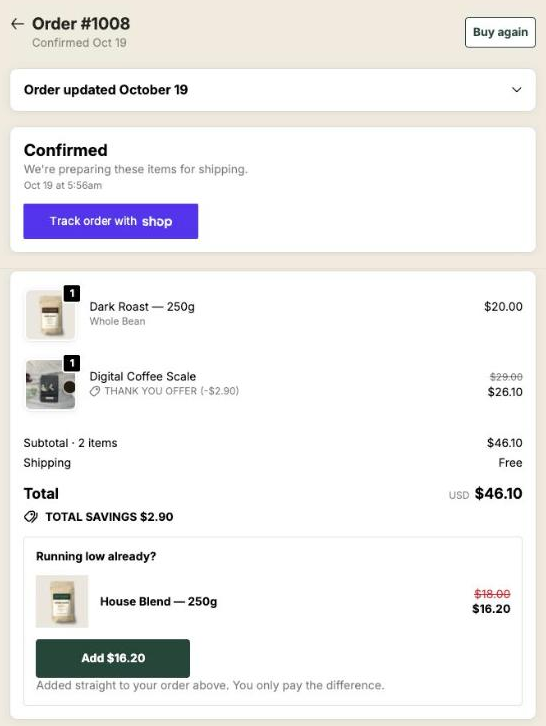
Buyers return to this page from their confirmation email, sometimes days later. Same blocks as the thank-you page, its own display rules and a different timing.
The thank-you page is seen once, right after paying. The order status page is the one behind the link in the confirmation email and in the buyer’s account. People open it to check where their parcel is, often more than once, and sometimes days after ordering.
That makes it a quieter surface than the thank-you page, and a cheap one to set up: the same blocks, built the same way.
Place the block once
As with the thank-you page, Shopify only shows the app where you put it. In your checkout editor, switch to the Order status page and add the Order status page offer block. Without that step, nothing appears.
What you can put there
Each funnel has an Order status tab with the same blocks as the thank-you page: text, banner, single product, carousel, bundle and sequence. A sequence here is always a shared one: you pick a sequence from your store, or create one, and it is the same sequence as on the thank-you page (chapter 8). A buyer who stopped halfway through it on the thank-you page carries on here from where they left off, with the same version if you are testing it.
The editor preview works the same way, so you can see the page before any buyer does.
Show it to: what they bought on the thank-you page
On this page Show it to has its own four choices: Everyone, Buyers who bought on the thank-you page, Buyers who bought from a specific thank-you block and Buyers who bought nothing on the thank-you page. They look at what the buyer added and paid for from your thank-you blocks, on this same order. With the specific block rule, pick the block, or the block is shown to nobody.
If you add blocks for buyers who bought on the thank-you page, move your current blocks to Buyers who bought nothing on the thank-you page. Otherwise those buyers see both sets.
The one-click rules of chapter 7 are not offered here, and the reason is practical. This page knows the order, but not reliably what the buyer did on the one-click page, and least of all whether they refused everything. A rule the app could not apply would mean blocks shown to the wrong people without anyone noticing.
These rules come with Scale and Scale Plus. On the other plans you can see them, but they are paused: every order status block is shown to every buyer.
The funnel is picked from the order alone, using your funnel conditions and their order. On the Free plan that is your one funnel, and its order status blocks are shown to every buyer.
Choose where the purchase goes with the delay in mind
The three options are the ones from chapter 7. Here the timing changes which one you want.
A buyer opening this page on day three may have an order that is partly on its way. With the default, Same order, unless it has fully shipped, the item still joins that order and will leave in a later parcel. If that is not how your warehouse works, choose Same order, only until the first parcel ships: as soon as anything has left, the buyer pays in a new checkout and gets a separate order instead.
A sequence only has the two same-order options. It never opens a new checkout, so when the order can no longer take additions, the sequence is simply not shown.
Timers count from the order
A countdown on this page works exactly as on the thank-you page: up to 72 hours, counted from the moment the order was placed. A buyer who comes back on the fourth day will not see a block whose timer ran out, unless you chose to keep it at full price or show a message.
What you should have now
The Order status page offer block placed, one product block in the Order status tab of your main funnel, and a test order where you open the status page from the confirmation email to check it is there.
Last updated