Part 4. Higher plans
15 Sell subscriptions, and make existing ones longer
Turn a one-off buyer into a subscriber in one tap, move a new subscriber up a plan with Loop, or lengthen a Recharge subscription without creating a second contract.
Three different things live in this chapter. The first works on every plan. The other two go through your subscription app and need the Scale plan.
Selling a subscription after checkout
An offer can carry a selling plan instead of a plain price. On the one-click page, the buyer taps once and leaves as a subscriber rather than as a one-off customer. This works on every plan, exactly like variants or quantity tiers.
It is the highest-value thing this app can do for a store that sells consumables, because you are not adding one sale, you are adding a stream of them.
What you set on the offer:
- The plan. The app lists the plans your subscription app already created for that product. It never creates a plan and never bills a renewal.
- Shipping, twice. Shopify requires the shipping amount on the first order and on every renewal, and the app cannot work them out for you. Enter 0 if shipping is free. The offer cannot be saved until both are filled in.
- The length, if you sell a fixed-length subscription. Three months on a monthly plan is three charges, and the contract then actually carries it. Left empty, the subscription has no end date, and a subscription with no end date cannot be lengthened later.
Your discount applies to the first charge only. Renewals are billed at the price set by the plan in your subscription app. The buyer has to tick a consent box before the button works, as Shopify requires.
A buyer whose order already contains a subscription will not see this offer. Shopify does not allow adding a subscription to an order that already has one. The one-click page itself still appears for them, so give them something else to see, or use the Loop upgrade below.
Say the terms plainly in the offer text, because a subscription accepted by surprise becomes a refund and a bad review.
On the thank-you and order status pages, a product block can also sell a subscription. There it always opens a new checkout, since Shopify cannot add a subscription to an order already placed. In the checkout on Plus, the product simply goes into the cart with its plan.
Moving a new subscriber up a plan, with Loop
This one happens on the one-click page. Create an offer whose type is Subscription upgrade. It is shown only to buyers who just subscribed to that product in the order they paid, and it proposes a bigger plan: another variant, another frequency, or both.
Nothing is added to the order and nothing is charged that day. If the buyer accepts, the app asks Loop to switch the subscription they just started, so the next renewal is the new plan, on the same subscription, with the same billing date.
The price on the offer is the renewal price, read live from Shopify. If it cannot be read at that moment, the offer is not shown rather than shown with a guess. Prepaid subscriptions, and subscriptions holding several products, are left alone.
Making an existing Recharge subscription longer
This one happens on the thank-you or order status page. Add a product block, and under What the button does choose Changes their existing subscription. Then pick the plan the buyer moves to, a target length in charges, or both.
The block sells nothing and charges nothing that day. When the buyer accepts, the app asks Recharge to move the subscription they already have. No second subscription, nothing for them to cancel, and their next billing date does not move.
Without Recharge connected, a block in this mode sells the product instead, and the editor tells you so.
Connecting your subscription app
Both connections live on the Subscription app page of the app, in two separate sections: connecting one never touches the other. Each takes an API token you create in your subscription app, with only the permissions the page lists, and stores it encrypted. It is never shown again, only its last four characters.
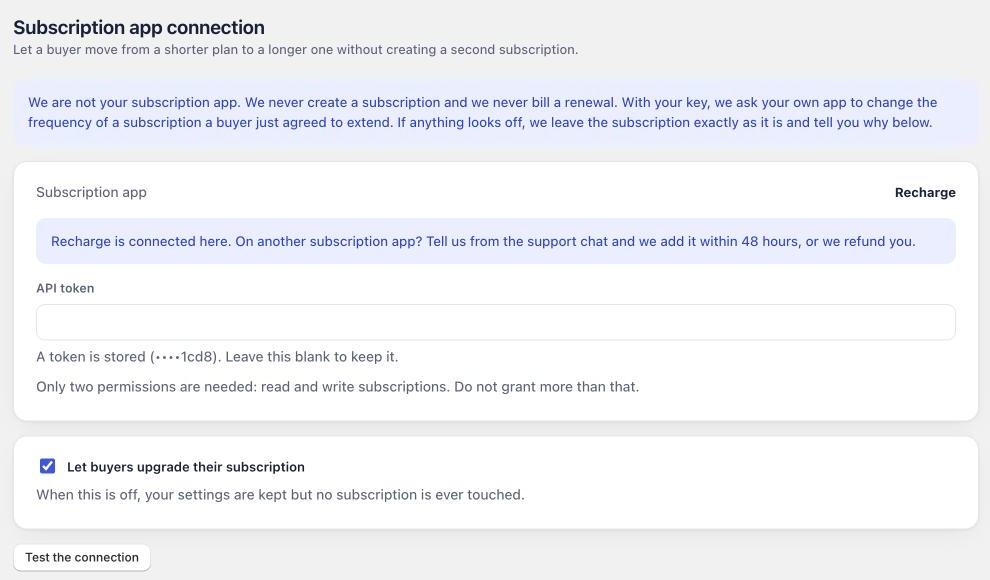
Recharge and Loop are the two we connect today. On another subscription app, tell us from the support chat: the page says we add it within 48 hours, or refund you.
Things the app refuses to do
It will not make a subscription shorter. If the buyer’s current commitment is already as long as what your block offers, or longer, the subscription is left alone, and the Subscription app page says why.
It will not claim success it cannot verify. After each change, the app reads the subscription back and checks the values really moved. A change that returns a cheerful response without changing anything is treated as a failure, because that is what it is.
It will not touch a subscription it cannot tie to the buyer who accepted, or an order with several subscriptions where it cannot tell which one you meant. The recent changes list shows each of these cases in plain words.
Last updated