Part 2. Raise the cart
8 The sequence block, one offer at a time and one payment
On the thank-you and order status pages, show offers one after another, let each answer pick the next, and charge the buyer once at the end.
A carousel shows everything at once and lets the buyer pick. A sequence does the opposite: one offer on screen, the buyer answers, and the answer decides what comes next. It is the closest thing the thank-you page has to the accept and decline tree of chapter 6.
It works on the thank-you page and on the order status page, never in the checkout.
How it behaves for the buyer
The buyer sees one offer with Add and No thanks. Whatever they tap, the next offer replaces it without reloading the page. Nothing is charged along the way. When the sequence ends, everything they added goes into the order they just placed in a single edit, and they pay the difference once.
If they reload the page halfway through, their earlier answers are kept.
Building one
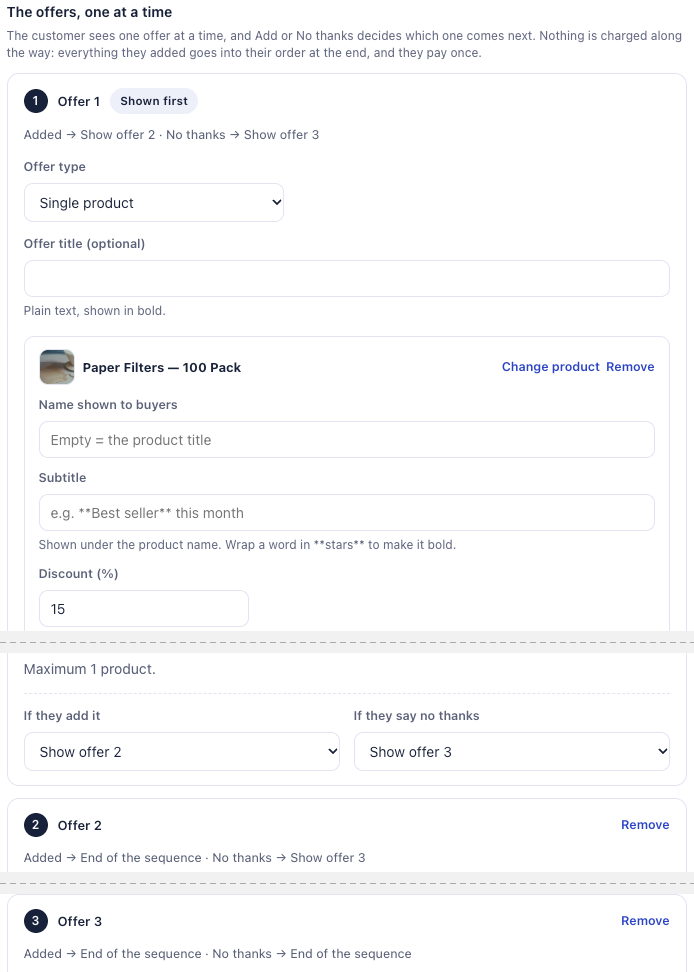
In the Thank-you page tab of a funnel, add a block and choose Sequence. Under Sequence, pick one you already built or + New sequence, and give it a Sequence name. Only you see the name; it lets you pick the same sequence again on another page. Then, for each offer:
- the product or products it proposes,
- an optional title,
- If they add it: show another offer, or end the sequence,
- If they say no thanks: the same choice.
Up to six offers. An offer can only lead to one further down the list, so a buyer can never loop back to something they already answered. If you build an offer that nothing leads to, the editor marks it Never shown so you can fix the path.
The sequence is a block like the others, so it has its own Show it to setting from chapter 7. A sequence aimed at buyers who refused everything on the one-click page is a reasonable second chance.
One sequence, several pages
A sequence belongs to your store, not to one block. Its offers, products, discounts and A/B versions live in the sequence, so a change applies to every page that uses it. Placement, display rule, timer and note stay with each block.
That is what lets you reuse it on the order status page (chapter 9). A buyer who answered two offers on the thank-you page and closed the tab picks up at the next offer when they come back from their confirmation email.
The one rule it never breaks
A sequence only ever adds to the existing order. It never opens a new checkout. So when the order can no longer take additions, because it was cancelled, has fully shipped, or already carries an added item waiting for payment, the sequence is not shown at all. Same if you chose Same order, only until the first parcel ships and a parcel has left. That is also why Where the purchase goes has no Always a new checkout option here. Put a plain product block on the same page if you want those buyers to see something.
Testing the whole sequence
On Scale and Scale Plus, you can A/B test a sequence as a whole: up to four versions, each one a complete sequence with its own offers, products, discounts and paths. Each order gets one version, and keeps it on the thank-you page and on the order status page. Results are shown by version, all pages together.
What a sequence test does not tell you. The stats do not break a sequence down offer by offer. If you want to know which single offer works, test it as a separate product block first, then put the winner into the sequence.
What you should have now
A sequence of two or three offers on your thank-you page, and one test order where you answer No thanks to the first offer, so you see the second one take its place.
Last updated