Part 1. Get live and earn your first upsell
4 Your first funnel in five minutes
Start from the funnel the app builds for you, or make one offer by hand. Live and testable before you think about strategy.
Build something simple and see it work. Strategy comes in chapter 5, once you have a live offer to compare against.
A funnel is a set of offers shown one after another. On the one-click page it is a small tree: a first offer, then one for the buyer who accepts and one for the buyer who declines.
Start from the funnel the app built for you
The first time you open the app on a store with no funnel, it builds a starter funnel from your own products and the last 60 days of sales:
- offer 1, right after payment: your best-seller at 15 percent off,
- if the buyer accepts: a product often bought with it, at 15 percent off,
- if the buyer declines: the same product as offer 1, at 25 percent off.
With no sales yet, it picks from your catalogue instead: in stock, with a photo, priced around half of a typical order.
The starter funnel is created switched off. Buyers see nothing until you read it and press Turn on this funnel. Check the three products before you do: the app chose them from data, not from knowing your store. On the Free plan only offer 1 is served, and the two follow-ups wait, saved, until you upgrade.
Or build one by hand
Stores that installed the app before October 2026 do not get a starter funnel. Neither does a store that already has a funnel. On the funnels page, create a funnel and add one offer. First choose what it proposes: A product is the usual answer. One more, any variant and One more, same variant offer another unit of what the buyer just bought, with nothing to pick, which works on any catalogue. Then answer four questions.
Which product. Pick something cheap next to what you already sell, and something you keep in stock. A product that goes out of stock stops being offered, which is correct behaviour and looks like a bug if you are not expecting it.
Which variant. If the product has variants, you choose which ones the buyer is allowed to pick. The buyer can only ever select from that list, never from anything else in your catalogue.
How many. One is the right answer for a first offer. Quantity tiers exist and are covered in chapter 11.
What discount. Something real. Five percent will not move anyone. Chapter 11 covers how to choose the number without eating your margin.
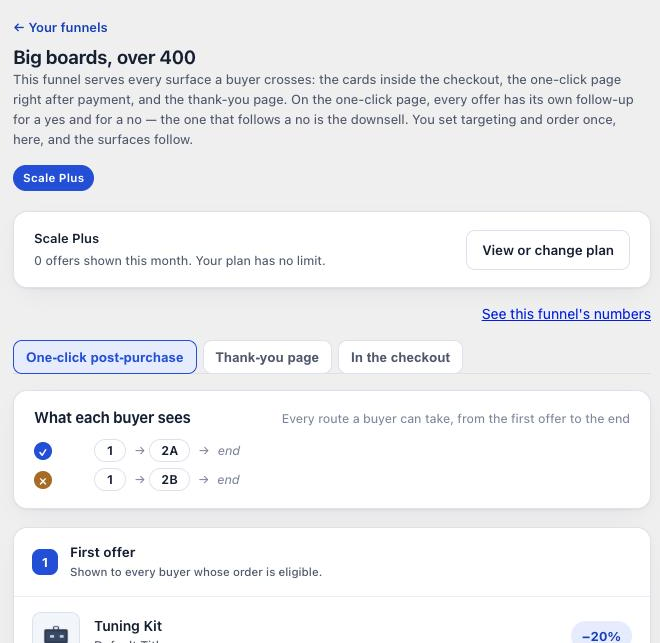
Save, and check the funnel is switched on in your funnel list.
Look at it before a buyer does
The funnel editor has a Preview next to the settings, in mobile and desktop sizes. It runs the real one-click page with your offer in it, so you see your product, your price and your wording as the buyer will. It writes nothing and charges nothing. It is close to the real page, not identical: Shopify calculates the final prices, taxes and shipping.
Now buy something
The preview is not proof. A real order is. Place one in your own store with a card, not a wallet, so the one-click page is not skipped. Go through checkout and pay.
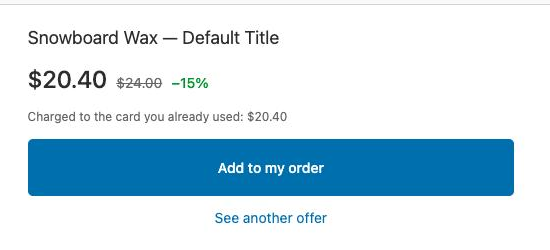
Accept the offer, then open the order in Shopify. The item should be on the same order you just paid for, at the discounted price, with no second shipping charge.
The post-purchase window is short. Shopify closes it soon after payment. If you leave the page open while you read this and then click, the offer can fail through no fault of the app. Test it at normal speed.
What you should have now
A live funnel, and one test order proving the whole chain works: the page appeared, the button worked, the item joined the order. From here on it is about earning more, not about wiring.
Last updated