Part 3. Measure, then multiply
14 Test one offer against another
Up to four versions of the same offer or block, split fairly, judged on revenue rather than on the rate that flatters you. One-click page, thank-you and order status pages, checkout.
By now you have opinions about what works. A test replaces them with an answer. This is on the Scale plan.
On the one-click page
You pick one offer in a funnel and give it up to four versions. Same position in the tree, same accept and decline branches, different content: another product, another discount, another headline.
Buyers are split between the versions by a stable draw, so the same buyer always sees the same version even if the page reloads. The discount served always matches the version shown, which sounds obvious and is the part most homemade tests get wrong.
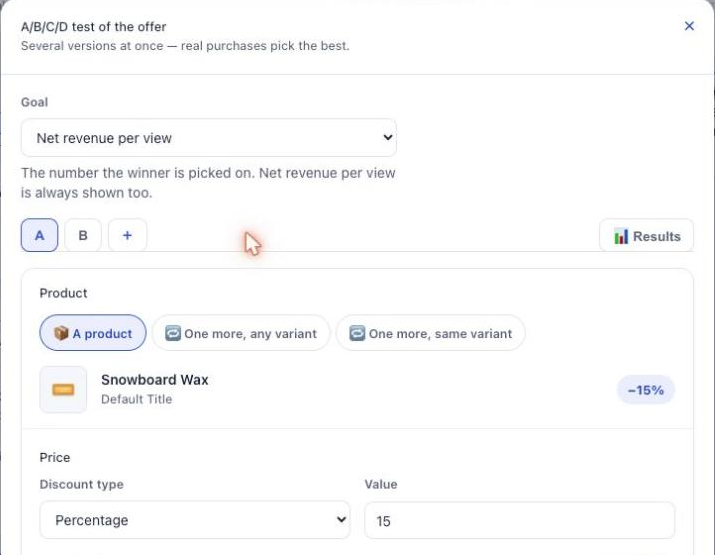
Change one thing
Test a different product, or a different discount, not both. If you change two things and the challenger wins, you have learned that something worked and you will never know which.
One test per funnel at a time, which the app enforces. That restriction is doing you a favour. Bundles and subscription upgrades cannot be tested yet.
Reading the verdict
The results page states a winner in a sentence, and it refuses to state one before the numbers can support it. A version ahead after 30 impressions is noise, and calling it a winner is how merchants end up adopting a worse offer with total confidence.
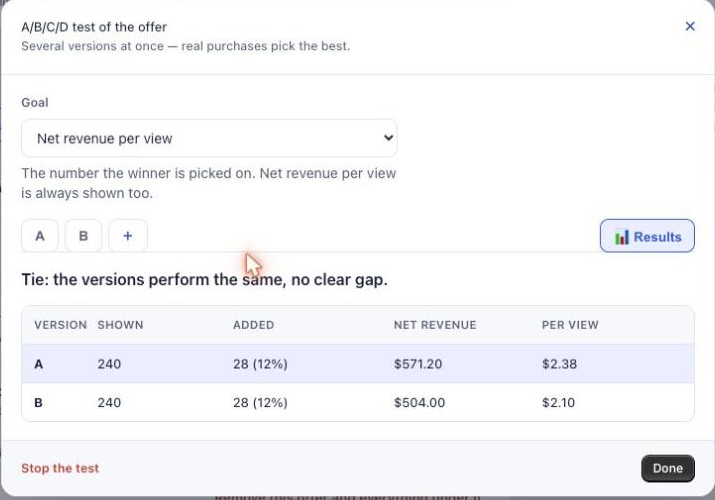
Watch for the cannibalisation warning. A version can win on acceptance rate and still bring in less money, usually because it is cheaper. The results page flags that instead of letting you celebrate a number that costs you revenue. When you see the flag, pick the version that earns more, not the one that gets clicked more.
Then adopt it
When there is a winner, one button copies it into the live offer. The test stops, and the funnel keeps running with the better content.
Set yourself a date to come back. The app reminds you after a week, and a test nobody reads is just a slower funnel.
On the thank-you and order status pages
Product blocks can be tested too. Open a block, choose Start a test, and add up to three versions next to the block itself, which is version A. A version can change the products, the discounts or the wording, or hide the block altogether. Who sees the block and where the purchase goes stay the same in every version.
Each buyer sees one version of the whole page, and keeps it. The results sit in a Page A/B test panel at the top of the page’s tab: views and clicks count distinct buyers, orders count paid orders, and only blocks under test are counted.
Two tools on that panel:
- Restart the test starts the numbers again from zero for every version. Use it after you change a version a lot, so the verdict only counts the new one. Nothing is deleted.
- Download raw data (CSV) gives you every row, including the history from before a restart.
In the checkout
Checkout blocks in a funnel can carry versions in the same way. Two differences: the draw is made block by block rather than for the whole page, and the checkout does not count views, because counting them would mean a network call on every render of the payment page, which we refuse to add to your checkout. Read a checkout test on what each version sold.
The separate checkout blocks (delivery protection, stock check, progress card, badge, slider) take another route. They can be shown to one group only, using a cart attribute written by an external A/B testing tool. Chapter 17 explains the two fields, and why you should leave them empty if you do not run such a tool.
What you should have now
One test running on your best-performing offer or block, using the second candidate from your chapter 5 shortlist, and a date in your calendar to go and read it.
Last updated