Part 4. Higher plans
16 One parcel, even when the warehouse already has the order
An item sold after checkout normally arrives too late for the warehouse. The app holds new orders for a few minutes, and the connector puts a late item on the order the warehouse already has.
If you fulfil in house, skip this chapter. It solves a problem that only exists when a warehouse system pulls your orders automatically.
The problem
Your 3PL imports the order seconds after it is paid. Your post-purchase offer is accepted a few seconds later, or a few minutes later on the thank-you page. The item is now on the Shopify order, but the warehouse copy was made before it existed.
The result is a second shipment, or a picker packing the wrong contents, or an item that never ships at all. Most upsell apps leave you to notice this yourself.
The app attacks it from two sides: it keeps new orders back for a few minutes, and when that is not enough, it pushes the late item into the order the warehouse already holds.
Available on the Scale plan. We connect Picqer today. On another warehouse system, tell us from the support chat: the settings page says we add it within 48 hours, or refund you.
Holding new orders for a few minutes
Once Picqer is connected with sending turned on, every new order is held for 10 minutes before Picqer can import it, so that an item accepted on the one-click or thank-you page is already on the order when the warehouse picks it up. The app then releases the order on its own. In your Shopify admin these orders show as on hold while they wait.
If a buyer added an item but has not paid for it yet, the hold continues until they do, for 90 minutes at most. If the item is still unpaid at that point on an order that was otherwise paid, it is taken back off the order before the order is released, so the warehouse never ships something nobody paid for. Cash on delivery and bank transfer orders are never touched this way: the whole order is due by nature, so the added item stays on it.
A hold cannot win every time. On orders that skip the one-click page, iDEAL for example, Shopify can hand the order to Picqer before the app has had a chance to hold it. That is what the connector below is for.
Pushing a late item into the warehouse order
When an item lands on an order that Picqer has already imported, the connector adds it to the Picqer order, so the picking list carries both lines and the buyer receives one parcel. It adds only what is missing, so running it twice never doubles a line.
If the warehouse has already started picking, the app leaves the order alone and says so in the list of recent orders. Cancelling a pick in progress would move stock and delete shipments, so it never does.
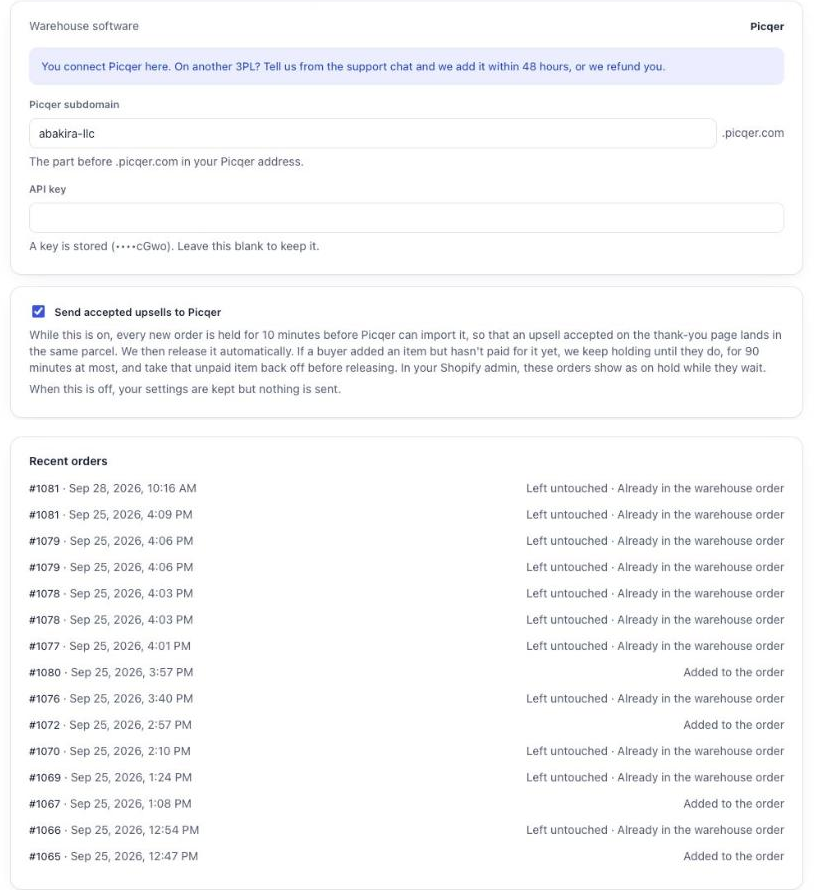
Two things to get right first
Every product needs a SKU. Warehouse systems reject an order line without one, and the rejection happens on their side, in their import log, where you will not think to look. The Test the connection button on the settings page checks each of your offer products by SKU in Picqer and lists the ones that will not reach the parcel. Run it before you turn sending on.
Sync starts when payment lands. For an item added from the thank-you or order status page, the balance has to be settled first. If you take cash on delivery, the item waits for the payment rather than racing ahead of it.
Changing plan pauses this, it does not delete it. Leaving Scale keeps your subdomain and your encrypted key exactly where they are. Nothing more is pushed, and coming back switches it on again as it was. That is how every paid feature in this app behaves.
Last updated