How to price an upsell: judge it per order, not per yes
Judge your first upsell by what it earns per order that sees it. A $50 bundle taken by 4% of buyers beats a $14.40 bag taken by 12%. The math and the test.
2026-10-30 — Abakira, updated 2026-11-08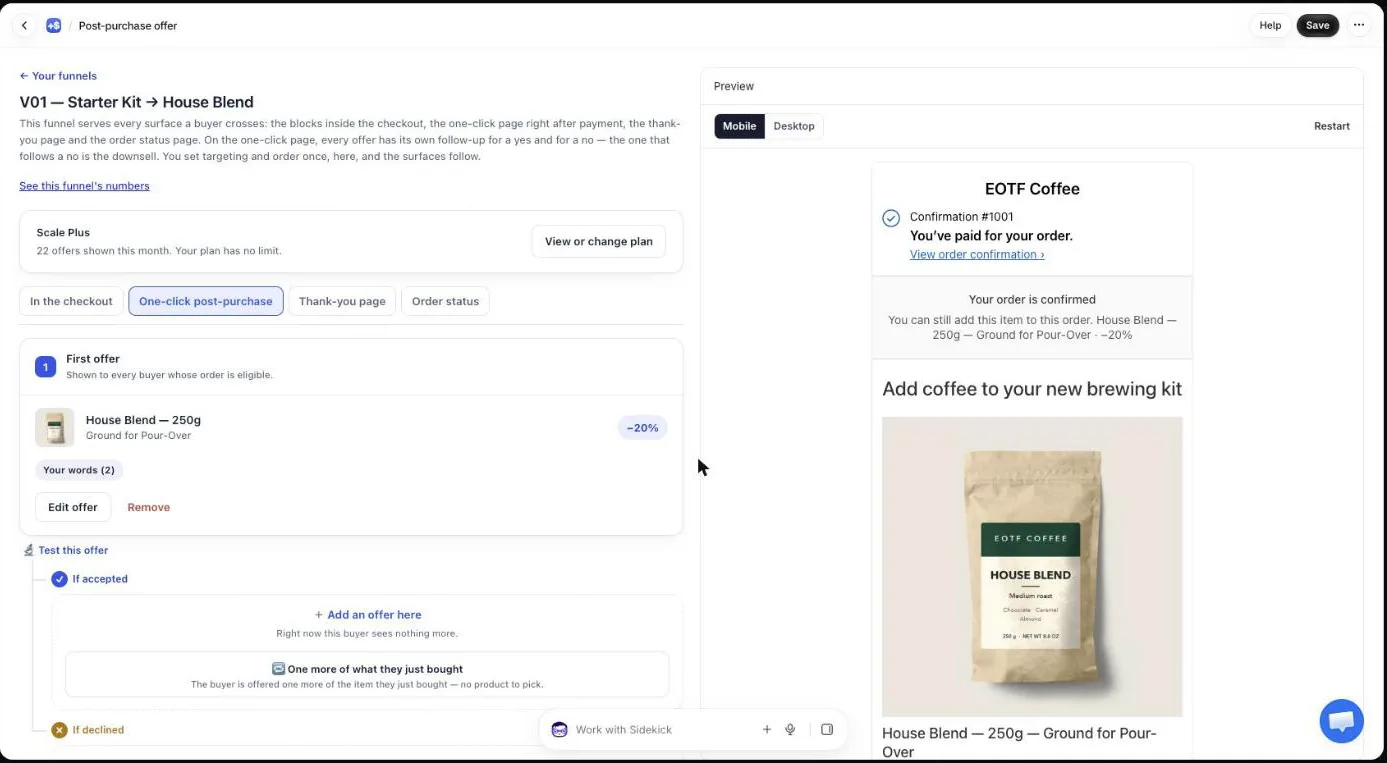
To price an upsell, pick the price that earns the most per order that sees it, not the one that gets the most yeses. The first offer after payment is the only one every eligible buyer sees, so judge it on net revenue per order shown: price times acceptance rate. Take a $50.25 bundle accepted by 4% of buyers and a $14.40 bag accepted by 12%: the bundle earns $2.01 per order shown, the bag $1.73.
Most pricing advice tells you to keep the upsell within 10 to 25% of the original price. That rule protects the acceptance rate. This page shows when to break it, how to work out the acceptance a higher price needs before you test it, and how to read the result in Post Purchase Upsell Abakira.
Why does the first upsell deserve the most attention?
The first upsell is the one offer every eligible buyer sees. Every offer after it reaches only the buyers who accepted or declined the one before, so its audience is smaller at each step. In Post Purchase Upsell Abakira, the funnel editor labels it First offer and says it plainly: “Shown to every buyer whose order is eligible.”
That makes the first price the biggest lever in the funnel. Change the price of a second-level offer and you change revenue on a fraction of orders. Change the first one and you change it on all of them.
On the Free plan it’s also the only one-click offer you have: one funnel, one level, and up to 100 offers shown a month on the one-click page. Pro adds levels two and three (up to seven offers per funnel). Either way, the first slot is where the money is.
Operators who sell low-priced front-end products in direct response put their first upsell at five to ten times the entry price and still report about one buyer in ten taking it. Brands with orders around $100 run their first one-click offer at $70 to $80 and see 6 to 10% take it. Neither is a “within 25%” price, and both are judged the same way: money per buyer who saw the page.
What does “revenue per order shown” mean?
Revenue per order shown is the net revenue an offer brings in, divided by the number of orders where the buyer actually saw it. It folds price and acceptance into one figure. A cheap offer with a high rate and an expensive one with a low rate become directly comparable, which neither number does on its own.
The formula:
revenue per order shown = net price of the offer × acceptance rate
“Net” means after your discount, at the price actually charged. If a buyer can pick a quantity, use the average amount added per acceptance instead of the single-unit price.
The word “shown” matters. In Post Purchase Upsell Abakira, an offer counts as shown when the page appears on the buyer’s screen, once per order. Shopify asks the app for the offer before it knows how the buyer paid, and it never shows the page to wallet, iDEAL or cash on delivery buyers. Counting at that first request would put buyers who never saw anything into the denominator and make every offer look worse than it is. Counting at display keeps the figure honest. Our article on what counts in an upsell take rate shows how much that choice moves the number.
The other half, revenue, is read from your Shopify orders, not from the buyer’s browser. An acceptance that never made it onto the order (the item sold out, the bank refused the extra charge) isn’t counted as money.
Why does revenue per order shown beat the 25% rule for the first offer?
The 25% rule is right about acceptance, and it is the right place to start; revenue per order shown is what you judge it by. A small price relative to the order gets accepted more often. Nobody disputes that. But acceptance rate is a means. A store pays its bills with revenue per order, and that number can go up when the rate goes down, as long as the price goes up faster.
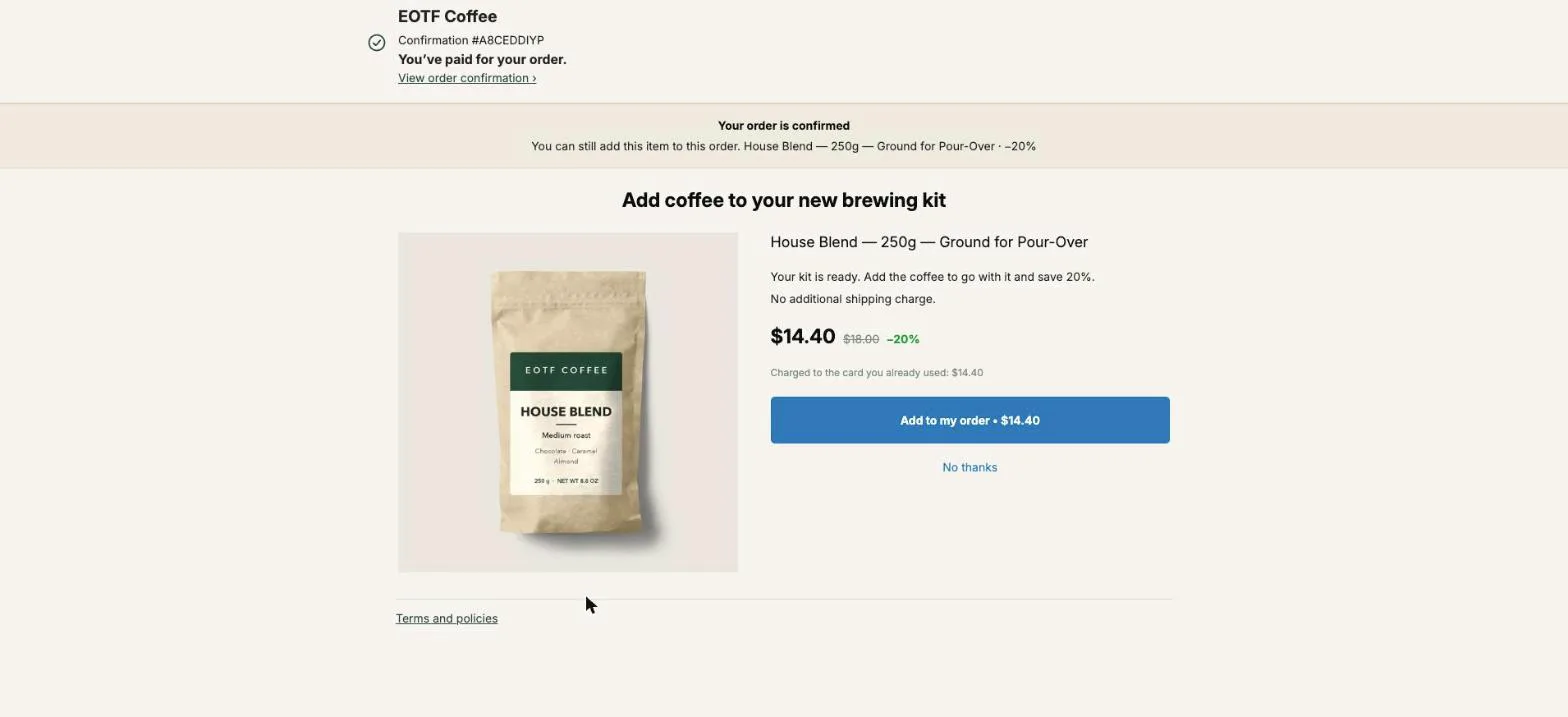
Here is a worked example on our demo coffee store. The buyer just paid $49 for the Pour-Over Starter Kit. Three candidates for the first offer, with acceptance rates picked to show the arithmetic:
| First offer | Net price | Share of the $49 order | Acceptance (example) | Revenue per order shown |
|---|---|---|---|---|
| Paper Filters (100 pack), $8 at −20% | $6.40 | 13% | 20% | $1.28 |
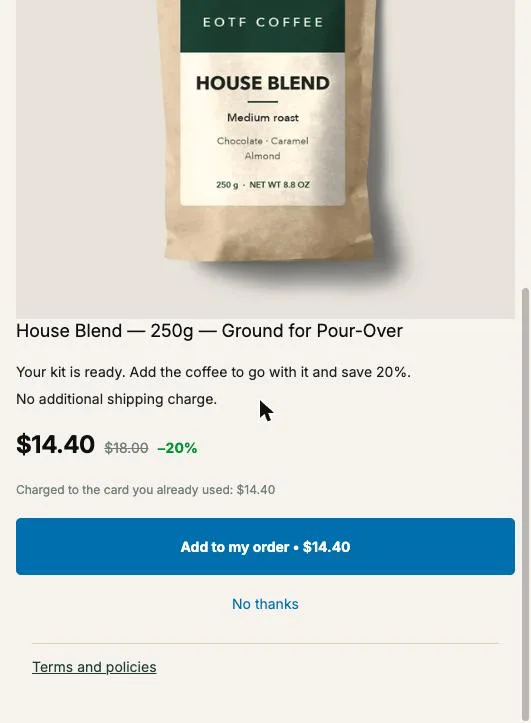
| House Blend 250 g, $18 at −20% | $14.40 | 29% | 12% | $1.73 |
| Bundle: Digital Coffee Scale + House Blend + Dark Roast, $67 at −25% | $50.25 | 103% | 4% | $2.01 |
The filters “win” on acceptance and finish last. The bundle gets a third as many yeses as the bag and still earns 16% more per order shown. Over 1,000 card orders that’s $2,010 against $1,730.
Our guide’s quarter-to-half range is where a single item belongs. A set sold at one discount is a different decision, which is why its price can sit higher, and the break-even table below tells you whether it is worth testing.
The rates are an illustration, not a forecast. The point is the shape: a price three and a half times higher needs only about 29% of the acceptance to come out ahead. Whether your buyers get there is a question for a test, and the next section tells you whether the test is worth running.
How do I know if a higher price is worth testing?
A higher price is worth testing when the acceptance rate it needs to break even is one your buyers can plausibly reach. That rate is your current revenue per order shown divided by the new price. If the answer is a rate you’ve seen on the page before, test. If it’s above anything you’ve ever measured, the price is too far.
break-even acceptance = current revenue per order shown ÷ new net price
With the bag earning $1.73 per order shown:
| Price you want to try | Acceptance it needs to tie |
|---|---|
| $29.00 (Digital Coffee Scale, no discount) | 6.0% |
| $35.25 (scale + one bag, −25%) | 4.9% |
| $50.25 (scale + two bags, −25%) | 3.4% |
| $75.00 (a bigger kit) | 2.3% |
This turns a vague question (“is $50 too expensive after a $49 order?”) into a specific one (“will 3.4% of my buyers take it?”). It also stops you from testing prices that have no chance. If your current offer converts at 2% and earns $0.40 per order shown, a $50 offer only needs 0.8%, and you should already be testing it.
Before you test on revenue, run the margin check. A bundle that earns more revenue per order shown can still keep less money if its products carry a thinner margin or a heavier parcel. Our page on contribution margin per order works out what an added line keeps after landed cost, card fees and extra postage, and where its break-even price sits.
What makes a high first upsell get taken?
A high first upsell gets taken when it doesn’t feel like a second shopping decision. Three things do that: the offer completes what the buyer just bought instead of asking them to want something new, the discount is real and visible, and the page explains in a few lines why this set belongs with their order.
Our guide’s chapter on what to offer after checkout makes the warning in its own terms: a single expensive item at full price reads as a decision, and decisions need a shopping session, not a button. So the expensive first offer is rarely one product. It’s usually one of these:
- A bundle. The main product plus one or two others at a single discount. In Post Purchase Upsell Abakira, pick A bundle under “What this offer proposes”.
- Quantity tiers. One unit at a small discount, more units at a bigger one. The editor flags a tier that has more units but a smaller discount than the one before it, since the buyer would pay more per unit for buying more. If you want a tier that exists to make the middle one look good, that’s a different technique: see decoy pricing after checkout.
- The upgrade. The bigger size or the better version of what they just bought.
Then give the price a reason. Post Purchase Upsell Abakira has a section called Your words on this page on each one-click offer: a Promise line at the top (up to 140 characters), a Selling headline above the product name (up to 90), Your argument (up to 600 characters on six lines, where a line starting with a dash becomes a bullet), and up to three Badges. The cheap bag can get by with one sentence. The $50.25 bundle needs the argument. For example:
Selling headline: Dial in your first brew
Your argument: A pour-over is a ratio. The scale is how you hit it every morning.
- The scale that fits your new kit
- Two bags to compare: House Blend and Dark Roast
- No extra shipping charge 25% off the three, on this page only.
That fits in five lines and under 250 characters. The product name stays visible under the headline; your headline is added to it, it never replaces it.
How do I test a higher price in Post Purchase Upsell Abakira?
Test a higher first-upsell price with an A/B test on the first offer: version A keeps your current offer, version B carries the bigger product, quantity tiers or extra-products grid, and its argument. The test runs on the Scale plan, with Net revenue per view as the default goal, which is the number this whole page is about.
- Open the funnel, go to the One-click post-purchase tab and click Test this offer under the First offer.
- Click Add a version. In version B, change the product to the bigger one, add your quantity tiers or a grid of extra products, and set the discount.
- Fill in Your words on this page for version B. Copy is part of what a version can change, so A can keep its one-liner while B gets the full argument.
- Leave Goal on Net revenue per view. The other goals are Acceptance rate and Total revenue; net revenue per view is always shown next to whichever one you pick.
- Let it run. Each buyer is assigned one version and keeps it, and the discount charged always matches the version they saw.
- When the card shows a winner, click Make this version the offer. The winning content replaces the first offer and the offers under it stay as they were.
To compare a bundle priced as one set, use the month-against-month method below: bundles are measured on the Results page, not in the split test.
Before you test the price, settle the product: our guide to A/B testing a post-purchase upsell explains which test to run first and how many views each version needs.
Two rules in the code decide when you get a verdict. Every version has to be shown at least 100 times, and a winner is named only at 95% confidence or more. Until then the card reads “Too early: not enough data to decide yet.” along with roughly how many more views are needed. With a 4% offer, 100 views is about four acceptances, so expect to wait past the minimum.
If a version wins on the goal you picked but earns less per view than another version, the results flag it and point you to the per-view column. That’s the case where the higher price was right and the goal was wrong.
The chapter on testing one offer against another covers how the verdict is computed.
How do I compare prices without an A/B test?
Without an A/B test, compare two prices one after the other on the Results page, which covers the last 30 days. Run the current price for a full month, note the funnel’s figures, switch the first offer to the new price and wait another full month. Then compute revenue per order shown for each period and keep the higher one.
Under Which step converts, each funnel shows three figures: how many buyers saw it, the share who accepted, and the revenue. Divide revenue by “saw it” and you have revenue per order shown. Open a funnel and the same figures appear for each step, as “saw it” and “accepted” under each offer.
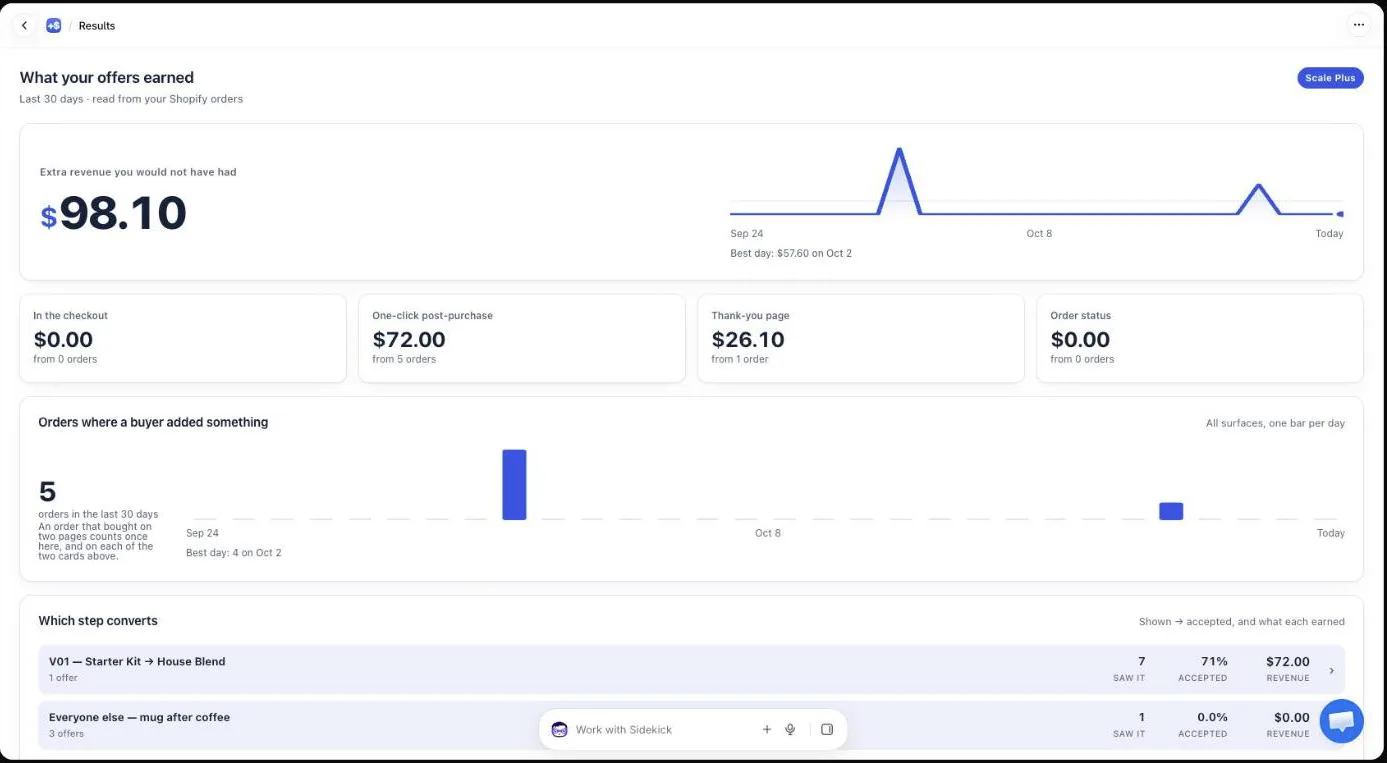
A sequential comparison is weaker than a split test, because the two months differ in traffic, season and ads. Keep it fair: same funnel, same targeting, no sale running in one month and not the other, and enough views in each period to mean something.
Should different orders get a different first-offer price?
Yes, when your order values spread widely. A $50 bundle after a $49 order is about one times the order. After a $250 order it’s a fifth, and you’re leaving room on the table. After a $20 order it’s two and a half times, and the break-even acceptance climbs.
On the Pro plan, targeting lets a funnel apply only to some orders. Set Who sees this offer to Order total is at least and enter an amount, compared with the total the buyer pays in their checkout currency. Funnels are checked from the top of your list down, so:
- Put a funnel with the bigger first offer at the top, targeted at “Order total is at least $100”.
- Put a funnel with the smaller first offer below it, for everyone.
Each funnel then has its own figures on the Results page, and its own revenue per order shown to optimize. Our guide chapter on multiple funnels and targeting shows the setup screen by screen.
What happens after the buyer refuses a high first offer?
A buyer who refuses a high first offer is still on the page and can be shown a cheaper one. On Pro, the If declined branch under the first offer holds that second offer, and it’s where the cheaper price goes: the same bundle at a deeper discount, a single bag, or a smaller version of what you offered.
That’s the real reason a high first price costs less than it looks. The buyers who would have taken the $14.40 bag don’t disappear when you raise the first offer: they can still be offered the bag one screen later. How deep that second price should go is its own question, worked through in our page on how deep to cut a downsell.
Judge the funnel as a whole, too. Revenue per order shown for the first offer tells you which first price is better. The funnel’s revenue divided by the buyers who saw its first step tells you whether the first price plus the downsell beats the old setup.
What first-upsell prices should I try first?
Start from your current offer’s revenue per order shown, then test one step up, not five. A practical order:
- Your current offer, measured. Without the baseline there is nothing to beat.
- A quantity step on the same product. Two or three units of what they just bought, at a better per-unit price. It’s the smallest change in what the buyer has to decide.
- A bundle around the order value. The main product plus one or two companions at a single discount, with a real argument written out (measure it month against month).
- A bigger version of their purchase, if your catalog has one.
Keep each test to one change. If version B changes the product, the price and the copy all at once, you’ll know B won but not why, and the next test starts from guesswork.
The wider picture of where an upsell sits next to cart, checkout and product-page techniques is in our overview of what raises average order value on Shopify. More pages on the method are under upsell methods.
Post Purchase Upsell Abakira has a free plan with up to 100 offers shown a month on the one-click page. A/B testing is on a paid plan; the listing has the current plans.
Test a higher price for your first post-purchase upsell
- Read the current number Open Results in Post Purchase Upsell Abakira and, under Which step converts, divide the funnel's revenue by the number of buyers who saw it. That is the revenue per order shown to beat.
- Work out the acceptance rate the new price needs Divide the current revenue per order shown by the price of the offer you want to try. If the answer is a rate you can realistically reach, the test is worth running.
- Build the higher offer In the funnel editor, click Test this offer under the first offer, then Add a version. Set the bigger product, the quantity tiers or the grid of extra products, and the discount, in version B.
- Write the argument Fill in Your words on this page for version B: a Selling headline and Your argument, up to six lines, where a line starting with a dash becomes a bullet.
- Keep the goal on Net revenue per view Leave the Goal on Net revenue per view, the default, and let the test run until it names a winner.
- Keep the winner When a version wins, click Make this version the offer. The test stops and the rest of the funnel stays as it was.
Frequently asked questions
Should an upsell always cost less than the product the buyer just bought?
No. The common advice is to stay within 25% of the original price, and that keeps acceptance high. But the first post-purchase offer is judged on revenue per order shown, and a bundle priced around the order value can win on that number with a much lower acceptance rate. Measure it before you rule it out.
Percentage or fixed amount: which discount should the first upsell use?
Either works for pricing. A percentage stays consistent across variants and never pushes the price below zero. A fixed amount gives you a round final price on a cheap item. In Post Purchase Upsell Abakira, a fixed amount higher than the product's lowest price is refused when you save.
How many orders do I need before I change the price?
Post Purchase Upsell Abakira's A/B test waits until every version has been shown at least 100 times, then names a winner only at 95% confidence or more. On a low-acceptance, high-price offer that usually takes several hundred views per version, and the test shows roughly how many more views it needs.
Does the thank-you page offer follow the same pricing rule?
The same measure applies: net revenue per view. The thank-you and order status pages have their own figures on the Results page, and their A/B tests can be downloaded as CSV. Every buyer reaches the thank-you page, so its views include buyers the one-click page never sees, like wallet and cash on delivery orders.
My orders range from $25 to $250. Can one upsell price fit all of them?
Rarely. On the Pro plan, targeting lets a funnel apply only when the order total is at least an amount you set. Put a funnel with the bigger offer for large orders at the top of the list and a funnel with the smaller offer for everyone else below it, since funnels are checked in order.
Related articles
Written by Abakira. We make small software: Shopify apps, web tools and iPhone apps. This article is about Post Purchase Upsell Abakira.