Decoy pricing in ecommerce: the tier to add after checkout
Add a 6-bag tier nobody expects to win and the 3-bag tier starts to look reasonable. How to build a decoy quantity tier on the page after payment.
2026-10-28 — Abakira, updated 2026-11-09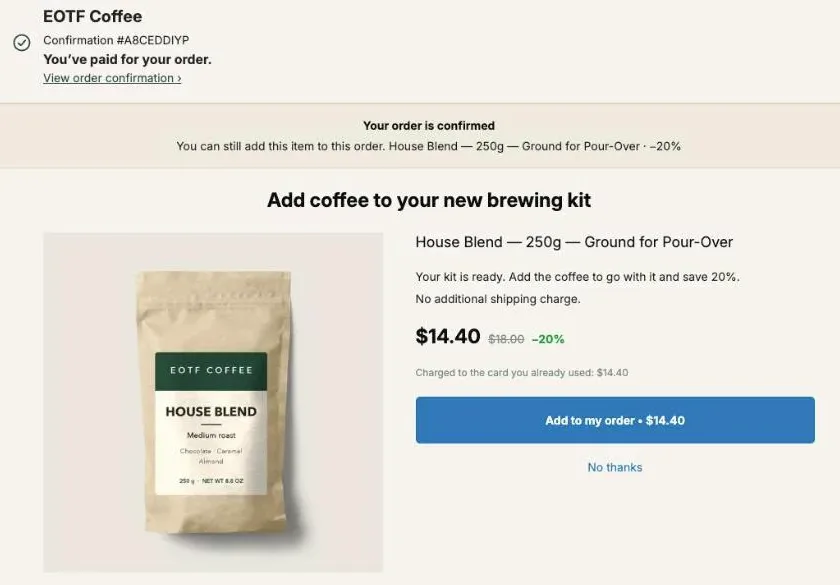
Decoy pricing in ecommerce means adding a price option you don’t expect most buyers to choose, so the option you do want them to choose looks like the sensible one. On a quantity ladder, that’s a big top tier, say 6 bags, sitting above the 2-bag and 3-bag tiers. It turns 3 bags from “the biggest one” into “the middle one”, and the middle reads as the safe pick.
Most decoy pricing advice is written for product pages and pricing tables. The page right after payment is a better place to try it, because a decoy there can’t lose you the sale: the order is already paid. This guide covers how the decoy effect works, the two shapes a decoy tier can take, a full example on an $18 bag of coffee, and how to build and test it in Post Purchase Upsell Abakira.
What is decoy pricing in ecommerce?
Decoy pricing in ecommerce is a way of setting several prices side by side so that one option, the decoy, makes another option, the target, look like the best value. The decoy is a real option with a real price. It’s just built to lose the comparison, so shoppers who weigh the options drift toward the target instead.
You’ve seen it without naming it. A drink menu where the medium costs almost as much as the large, so the large looks like a steal. A software pricing page where the middle plan is nearly as expensive as the top plan, with far fewer features. A bundle priced a few dollars above the best single item in it.
Three roles show up in every version:
- the target, the option you want to sell most, usually the one with the healthiest margin per order;
- the decoy, an option close to the target but clearly worse value, or far above it;
- the cheap entry, the option a hesitant buyer would pick by default.
It shows up in subscription plans, bundles and volume pricing. Volume pricing is the one that fits a page after checkout, because the buyer has already chosen the product. The only question left is how many.
Why does a decoy change what people buy?
A decoy changes what people buy because shoppers rarely judge a price on its own. They judge it against the options next to it. Two effects do the work, and each one gives a different shape of decoy tier.
The compromise effect: when people face a cheap option, a middle option and an expensive one, the middle option reads as the safe one: it avoids both the cheapest and the most expensive choice. Add a top option, and whatever used to be the top becomes the middle.
The attraction effect, sometimes called asymmetric dominance: when one option is only slightly cheaper than the target but much worse value, the target wins the comparison easily. Buyers stop asking “do I want this?” and start asking “why would anyone take the worse one?”
On a quantity ladder, the compromise effect gives you a top-anchor decoy (a 6-bag tier above a 3-bag target). The attraction effect gives you a dominated-neighbor decoy (a 2-bag tier priced so that the third bag is the cheapest bag on the menu). Both are worked out with real numbers below.
Why put the decoy after checkout instead of on the product page?
A decoy after checkout carries no risk to the main sale, because the buyer has already paid for it. On a product page, a decoy tier sits next to the buy button, so it is part of the decision to buy at all. On the one-click page between payment and the order confirmation, the worst outcome is a “No thanks”.
That changes how bold you can be. On the page after payment, the same tier only frames the offer; the first bag is already in the box.
Three more things make this page a good fit:
- The buyer has just chosen the product. You’re not asking them to pick between products, only between quantities of something they already wanted. That’s the cleanest setting for a quantity decoy.
- Adding is one tap. Shopify adds the accepted item to the same order and charges the card the buyer already used. The buyer reads “Charged to the card you already used” followed by the amount for the quantity they picked.
- Shipping is already paid. The extra units go in the same parcel, on the same order. A tier at 30% off can still make money here when it would hurt on a standalone order.
Shopify shows the one-click page after a card payment. Buyers who pay with a wallet, PayPal or another method go straight to the thank-you page, which can carry its own quantity tiers (see the FAQ).
What does a decoy quantity ladder look like?
A decoy quantity ladder is a normal ladder with one extra tier that is there to frame the others. Here is a worked example on the House Blend from our demo store, EOTF Coffee: a 250g bag at $18. These are example prices for the arithmetic, not results from a store.
Start with a plain ladder, the kind most stores would set up after checkout:
| Tier | Discount | Charged | Per bag |
|---|---|---|---|
| 1 bag | −15% | $15.30 | $15.30 |
| 2 bags | −20% | $28.80 | $14.40 |
| 3 bags | −25% | $40.50 | $13.50 |
In this menu, 3 bags is the top of the ladder, so it reads as the extreme option.
The top-anchor decoy
Now add one tier above it:
| Tier | Discount | Charged | Per bag |
|---|---|---|---|
| 1 bag | −15% | $15.30 | $15.30 |
| 2 bags | −20% | $28.80 | $14.40 |
| 3 bags (target) | −25% | $40.50 | $13.50 |
| 6 bags (decoy) | −30% | $75.60 | $12.60 |
The 6-bag tier asks for $75.60 on top of an order the buyer just paid. It doesn’t have to sell. Its job is to make $40.50 look moderate. Three bags is now the middle of the menu, a month of morning coffee rather than “the big one”.
Notice the discount steps. The decoy’s per-bag price is only 90 cents below the target’s. That’s deliberate: a decoy with a huge discount stops being a decoy and becomes the deal, and then you’re shipping six bags at your thinnest margin.
The dominated-neighbor decoy
The second shape doesn’t add a tier. It reprices the 2-bag tier so that the third bag is obviously the best buy:
| Tier | Discount | Charged | What the extra bag costs |
|---|---|---|---|
| 1 bag | −15% | $15.30 | $15.30 |
| 2 bags (decoy) | −17% | $29.88 | +$14.58 |
| 3 bags (target) | −25% | $40.50 | +$10.62 |
Going from 1 to 2 bags costs $14.58 more. Going from 2 to 3 costs only $10.62. A buyer who was ready to take 2 does the math (or just sees the per-bag price drop) and takes 3. The 2-bag tier is a real, buyable option; it’s just the worst value on the menu.
You can combine both: a weak 2-bag tier, a strong 3-bag target, and a 6-bag anchor on top. Keep it to four lines. On a phone, between payment and confirmation, a longer menu reads like a price list. To spread tiers across the yes and no branches instead, see the quantity ladder in a post purchase upsell funnel.
How do I build a decoy tier in Post Purchase Upsell Abakira?
You build a decoy tier in Post Purchase Upsell Abakira by adding quantity tiers to an offer on the one-click page. The offer’s own discount is the price of one unit, and each tier adds a quantity with its own discount. An offer holds up to 5 tiers, each from 2 to 20 units, so a 6-bag or even a 12-bag anchor fits. Quantity tiers are available on every plan, the free plan included.
- Open your funnel and select the One-click post-purchase tab. Click Edit offer on the first offer, or add one. Under “What this offer proposes”, “A product” lets you pick the bag yourself; “One more, any variant” offers more of what the buyer just bought.
- Set the offer’s discount to 15%. That’s the 1-bag line.
- Under Quantity tiers, click Add a tier. Enter 2 in Quantity and 20 in Discount for this quantity. Add a second tier: 3 at 25%.
- Add the decoy: 6 at 30%.
- Read the line under the tiers. If a bigger quantity ever carries a smaller discount, the admin says: “A tier with more units has a smaller discount than the one before it. Buyers would pay more per unit for buying more.” The dominated-neighbor shape above passes this check, because 17% is still above 15%.
- Save, place a test order with a card, pick 3 bags in the Quantity menu and accept. In your Shopify admin, the order shows one extra line with three units and the 25% discount.
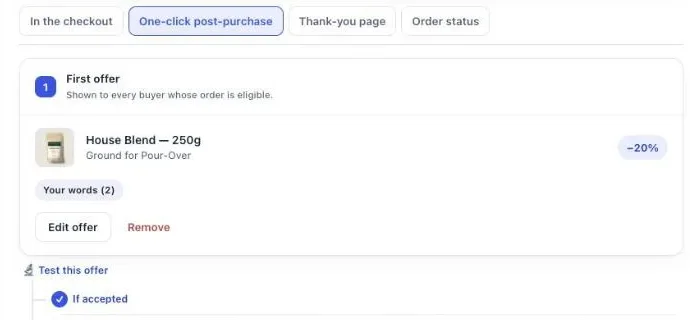
The buyer sees a Quantity menu under the product. With the decoy ladder, its lines read “1 unit”, “2 units · −20%”, “3 units · −25%” and “6 units · −30%”. When the buyer switches line, the price and the “Charged to the card you already used” amount update to that quantity.
The server only signs a quantity that matches a saved tier exactly. A buyer can’t send 7 units and get the 6-unit price, and nothing is ever rounded to the nearest tier. Every price a buyer sees in that menu is a price you saved, which is also what keeps a decoy honest.
How do I point buyers at the target tier?
You point buyers at the target tier with the offer’s own text, because the menu lines themselves are written by the app: one line per tier, with the quantity and the discount. The offer’s text sits above the price, in the section “Your words on this page”, and that’s where you make the case for 3 bags.
The field Your argument turns any line starting with a dash into a bullet, and it accepts tokens that the app replaces with real figures: {product}, {price}, {amount} and {save}. {save} follows the tier the buyer has selected, so a line that reads “Save {save} on this bag” stays true as the quantity changes. If a token has no value, the whole line is hidden rather than shown with a hole in it.
A few lines that do the job on a coffee offer:
- “Three bags = a month of daily pour-overs.”
- “Same parcel, no extra shipping.”
- “Save {save} on every bag you add.”
The field holds up to 6 lines, which is about what fits above the button on a phone. You can also add up to 3 badges, in green, amber or red. One more rule from Shopify on this page: no exclamation marks. The editor refuses them with “Shopify does not allow exclamation marks on this page.”
How do I test whether the decoy works?
You test a decoy with an A/B test on the offer: version A is the ladder without the decoy, version B is the same ladder with it. Everything else stays identical, so any difference comes from the decoy tier. In Post Purchase Upsell Abakira, quantity tiers are part of what a version can change. A/B testing is on the Scale plan.
- In the funnel editor, click Test this offer under the offer.
- Click Add a version. Keep the 6-bag tier in version B only, and remove it from version A if you already added it (for the dominated-neighbor shape, reprice the 2-bag tier in version B instead). Change nothing else.
- Set the Goal to Net revenue per view. It’s the default, and for a decoy it’s the right one.
- Let it run. Each buyer is assigned one version and keeps it, and the discount charged always matches the version shown.
- When the results name a winner, use Make this version the offer. The test stops and the funnel keeps the winning ladder.
Why revenue per view and not acceptance rate?
Revenue per view is the right goal because a decoy can lower the acceptance rate and still raise what the page earns. Here is a made-up split, on the example prices above, to show the arithmetic. Out of 100 buyers who see the offer: The same logic sets the price of the first offer: see how to price an upsell by revenue per order shown.
| Version A (no decoy) | Version B (6-bag decoy) | |
|---|---|---|
| 1 bag at $15.30 | 5 | 3 |
| 2 bags at $28.80 | 3 | 2 |
| 3 bags at $40.50 | 2 | 3 |
| 6 bags at $75.60 | n/a | 1 |
| Accepted | 10 of 100 | 9 of 100 |
| Revenue | $243.90 | $300.60 |
| Revenue per view | $2.44 | $3.01 |
In that split, version B wins on money and loses on acceptance. Judge it on acceptance and you’d throw away the better ladder. The results page always shows net revenue per view, whatever goal you picked, and it warns you when a version wins on your goal but earns less per view than another one.
Don’t call the test early. Below the sample it needs, the verdict reads “Too early: not enough data to decide yet.” along with roughly how many more views it needs. Our guide chapter on testing one offer against another explains how the verdict is reached.
How do I price the decoy without losing margin?
You price the decoy from your landed cost, not from the discount you think looks impressive. The decoy is meant to lose, but some buyers will take it, and each of them gets your lowest per-unit price. That price has to stay profitable.
Run the numbers before you publish. Say your landed cost is $7 a bag, packaging included. On the example ladder:
| Tier | Per bag | Margin per bag at $7 cost |
|---|---|---|
| 1 bag at −15% | $15.30 | $8.30 |
| 3 bags at −25% | $13.50 | $6.50 |
| 6 bags at −30% | $12.60 | $5.60 |
At $7 a bag, every tier still earns money, and the shipping was paid by the first order. At a $10 landed cost, the 6-bag tier leaves $2.60 a bag. That’s thin but positive; at that point, keep the decoy’s discount where it is and don’t let it creep up.
Three rules keep a decoy cheap to run:
- Keep the decoy’s per-unit discount close to the target’s. A few points more, not ten. The anchor works through the size of the total, not the size of the discount.
- Check the bigger box. Six bags may need a different carton or push the parcel into a higher weight band. Since the units ship on the same order, the extra weight is yours to absorb.
- Watch stock. A decoy that suddenly sells on a busy day can drain a product. If an item sells out while the offer is on screen, the buyer sees that it just sold out and that their original order stays confirmed and paid.
For where to set the single-unit discount in the first place, the chapter on choosing a discount, a countdown and proof walks through the ceiling.
Which products work with a decoy quantity tier?
A decoy quantity tier works on products that people use up and buy again: coffee, tea, supplements, skincare, pet food, candles, socks, cleaning refills. The buyer has a reason to want more than one, and a stock-up quantity like 6 makes sense to them even if they don’t take it.
It works badly on things nobody needs several of. A second espresso machine at 30% off is not a decoy, it’s noise. For those products, a decoy can still work as a bundle instead of a quantity: the product alone, the product with one accessory, and the product with two accessories, priced so the full set looks like the obvious choice. Our page on what to offer after checkout helps pick the product before you build the ladder.
Two more cases where a decoy helps:
- Products bought with “One more, any variant”. The buyer just chose a flavor or a grind. A quantity ladder on the same product (see which item a same product upsell re-offers) lets them stock up on the one they picked, and the variant picker keeps working next to the quantity menu.
- Year-round, not just in November. Seasonal quantity ladders are built for one weekend. A decoy tier is a permanent shape for the menu. For the Black Friday version of the ladder, with steeper percentages and a one-step shift from the product page, see Black Friday quantity discounts after checkout.
Where does the extra stock go once the buyer accepts?
The extra units go on the order the buyer just placed, in the parcel they’re already waiting for. The one-click page adds the line to the same Shopify order, so there’s no second order to pick and no second label to print. In your Shopify admin, the accepted tier appears as one more line, with its quantity and its discount.
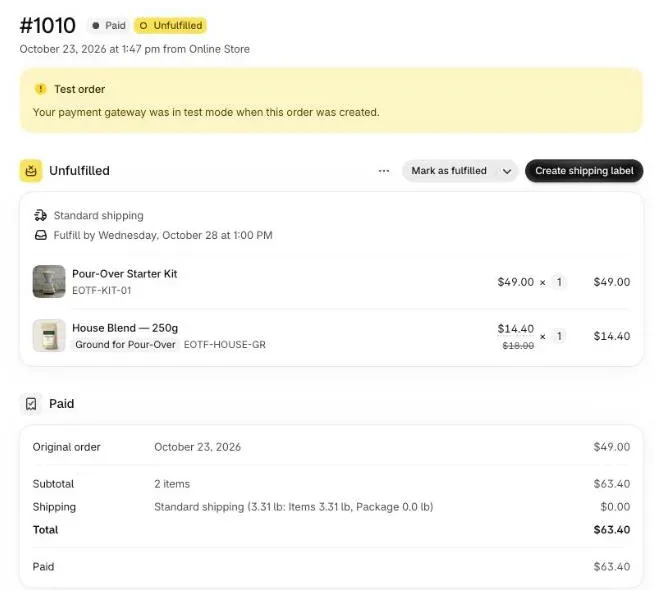
That single-order mechanic is what makes a generous decoy tier affordable after checkout when it wouldn’t be on its own. If a warehouse ships your orders the moment they’re paid, read how to keep a post-purchase upsell in one parcel with a 3PL before you add a 6-unit tier.
After the decoy ladder, plan the next step of the funnel. A buyer who took 3 bags has stocked up, so the “If accepted” branch should offer something else, like filters or a mug. A buyer who declined may still want one bag at a better price in the “If declined” branch. A second level of offers needs a paid plan. And for the bigger picture of where quantity offers sit next to bundles, cart upsells and checkout blocks, see what raises average order value on Shopify, or browse the other upsell methods on this blog.
Post Purchase Upsell Abakira has a free plan with up to 100 offers shown a month, quantity tiers included. The listing has the current plans.
Add a decoy quantity tier to a post-purchase offer
- Open the offer In Post Purchase Upsell Abakira, open your funnel, go to the One-click post-purchase tab and click Edit offer on the offer you want to ladder.
- Set the single-unit price Set the offer's own discount. That is the price of one added unit, for example 15% off an $18 bag.
- Add the real tiers Under Quantity tiers, click Add a tier and enter 2 units at 20%, then 3 units at 25%.
- Add the decoy tier Click Add a tier again and enter 6 units at 30%. Check that each tier has a bigger discount than the one before it.
- Point at the target tier Under Your argument, add a bullet line that makes the case for 3 units, then save.
- Test it against the ladder without the decoy Click Test this offer, click Add a version, add the 6-unit tier to version B only and remove it from version A, set the Goal to Net revenue per view and let the test run until it names a winner.
Frequently asked questions
Is decoy pricing a dishonest trick?
Not when the decoy is a real option at a real price. A 6-bag tier that the buyer can pick, and that charges exactly what the menu says, is a genuine offer. The line gets crossed when the decoy is fake, can't actually be bought, or hides its terms.
Does the decoy tier need to sell at all?
No. Its job is to change how the other tiers look. If nobody ever picks it but more buyers pick 3 bags instead of 1, it is doing its job. If a lot of buyers pick it, it was priced as a deal rather than as a decoy, so check your margin on it.
Can I label one tier as the most popular?
The quantity menu lines on the one-click page are written by the app, one per tier, with the quantity and the discount. To point buyers at the middle tier, write it in the offer's own text under Your argument, for example a bullet that says three bags last a month of daily brewing.
Can I run a decoy tier on the thank-you page too?
Yes. Thank-you page product blocks take quantity tiers, from 2 to 9 units, with a discount from 1 to 90% each. That reaches buyers who paid with methods the one-click page doesn't show for, like PayPal.
Do quantity tiers work with a fixed-amount discount?
Yes. A tier takes its discount in the unit of the offer, so a fixed-amount offer has fixed-amount tiers. Percentages are easier to compare in a quantity menu, which is why the examples here use them.
How long should a decoy A/B test run?
Until the results page names a winner. Below the sample it needs, it says Too early: not enough data to decide yet, and gives an estimate of the views still missing. The app sends a reminder after a week.
Related articles
Written by Abakira. We make small software: Shopify apps, web tools and iPhone apps. This article is about Post Purchase Upsell Abakira.