Black Friday quantity discounts after checkout on Shopify
A Black Friday ladder of -13, -33, -40 and -43% rebuilt for the page after payment: shift it one step, priced per added unit, shipped in the same parcel.
2026-10-24 — Abakira, updated 2026-11-10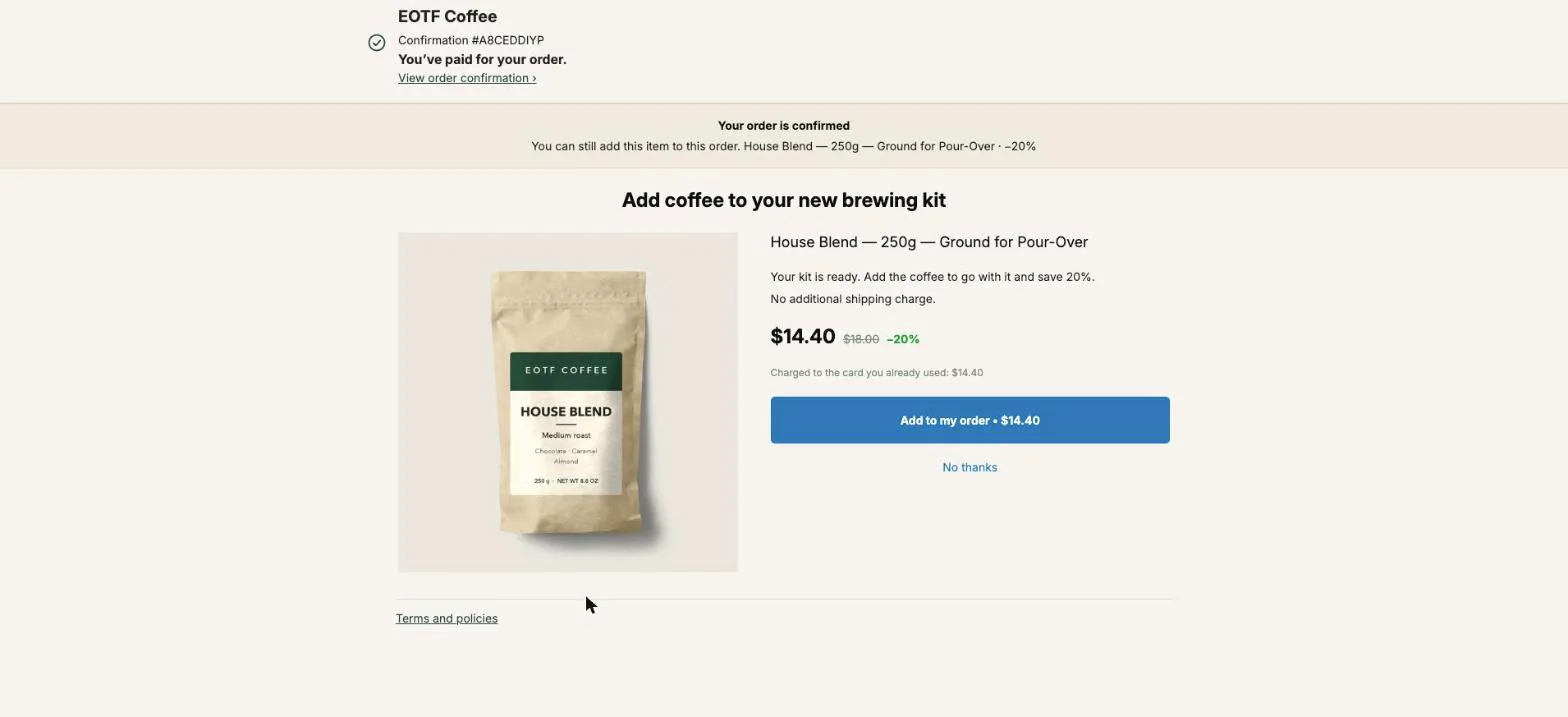
A Black Friday quantity discount works best on Shopify when it runs twice: once on the product page, where the buyer decides how many to buy, and once on the one-click page right after payment, where the buyer has already said yes. An aggressive ladder looks like this: −13% for one, −33% for two, −40% for three, −43% for four. After checkout, you keep those percentages and shift them one step, so the first added unit gets the two-unit rate.
That one rule is most of this article. The rest is the arithmetic behind it, how to build it in Post Purchase Upsell Abakira, and the Black Friday details that decide whether the extra units make money.
What is a Black Friday quantity discount?
A Black Friday quantity discount is a price that drops per unit as the buyer takes more of the same product, run during the BFCM weekend. In 2026, Black Friday falls on November 27 and Cyber Monday on November 30. The ladder is usually shown on the product page as a table or as selectable boxes: one unit, two units, three units, each with its own saving.
It works on anything bought by the unit and used up: coffee, supplements, skincare, candles, socks, pet food. It works badly on items nobody needs two of, like a single appliance or a mattress.
Merchants reach for it in November for one reason. A flat 30% off sitewide gives the same discount to the buyer who takes one unit and the buyer who takes four. A ladder pays the discount only when the order grows, so the margin goes to the orders that earn it.
What does an aggressive Black Friday ladder look like in 2026?
A Black Friday ladder built for volume starts with a small discount on one unit and gets steep from the second unit. An aggressive ladder looks like this: −13% for one, −33% for two, −40% for three, −43% for four. The big jump sits between one and two units, on purpose.
Here is that ladder on an $18 bag of coffee, the House Blend on our demo store:
| Quantity | Discount | Total | Per unit |
|---|---|---|---|
| 1 | −13% | $15.66 | $15.66 |
| 2 | −33% | $24.12 | $12.06 |
| 3 | −40% | $32.40 | $10.80 |
| 4 | −43% | $41.04 | $10.26 |
Look at the steps. Going from one to two drops the per-unit price by $3.60. Going from three to four drops it by 54 cents. The ladder is built to get people off one unit, and after that it flattens out. That shape matters when you rebuild it after checkout.
Why offer quantity again after the buyer has paid?
Offering quantity again after payment works because the hardest part of the sale is done. On the one-click page the buyer’s card is already charged and their address is already filled in. Taking more is one tap: Shopify adds the line to the same order and charges the same card, with no new payment form.
Plenty of Black Friday buyers pick one unit on the product page anyway. Some are trying the product. Some are watching the cart total. Some simply never scrolled to the ladder. The page after payment is the second chance to show those buyers what two or three units cost, at the moment they feel the best about the brand.
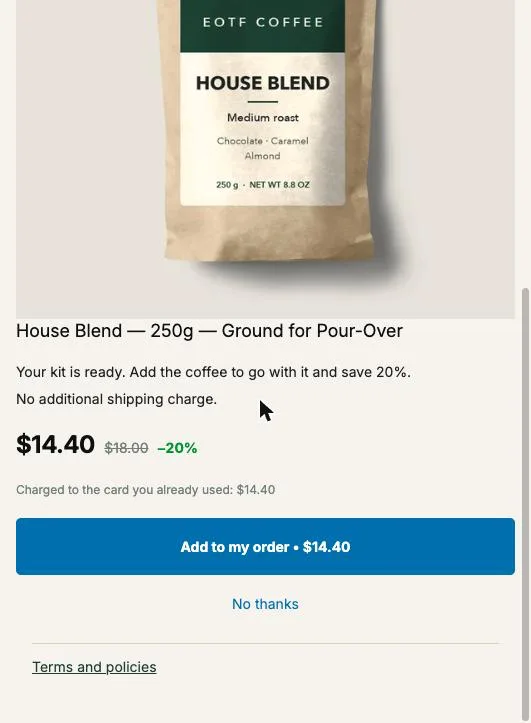
The buyer reads this on our page, in their language: “Charged to the card you already used”, followed by the amount. That line updates when they change the quantity, because the app works the amount out from the exact quantity and discount it will charge.
Should the post-purchase tiers copy the product page tiers?
The post-purchase tiers should copy the product page percentages but start one step higher. The buyer has already paid the one-unit rate for the first unit. Offering one more at −13% gives them nothing they didn’t already turn down. Offering one more at −33%, then two more at −40% and three more at −43%, prices each added line at the rate of the ladder’s next step.
On the $18 bag, after a buyer paid $15.66 for one:
| Added after payment | Discount | Line total | Per unit |
|---|---|---|---|
| 1 unit | −33% | $12.06 | $12.06 |
| 2 units | −40% | $21.60 | $10.80 |
| 3 units | −43% | $30.78 | $10.26 |
Why not go further and match the cart ladder exactly? Because the arithmetic gets expensive fast. If the buyer had put two bags in the cart, they’d have paid $24.12. They paid $15.66 for one, so a second bag added after payment would have to cost $8.46 to match: 53% off. The same calculation for two added bags gives $16.74 on $36 (53.5% off), and for three added bags $25.38 on $54 (53% off). Parity with the product page ladder means roughly 53% off every unit you add after checkout. You don’t need it. The buyer compares the offer with the $15.66 they just paid per bag, and $12.06 already beats that by 23%.
How do I set up the ladder in Post Purchase Upsell Abakira?
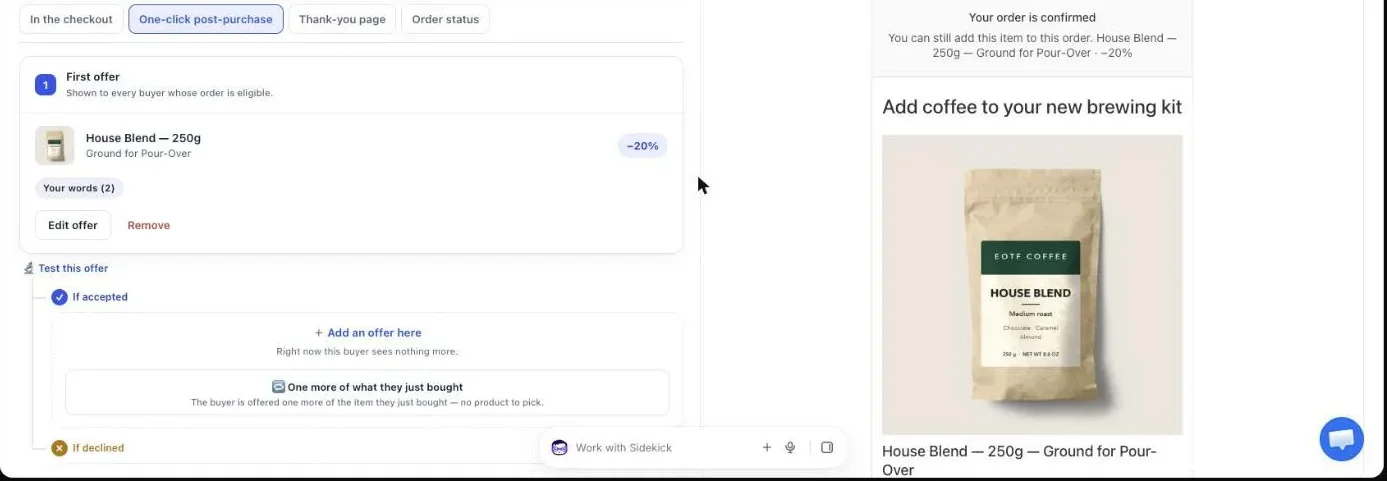
You set up the ladder in Post Purchase Upsell Abakira on one offer of the one-click page: the offer’s own discount is the single-unit price, and each tier adds a quantity with its discount. Quantity 1 is never a tier. It’s the offer itself, so the menu always starts at one unit and the tiers begin at two.
- Open your funnel and add the first offer. Under “What this offer proposes”, pick “One more, any variant”. The admin explains it as “One more of the product they just bought”: the item is decided at checkout, from the order Shopify signed, and you choose which variants the buyer can pick (whole bean for ground, a second flavor).
- Set “Discount type” to “Percentage” and enter 33. That’s the price of one added unit.
- Open “Quantity tiers” and click “Add a tier”. Enter 2, then 40 in the discount field (the row reads “2 units at 40”). Add a second tier: 3 units at 43.
- Read the line under the tiers. If a bigger quantity carries a smaller discount, the admin says so in these words: “A tier with more units has a smaller discount than the one before it. Buyers would pay more per unit for buying more.” Fix it before you save.
- Add a countdown if you want one. On the one-click page it runs from 30 seconds to 30 minutes, and at zero the offer is declined on our server for real.
- Place a test order with a card, pick 3 units, tap “Add to my order”, and open the order in your Shopify admin. You should see one order, with the extra line carrying three units and the 43% discount.
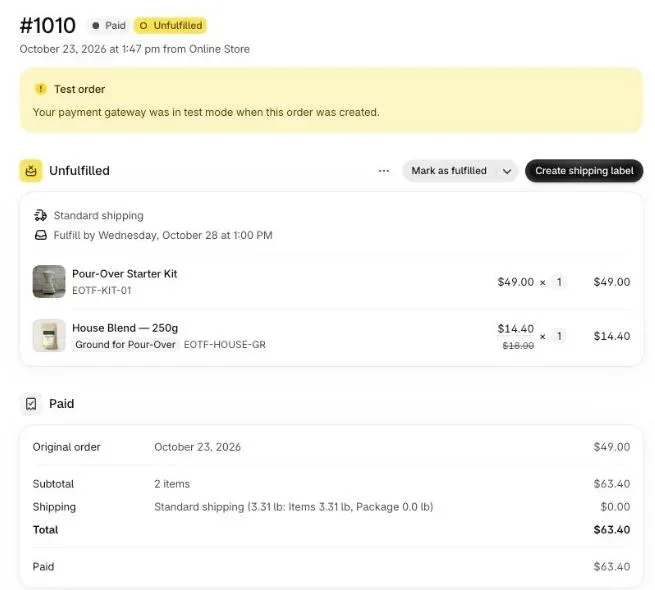
If the buyer’s order holds several products, a “One more” offer picks the line with the highest unit price. On a coffee store where someone bought a $49 kit and an $18 bag, the offer is built on the kit. When that’s the wrong product for a ladder, choose “A product” instead and pick the bag yourself.
What does the buyer see in the quantity menu?
The buyer sees a “Quantity” menu under the product, with one line per option. With the ladder above, the menu reads “1 unit”, then “2 units · −40%”, then “3 units · −43%”. When the buyer switches line, the big price changes to the unit price at that tier, next to the struck-through full price, and the “Charged to the card you already used” amount changes to the total for that quantity. On the $18 bag at 3 units, that’s $10.26 a bag and $30.78 charged.
Three choices fit on a phone without scrolling. You can save up to five tiers per offer, each between 2 and 20 units, but a five-line menu between payment and confirmation starts to look like a price list, and the buyer has seconds, not minutes. For Black Friday, two tiers are enough on cheap items and three on items people stock up on. Outside BFCM, a big top tier can do a different job: see how a decoy quantity tier makes the middle tier look reasonable.
The menu lines carry the discount and the big price carries the per-unit figure, so the buyer gets both arguments without you writing a word. If you want the saving spelled out in a sentence (“Stock up for the holidays”), the offer’s text and the default buyer wording can be rewritten in the app’s Buyer page settings.
Can a buyer change the quantity to get a better price?
A buyer cannot get a quantity or a discount you didn’t save. When they tap “Add to my order”, our server checks the requested quantity against the tiers stored for that offer. A quantity that matches a saved tier exactly is signed with that tier’s discount. Anything else is refused: no rounding to the nearest tier, no in-between price.
So a buyer can’t ask for 7 units when you set tiers at 2 and 3, and they can’t be charged a price that wasn’t on their screen either. On Black Friday, when people hunt for loopholes and a pricing mistake spreads in a group chat within the hour, this is the part you want to be boring.
The same goes for the product. On a “One more” offer, the item comes from the order lines Shopify signed, not from anything the browser sends.
Where does the extra stock ship from?
The extra units ship in the parcel the buyer is already waiting for. The one-click page adds the line to the same Shopify order, so there’s no second order, no second shipping label and no second pick. That’s the reason a −43% tier can still earn money after checkout when it would hurt on a standalone order: the shipping was paid on the first unit.
Run the margin before you publish the tiers. Take your landed cost per unit, add packaging if a bigger quantity needs a bigger box, and compare with the lowest per-unit price on the ladder. Example: with a landed cost of $6 a bag, the $10.26 bag at −43% still leaves $4.26 on each added unit, with no extra shipping. With a landed cost of $9, the top tier leaves $1.26 and you should stop at −40%.
If a warehouse pulls your orders the second they’re paid, read how we keep the extra line in the same box in why a post-purchase upsell ships in a second parcel with a 3PL, before the BFCM volume hits.
What should come after a yes or a no?
After a yes on the quantity ladder, show a different product; after a no, show the same product at a better price. A buyer who just took three bags has stocked up, so a fourth offer of the same bag wastes the slot. Offer something next to it: a mug, a filter pack, a grinder. Our list of Black Friday upsell ideas for the page after payment has more pairs to pick from. A buyer who doesn’t want more of the same may still want the rest of the set: see Black Friday bundle ideas for the thank-you page. Shopify allows up to three offers per order, so the funnel tree is at most three levels deep.
The decline branch is where the money hides. A buyer who said no to “1 unit at −33%” said no to a number. Show one bag at −40% in the “If declined” branch and you change the reason for refusing, not the product. The chapter on what to show after a yes, and after a no covers both branches. A second level in the tree needs a paid plan; the free plan runs one offer, tiers included.
What if the buyer paid with Apple Pay or PayPal?
Buyers who paid with Apple Pay, PayPal or a gift card never reach the one-click page. Shopify only shows it after a credit card payment. Those buyers still land on the thank-you page, and a thank-you page block can carry quantity tiers too.
On the thank-you page the tiers run from 2 to 9 units, with a discount from 1 to 90% each, under “Quantity tiers” in the block editor (“From this quantity”, “Discount at that quantity”). Use the same shifted ladder so a buyer sees the same deal whichever way they paid. The full list of payments the one-click page skips is in why Apple Pay, PayPal and Google Pay orders never see your post-purchase offer.
How do I keep the product page ladder and the post-purchase ladder in sync?
You keep the two ladders in sync by writing them in one table before November and changing both on the same day. Most Black Friday problems with quantity discounts come from a product page that changed on Thursday night and a post-purchase offer that still carries October’s numbers.
A few rules that save a support inbox:
- Keep the post-purchase rate for one added unit at or above the product page’s two-unit rate. If the product page gives −33% for two and the page after payment gives −25% for one more, the buyer who reads both feels cheated.
- On the product page, Shopify’s built-in discounts don’t do tiers: the help center points to discount apps, or Checkout Blocks on Plus, for tiered pricing. Native automatic discounts are also capped at 25 active at a time, app discounts included. A quantity breaks app handles the whole ladder in one place.
- Turn the post-purchase ladder off, or back to your everyday tiers, on Tuesday December 1. An offer at −43% that survives into December is a price you’ll be asked to honor all year.
- Decide what happens when stock runs out. If the bag sells out while the offer is on screen, the buyer reads “This item just sold out. Your original order remains confirmed and paid.” Nothing is added, and the first order stands.
For the discount itself, start from your margin rather than from the competitor’s banner: the chapter on choosing a discount and a countdown walks through the ceiling. If a Black Friday code is also running on your store, how Black Friday discount codes and post-purchase upsells stack covers what happens to the added line. If you want the bigger picture of where quantity offers sit next to bundles, cart upsells and checkout blocks, our page on what raises average order value on Shopify sorts them by where they happen.
The same tiers work outside a sale when your prices are going up: a stock-up offer at today’s price before a price increase.
What results should I expect from the ladder after checkout?
The ladder after checkout raises the value of the orders that take it. The Results screen shows “Revenue earned” and the “Acceptance rate” for each funnel. Read them after the first full day of Black Friday, not after the first hour. The quantity buyers took is not on that screen, so read it on the added lines of the orders in your Shopify admin.
If almost everyone takes one unit, your top tiers are too weak to matter and you can drop one. If many take the top tier, your ladder is generous, and the margin check above tells you whether that’s fine. The guide chapter on reading your numbers explains each line of that screen.
Post Purchase Upsell Abakira has a free plan that runs an offer with quantity tiers on a live store. The listing has the current plans.
Set up a Black Friday quantity ladder on the post-purchase page
- Create the offer In your funnel, add an offer and choose One more, any variant under What this offer proposes, so the item is the product the buyer just paid for.
- Set the single-unit discount Choose Percentage as the Discount type and enter the second step of your Black Friday ladder, for example 33.
- Add the tiers Open Quantity tiers, click Add a tier, and enter 2 units at 40, then 3 units at 43.
- Check the warning line If the admin shows that a tier with more units has a smaller discount than the one before it, fix the order before saving.
- Add a countdown Set a countdown between 30 seconds and 30 minutes. When it reaches zero, the offer is declined and the buyer moves on.
- Place a test order Pay with a card, pick 3 units in the Quantity menu, accept, and check in your Shopify admin that the order shows one extra line with three units and the tier discount.
Frequently asked questions
Should my post-purchase tiers be the same as my product page tiers during Black Friday?
No. Copy the percentages but shift them one step. The buyer just paid the one-unit rate, so the first added unit gets the two-unit rate, two added units get the three-unit rate, and so on. Matching the cart ladder exactly would mean about 53% off every added unit.
Can a buyer pick a quantity I did not set up?
No. Post Purchase Upsell Abakira only signs a quantity that matches a saved tier exactly. A request for any other quantity is refused by the server, and the buyer is never charged a price they did not see.
What happens if the item sells out during Black Friday while the offer is on screen?
The buyer sees: This item just sold out. Your original order remains confirmed and paid. Nothing is added and the first order is untouched.
Can I use a fixed amount instead of a percentage on each tier?
Yes. A tier takes its discount in the unit of the offer, so a fixed-amount offer has fixed-amount tiers. Percentages are easier to read in the quantity menu and easier to keep in line with a product page ladder.
How many quantity tiers can one offer have?
Up to five tiers, each between 2 and 20 units, on top of the single unit that the offer itself carries. For a one-tap page after payment, two or three tiers read better than five.
Does the quantity ladder work for Apple Pay and PayPal orders?
Yes, on the thank-you page. Thank-you page blocks reach every buyer and take quantity tiers too, from 2 to 9 units. The one-click page itself follows card payments only.
Related articles
Written by Abakira. We make small software: Shopify apps, web tools and iPhone apps. This article is about Post Purchase Upsell Abakira.