Tax refund season marketing ideas: upsell the full kit
Skip the sitewide tax refund sale. Offer the full kit after payment on orders above a set total, with a cheaper accessory for buyers who say no.
2026-11-11 — Abakira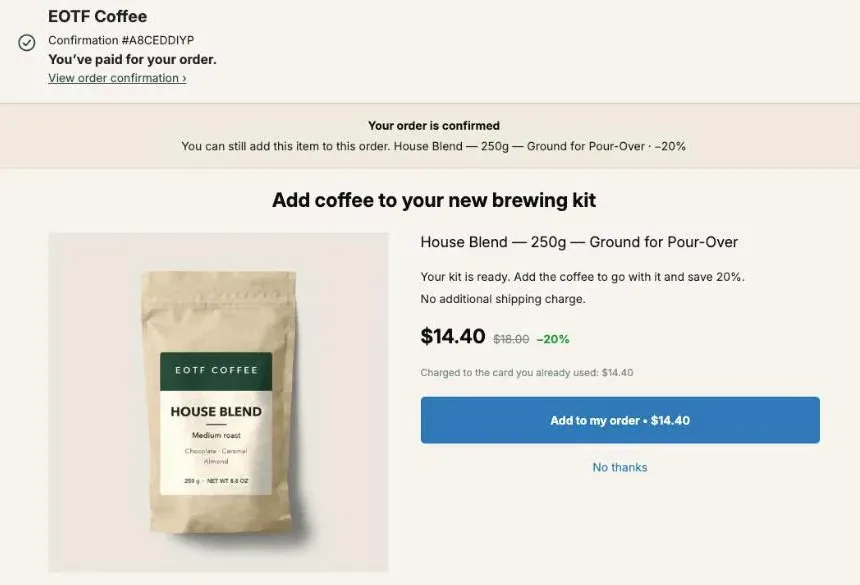
The tax refund season marketing idea that keeps your margin on Shopify is to hold full prices and sell the complete kit after payment, only to orders that are already above a set total. Post Purchase Upsell Abakira does this with one funnel: the condition Order total is at least, a bundle card holding the rest of the kit, and a cheaper accessory for buyers who say no.
The season is easy to date from the IRS’s own weekly statistics. In 2026, filing opened on January 26, 28.7 million refunds had gone out by February 20 at an average of $3,804, and by May 8 the count reached 99.1 million refunds for $324.8 billion. So the funnel runs from early February to the end of April, and it comes down with one checkbox.
When does tax refund season start and peak for a Shopify store?
Tax refund season for a US store runs from late January, when the IRS opens filing, to the April 15 deadline, with half of the season’s refunds out by mid-March. The IRS’s 2026 weekly filing statistics show the shape: refunds were front-loaded, and the earliest ones were the largest.
Here are the cumulative 2026 figures, from four of those weekly IRS reports:
| Week ending (2026) | Refunds issued so far | Amount refunded so far | Average refund |
|---|---|---|---|
| February 20 | 28.7 million | $109.3 billion | $3,804 |
| March 13 | 50.4 million | $182.6 billion | $3,623 |
| April 10 | 78.1 million | $265.2 billion | $3,397 |
| May 8 | 99.1 million | $324.8 billion | $3,276 |
Two things follow for planning. About 29% of the refunds counted by May 8 had already gone out by February 20, and half by mid-March. And the average refund dropped by $528 between the first and last line, so the larger refunds come early. The IRS also said it expected most refunds carrying the Earned Income Tax Credit or the Additional Child Tax Credit to be available by March 2, 2026, for taxpayers who chose direct deposit.
For 2027, the safe reading is: have the funnel built in January, switch it on in early February, and keep it until the end of April. If the IRS sets a different opening date for 2027, shift the start to match.
Why upsell the full kit instead of running a tax refund sale?
Upselling the full kit protects the price of the first item. A sitewide tax refund sale cuts the margin on every order, while a post-purchase kit offer only discounts the extra items, after the main sale is paid for and only for buyers who accept.
A kit at a small discount sells more of your products without marking down the whole catalog. The post-purchase page is the place for that kit, because it only reaches people who just bought.
Here’s the arithmetic on our demo coffee store, with example landed costs you should replace with yours. The Pour-Over Starter Kit sells at $49 and costs $20 to land. The rest of the kit, House Blend at $18, the Everyday Coffee Mug at $16 and Paper Filters at $8, costs $13 together.
| Approach | Buyer pays | Your margin on the order |
|---|---|---|
| Starter Kit at full price, no offer | $49.00 | $29.00 |
| 20% sitewide sale, Starter Kit only | $39.20 | $19.20 |
| Starter Kit at full price + the rest of the kit at 10% after payment | $49.00 + $37.80 = $86.80 | $29.00 + $24.80 = $53.80 |
The sale gives away $9.80 on every kit sold. The post-purchase version keeps the $49 intact and adds $24.80 of margin when the buyer accepts. When they decline, you still have the full-price order. What actually raises average order value on Shopify sorts the other levers (product page, cart, checkout) by where they act; this article stays on the part after payment.
How do I show the kit offer only on orders above a certain total?
The kit offer reaches only bigger orders when it sits in its own funnel with the condition Order total is at least. Post Purchase Upsell Abakira checks funnels from top to bottom and shows the first one whose condition the order meets, so orders under the amount fall through to your everyday funnel.
- On Your funnels, click Create a funnel and give it a Funnel name you’ll recognize in May, such as “Tax refund 2027, kit over $45”.
- In the condition menu, choose Order total is at least and type the amount. The field refuses zero or text with “The minimum amount must be a number greater than zero.”
- Use the arrows to move this funnel above any funnel set to Everyone. The list states the rule: “The first funnel whose condition the order meets is the one shown.”
- Leave Active unticked until February, then Save.
- In early February, tick Active, click Try a cart, type an Order total above and below your amount, and check which funnel the app marks “This one is shown”.
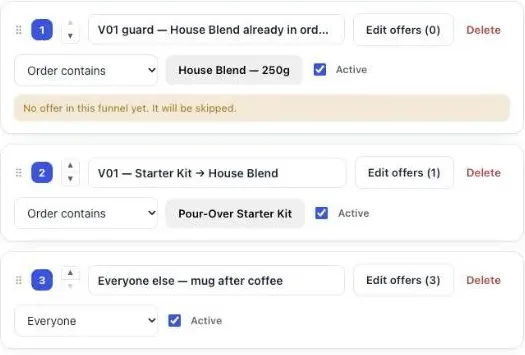
If a funnel set to Everyone sits above it, the tax refund funnel never runs, and the list says so next to it: “Never shown: a funnel above applies to everyone. Move it down, or give it a condition.”
Targeting by order total, product or variant comes with the Pro plan and above, along with up to 20 funnels. The free plan runs one funnel, shown to every buyer, with one offer level and 100 offers shown a month on the one-click page. The guide chapter on multiple funnels and targeting walks through each screen.
What order total should trigger the tax refund funnel?
The order total that should trigger a tax refund funnel is just under the price of your kit’s main item, so every order containing that item qualifies. On the coffee store, a $49 Starter Kit means an amount of 45, and an order of one $18 bag of coffee stays below it.
Three details shape the exact number.
The amount is read in the buyer’s currency. The help text under the field reads: “Compared with the order total the buyer pays, in their checkout currency.” An amount of 45 means $45 for a buyer paying in dollars and €45 for one paying in euros. Tax refunds are a US event, so set it for dollars.
Leave a few dollars of room. When Shopify hasn’t filled in the order total yet, the app adds up the product lines instead, which leaves out shipping and taxes. An amount slightly under the item price gives the same answer either way.
A total the app can’t read shows the funnel. The app never hides a funnel on a failed read. An offer shown by mistake costs one page; one hidden by mistake costs a sale.
An amount catches every order at that level, kit or not: three bags of coffee also make $54. When the kit offer only makes sense next to one item, or your main item comes as several products (two kit sizes, a premium version), target those products directly instead: Order contains takes up to 300 products, and a funnel holds one condition. A whole collection works with Order contains a product from, which covers up to 10 collections and 500 products per funnel on the Scale plan. For stores where every product is expensive, our article on high-ticket upsells for big orders covers thresholds in the hundreds of dollars.
How do I sell the full kit in one tap after payment?
The full kit sells in one tap through a bundle card on the one-click page. In the offer’s Grid section, click Add a bundle card to the grid and tick 2 to 4 products. One button on the card then adds every product to the order the buyer just paid for, charged to the same card.
The admin’s note under the button reads “In the picker, tick 2 to 4 products: the first one carries the card.” Each product in the card gets its own Discount, as a Percentage or a Fixed amount (a fixed amount applies per unit). A product left at zero takes the card’s rate, shown as “Bundle rate”. The card shows the crossed-out total and the price the buyer pays. Name it in Bundle title, for example “The complete morning set”.
On the demo store, the card for a Starter Kit buyer holds the three missing pieces:
| Line | Regular price | Discount | Buyer pays |
|---|---|---|---|
| House Blend 250g | $18.00 | 10% | $16.20 |
| Everyday Coffee Mug | $16.00 | 10% | $14.40 |
| Paper Filters, 100 pack | $8.00 | 10% | $7.20 |
| Card total | $42.00 | $37.80 |
A few rules from Shopify and the app shape the card:
- Shopify accepts up to three post-purchase offers per checkout, and a bundle card counts as one, whatever it holds.
- The grid stacks up to 6 cards under the main offer. Tick Show only these cards and the page drops the main offer to show only the cards, each with its own button.
- A one-click offer needs a discount above 0% to save. A card with no discount gets “No discount: this card saves the buyer nothing and cannot be saved. Give it a discount.”
- The one-click page adds no shipping line for the accepted items. They join the order and the parcel that was already leaving.
There’s a second way to sell a kit on the same page: the offer’s Bundle section, which “sells the main product together with 1-2 more, in a single purchase at the bundle rate”, with one Bundle discount (%) for all of them. Use it when the kit is the main offer itself; use the bundle card when you want the kit next to single items. Our Black Friday bundle ideas go deeper into pricing a set with one free item, a pattern that works the same in March.
What should buyers who decline the kit see?
Buyers who decline the kit should see one cheaper accessory from it, at a bigger discount, in the If declined branch of the first offer. The admin labels that branch plainly: “Shown only to buyers who just declined — this is your downsell.” On the coffee store, that’s Paper Filters alone after a no to the $37.80 set.
- Open the funnel with Edit offers and stay on the One-click post-purchase tab.
- Under the first offer, open If declined and click Add an offer here.
- Pick the accessory and set its Discount above the kit’s. Our starter funnel uses 15% for the first offer and 25% for the offer after a no, built from your last 60 days of sales.
- Save.
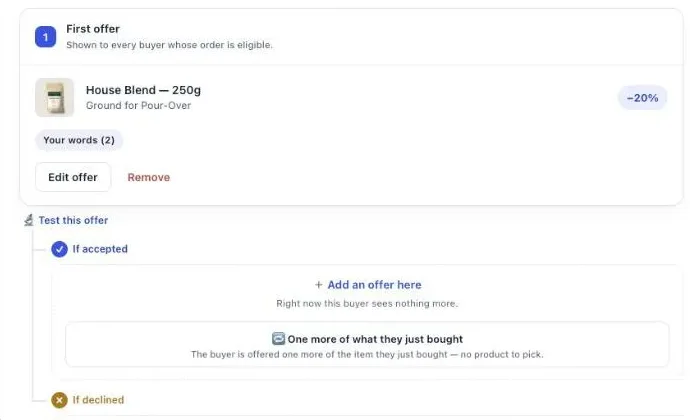
The accessory is a part of the set the buyer just saw, at a lower price and a lower total. The If accepted branch can hold a different follow-up, such as a second bag of coffee for the buyer who took the whole kit.
A funnel holds up to 7 offers over 3 levels. Follow-up offers after a yes or a no are the second and third levels, which come with the Pro plan and above. Our article on how deep to cut a downsell has the margin math for the gap between the two discounts, and the guide chapter on the accept/decline tree shows every branch.
How do I reach tax refund buyers who pay with PayPal or Apple Pay?
Tax refund buyers who pay with PayPal or a wallet go straight to the thank-you page, so the kit offer needs a copy there. The app’s own help text says it: “iDEAL, PayPal and wallet payments never get the one-click page.” A Bundle block on the funnel’s Thank-you page tab covers them.
- Open the tax refund funnel and click the Thank-you page tab.
- Under Add a block, pick Bundle and add the same 2 to 4 products.
- Set Show it to to Buyers who did not see the one-click page. The admin calls this “Your safety net”. That rule comes with the Pro plan and above; on the free plan, a thank-you block shows to every buyer.
- Set Where the purchase goes to Same order, only until the first parcel ships.
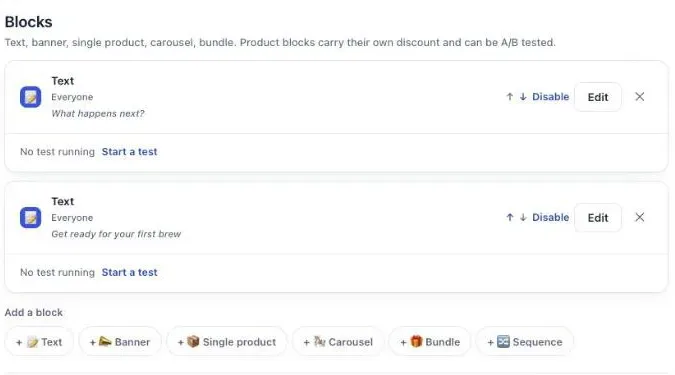
A block is shown only to buyers who went through its funnel, on every surface. So the thank-you bundle in the tax refund funnel reaches the same orders above your amount, and nobody else. Under the button, the buyer reads “Added straight to your order above. You only pay the difference.” The thank-you block has to be placed once in Shopify’s checkout editor before anything you build there appears; our guide chapter on the thank-you page has the screens.
Which products make a good tax refund kit?
A good tax refund kit is the main item plus the two or three things a buyer needs to use it on day one. Each piece should be a product your store already sells, in stock through April, priced well under the main item, so the full set costs less than a second main purchase.
Some kits by type of store, built the same way as the coffee one:
| Store | Main item | The rest of the kit | Accessory downsell |
|---|---|---|---|
| Coffee | Pour-over starter kit | Beans, mug, filters | Filters alone |
| Fitness | Adjustable dumbbells | Mat, resistance bands, grip gloves | Bands alone |
| Camera gear | Mirrorless body | Spare battery, memory card, strap | Memory card alone |
| Skincare | Serum | Cleanser, moisturizer, SPF | Travel-size cleanser |
| Kitchen | Stand mixer | Extra bowl, dough hook, spatula set | Spatula set |
Three checks before you lock the kit. Every product in the card needs stock for the whole season, from February to the end of April. Each piece should be cheaper than the main item, so the card stays an add-on and not a second purchase. And when the kit has a consumable (filters, bands, a travel size), make it the downsell accessory: it is something the buyer will need again.
If your catalog has a premium version of the main item, the funnel can offer it as the kit’s alternative instead: the same funnel structure, with the upgrade as the first offer. Our guide chapter on what to offer has the price ranges we start from.
What should the kit offer say?
The kit offer should name what the set completes and what it saves, in the buyer’s own terms. In Post Purchase Upsell Abakira, each one-click offer has its own words under Your words on this page: a Selling headline that sits above the product name, and Your argument.
Headlines for the same funnel:
| Offer | Selling headline |
|---|---|
| Bundle card, full kit | ”Everything else your kit needs, in the same box” |
| Premium version as the first offer | ”The full set, at less than buying it piece by piece” |
| Accessory downsell | ”Just the filters, then” |
In Your argument, two or three lines do the job. A line starting with a dash becomes a bullet, and {save} writes the real amount saved, so the text never contradicts the price shown under it:
- ”- Goes in the same parcel as your kit”
- ”- Saves {save} on the set”
Shopify does not allow exclamation marks on this page, and the editor blocks them on save with “Shopify does not allow exclamation marks on this page.” The buttons, “Add to my order” and “No thanks”, can’t be changed, and they are translated into each buyer’s language.
How do I know if the tax refund funnel made money?
The tax refund funnel made money when the revenue from its offers, which the app reads from your Shopify orders, is more than the discount it gave away. In Post Purchase Upsell Abakira, open Results in the last days of April, before you untick Active, and read the By product table.
That table covers the last 30 days of paid orders, so its rows for the kit and the accessory show what the season’s final month sold. Its columns are Saw it, Orders, Units, Revenue, Share and Clicks. A bundle card stays one line, so you can compare the full kit against the accessory downsell directly, then decide next February whether the card needs a deeper discount.
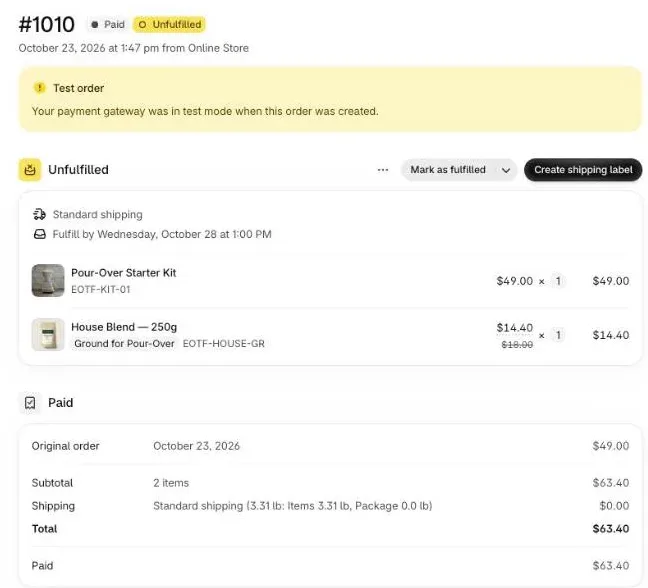
Before the season, place one test order paid by card above your amount, accept the offer, and open the order in your Shopify admin. The accepted items sit on the same order as the first purchase, in the same unfulfilled shipment, at the discounted price. That’s how our test order #1010 reads: the $49.00 Starter Kit and House Blend at $14.40, $63.40 in total.
On the Scale plan, Test this offer runs up to 4 versions of an offer, gives a first verdict at 100 views per version, and judges by revenue per view by default. Over a February-to-April season, test two kit headlines, or the kit against the premium version. The guide chapter on reading your numbers explains each figure.
When should I switch the funnel off?
The tax refund funnel comes off at the end of April, once the filing deadline has passed and the weekly refund count has slowed. In Post Purchase Upsell Abakira, untick Active on the funnel and save. Your everyday funnel set to Everyone takes over, and the tax refund funnel stays in the list for next year.
| Date (2027) | What to do |
|---|---|
| By late January | Build the funnel, inactive. Pick the kit products and check stock through April. |
| Early February | Tick Active, run Try a cart above and below the amount, place one test order. |
| Mid-March | Check Results and compare the kit line with the downsell line in By product. |
| End of April | Read Results, then untick Active. |
On the free plan, the season is an edit of your single funnel rather than a second one: swap its first offer for the kit in February and put it back in May. That funnel shows to every buyer, so pick a kit that suits every order. The rest of the calendar, from Valentine’s Day to Black Friday, is in our seasonal articles.
Post Purchase Upsell Abakira has a free plan that runs on a live store; the listing has the current plans and what each one includes.
Set up a tax refund season kit upsell with Post Purchase Upsell Abakira
- Create the funnel On Your funnels, click Create a funnel and give it a Funnel name such as Tax refund 2027, kit over $45.
- Set the order total In the condition menu, choose Order total is at least and type the amount, for example 60.
- Place it above the catch-all Use the arrows to move the funnel above any funnel set to Everyone, keep Active unticked until February, then Save.
- Build the kit offer Click Edit offers. On the One-click post-purchase tab, set the first offer to the main missing piece, then in the Grid section click Add a bundle card to the grid and tick the 2 to 4 products of the full kit, the first one carrying the card.
- Price each piece Give each product in the card its own Discount. Leave a product at zero only if it should take the card's Bundle rate.
- Add the accessory downsell Under If declined, click Add an offer here and offer one cheap accessory from the kit at a bigger discount than the first offer.
- Cover buyers who skip the one-click page On the Thank-you page tab, add a Bundle block with the same kit, set Show it to Buyers who did not see the one-click page and Where the purchase goes to Same order, only until the first parcel ships.
- Test, then switch on Tick Active in early February, click Try a cart and type an Order total above and below your amount, then place one test order.
Frequently asked questions
Should I mention tax refunds in the offer itself?
You don't need to. The offer appears after the buyer has paid, so the headline can talk about the product: what completes the kit and what the bundle saves. The season can stay in your ads and emails.
Can I run the tax refund funnel and my everyday funnel at the same time?
Yes, on the Pro plan and above, which serve up to 20 funnels. Put the tax refund funnel with its Order total is at least condition at the top of Your funnels and keep a funnel set to Everyone at the bottom. Orders above the amount get the kit offer; every other order falls through to the everyday one.
What happens to the funnel after April?
Untick Active on the tax refund funnel and save. The funnel stays in your list with its offers, headlines and discounts, and nothing is deleted. Next February you tick Active again, check the products are still in stock, and it runs.
Can I use a fixed dollar discount on the kit instead of a percentage?
Yes. Each offer's Discount is a Percentage or a Fixed amount. Inside a bundle card, each product carries its own discount, and a fixed amount is applied per unit. A product left at zero inside the card takes the card's rate, shown as Bundle rate.
Does the threshold include shipping and taxes?
Yes, when Shopify has filled in the order total: the app compares your amount with the total the buyer pays, in their checkout currency. If that total is not there yet when the page loads, the app adds up the product lines instead, which leaves out shipping and taxes. So set the amount a little below the basket you are aiming for rather than right on it.
Related articles
Written by Abakira. We make small software: Shopify apps, web tools and iPhone apps. This article is about Post Purchase Upsell Abakira.