January sale ideas for ecommerce - subscribers and stock-ups
January sale ideas for Shopify: clearance, tiered discounts, resolution bundles, plus a subscription or a 6-month stock-up offered one tap after payment.
2026-11-06 — Abakira, updated 2026-11-10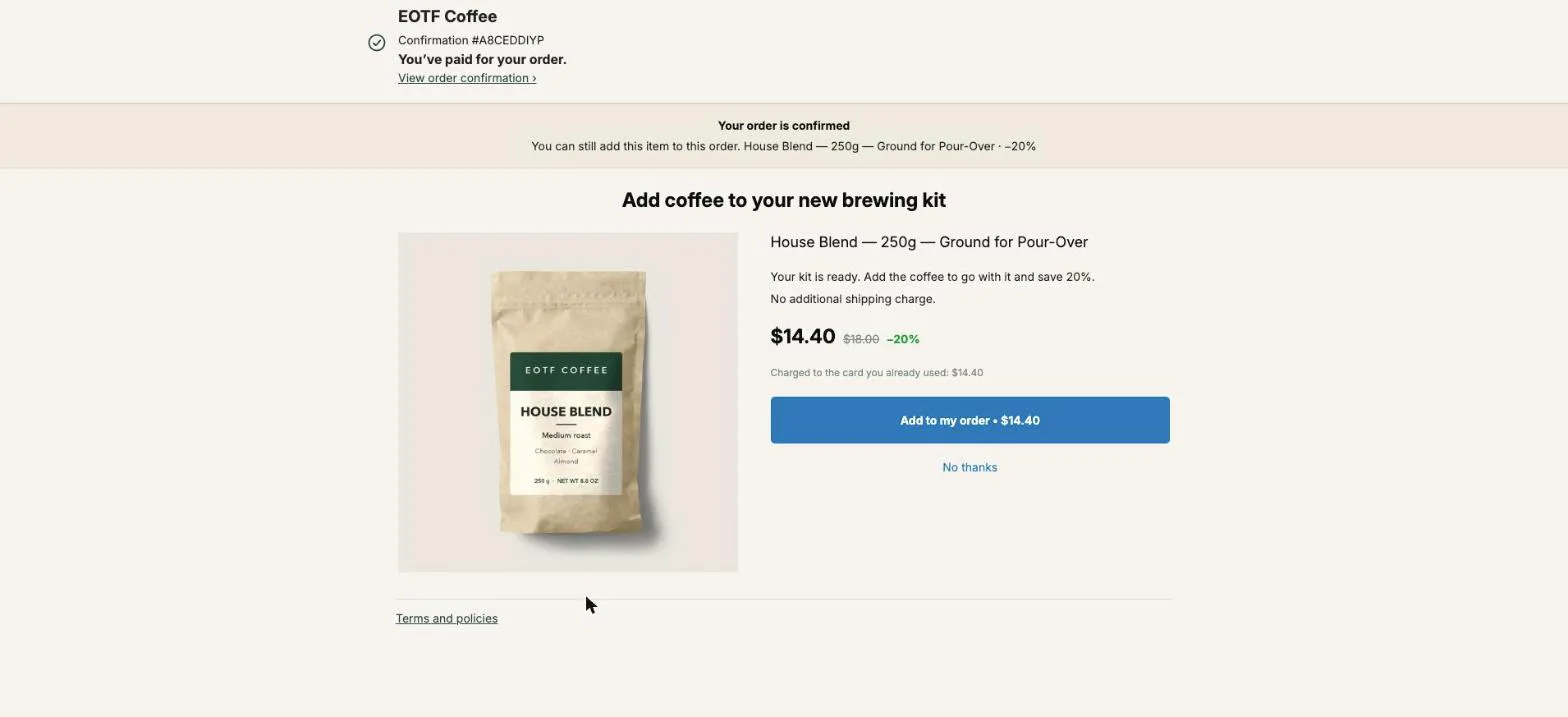
The January sale ideas that work best for an ecommerce store are the ones that keep paying after January: clear dead stock with tiered discounts, sell resolution bundles, re-engage December buyers, and turn every new January buyer into a subscriber or a prepaid customer on the page right after checkout. Ad space gets cheap in January once the holiday bidding is over, so it’s a month to buy customers in volume and earn on their second order. On Shopify, a one-click post-purchase offer can add a subscription or a 3-, 6- or 12-unit stock-up to the order the buyer just paid for, without a second checkout.
The classic sale tactics come first below, with what each one is for. The rest of the page is the part that changes what January is worth: the subscription offer, the stock-up offer, which one to show first, and how to set both up in Post Purchase Upsell Abakira.
What are the best January sale ideas for an ecommerce store?
The best January sale ideas for an ecommerce store do one of three jobs: clear stock you no longer want, bring back customers you already have, or buy new customers while ads are cheap. The last two ideas in the table make each new customer worth more than one order.
| Idea | What it’s for | Where it runs |
|---|---|---|
| Clearance on last season’s stock | Free up cash and warehouse space | Collection page, email |
| Tiered discounts (more items, bigger discount) | Move clearance stock in bigger baskets | Cart, product page |
| New Year resolution bundles | Sell to “fresh start” intent: fitness, skincare, organizing, budgeting | Product page, ads |
| Email and SMS to December buyers | Second order from people who already trust you | Email, SMS |
| Offers for gift card and store credit holders | Turn December gifts into January orders | Email, thank-you page |
| Dated pushes: payday, Blue Monday, last chance | Give the sale a deadline so it doesn’t drag | Email, ads |
| Early Valentine’s Day collection | Carry the sale traffic into February | Homepage, email |
| Next-order credit and free shipping threshold | Raise basket size and bring buyers back | Cart, thank-you page |
| Subscription offered after payment | Turn a one-off January buyer into recurring revenue | One-click post-purchase page |
| 3-, 6- or 12-unit stock-up after payment | Collect several months of revenue on day one | One-click post-purchase page |
Why is January a good month to buy new customers?
January is a good month to buy new customers because advertising costs drop once the holiday bidding wars end. Cheaper clicks mean more first orders for the same budget. The catch is that a January buyer who orders once and disappears was cheap and stayed cheap. The value sits in what happens after the first order.
That’s why the post-purchase offer matters more in January than in December. In December the job is a bigger gift order. In January the job is a customer who orders again in February, March and April. Two offers do that on the page right after payment: a subscription, and a prepaid stock-up.
How do I clear old stock in January without training buyers to wait for sales?
Clearing old stock in January means tying the discount to quantity or to a reason. Tie the discount to quantity (2 items at 15% off, 3 at 25%) rather than a flat cut on the whole catalog, and give the sale a hard end date.
A few rules keep a clearance sale clean:
- Discount the products you want gone, and keep best-sellers at their usual price. The sale is for stock, not for the products that already sell.
- Put the reason in the headline: “last of the 2026 colors”, “old packaging, same product”. The reason tells buyers why this price exists now.
- End it on a date and say the date, in the sale banner and in a last-chance email the day before.
- Watch margin per order, not revenue. A clearance order that ships one cheap item with free shipping can lose money.
Stores selling consumables can also clear stock through the post-purchase page. An offer can propose another unit of the exact item the buyer just paid for, with quantity tiers, so the extra units leave in the same parcel at no extra shipping cost. That’s the stock-up offer described further down. For a full clearance plan, from the inventory reports to a mystery box offered after payment, see how to sell dead stock on Shopify.
How do I bring December buyers back in January?
December buyers come back in January through email and SMS sent to the people who actually ordered, segmented by what they bought. A buyer who ordered a starter kit in December gets a refill offer; a buyer who ordered an accessory gets the product it goes with.
The segments worth separate messages:
- Bought a starter product or device: offer the refill or the next accessory.
- Bought gift cards: the recipients are new customers. Make sure your welcome flow works for someone who never chose your brand.
- Signed up but never bought: a January code with a deadline, sent once, not five times.
- Your best repeat customers: early access to the sale, before it’s public.
Our Christmas upsell ideas cover the December side: second gifts and gift sets added to the order after payment. January picks up from there.
How do I turn a January buyer into a subscriber right after checkout?
A January buyer becomes a subscriber after checkout through a one-click post-purchase offer that carries a subscription plan. The page offers the same product or a refill on a plan, the buyer ticks a consent box and taps once. The subscription joins the paid order, and your subscription app bills the renewals.
In Post Purchase Upsell Abakira, selling a subscription on the one-click page works on every plan, the free plan included. The app never creates a plan and never bills a renewal. It reads the plans your subscription app already created for the product and lets you pick one.
To set it up:
- In your subscription app, check that the product you will offer has a subscription plan. If it has none, the editor tells you the product has no subscription plan.
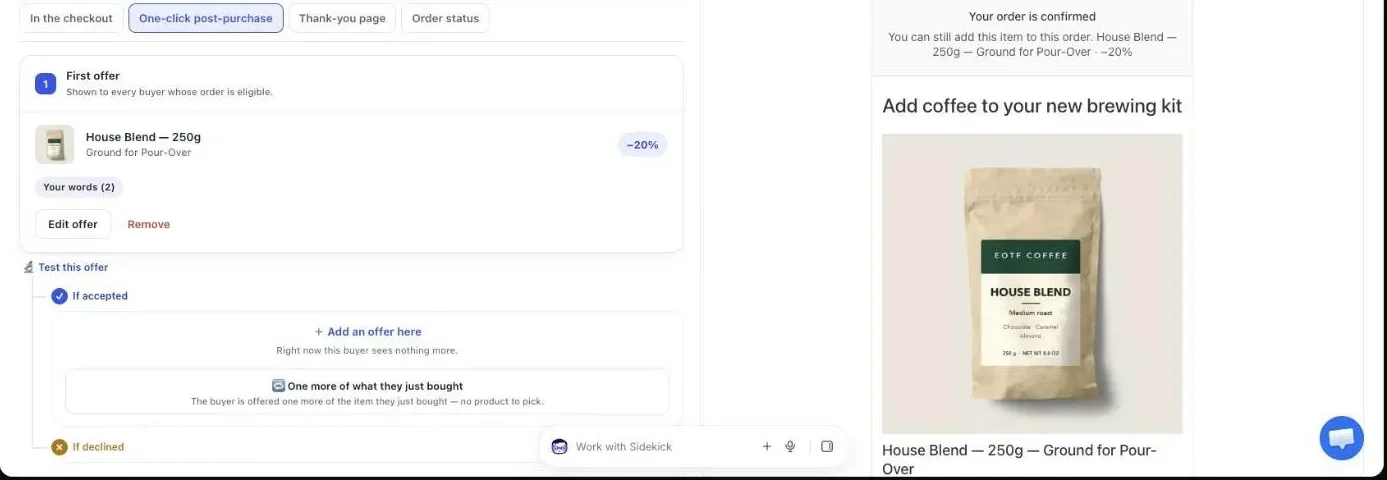
- In Post Purchase Upsell Abakira, open the funnel you use for January and stay on the One-click post-purchase tab.
- Click Edit offer on the first offer and choose the product that carries the plan.
- Under Sell as a subscription, replace One-time purchase with the plan.
- Fill in Shipping on the first order and Shipping on every renewal. Enter 0 if shipping is free. The offer can’t be saved until both are filled in, because Shopify requires both amounts.
- For a fixed-length plan, enter Length, in charges. Leave it empty for a subscription that runs until cancelled.
- Set the discount and the headline, then place a test order paid by card.
The discount needs one decision. In the app, the discount on a subscription offer covers the first charge only, and the editor reminds you that renewals are billed at the price set by the plan in your subscription app. So a 20% January discount is a 20% discount on the first bag, not on the whole year. If you want a lower price on every renewal, that price belongs in the plan, inside your subscription app.
The subscriptions chapter of our guide has every setting, and selling a subscription after checkout with Recharge or Loop covers Shopify’s rules in detail.
What does the buyer see on a subscription offer?
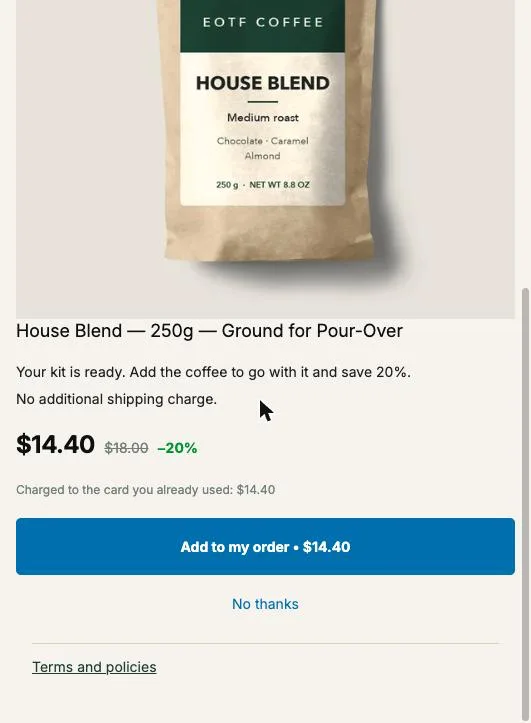
The buyer sees the offer with a Subscription badge, the price of the first charge, the shipping on each renewal, a short line that says the subscription renews until cancelled, and Shopify’s consent box. The box is never pre-ticked, and the Add to my order button stays disabled until the buyer ticks it.
The lines Post Purchase Upsell Abakira shows under a subscription offer, word for word in English:
- “This is a subscription. It renews automatically until you cancel it.”
- “Shipping on each renewal: {amount}”, with your renewal shipping amount.
- On a fixed-length plan: “Number of payments: {count}. The subscription then ends automatically.”
Those lines are shown in the buyer’s language. The rest is yours to write: the headline, the description, the reason to subscribe. For a January buyer, the reason is concrete. “Your first refill ships in 4 weeks, you can skip or cancel from your account” says more than “never run out”.
Three buyers won’t see the subscription offer. A buyer whose order already contains a subscription won’t, because Shopify does not allow a second one on the same order. A buyer with no shipping address (local pickup, digital products) won’t either. And a buyer who paid with a wallet, an installment service or a gift card never reaches the one-click page at all. The one-click page still appears for the first two groups, so give them a one-time offer, and reach the third group on the thank-you page, covered below.
Should I sell a prepaid supply instead of a subscription?
A prepaid supply beats a subscription when you want the cash now and don’t expect long subscriptions. The buyer pays for several months today, the units ship in the same parcel, and nothing renews. A subscription wins when buyers keep it going, because renewals add up past what a pack collects.
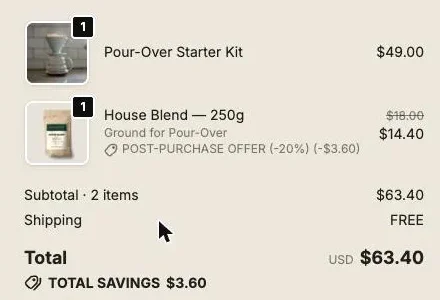
Here is the arithmetic on a $18 bag of coffee, with the discounts we’d start from:
| Offer after checkout | Collected today | Collected by month 6 if kept |
|---|---|---|
| 1 extra bag at 20% off | $14.40 | $14.40 |
| Monthly subscription, 20% off the first charge | $14.40 | $14.40 + 5 × $18 = $104.40 |
| 3 bags at 15% off | $45.90 | $45.90 |
| 6 bags at 20% off | $86.40 | $86.40 |
| 12 bags at 25% off | $162.00 | $162.00 |
The subscription only passes the 6-bag pack if the buyer pays the sixth charge. If they cancel after the third, it has collected $50.40 against $86.40. The prepaid pack also costs one shipment instead of six. Shipping cost on renewals isn’t in the table: on a subscription you charge or absorb it six times, on the pack once.
Neither is wrong. Pick by product. We’d put a subscription on things used up on a fixed rhythm (coffee, supplements, pet food, filters), and a stock-up on things bought in batches or used unevenly.
How do I set up a 3-, 6- or 12-month stock-up offer?
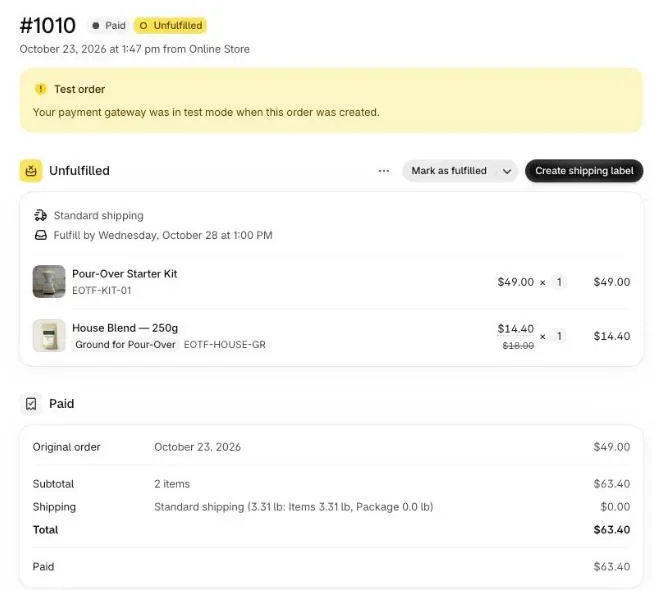
A stock-up offer in Post Purchase Upsell Abakira offers more units of what the buyer just bought, with quantity tiers whose discount grows with the quantity. The type One more, same variant picks the exact item from the order, so one offer covers every product. The tiers turn “one more” into 3, 6 or 12.
- Open the funnel and stay on the One-click post-purchase tab.
- Add the offer and choose the type One more, same variant. The buyer is offered the item they just bought, in the variant they picked.
- Set the discount for a single unit. Quantity 1 is always the offer itself.
- Under Quantity tiers, click Add a tier for each pack: for example 3 units at 15%, 6 at 20%, 12 at 25%.
- Save, then place a test order and accept the biggest tier to check the line on the order.
The limits are generous enough for a year’s supply of most products: up to five tiers per offer, each tier from 2 to 20 units. The editor warns you if a bigger tier carries a smaller discount than the one before it, because the buyer would then pay more per unit for buying more.
If you’d rather offer the stock-up of a specific product (the refill pack, not the device the buyer bought), pick the product directly instead of the repeat type. Tiers work the same way. One thing to know: tiers and a subscription plan don’t mix on the same offer. Selecting a plan pauses the tiers, since the plan carries its own pricing, and removing the plan brings them back.
Which offer goes first, the subscription or the stock-up?
The subscription goes first when your product is used daily and you already run a subscription app, and the stock-up goes second for the buyers who decline. That order gives a buyer who doesn’t want a commitment a second offer with none. Without a subscription app, lead with the stock-up and put a single extra unit behind it.
In the funnel editor, every offer on the one-click page has two branches: If accepted and If declined. Click Add an offer here under If declined on the subscription offer and add the stock-up. The buyer sees the second offer only after tapping “No thanks” on the first.
Our setup for a consumables store in January:
| Step | Offer | Shown to |
|---|---|---|
| First offer | Same product on the monthly plan, 20% off the first charge | Every eligible buyer |
| If declined | One more, same variant with tiers 3 / 6 / 12 | Buyers who said no to the subscription |
| If accepted | Nothing, or a small accessory | Buyers who subscribed |
The free plan runs one offer level, so it holds the first offer only. The branches behind it are on the paid plans; see how the accept and decline tree works. On a paid plan you can also show the January funnel only to certain orders with the conditions Order contains (a product) or Order total is at least (an amount), covered in the multiple funnels and targeting chapter.
How do I reach January buyers who don’t see the one-click page?
January buyers who pay with a gift card, a wallet such as Apple Pay, or an installment service skip the one-click page, so the thank-you page is where they see your offer. Every buyer reaches the thank-you page, whatever they paid with. If you sold gift cards in December, the people redeeming them land there.
On the thank-you page, a product block can sell the same refill, or a 3- or 6-unit stock-up with quantity tiers. A subscription sold from the thank-you page always opens a new checkout, since Shopify cannot add a subscription to an order already placed. By default, a one-time product block adds the item to the order the buyer just placed; the Where the purchase goes setting changes that.
The thank-you page chapter of our guide shows how to add the block, and Apple Pay and PayPal on the post-purchase page explains which payments reach the one-click page.
How do I keep January discounts from eating my margin?
January discounts stay profitable when each one is attached to something that pays you back: more units, a commitment, or a deadline. A discount that buys nothing (a sitewide 30% on best-sellers) cuts margin on orders you would have had anyway.
The settings that protect margin after checkout:
- First charge only. On a subscription offer, the discount stops after the first charge. You pay for the conversion once, not every month.
- Bigger discount for bigger tiers only. Keep the single extra unit at a modest discount and save the deepest one for the largest pack.
- One parcel. A pack added on the one-click page ships with the original order, so a 12-unit pack is one shipment instead of twelve. Say it in the offer text, as in “No additional shipping charge”.
- Separate pricing for renewals. If renewals should be cheaper than full price, set that in the subscription plan, not in the post-purchase discount.
Before the sale, check the price of each pack against your landed cost. Our article on pricing a post-purchase upsell has the calculation.
When should the January funnel go live after your last Christmas shipping date?
The January funnel should go live the morning after your last Christmas shipping date and come down the day the sale ends. Build it in December, leave Active unchecked, and switch it on that morning. Funnels are checked from top to bottom, so put it above your everyday funnel while it runs. The free plan runs a single funnel: there, change the offer on that funnel the same morning instead.
A short calendar:
- Mid-December: build the January funnel, test it with an order paid by card, then uncheck Active.
- The day after your last Christmas shipping date: switch off the December funnel, switch on the January one.
- During the sale: read the Results screen weekly. It breaks conversion down by funnel and by offer, so the subscription and the stock-up each get their own figure.
- The day the sale ends: uncheck Active on the January funnel. Your everyday funnel takes over.
- February: an early Valentine’s Day offer, if you sell giftable products; see Valentine’s Day upsell ideas for after checkout.
For buyers whose first order is already on its way, the order status offer that sells step two before the third week of January covers the rest of the month.
For buyers who subscribe in January and might want a bigger plan right away, upgrading a subscription right after purchase covers moving a new subscriber from 3 months to 6. The other seasonal setups are on the seasonal articles page.
Post Purchase Upsell Abakira has a free plan with 100 offers shown a month on the one-click page. The listing has the current plans and what each includes.
Sell a subscription one tap after checkout for a January sale
- Check the plan exists In your subscription app (Recharge, Loop or another one that creates Shopify selling plans), make sure the product you will offer has a subscription plan. If it has none, the editor tells you the product has no subscription plan.
- Open the funnel In Post Purchase Upsell Abakira, open the funnel you use for January and stay on the One-click post-purchase tab.
- Edit the first offer Click Edit offer on the first offer and choose the product that carries the plan. A repeat offer (One more, same variant) cannot carry a subscription.
- Pick the plan Under Sell as a subscription, replace One-time purchase with the plan your subscription app created.
- Enter both shipping amounts Fill in Shipping on the first order and Shipping on every renewal. Enter 0 if shipping is free. The offer cannot be saved until both are filled in.
- Set a length if the plan has one For a fixed-length subscription, enter Length, in charges. Leave it empty for a subscription that runs until cancelled.
- Set the discount and the words Set the discount, which applies to the first charge only, and write a headline that states the terms: how often, how much, how to cancel.
- Place a test order Pay by card, tick the consent box on the one-click page, accept, and check in your subscription app that the new contract appears.
Frequently asked questions
When should a January sale start on a Shopify store?
Start it the day after your last Christmas shipping date has passed, and have the January funnel ready before that day so you only switch it on. A sale that starts while December offers are still live mixes two messages on the same order.
What should a pickup or digital-only buyer see after checkout?
A one-time offer. Shopify cannot add a subscription to an order without a shipping address, which covers local pickup and digital-only orders, so build the offer on those orders around a single bag or a stock-up.
Do renewals keep the January discount?
No. In Post Purchase Upsell Abakira, the discount on a subscription offer applies to the first charge only. Every renewal is billed at the price set by the plan in your subscription app.
Can I offer more than 12 units in a stock-up offer?
Yes, up to 20 units. An offer on the one-click page holds up to five quantity tiers, each starting at 2 units, and the highest tier can carry 20.
Can I run a January post-purchase offer on the free plan?
Yes. The free plan of Post Purchase Upsell Abakira runs one funnel with one offer level on a live store, up to 100 offers shown a month on the one-click page. A second offer after a no, and targeting by product, are on the paid plans listed on the App Store page.
Related articles
Written by Abakira. We make small software: Shopify apps, web tools and iPhone apps. This article is about Post Purchase Upsell Abakira.