Christmas upsell ideas for after checkout on Shopify
Christmas upsells to show after payment: a second gift, the missing piece of a set, gift wrap, and a deadline of up to 72 hours counted from the order.
2026-10-26 — Abakira, updated 2026-11-10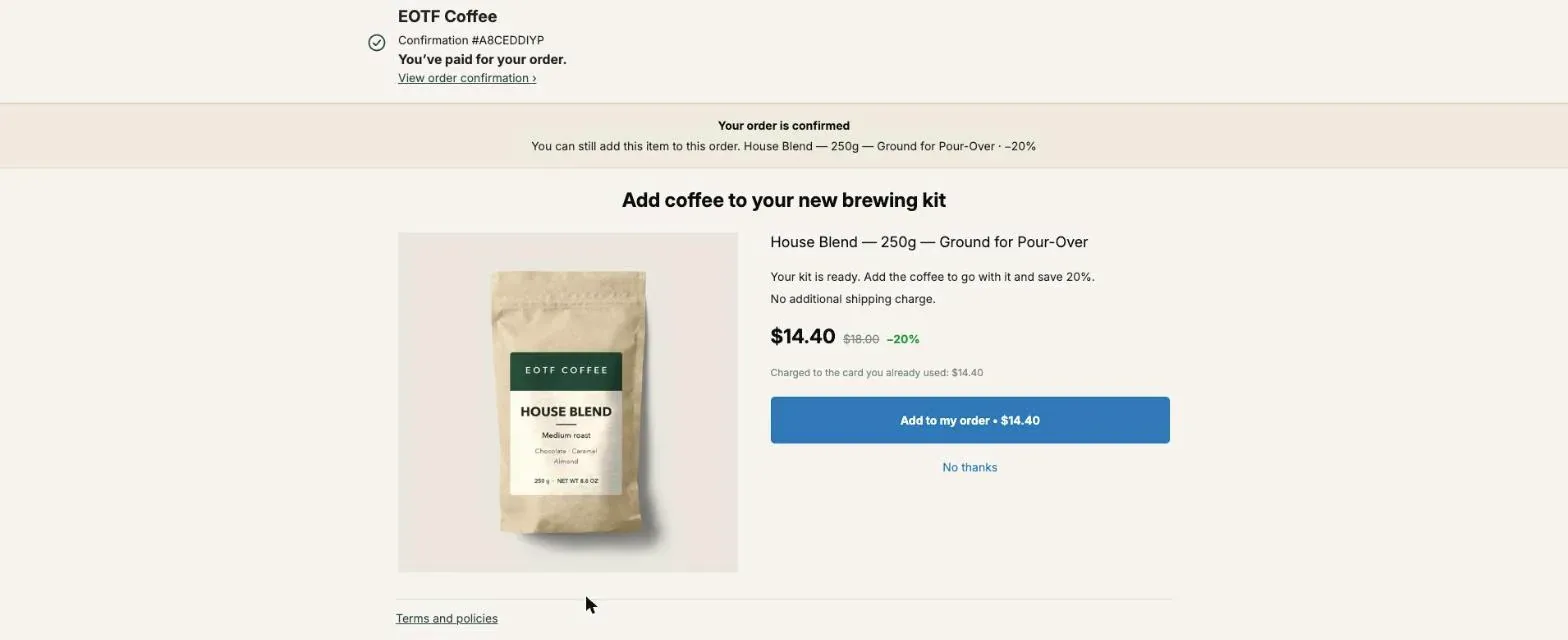
The Christmas upsell ideas that fit the page after checkout are the ones that turn one present into two: a second small gift, the missing piece of a gift set, gift wrap, and a treat the buyer keeps for themselves. After payment, the buyer has already chosen the main present, and one tap adds the extra item to the same order and the same parcel. In Post Purchase Upsell Abakira, a thank-you or order status offer can carry a deadline of up to 72 hours, counted from the moment the order was placed.
Christmas 2026 falls on a Friday. Black Friday offers run until Cyber Monday, November 30, so December 1 is the day to switch to the Christmas set below. Each idea comes with the exact setting in the app and the arithmetic behind it.
Which Christmas upsells work after checkout?
Christmas upsells work after checkout when they finish the gift the buyer just paid for instead of starting a new purchase. Six offers fit December on a Shopify store, and each one runs either on the one-click page right after payment or on the thank-you page that every buyer reaches.
| Offer | Where it runs | Setting in Post Purchase Upsell Abakira | Good for |
|---|---|---|---|
| A second, smaller gift | One-click page or thank-you page | A product or a Single product block | Stores with a cheap item that stands alone as a present |
| Complete the gift set | One-click page | Order contains on the funnel, then A product | Ranges sold piece by piece: kits, skincare lines, collections |
| The set, one item free | Thank-you page | Bundle block, one item at 100% | Accessories and refills |
| Gift wrap or a card | One-click page or thank-you page | A product | Any order that is a present |
| Something for the buyer | One-click page | A product, deeper discount | Products the buyer may want too |
| A deadline offer | Thank-you and order status pages | Countdown up to 72 hours | The last two weeks before your shipping cutoff |
The first two are the ones to build if you only have an afternoon.
Why put Christmas upsells after payment instead of in the cart?
A Christmas upsell placed after payment can’t cost you the main sale, because the order is already placed when the offer appears. In the cart, every extra suggestion is one more thing between the buyer and the Pay button. After payment, the buyer answers one question with one button and goes back to their list.
The one-click page charges the card the buyer already used, with no form to fill in. The page reads “Charged to the card you already used: $14.40” under the price, and “No additional shipping charge.” sits above it. The added item goes into the box that was going out anyway, so there’s no second label and no second delivery.
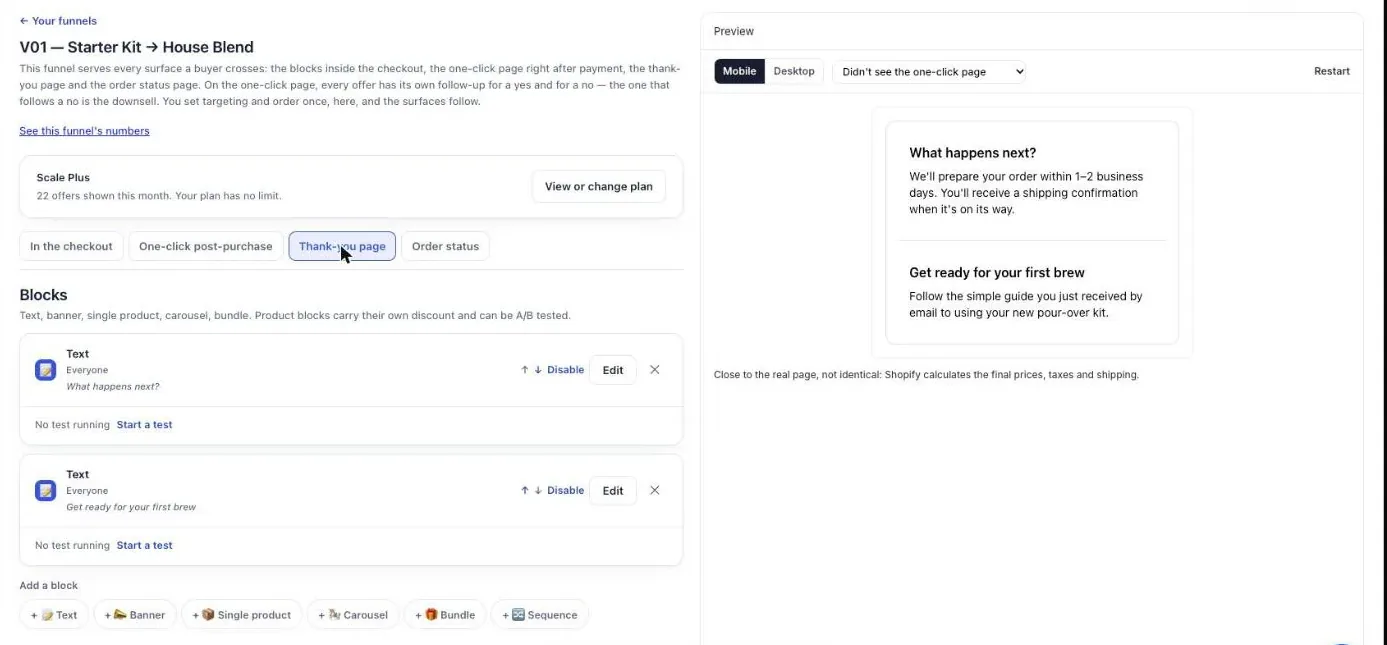
The thank-you page does a different job. Shopify only shows the one-click page after a credit card payment, so buyers who pay with Apple Pay, Google Pay, PayPal, Klarna or a gift card go straight to the thank-you page. That page is the one every buyer sees, and the order status page carries the same blocks for buyers who open their order link later.
How do I offer a second gift after a Christmas order?
A second-gift offer proposes a small, cheaper item that can be given to another person on the list, right after the first present is paid. In Post Purchase Upsell Abakira, it is an offer of type A product on the one-click page, or a Single product block on the thank-you page, with its own discount.
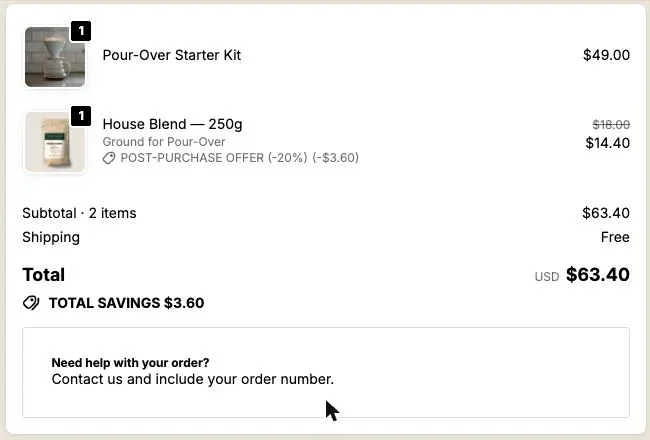
What makes it work is the price ratio. On our coffee store, a buyer who paid $49 for a pour-over starter kit is offered a 250 g bag of coffee at 20% off: $14.40 instead of $18. That’s 29% of the first order. Aim for a quarter to a half of the order value; an offer priced near the main present is a second purchase, and the buyer has to think.
Good second gifts are items that stand alone in a stocking: a sample size of your best-seller, a refill, a small accessory, a mug, a candle. They should not need the main product to make sense, because they may go to someone else.
The words matter more in December than the rest of the year. The Selling headline sits above the product name on the one-click page, and the product name always stays visible because Shopify requires it. Write the headline for the occasion:
- “One more for the list, 20% off”
- “A stocking filler, in the same box”
- “For the person you forgot”
Shopify refuses exclamation marks on the one-click page, and the editor blocks them when you save. The occasion carries the headline without them.
How do I sell the missing piece of a gift set?
A complete-the-set offer shows the buyer the item that goes with the one they just bought: the cups for the kettle, the conditioner for the shampoo, the second book in a series. In Post Purchase Upsell Abakira, you build one funnel per range with the condition Order contains and the range’s first product, then offer the missing piece as A product.
This is the offer that needs targeting. Without it, every buyer sees the same item, and a buyer who already has the cups gets offered the cups. With it, the funnel only serves orders that contain the product you pick. Order contains accepts up to 300 products in one condition, and it can point at a variant instead of the whole product, so “the 3-pack” and “the 6-pack” can lead to different offers.
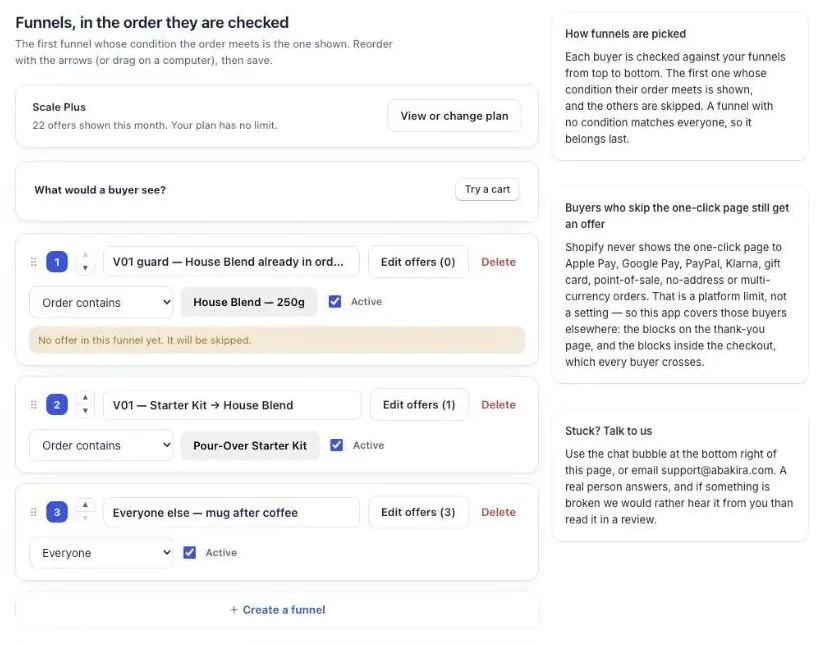
Funnels are checked from the top, and the first one whose condition the order meets is the one shown. Put the narrow ones first (a single product or a variant) and keep a funnel with no condition at the bottom for every other order. The admin warns you if a funnel sits below one that matches everyone, because it can never be reached. Targeting and several funnels are on the paid plans; our guide chapter on multiple funnels and targeting walks through each screen.
The same funnel works after Christmas too: see how to sell more gifts online by completing the gift for Valentine’s Day, Mother’s Day and birthdays, and Valentine’s Day upsell ideas for after checkout for February in detail.
Can I give one item of a Christmas set for free?
A free item inside a set is a gift that doesn’t look like another discount, and on the thank-you page it fits in a Bundle block. Each product in the bundle has its own Discount (%) from 0 to 100, and 100 means the item is free. Setting an item to 100 makes it free, and the field’s help text asks you to say so in the offer wording.
A coffee example: the filter papers at full price and the measuring scoop free, in the funnel that serves kit buyers. The buyer reads one line (“Add the papers, the scoop is on us”) and one button. On the one-click page, a gift is an offer at 100% off that adds a $0 line to the paid order; the full setup, including when a free gift beats a discount, is in our Black Friday free gift article, and it works the same in December. For sets of three with the cheapest item free, the arithmetic in Black Friday bundle ideas carries over unchanged.
Should I offer gift wrap after checkout?
Gift wrap is the most natural December add-on, and after payment it arrives at the right moment: the buyer has just decided who the order is for. Create the wrap in Shopify as a product with a price and a photo, then offer it as A product on the one-click page or as a Single product block on the thank-you page. It joins the same order, so the packer sees it on the same slip as the present. Keep the price low enough to be a reflex next to the order. The full setup is in gift wrapping upsell on Shopify, offered after checkout.
How do I add a Christmas deadline to an upsell?
A Christmas deadline works when it is the same for every visit, and on the thank-you and order status pages Post Purchase Upsell Abakira counts it from the order itself. A block’s countdown runs for up to 72 hours. The countdown is counted from the moment the order was placed, not from the moment the page opens, so it shows the same deadline on every visit and every device.
That anchoring is what makes a long timer honest. A buyer who orders on Monday evening, closes the tab, and opens the order status link on Wednesday sees the same deadline running, not a fresh one. Reloading doesn’t reset it, and switching from phone to laptop doesn’t either.
You choose what happens at zero under When the countdown reaches zero:
| Setting | What the buyer sees after the deadline |
|---|---|
| Hide the block | Nothing. The offer is gone. This is the default. |
| Keep the block, at full price | The same product, without the discount. |
| Keep the block, show a message | The block stays, and your text replaces the button. |
For the message, the field is Message when the offer has ended. Leave it empty and the app uses its own sentence, translated. The text on the timer bar is yours too: Countdown wording (optional) takes a sentence with a placeholder for the time left, such as “You have {countdown} left to add these to your order”. A December version: “{countdown} left to add this and still ship before Christmas”.
The one-click page has its own timer, shorter: Show a countdown runs from 30 seconds to 30 minutes, and at zero the offer is really declined and the buyer moves on. Countdowns are not allowed inside the checkout itself, so they live on these pages only. Our guide chapter on discounts, timers and proof shows every field.
As for the shipping cutoff, working out your last order date and the countdown for each week of December has its own article.
How do I make sure the extra gift ships in the same box?
An extra Christmas gift ships in the same box when it is added to the order before that order leaves your warehouse. On the one-click page, that’s always the case: the item joins the order that was just paid. On thank-you and order status blocks, the setting Where the purchase goes decides it, with three choices:
- Same order, unless it has fully shipped (the default). The item is added to the order until everything has shipped.
- Same order, only until the first parcel ships. As soon as one parcel has left, even for part of the order, the buyer pays in a new checkout and gets a separate order.
- Always a new checkout. A separate order every time, with your usual shipping rates.
In December, the second choice is the safe one. A buyer who opens the order status page to track a parcel that has already left shouldn’t add a present that then ships on its own, maybe after the 25th. A buyer whose first parcel has already left pays for the extra item in a new checkout and gets a separate order, with your usual shipping rates.
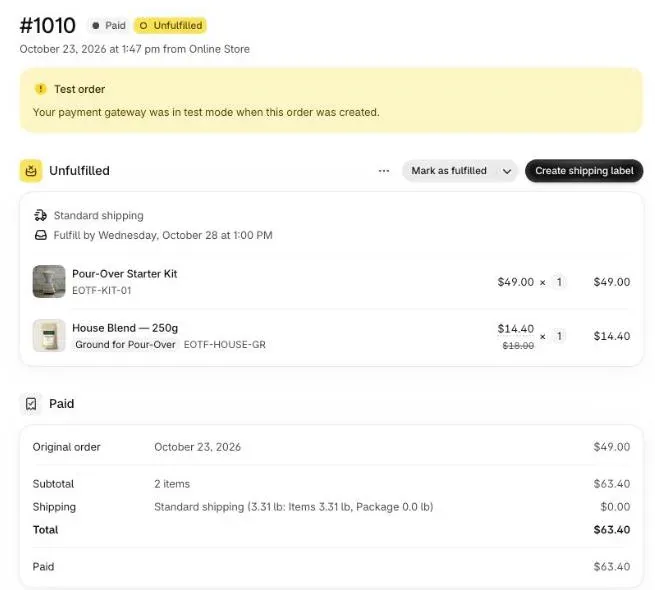
What do buyers who pay with PayPal or Apple Pay get?
Buyers who pay with PayPal, Apple Pay, Google Pay, Klarna or a gift card never see the one-click page, so their Christmas offer goes on the thank-you page. In Post Purchase Upsell Abakira, a thank-you block can be shown to Buyers who did not see the one-click page, which the admin describes as “Your safety net”.
Give them the strongest of your December offers, since it is the only one they’ll see. A Single product, Carousel or Bundle block adds the item to the order they just placed. The article on Apple Pay, PayPal and Google Pay orders explains why the one-click page skips them, and our guide chapter on the thank-you page has the screens for each rule.
How do I switch from Black Friday offers to Christmas offers?
The switch from Black Friday to Christmas offers is a funnel swap on the morning of December 1, done in the funnels list. Create a December funnel, move it to the top, and uncheck Active on the November one. Nothing is deleted when a funnel is inactive, so next year’s Black Friday funnel is one checkbox away.
A calendar for December 2026:
| Date | What to do |
|---|---|
| Before November 23 | Build the December funnel, inactive. Write the headlines. |
| December 1 | Deactivate the Black Friday funnel, activate the December one, place one test order. |
| December 1 to your last shipping day | Leave it running. Check the order in your admin once a week. |
| Your last shipping day | Shorten the thank-you countdown so it closes before your final packing run. |
| The morning after | Uncheck Active on the December funnel. The funnel below takes over. |
Once the last shipping day has passed, the January sale ideas that turn holiday buyers into subscribers take over.
On the free plan you have one funnel, so the swap is an edit of that funnel’s offers instead of a checkbox. Do it on December 1 and again after Christmas. The free plan shows 100 offers a month on the one-click page; a store with more than about a hundred card orders in December should look at the plans on the listing before the month starts. For the November side of the season, see Black Friday upsell ideas for the page after checkout and how to set up the BFCM thank-you page.
How do I price a Christmas upsell so it stays profitable?
A Christmas upsell stays profitable when the discount comes out of a parcel that is already paid for. The extra item needs no second pick ticket, no second label and no second shipping charge, so a deeper discount than your sitewide December price still leaves margin. Here is the arithmetic on our $18 bag of coffee. Say the bag costs $6 to buy and pack:
| Offer | Buyer pays | Your cost | Margin kept |
|---|---|---|---|
| Second gift at 20% off | $14.40 | $6.00 | $8.40 |
| Second gift at 30% off | $12.60 | $6.00 | $6.60 |
Two rules carry most of the result. Keep the offer between a quarter and a half of the average order. And if you also run a December discount code, set the upsell discount deeper than the code. A sitewide percentage code does not apply on the one-click page (we checked on September 27, 2026, with a −10% code on all products), so a 20% offer there shows $14.40 whatever the code says. On the thank-you page an item added to the existing order gets the code’s percentage applied again, so check the final price in a test order if you run a December code. Our guide chapter on what to offer covers the price ratio in detail, and what actually raises average order value on Shopify covers the techniques that work before payment too. The other seasonal articles are grouped on one page.
Post Purchase Upsell Abakira has a free plan that runs on a live store, and the listing has the current plans.
Set up a Christmas second-gift offer with a deadline on the Shopify thank-you page
- Open the thank-you tab of your funnel In Post Purchase Upsell Abakira, open the funnel you use for December and click the Thank-you page tab.
- Add a product block Under Add a block, pick Single product, then Add a product and choose a small item that works as a second present.
- Set the discount Enter the discount in Discount (%) and write a Heading that names the occasion, such as One more for the list.
- Add the countdown In Countdown (empty = none), set the window in hours and minutes, up to 72 hours. It is counted from the moment the order was placed.
- Choose what happens at zero Under When the countdown reaches zero, pick Hide the block, Keep the block, at full price, or Keep the block, show a message.
- Keep the item in the same parcel Under Where the purchase goes, pick Same order, only until the first parcel ships.
- Place a test order Place an order, add the item from the thank-you page and check in your Shopify admin that it sits on the same order and the same shipment.
Frequently asked questions
When should Christmas upsells go live on a Shopify store?
On December 1, right after Cyber Monday, if you ran Black Friday offers. Swap the November funnel for the December one that morning, place one test order, and leave it running until the day after your last shipping date for Christmas delivery.
Can a Christmas upsell be shipped to a different address than the order?
No. An item accepted after checkout joins the order the buyer just placed, so it goes to that order's shipping address in the same parcel. A buyer who wants a gift sent somewhere else needs a separate order.
Does a post-purchase offer change the price of the gift the buyer already paid for?
No. The original order is already placed when the offer appears. Accepting adds a new line with its own discount; declining leaves the order exactly as it was.
Can I run a Christmas upsell on the free plan of Post Purchase Upsell Abakira?
Yes. The free plan runs one funnel with one offer level on a live store and shows 100 offers a month on the one-click page. Targeting by product and several funnels at once are on the paid plans, listed on the App Store page.
What happens to a Christmas offer after December 25?
Nothing changes on its own: a funnel keeps running until you switch it off. Uncheck Active on the December funnel once your last Christmas shipping day has passed, and the funnel below it takes over.
Related articles
Written by Abakira. We make small software: Shopify apps, web tools and iPhone apps. This article is about Post Purchase Upsell Abakira.