Black Friday free gift with purchase, given after checkout
Give the Black Friday gift after payment: one tap on the post-purchase page adds it to the paid order at $0, in the same parcel, with no code to type.
2026-10-25 — Abakira, updated 2026-11-08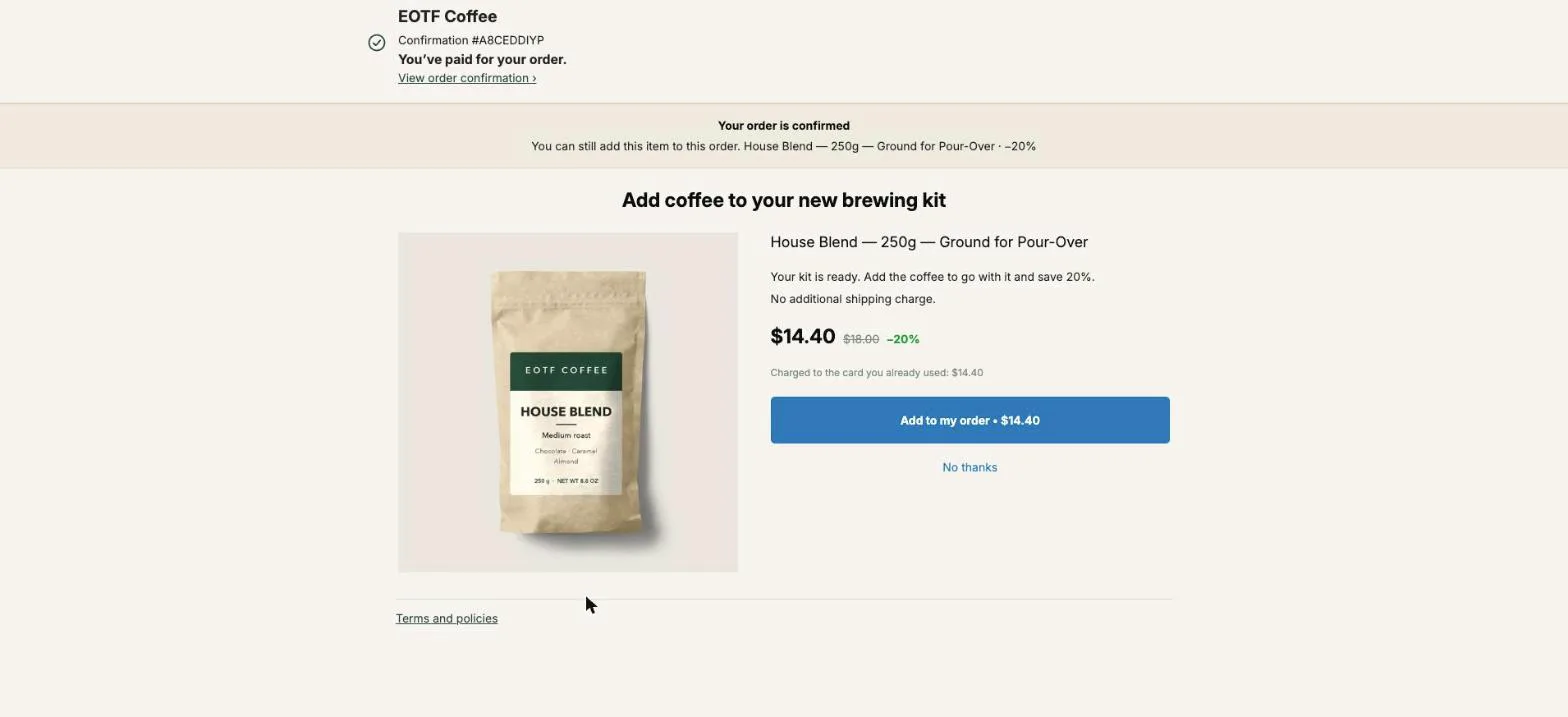
A Black Friday free gift with purchase works best on Shopify when the buyer gets it right after paying, on the one-click post-purchase page: one tap, and the gift joins the order they just paid as a line at $0, in the same parcel. No code to type, no item to add to the cart, no second checkout. With Black Friday on November 27, 2026, a $4 gift costs less than the next 10% off on any order above $40, and it doesn’t look like every other store’s discount.
This page covers why a gift beats a deeper discount during BFCM, which gift to pick, how to set the $0 line up step by step, how to tie the gift to a spend threshold, and what to give the buyers who pay with PayPal or Apple Pay. Amounts are in US dollars.
Why give a free gift instead of a bigger Black Friday discount?
A free gift protects margin during the one week when discounts stack. A deeper sitewide discount is paid on every order, including the ones that would have happened at the old price. A gift has a fixed cost per order, usually the landed cost of a small item, and the buyer values it at its shelf price, not at what you paid.
Here is the arithmetic on a store already running 20% off sitewide, with a $60 average Black Friday order and a gift that costs $4 to buy and pack:
| Extra 10% off | Free gift after checkout | |
|---|---|---|
| Cost per order | $6.00 | $4.00 at most, only when the buyer taps |
| Cost on 500 orders | $3,000 | $2,000 at most |
| What the buyer sees | 30% instead of 20%, like the store next door | A named product, at $0, in the same box |
The gap widens with order value. On a $100 order, the extra 10% costs $10 and the gift still costs $4. A fixed-cost incentive gets cheaper in relative terms exactly when your customers spend more, and BFCM is the weekend when they do.
There is a second reason. A gift with a real name (“a 50 g bag of our espresso blend”) can’t be compared on price the way a percentage can.
What does a gift after checkout do that a cart gift can’t?
A gift after checkout skips the cart entirely. The buyer has already paid when the offer appears, so the gift can’t push them away from checkout, can’t break a discount code, and can’t be removed by accident when the cart changes. On the one-click page, one tap adds it to the paid order at $0.
Gifts in the cart are the classic way to run this, and they work for a spend threshold, because the buyer sees the goal while shopping. Shopify’s own tool is the Buy X get Y automatic discount: under Discounts, Create discount, you pick what the customer buys, set the gift under Customer gets with the value Free, and cap it at one use per order. The gift item still has to be in the cart for the discount to apply, and as of October 2026 Shopify doesn’t add it on its own. Stores either tell the buyer to add it, or install an auto-add app.
The after-checkout version has none of that plumbing. It also does three things a cart gift can’t:
- It reaches the buyer at the right moment. The buyer has just said yes and is waiting for the confirmation. A gift there reads as a thank-you, not a sales tactic.
- It opens the door to the next offer. On a paid plan, the gift’s If accepted branch can show a paid offer right after, to a buyer who just tapped yes.
- It costs nothing when it’s not taken. A cart gift ships with every qualifying order. An after-checkout gift ships only to the buyers who tap.
The two can work together. Announce “Spend $75, get a free espresso sample” on the site, and deliver the sample on the post-purchase page to orders above $75, as shown further down.
Which free gift should I give on Black Friday?
The best Black Friday gift is a small item the buyer will use within a week, that makes the main product better, and that ships in the same box without a bigger carton. A sample of your best-seller, a refill, a matching accessory or a consumable all fit. A gift that has nothing to do with the order reads as clearance.
Our test store sells coffee, so these are the kinds of gifts we’d set up, from best to worst:
| Gift | Why it works over BFCM | Watch for |
|---|---|---|
| 50 g sample of a second blend | The buyer tries a product they didn’t pick, and comes back for the 250 g bag | Keep it under the weight that changes your shipping rate |
| Pack of filter papers | Used with every brew, so the gift is opened the day it arrives | Only for orders that contain a brewer |
| Measuring scoop | Cheap, light, lasts years, shows your brand every morning | Low perceived value on its own: name it in the headline |
| A “one for you” mini bag | Addressed to the person who paid, so the buyer keeps something from the parcel | Say it in the headline, or it reads as a random extra |
| Last season’s mug | Clears stock | Heavy and fragile: check the parcel |
A small item addressed to the buyer is the one part of the parcel they keep, so say who it is for in the headline.
Whatever the gift, create it in Shopify as a real product with its regular price, a photo, a weight and tracked stock. The regular price is what the buyer sees struck from the line, and the stock is what stops you promising a gift you no longer have.
To give a different gift at each order level the rest of the year, see free gift tiers that grow with the order.
How do I add a free gift at $0 after checkout on Shopify?
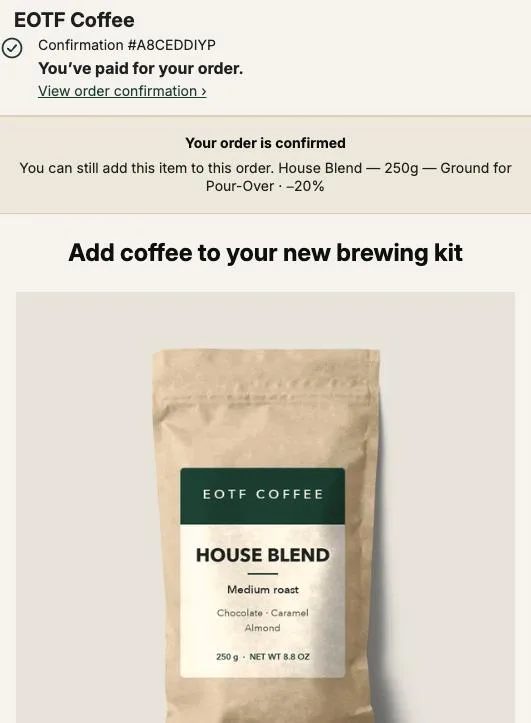
A free gift after checkout on Shopify is an offer on the one-click post-purchase page with a 100% discount. In Post Purchase Upsell Abakira, you add the gift as A product, set Discount type to Percentage with a value of 100, and the buyer taps Add to my order. The line joins the paid order at $0.
The steps:
- In Shopify admin, open Settings, then Checkout, then Post-purchase page, and select Post Purchase Upsell Abakira. Without this, Shopify never shows the page.
- In the app, open your funnel and go to the One-click post-purchase tab. Add an offer.
- Under What this offer proposes, choose A product and pick the gift.
- Under Discount type, choose Percentage and enter 100 in Value. Fixed amount works too, as long as it equals the price: the admin refuses an amount above it with “A fixed discount cannot be higher than the price”, and a percentage above 100 is refused as well.
- Write a Selling headline that names the gift. “A free sample of our espresso blend, in the same box” tells the buyer what, how much and when. Shopify doesn’t allow exclamation marks on this page, and the editor refuses them when you save.
- Place a test order with a credit card on your test gateway and tap the offer.
We checked the $0 line on a test order (#1108): the gift was offered with a fixed amount equal to its price, and Shopify recorded it on the paid order as a $0 line. A percentage of 100 produces the same line.
On the page, the buyer sees $0.00 in large type with the regular price struck through beside it, as Shopify calculated them. The button carries the amount, so it reads “Add to my order • $0.00”. On the order itself, the discount is labelled “Post-purchase offer (-100%)”, and the admin shows you that label in the offer editor before you save.
The free plan can carry the gift: it serves one offer from one funnel, and that offer can be the gift at 100% off. It caps how many offers are shown each month, so check the figure on the App Store listing against your expected Black Friday orders. Our guide chapter on what to offer after checkout explains how to choose between a gift, a repeat and a complementary product the rest of the year.
Does my Black Friday discount code change the $0 gift?
A Black Friday discount code does not reach the one-click post-purchase page. In our tests, codes and automatic discounts at the order level and the product level never touched an item added there, so the gift stays at exactly $0 and a paid offer stays at the price written on it. Nothing needs adjusting before the weekend.
The thank-you page is different. A percentage code on all products can be applied again to an item added there, which matters for paid items, not for a free one. The article on keeping upsell prices exact under a Black Friday discount code shows the numbers and the setting that fixes it.
How do I give the gift only above a spend threshold?
A spend-threshold gift on the post-purchase page uses a funnel condition instead of a cart rule. In Post Purchase Upsell Abakira, create a funnel that holds only the gift, set its condition to Order total is at least with your threshold, and place it above your other funnels. Orders under the threshold fall through to the next funnel.
Pick the threshold from your own numbers. Take your average order value over the last 30 days and set the bar 20 to 30% above it. A $60 average gives a $75 gift line: close enough that a buyer adds one item to reach it, far enough that it lifts the order.
The setup, on a paid plan:
- Create a funnel named “BFCM gift over $75” with the gift offer at 100%.
- Set its condition to Order total is at least and enter 75.
- Move it to the top of your funnel list. The app checks funnels from the top and the first active one whose condition is met wins.
- Keep your usual funnel below it, without a condition, for every other order.
- Announce the threshold on the site, in the announcement bar and in your Black Friday email, so the gift moves the cart before payment and pays it back after.
Order contains works the same way for a buy-this-get-that gift: a funnel that only triggers when the order contains your brewer, with the filter papers as the gift. Our guide chapter on running several funnels with targeting covers the order of checks and the warning the admin shows when a funnel without a condition hides the ones below it.
Can I follow the gift with a paid offer?
A free gift is the strongest first step of a Black Friday funnel, because the buyer who taps it has just said yes twice in a minute. In Post Purchase Upsell Abakira, put the gift as the first offer and a paid offer in its If accepted branch: a “double your order” on the item they paid for, at a deeper price than the sitewide sale.
Shopify allows a buyer to accept at most three offers on the post-purchase page, and the gift counts as one. A funnel holds up to three levels, so a gift, then a paid offer, then a downsell in the paid offer’s If declined branch fits exactly. The buyer who reaches the limit reads “You’ve reached the maximum number of add-ons for this order.” before tapping, not after.
Keep the paid offer close to the gift. A buyer who just took a free espresso sample is in the right frame for a second bag of the coffee they bought, not for a grinder. The Black Friday upsell ideas article sets out the paid offers that fit that second slot, and the quantity ladder for the page after checkout if you’d rather sell more units.
What about buyers who pay with PayPal or Apple Pay?
Buyers who pay with PayPal, Apple Pay, Google Pay, Klarna or a gift card skip the one-click page, because Shopify only shows it after a card payment. Their gift goes on the thank-you page, which every buyer reaches. Post Purchase Upsell Abakira has a rule there named “For buyers who never saw the post-purchase page”, made for exactly them.
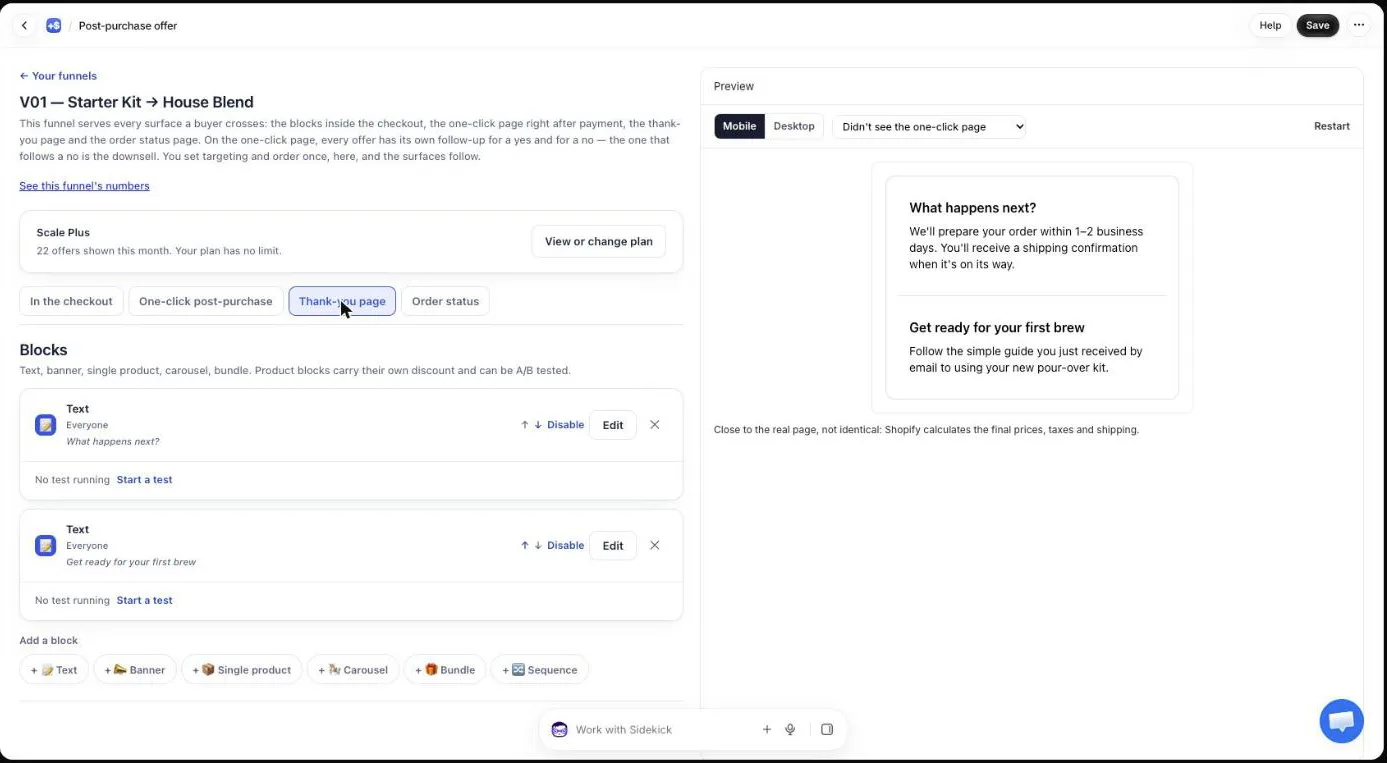
Two blocks give a gift on that page:
- Bundle: each product in the bundle takes its own discount, and the field says “0 to 100. 100 means the item is free”. Pair a paid item with a free one: “Buy the filter papers, get the scoop free”. The buyer pays for the paid item only, and both land on the same order.
- Single product: a percentage stops at 90 here, so a free product uses Or a fixed amount off, per unit set to its price. The admin says it plainly: “Use the price itself to offer it for free.” The fixed amount shows only to buyers who pay in your store currency.
The article on why Apple Pay, PayPal and Google Pay orders never see the post-purchase page explains how the two pages split buyers, and our guide chapter on the thank-you page shows each block setting.
How do I word the gift so buyers take it?
Gift wording on the post-purchase page should name the item, say it’s free, and say it ships with the order. Buyers who just paid are scanning for one thing: whether this costs them money. “Free” and “in the same box” answer that before they read the rest.
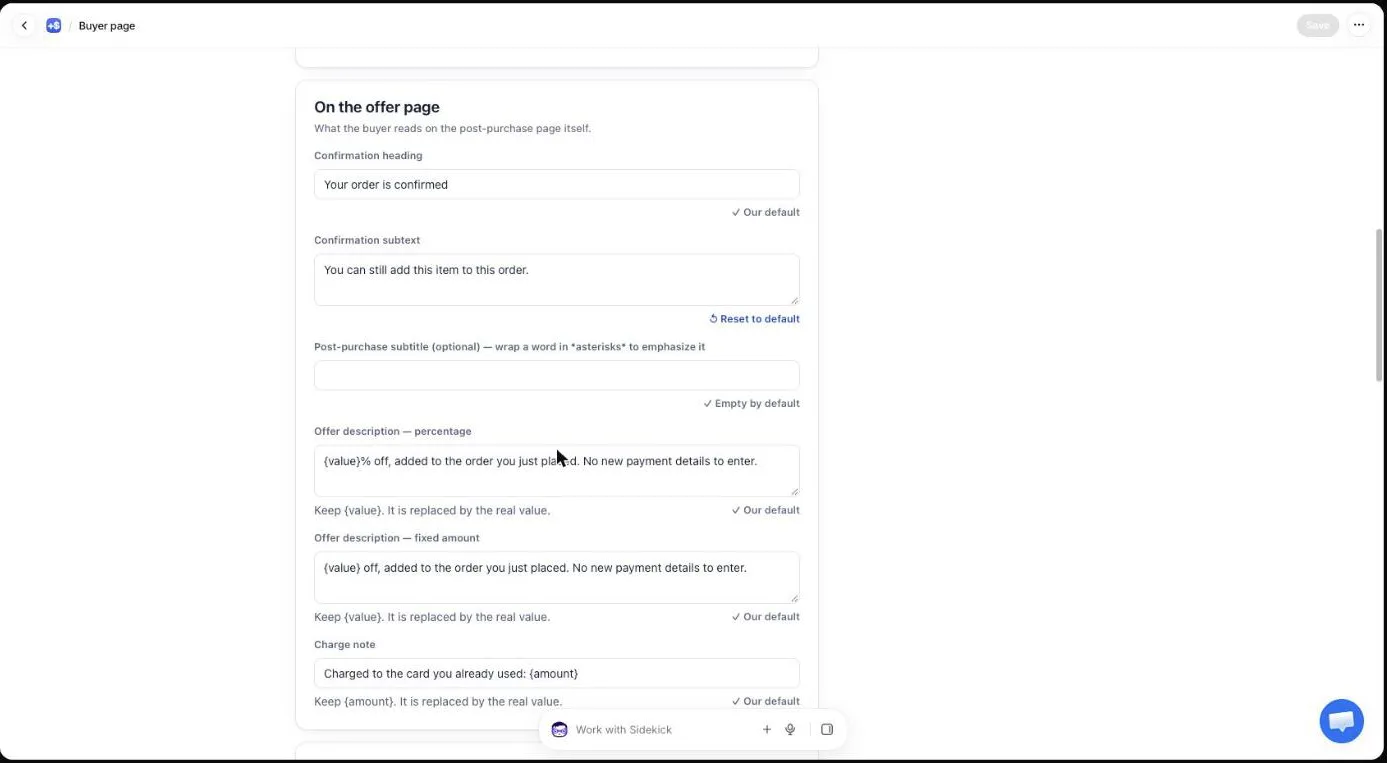
Three places carry the message, each set per offer:
- Promise line, at the top of the page: “A thank-you from us, on the house.”
- Selling headline: “A free 50 g bag of our espresso blend, in the same box.”
- Badges, up to three: “Free”, “Ships with your order”.
The page also has general texts under Buyer page in the app menu, shared by every offer. On a store whose gift runs all weekend, we’d leave those alone and put the gift message in the offer, so it disappears with the offer on December 1.
Show the gift’s real value. A struck price next to $0.00 tells the buyer what they’re getting, where “free sample” alone says nothing about size. That’s one more reason to create the gift with its regular shelf price rather than at $0.
How do I ship the gift and keep stock under control?
The gift ships with the order because it is on the order. On the one-click page, the item is added to the order the buyer just paid, so it appears on the same packing slip and leaves in the same parcel, with no second order to merge and no second label.
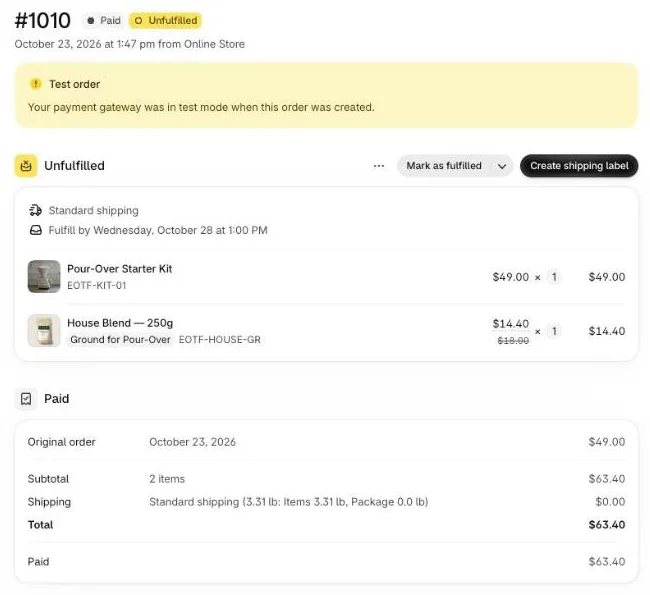
Four checks before November 27:
- Stock. Plan gift stock as if every card buyer taps it, since a free item is the easiest yes of the weekend. Track inventory on the gift product. If it runs out, the buyer who taps reads “This item just sold out. Your original order remains confirmed and paid.” and nothing else changes.
- Weight. Give the gift its real weight in Shopify. A heavy gift on a weight-based rate can change what shipping costs you, and the test order shows it in the order summary.
- Returns. Decide now whether a returned order must send the gift back, and write it in your return policy.
- Warehouse. If a 3PL pulls your orders, place a test order and check the gift reaches the pick list with the rest. The article on keeping post-purchase items in one parcel with a 3PL covers the timing.
When should the Black Friday gift go live?
A Black Friday gift should be live and tested by November 15, 2026, and frozen from November 23. That leaves a week to place test orders with a card and a wallet, check stock and weight, and watch a few real orders go through before the traffic peak on Friday, November 27.
| Date | What to do |
|---|---|
| November 1 | Choose the gift, order stock, create the product in Shopify with price, weight and inventory |
| November 8 | Build the gift offer at 100%, the threshold funnel if you use one, and the thank-you block for wallet buyers |
| November 15 | Test orders: one by card with the gift tapped, one by PayPal or Apple Pay on the thank-you page |
| November 23 | Stop changing offers |
| November 27 to 30 | Watch stock on the gift product once a day |
| December 1 | Turn the gift funnel off, or move it below your regular funnel |
When you read the results on December 1, a gift adds no revenue on its own line, so count accepted offers on the Results screen and look at what follows: how many buyers who took the gift accepted the paid offer after it, and, in January, how many came back for the full-size product. Our guide chapter on reading your numbers explains each figure on that screen, and the seasonal articles cover the rest of the BFCM setup. For the levers that raise order value before payment, see what actually raises average order value on Shopify.
Post Purchase Upsell Abakira can run the $0 gift from its free plan, within a monthly limit on offers shown. The listing has the current plans.
Give a Black Friday free gift after checkout on Shopify
- Create the gift as a real product In Shopify admin, create the gift as a product with its regular price, a photo, a weight and tracked stock, so it ships and gets counted like any other item.
- Select the app for the post-purchase page In Shopify admin, open Settings, then Checkout, then Post-purchase page, and select Post Purchase Upsell Abakira.
- Add the gift as an offer In the app, open your funnel, go to the One-click post-purchase tab, add an offer and choose A product under What this offer proposes, then pick the gift.
- Set the discount to 100% Under Discount type, choose Percentage and enter 100 in Value. A Fixed amount equal to the price gives the same $0 line; an amount above the price is refused.
- Write the headline Write a Selling headline that names the gift and says it ships in the same box, without an exclamation mark.
- Place a test order with a card Pay with your test gateway card, tap Add to my order on the gift, and check in your Shopify admin that the gift sits on the same order as a $0 line.
Frequently asked questions
Does a free gift after checkout need a discount code?
No. On the one-click post-purchase page the gift is an offer with its own discount set to 100% or to a fixed amount equal to the price. The buyer taps Add to my order and the line is added at $0. Nothing is typed and nothing is stacked on top of your Black Friday code.
Can a buyer claim the free gift twice on the same order?
No. Once the item is on the order, a second tap on the same offer is refused and the buyer reads This item has already been added to your order.
How does the free gift appear on the Shopify order?
As a normal line on the order the buyer just paid, with the product at its regular price and a discount labelled Post-purchase offer (-100%). It is on the same packing slip as the rest and ships in the same parcel.
Can I run a Black Friday free gift on the free plan of Post Purchase Upsell Abakira?
Yes, the gift can be the one offer of a free-plan funnel. The free plan limits the offers shown per month, and threshold conditions and a paid offer after the gift need a paid plan; the App Store listing has the current plans.
What if the gift product runs out of stock during the weekend?
The buyer who taps the offer reads This item just sold out. Your original order remains confirmed and paid. Nothing is added and the paid order is untouched. Swap the gift product in the offer when stock is low, or turn the funnel off.
Should the gift be announced before checkout?
Announce it if you set a spend threshold, because the threshold is what moves the cart. A gift with no condition works better as a surprise after payment, since it costs you nothing on orders that would have happened anyway until the buyer taps.
Related articles
Written by Abakira. We make small software: Shopify apps, web tools and iPhone apps. This article is about Post Purchase Upsell Abakira.