Black Friday upsell ideas for the page after checkout
Seven Black Friday upsells to show right after payment: double the order, quantity tiers, a $0 gift, gift wrap and a downsell, with the exact settings.
2026-10-24 — Abakira, updated 2026-11-08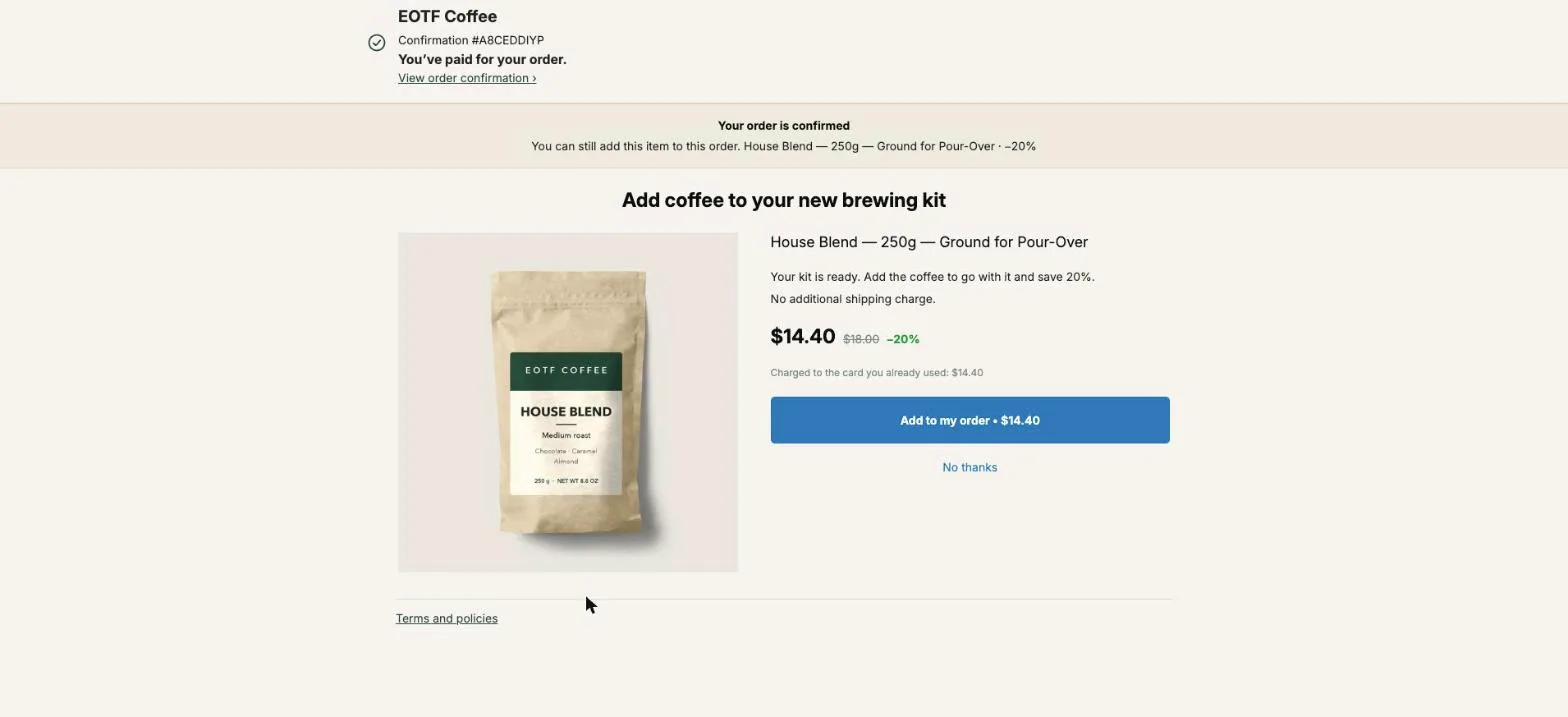
The Black Friday upsell ideas that earn the most are the ones shown in the minute after payment: more of the product the buyer just bought at a deeper price, a quantity ladder, a free gift, gift wrap, and a cheaper fallback for the buyer who says no. That minute is the only point of the weekend where the buyer has already said yes and the card is already on file. Black Friday 2026 is November 27 and Cyber Monday is November 30, so these offers need to be built and tested by mid-November.
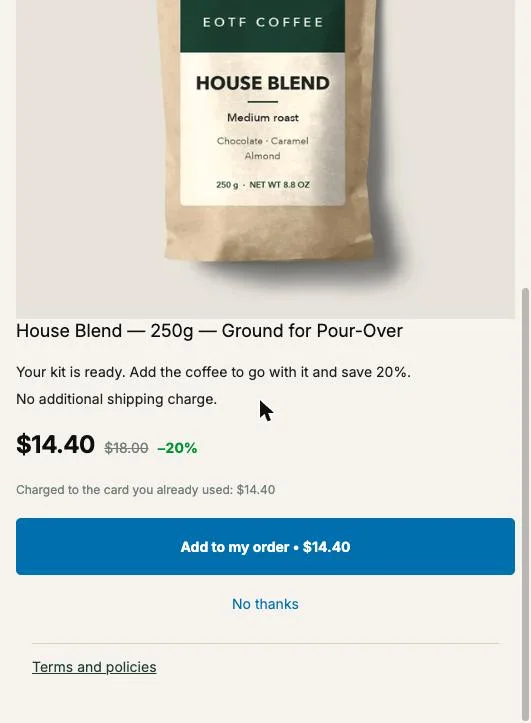
On the one-click page, the item is added to the order that was just paid, charged to the same card, and shipped in the same parcel. The buyer sees “Charged to the card you already used” under the offer and one button, “Add to my order”. Below are seven offers that fit a sale weekend, the exact settings for each in Post Purchase Upsell Abakira, and the arithmetic that keeps them profitable.
Which upsells work best on Black Friday?
Black Friday upsells work best when they extend a decision the buyer already made instead of asking for a new one. A sale-weekend buyer came for a discount and just paid, so the strongest offers are more of the same item cheaper, a quantity ladder, a free gift, gifting extras, and a downsell after a refusal.
Here are the seven, with where each one runs and what it needs.
| Offer | Where it runs | Setting in Post Purchase Upsell Abakira | Best for |
|---|---|---|---|
| Double your order | One-click page | One more, same variant | Consumables: coffee, supplements, skincare |
| Quantity ladder | One-click page | Quantity tiers, up to 5 tiers, up to 20 units | Anything bought in multiples |
| Free gift after payment | One-click page | Percentage discount at 100 | Samples, refills, small accessories |
| Gift wrap or gift card add-on | One-click page or thank-you page | A product | Holiday gift orders |
| Downsell after a no | One-click page | The If declined branch | Every store with a second candidate |
| Bigger offer for bigger orders | One-click page | Order total is at least | Stores with a wide spread of order values |
| Last-chance shelf | Thank-you page | Carousel or Bundle block with a timer of up to 72 hours | Buyers whose payment skipped the one-click page |
Each offer has its own section below. If you only have time for one, build the first.
How do I set up a “double your order” upsell for Black Friday?
A “double your order” upsell offers another unit of the exact item the buyer just paid for, at a lower price than they just paid. In Post Purchase Upsell Abakira it is the offer type One more, same variant: the app reads the item from the order Shopify signed, so one offer covers your whole catalog without picking a product.
It is the offer that wins most often on Shopify stores that sell anything people use up. The buyer isn’t weighing a new product. They are getting a better price on one they chose thirty seconds ago, and on Black Friday that price is the whole reason they came.
Setting it up takes about five minutes:
- In Shopify admin, open Settings → Checkout → Post-purchase page and select Post Purchase Upsell Abakira. Nothing appears until Post Purchase Upsell Abakira is selected there.
- In the app, open your funnel, click the One-click post-purchase tab, then Edit offer on the first offer.
- Under What this offer proposes, pick One more, same variant. The admin describes it as “The item is decided at checkout. No choice to make: they already picked it.” If you sell sizes or flavors and want the buyer to be able to switch, pick One more, any variant instead.
- Under Discount type, pick Percentage and set the discount (the next section covers how deep).
- In the offer’s text fields, write a Selling headline such as “Double your order at 20% off”. The product name stays visible under it, because Shopify requires the product to keep its store title.
- Save, then place a test order with a test credit card and accept the offer.
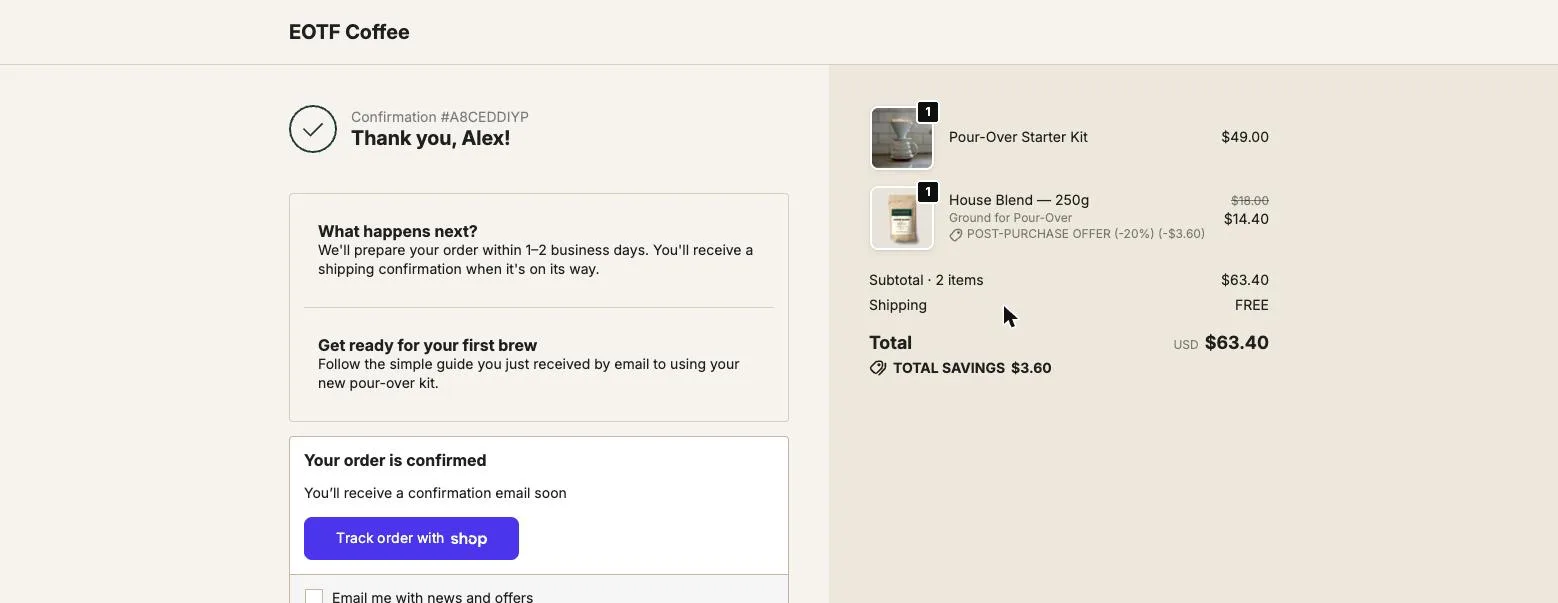
When an order holds several products, the repeat offer proposes the one with the highest unit price. On a coffee store where a buyer took a $49 brewing kit and a $18 bag, that means the kit. If you’d rather repeat the bag, use A product and pick the bag, or put the kit buyers in a separate funnel.
How deep should a Black Friday upsell discount be?
A Black Friday upsell discount has to beat the sitewide sale price the buyer just paid, or the offer reads as a price increase. If your store runs 25% off all weekend, an offer at 20% off asks the buyer to pay more for the second bag than for the first. Go at least 5 to 10 points deeper than the sale.
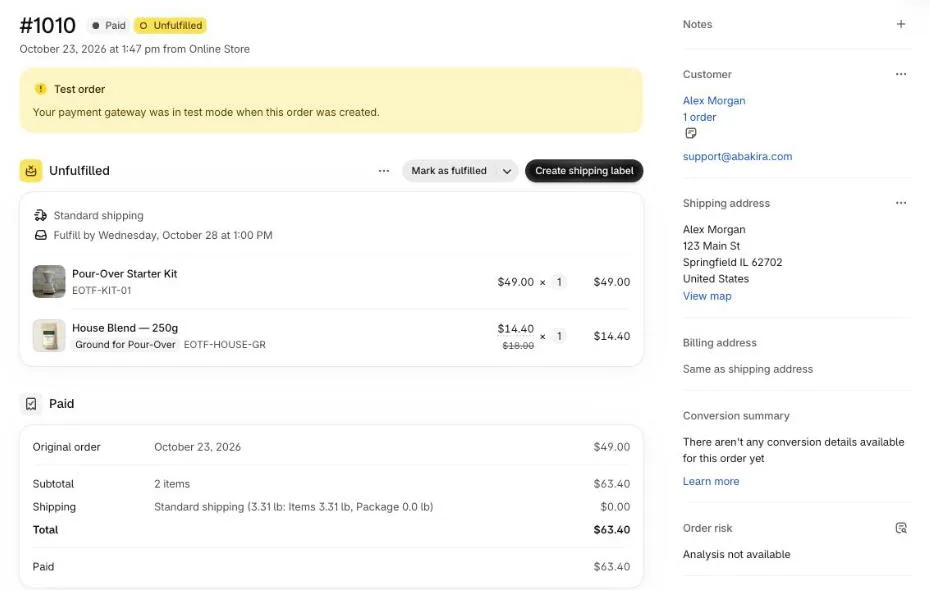
The percentage comes off the product’s price in your store, and the price on the page is the one Shopify calculates for that line. A sitewide code does not touch the one-click page: in our tests on September 27, 2026, a −10% code on all products was not applied there, so a 20% offer on the $18 bag shows $14.40 whatever your code says. That is why the depth has to be set with your sale in mind. How the two fit together over the weekend is covered in Black Friday discount codes and post-purchase upsells.
The margin holds up better than it looks, because the extra item rides in a parcel that is already paid for. Here is the arithmetic on an $18 bag of coffee that costs $6 to buy and pack:
| Offer | Buyer pays | Your cost | Margin kept |
|---|---|---|---|
| 1 more bag at 20% off | $14.40 | $6.00 | $8.40 |
| 2 more bags at 30% off | $25.20 | $12.00 | $13.20 |
| 3 more bags at 40% off | $32.40 | $18.00 | $14.40 |
No second pick, no second label, no second shipping charge. The deeper tier keeps less per bag and more per order, which is the trade you want on a weekend where traffic is expensive.
How should I price quantity tiers during a Black Friday sale?
Black Friday quantity tiers should give a bigger percentage at every step, so each extra unit is cheaper than the last. Big jumps early, small jumps late: the second unit does most of the work.
In Post Purchase Upsell Abakira, the offer’s own discount is the price for one unit. Quantity tiers start at 2 units, and you can add up to 5 tiers, up to 20 units. Click Add a tier, set the Quantity and the Discount for this quantity. If a tier with more units carries a smaller discount than the one before it, the admin warns you: “Buyers would pay more per unit for buying more.”
A ladder that fits a sale weekend on a consumable:
- One more unit at 20% off (the offer’s discount).
- Two more at 30% off (first tier).
- Three more at 40% off (second tier).
The buyer picks the quantity on the page and the button updates with the amount, for example “Add to my order • $32.40 (3 items)”. The server only charges a quantity you configured, at the discount you set for it. A buyer cannot send a quantity of 7 and get your 5-unit price, and nothing is ever rounded to the nearest tier.
If you already run tiers on your product pages, here is how to shift the product-page ladder one step for the page after checkout. Our guide chapter on discounts, quantity tiers and countdowns goes through each field.
Should I give a free gift after checkout on Black Friday?
A free gift after checkout works on Black Friday because every competitor is cutting prices, and a gift is the one thing that doesn’t look like another discount. On the one-click page, a gift is an offer at 100% off: the buyer taps once, a line at $0 joins the paid order, and it ships in the same parcel.
What makes a good gift: a sample of your best-seller, a refill, a small accessory that makes the main product better. A buyer who gets a sample of a second product has a reason to come back for the full size in January.
How to set it up in Post Purchase Upsell Abakira:
- Create the gift in Shopify as a normal product with a price and stock, so it ships and gets counted.
- In the funnel, add it with A product.
- Set Discount type to Percentage and enter 100. A fixed amount equal to the price does the same. A fixed amount above the price is refused when you save.
- Write a Selling headline that says what it is, for example “A free sample of our espresso blend, in the same box”.
Shopify doesn’t allow exclamation marks on this page, and the editor refuses them when you save. “Free” does the job without one.
A gift at the first level and a paid offer after it also works: put the gift as the first offer and a “double your order” in its If accepted branch. The buyer who just said yes to something free is in the right frame for the next offer.
The full setup, with the spend-threshold funnel and the version for wallet buyers, is in Black Friday free gift with purchase, given after checkout.
How do I sell gift wrap or a gift card add-on over BFCM?
Gift wrap is a strong Black Friday add-on for any order that is a present. Create gift wrap in Shopify as a product with a price and a photo, then offer it as A product on the one-click page. It joins the same order and the same packing slip.
Two details matter more than the product itself:
- Price it low enough to be a reflex. A $4 or $5 wrap next to a $60 order needs no thought. A $15 wrap is a decision.
- Name it in the headline for what it does: “Ready to give: wrapped, with a card” says more than “Gift wrap”.
The same logic covers a greeting card, a ribbon, a gift box for a candle, or a protective case for a fragile gift. Anything that turns the purchase into a present belongs here, at the moment the buyer is thinking about who it’s for.
The full setup, from the product to the packing bench, is in gift wrapping upsell on Shopify, offered after checkout.
What should I offer a Black Friday buyer who says no?
A Black Friday buyer who declines the first offer should see a cheaper version of it, not nothing. In Post Purchase Upsell Abakira every offer has an If declined branch, shown “only to buyers who just declined — this is your downsell.” A bigger discount catches the buyer who liked the idea but not the price.
The same product cheaper, or a single unit instead of three, are the two downsells that fit a sale weekend. The margin math for picking the downsell discount is in how deep to cut a downsell.
The ready-made funnel in the app is built on this exact pattern. Start from a ready-made funnel reads your last 60 days of sales and picks three offers: your best-seller at 15% off first, an item often bought with it (or your next best-seller) at 15% off if the buyer accepts, and, if the buyer declines, the “same product, bigger discount” at 25% off. It builds the funnel switched off, and you turn it on with Turn on this funnel once you’ve checked the products.
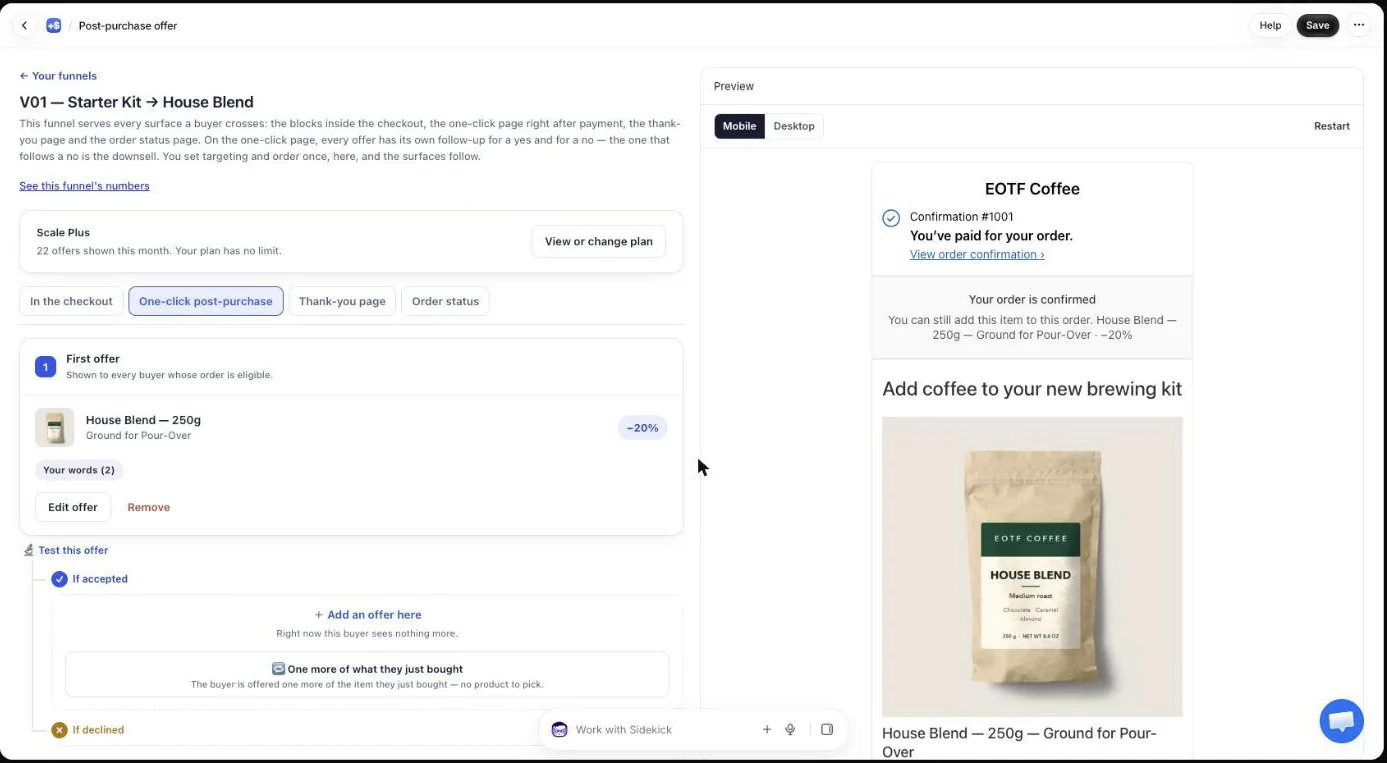
A funnel goes three levels deep and holds up to seven offers, and each buyer walks one path of three at most. On the free plan, the first level serves; the follow-up offers are saved and switch on with a paid plan. Our guide chapter on the accept and decline tree covers what to put after a yes and after a no.
Does a countdown help a Black Friday upsell?
A countdown helps a Black Friday upsell when the deadline is real, and on the one-click page it is. In Post Purchase Upsell Abakira, Show a countdown runs from 30 seconds to 30 minutes, and the admin states what happens at zero: “The urgency is real: when it reaches zero, the offer is declined and the buyer moves on.”
That matters on the one weekend when shoppers have seen a hundred fake timers. Reload the page and the time doesn’t reset; at zero the offer is refused on the server and the buyer moves to the next one. We’d set it between 5 and 10 minutes. Ten minutes is the default the app proposes when you switch it on.
The thank-you and order status pages take a different kind of timer. A block there can carry a countdown of up to 72 hours, counted from when the order was placed, so the buyer sees the same deadline on every visit and every device. That fits a weekend offer: a Friday buyer who opens the order status link on Sunday still sees a running clock. Under When the countdown reaches zero, you choose between Hide the block, Keep the block, at full price and Keep the block, show a message. Countdowns inside the checkout itself are not allowed, so keep them on these pages.
How do I show bigger upsells to bigger Black Friday orders?
Bigger Black Friday orders should see bigger offers, because the price ratio decides acceptance: a buyer who spent $300 takes a $60 add-on as an impulse. In Post Purchase Upsell Abakira, each funnel can carry the condition Order total is at least or Order contains, and the first matching active funnel serves the buyer.
The buyer who spent $35 won’t take that $60 add-on, which is why the small orders get their own offer.
A sale-weekend setup with three funnels, checked in this order:
- Order total is at least 150: a bundle or a three-unit ladder.
- Order contains your hero product: its refill or its accessory.
- No condition: one more unit at 20% off, for everyone else.
The funnel with no condition has to stay last. Any funnel placed after it can never be reached, and the admin warns you when that happens. The condition compares against the order total the buyer pays, in their checkout currency. Targeting and multiple funnels are on the paid plans; the App Store listing has the current details. Our guide chapter on multiple funnels and targeting shows the screens.
How do I reach Black Friday buyers who pay with PayPal or Apple Pay?
Black Friday buyers who pay with PayPal, Apple Pay, Google Pay, Klarna or a gift card reach the thank-you page, and that page is where their offer goes. In Post Purchase Upsell Abakira, the thank-you tab has a rule “For buyers who never saw the post-purchase page”, on the Pro plan and above. On the free plan, thank-you blocks are shown to every buyer, so put an offer there that differs from the one-click offer.
Every buyer who pays with a wallet skips the one-click page, so this rule is the only upsell they ever see. A Single product, Carousel or Bundle block on the thank-you page adds the item to the order the buyer just placed by default. The block’s Where the purchase goes setting offers three choices: “Same order, unless it has fully shipped” (the default), “Same order, only until the first parcel ships” and “Always a new checkout”. A card buyer who already paid is sent to Shopify’s payment page for the difference only.
A thank-you Bundle block also gives you a gift mechanic for these buyers: each item in the bundle takes its own discount from 0 to 100, and 100 means the item is free. “Buy the filter papers, get the scoop free” fits there. On single-product blocks on these pages, a percentage stops at 90; to give one product away there, use a fixed amount equal to its price. The article on why Apple Pay, PayPal and Google Pay orders never see the post-purchase page explains the setup in detail.
For the full weekend setup of that page, with its rules, countdown and test, see how to set up your BFCM thank-you page.
Can I add social proof to a Black Friday upsell?
Social proof on a Black Friday upsell has to be a measured number, not a typed one. In Post Purchase Upsell Abakira, Show how many buyers added it displays the share of buyers who took the offer, calculated from your own orders, and only when that share is 10% or more.
The figure appears once the offer has reached 50 views, so switch it on before the weekend and leave it. If the figure doesn’t meet the bar, the admin tells you why (“Not enough data yet. Hidden until the figure means something.”) and the buyer sees nothing odd.
When should my Black Friday upsell be live?
A Black Friday upsell should be live and tested by November 15, 2026, with nothing changed after November 23. Building late leaves no time for test orders, and changing offers during the weekend makes the results unreadable. The calendar below works backward from Friday, November 27.
| Date | What to do |
|---|---|
| By November 15 | Build the funnel, pick the discounts, write the headlines |
| November 16 to 22 | Place test orders, accept and decline every branch, check each order in your admin |
| November 23 | Check your plan’s monthly offer limit and freeze the setup |
| November 27 to 30 | Leave it alone |
| December 1 | Read offers shown, offers accepted and revenue added |
To run a different offer on each day of the weekend, give each period its own funnel and switch between them: see Cyber Monday upsell: one funnel per BFCM period. On December 1, swap them for the Christmas upsell ideas for after checkout.
Test with a credit card: Apple Pay, Google Pay, PayPal, Klarna, gift cards and cash on delivery never show the one-click page, so a test with one of those shows nothing. The order should come back as a single order, with the extra line and its discount on it.
The free plan shows 100 offers a month. If you expect more than about a hundred card orders over the weekend, it runs out before Monday, so look at the plans on the listing before the 23rd rather than during the rush.
When you read the results on December 1, divide accepted offers by offers shown, not by all orders. Buyers who paid with a wallet never saw the one-click offer and can’t have accepted it. Write down which offer won and at what discount; next November, that note is the starting point. Our guide chapter on reading your numbers explains each figure on the Results screen, and the guide chapter on what to offer covers the price ratio that applies the other 51 weeks of the year. For the techniques that raise order value before payment as well, see what actually raises average order value on Shopify, and the other seasonal articles on the blog.
Post Purchase Upsell Abakira has a free plan that runs on a live store, and the listing has the current plans.
Set up a double-your-order upsell for Black Friday on Shopify
- Select the app for the post-purchase page In Shopify admin, open Settings, then Checkout, then Post-purchase page, and select Post Purchase Upsell Abakira.
- Open the one-click tab of your funnel In the app, open your funnel and click the One-click post-purchase tab, then Edit offer on the first offer.
- Choose the repeat offer type Under What this offer proposes, pick One more, same variant so the buyer is offered another unit of the exact item they just paid for.
- Set the discount Under Discount type, pick Percentage and enter a discount deeper than your sitewide Black Friday discount.
- Add quantity tiers Under Quantity tiers, click Add a tier and set 2 units and 3 units, each with a bigger discount than the tier before.
- Write the headline and add the countdown Write a Selling headline such as Double your order, then turn on Show a countdown under Presentation and set it between 30 seconds and 30 minutes.
- Place a test order Pay with a test credit card, accept the offer and check in your Shopify admin that the extra line sits on the same order.
Frequently asked questions
Does a post-purchase upsell lower my Black Friday checkout conversion rate?
No. The one-click page and the thank-you page appear after the buyer has paid, so the original order is already placed when the offer shows. A buyer who taps No thanks keeps the order exactly as it was.
Does the buyer pay shipping again when they accept a post-purchase offer?
No. On the one-click page the item joins the order that was just paid and ships in the same parcel, with no second shipping charge. Check the weight of heavy items, because their shipping cost comes out of your margin.
How many post-purchase offers can one buyer see on Black Friday?
Shopify lets a buyer accept at most three offers on the post-purchase page. In Post Purchase Upsell Abakira that means a funnel of up to three levels and seven offers, where each buyer walks one path of three at most.
Should I keep the same upsell running from Black Friday to Cyber Monday?
Keep it if it converts. If you want a different offer on Monday, build it as its own funnel before the weekend and switch on the day: each funnel keeps its own row on the Results screen, even turned off, so you can still tell what each version earned. Read the rows on December 1.
Can I run a Black Friday post-purchase upsell on the free plan?
Yes. The free plan of Post Purchase Upsell Abakira runs one funnel with one offer on a live store and shows 100 offers a month. A store expecting a few hundred card orders over the weekend should look at the paid plans on the App Store listing before November 27.
Related articles
Written by Abakira. We make small software: Shopify apps, web tools and iPhone apps. This article is about Post Purchase Upsell Abakira.