Gift wrapping upsell on Shopify, offered after checkout
Sell gift wrap right after payment, when the buyer knows it's a present: one product, one tap, added to the same order while nothing has shipped.
2026-10-26 — Abakira, updated 2026-11-08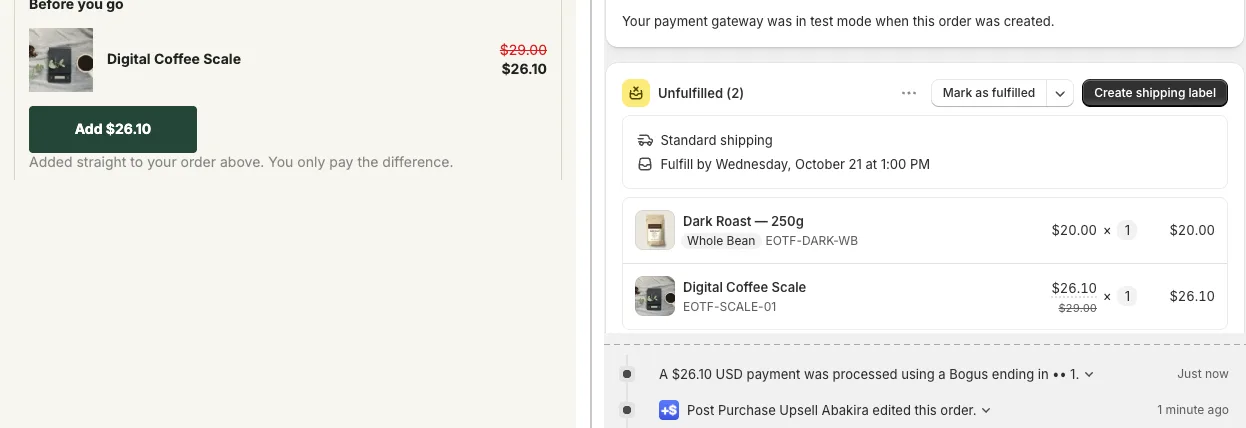
A gift wrapping upsell on Shopify sells best right after payment, on the one-click post-purchase page or the thank-you page, because that’s when the buyer knows the order is a present and the purchase itself is already done. Create gift wrap as a normal product, offer it with one tap, and have it join the order the buyer just paid for, so it ships in the same parcel as the items it wraps. With Post Purchase Upsell Abakira, a wrap added from the thank-you page goes onto the existing order only while nothing has shipped, if you pick that rule.
The rest of this page covers the product to create, the price, which page to use, and how the parcel gets wrapped on the warehouse side.
Why sell gift wrap after checkout instead of in the cart?
Gift wrap sold after checkout reaches the buyer at the one moment the purchase is settled. In the cart, the wrap is one more decision stacked on top of the price, the shipping fee and the discount code. After payment, the order is placed and the only question left is whether it should arrive ready to give.
The other reason is mechanical. A cart add-on asks every shopper, including the ones buying for themselves. After checkout you can ask once, with a single button, and the answer can’t cost you the original sale: a buyer who taps No thanks keeps their order exactly as it was.
How do I create a gift wrap product in Shopify?
A gift wrap product is a normal Shopify product with a price, a photo and a SKU, which the upsell adds to the order like any other item. There is nothing special to install for it. What matters is that the warehouse can see it on the order, pick the materials and charge for it like a product.
- In your Shopify admin, go to Products and add a product. Call it what the buyer will read. On the one-click page, Shopify keeps the product’s own title visible under your headline, so “Holiday gift wrap with card” works harder than “GW-01”.
- Upload a real photo of a wrapped parcel from your store. Shoot your own paper and ribbon on one of your own boxes, so the buyer sees exactly what will arrive.
- Set the price (see the next section).
- Turn on Physical product: the wrap leaves in the parcel. Enter the weight of the paper, ribbon and card, because weight-based shipping rates use product weight.
- Give it a SKU, such as
GIFT-WRAP. If a warehouse system receives your orders, it matches lines by SKU and may reject a line without one. - If you track inventory on it, set the number of wraps you can actually prepare. Leave the product Active. A sold-out wrap shows the buyer “This item just sold out. Your original order remains confirmed and paid.” instead of adding it.
One product covers every order. If you want two styles, create two products rather than two variants: on the one-click page you choose the variant you offer, and two products are easier to place in different spots.
How much should I charge for gift wrap?
Price gift wrap between $4.99 and $10 after checkout, low enough that the buyer doesn’t stop to think. The price should be small next to the order: a $5 wrap on a $49 order adds 10.2% to the order value.
Work out your cost before you pick the number. Count the paper, the ribbon, a card if you include one, and the minutes it takes someone in your team to wrap a parcel. Then price so that one wrap pays for itself even on your smallest order.
| Order value | Wrap at $4.99 | Wrap at $7.99 | Wrap at $9.99 |
|---|---|---|---|
| $30 | +16.6% | +26.6% | +33.3% |
| $49 | +10.2% | +16.3% | +20.4% |
| $80 | +6.2% | +10.0% | +12.5% |
On stores with a low average order, $4.99 keeps the wrap under a fifth of the order.
You can also discount it. A wrap “normally $7.99, $4.99 now” works on the one-click page because the discount shows next to the price, and in Post Purchase Upsell Abakira every offer has its own discount, percentage or fixed amount.
Should gift wrap go on the one-click page or the thank-you page?
Gift wrap belongs on both pages, because each one reaches different buyers. Shopify shows the one-click post-purchase page only when the buyer paid by credit card. Apple Pay, Google Pay, PayPal, Klarna, gift cards and cash on delivery skip it and go straight to the thank-you page, which every buyer reaches.
| One-click post-purchase page | Thank-you page | |
|---|---|---|
| Who sees it | Buyers who paid by credit card | Every buyer, whatever the payment method |
| How they pay for the wrap | Charged to the card already used, one tap | Card buyers pay the difference on a Shopify payment page; cash on delivery buyers pay at the door |
| Where the wrap goes | The same order, same parcel | The same order, by order editing, while the rule you chose allows it |
| Limit | Shopify allows up to three accepted offers per order | Up to six blocks per page in each funnel |
| Free plan | One funnel, one offer, 100 offers shown a month | Thank-you blocks shown to every buyer; not counted in the 100 |
Put the wrap on the one-click page for card buyers, and on the thank-you page for everyone else. Set up that way, a buyer never sees the wrap twice.
How do I offer gift wrap on the one-click post-purchase page?
The one-click post-purchase page appears between payment and the order confirmation, and adds the wrap to the paid order with one tap on the card the buyer already used. In Post Purchase Upsell Abakira, gift wrap is an offer of the kind A product, built in a funnel like any other offer. On a jewelry store, the box can ride in the same bundle card as the matching earrings: see jewelry upsell ideas.
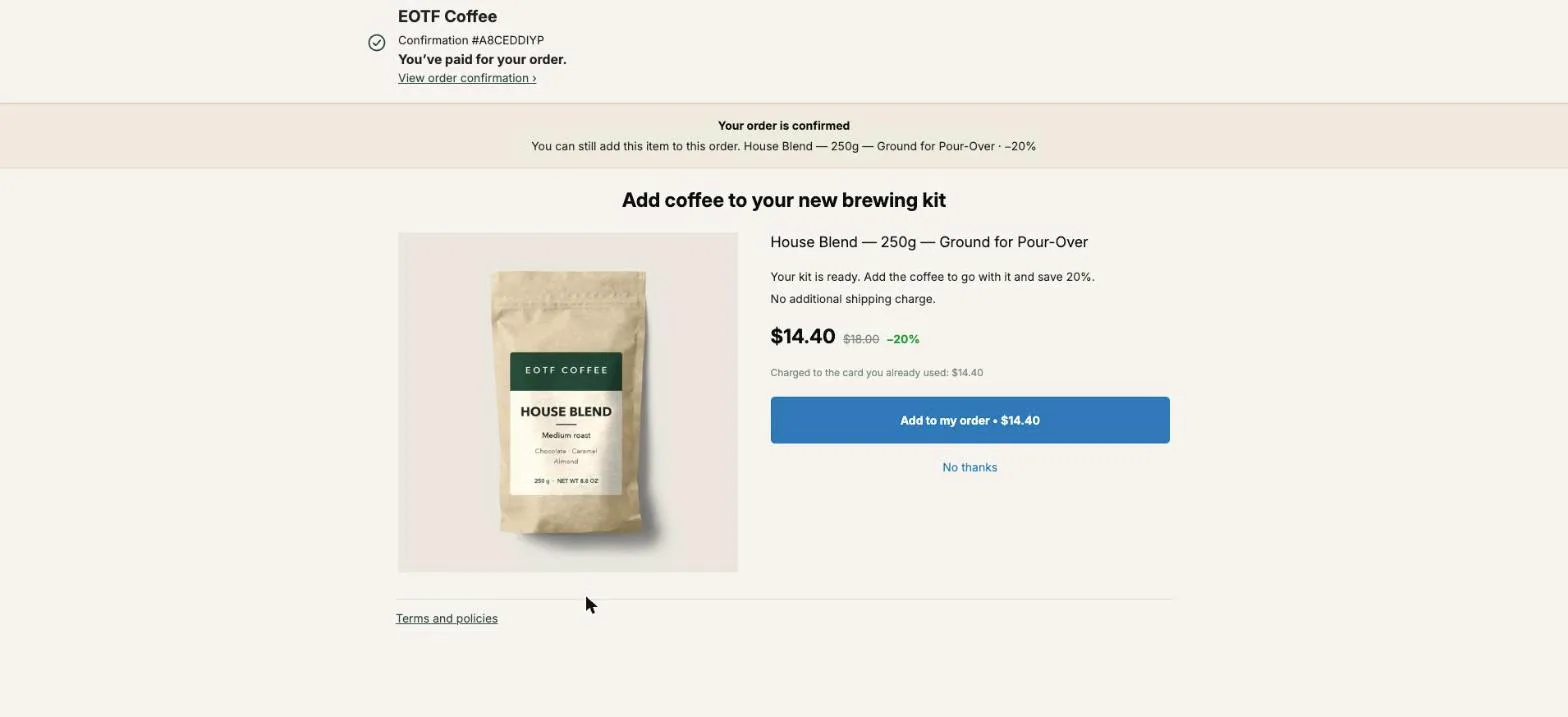
- Open your funnel and set What this offer proposes to A product.
- Pick the Gift wrap product.
- In Selling headline, say what the buyer gets. “Ready to give: wrapped, with a card” says more than the product name alone. The headline sits above the product title, which Shopify keeps visible.
- In Your argument, add a line or two. A line starting with a dash becomes a bullet: ”- Wrapped by hand before it leaves”, ”- Ships in the same parcel”.
- Choose a discount, or leave it at 0. At 0 the admin reminds you the buyer saves nothing on this offer, which is fine for a wrap sold at its normal price.
On a paid plan, the wrap can also be the second offer. Put your main upsell first and the wrap in its If accepted branch: a buyer who just added a second item is a buyer with more to wrap. Targeting by product, to show the wrap only after orders that contain giftable items, is also on the paid plans; the App Store listing has the current details.
How do I add gift wrap from the thank-you page to the same order?
The thank-you page adds gift wrap to the existing order through a Single product block, which edits the order the buyer just placed instead of opening a second checkout. One order, one packing list, one shipping label. That’s the setting that makes gift wrap work after checkout, because a wrap in a second parcel is useless.
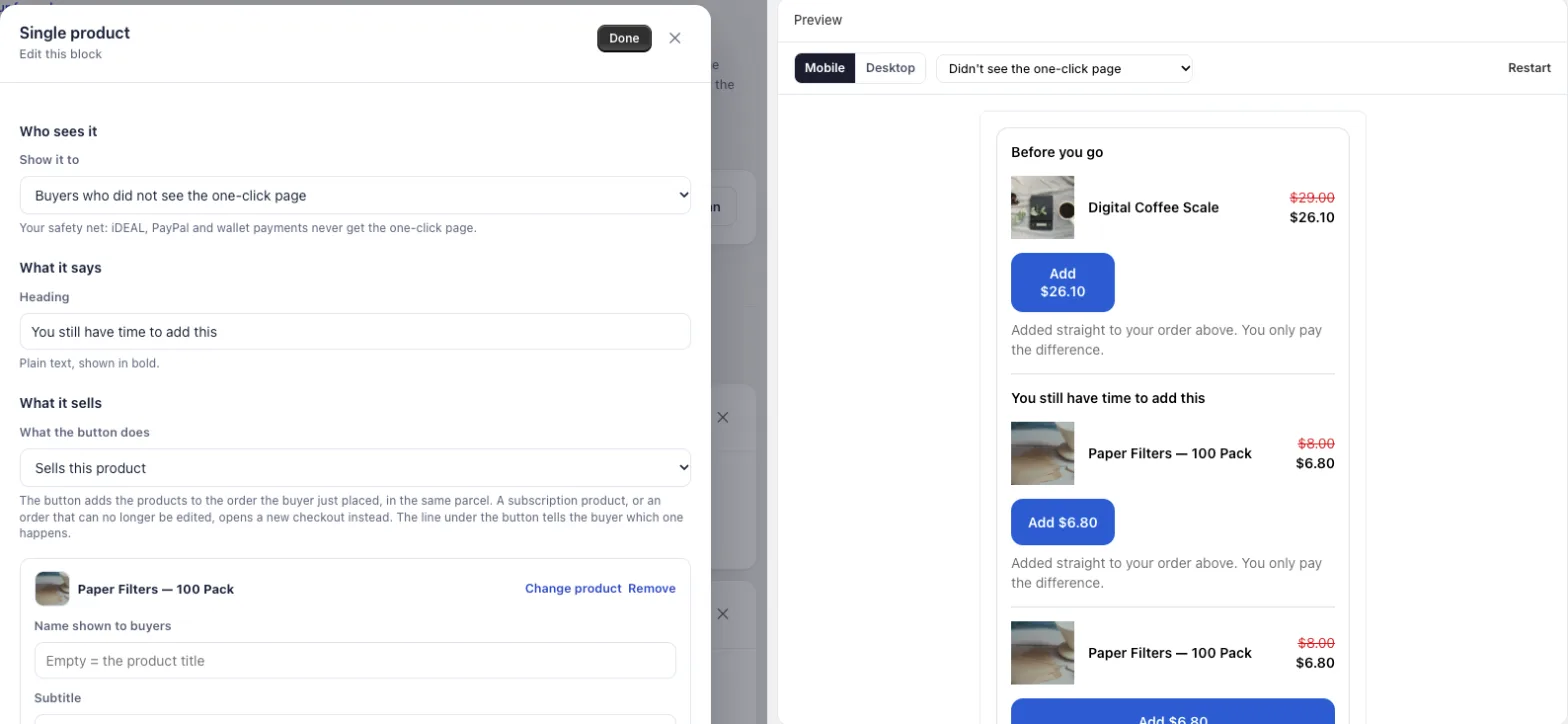
- Place the Thank you page offer block once in Shopify’s checkout editor, on the Thank you page. Without it, nothing you build in the app appears.
- In your funnel, open the Thank-you page tab and add a Single product block.
- Set Show it to to Buyers who did not see the one-click page. These are the buyers who paid with a wallet, PayPal, a gift card or cash on delivery, and never got the one-click offer.
- Write a Heading, such as “Is this a gift?”. It shows in bold above the product.
- Keep What the button does on Sells this product and pick Gift wrap. Name shown to buyers lets you rename the product on this page only; empty means the product title.
- Set Where the purchase goes to Same order, only until the first parcel ships (next section).
Under the button, the buyer reads, word for word: “Added straight to your order above. You only pay the difference.” A card buyer then goes to a Shopify payment page for the wrap’s price only. A buyer paying on delivery is never sent to an online payment: the wrap joins the order and its price is added to what they pay at the door.
Which “Where the purchase goes” option fits gift wrap?
For gift wrap, choose Same order, only until the first parcel ships. Gift wrap only has value inside the parcel it wraps, so it should join the order while nothing has left, and switch to a new checkout as soon as any parcel is on its way. Post Purchase Upsell Abakira offers three options on every product block:
| Option in the admin | What happens | Fit for gift wrap |
|---|---|---|
| Same order, unless it has fully shipped | Added to the order unless everything has shipped. A partly shipped order still takes the wrap, which leaves in a later parcel. | Fine if you never split orders |
| Same order, only until the first parcel ships | Added while nothing has shipped. As soon as one parcel has left, the buyer pays in a new checkout and gets a separate order. | The right choice |
| Always a new checkout | A separate order, with your usual shipping rates. | Not for wrap |
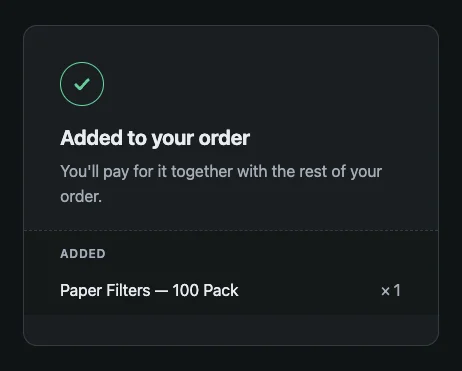
The app checks the order twice: when it shows the block, and again when the buyer taps, because a parcel can leave in between. The link behind the button stays valid for 24 hours, and an order that already carries an added item still waiting for payment refuses a second one, so a buyer who taps twice doesn’t end up with two unpaid wraps.
Can buyers add gift wrap later, from the order status page?
Buyers can add gift wrap from the order status page, the page behind the link in the confirmation email that they reopen to track the parcel. It takes the same blocks as the thank-you page. It needs one more step: add the Order status page offer block in Shopify’s checkout editor, on the Order status page.
That page is where the shipping rule matters most. A buyer who opens it on day three may have an order that’s partly on its way, so set the wrap block to Same order, only until the first parcel ships here too. On the free plan, order status blocks are shown to every buyer of your funnel, and they don’t count toward the 100 one-click offers a month.
A countdown fits this page in December: a block can carry a timer of up to 72 hours, counted from the moment the order was placed, so the offer closes at a time you choose.
How does the warehouse know which order to wrap?
The warehouse knows an order needs wrapping because the wrap is a line on the order, with its own SKU, in the same shipment as the items. In the Shopify admin, an accepted wrap appears in the order’s unfulfilled items next to the products, and the timeline records “Post Purchase Upsell Abakira edited this order” with the time of the edit.
Make it impossible to miss on the packing bench:
- Name the SKU so it reads at a glance (
GIFT-WRAP), and check that your packing slip shows it. - Tell the team the rule: an order with a wrap line ships wrapped, everything inside it, unless the buyer’s note says otherwise.
- Keep the materials next to the packing station from mid-November.
If a 3PL or a warehouse system imports your orders, the wrap has to reach the warehouse before it picks the order. Warehouse systems copy an order seconds after payment, often before the buyer has tapped anything. The article on why a post-purchase upsell ships in a second parcel with a 3PL explains the race and what prevents it, and our guide chapter on same order, cash on delivery and the price you show covers what happens to an added line that isn’t paid yet.
How do I collect the gift message?
Collect the gift message in the cart, with Shopify’s order note, and sell the wrap after checkout. In the theme editor, open the cart settings and turn on Enable cart note: buyers get a text box for extra order information. The note appears on the order, where your packing team reads it.
Label the box so buyers know what it is for, for example “Gift? Write your card message here”. Then the two halves meet on the same order: the message typed before payment, and the wrap added after it.
When should the gift wrap offer go live?
The gift wrap offer should be live before Black Friday, on November 27, 2026, and should end on your last shipping date for Christmas delivery. A wrap sold to a buyer whose parcel can’t arrive before December 25 is a promise you can’t keep.
Before you switch it on, place two test orders: one paid by card that accepts the wrap on the one-click page, and one paid with another method that adds it from the thank-you page. Each time, open the order in Shopify and check that it’s a single order with the wrap line on it. Test the card order with a real card or Shopify’s test gateway; a wallet payment skips the one-click page and shows nothing there.
After December, switch the wrap off or swap it for the next occasion: the same product works for Valentine’s Day and Mother’s Day with a new photo. Pair it with an offer that completes the gift, targeted on the products people give. Before mid-December, check your Christmas shipping cutoff and how long buyers can still add to their order. For the rest of the season’s offers, see our Black Friday upsell ideas for the page after checkout and how to set up your BFCM thank-you page. The guide chapter on the thank-you page shows every block setting with screenshots.
Post Purchase Upsell Abakira has a free plan that runs one funnel on a live store. The listing has the current plans.
Sell gift wrap after checkout on Shopify
- Create the gift wrap product In Shopify, create a product called Gift wrap with a real photo, a price, a SKU, the Physical product setting on and the weight of the paper and ribbon. Set it to Active.
- Build the one-click offer In Post Purchase Upsell Abakira, open your funnel, set the first offer to A product, pick Gift wrap and write a Selling headline that says what the buyer gets.
- Add a thank-you page block In the funnel's Thank-you page tab, add a Single product block with Gift wrap, set Show it to Buyers who did not see the one-click page.
- Choose where the purchase goes In the same block, set Where the purchase goes to Same order, only until the first parcel ships.
- Place a test order Pay with a card and accept the wrap on the one-click page, then pay with another method and add the wrap from the thank-you page. Each time, check that Shopify shows one order with the wrap line on it.
Frequently asked questions
Should gift wrap be free or paid?
Paid, at a price low enough to be a reflex next to the order. A free wrap is a cost you carry on every order that asks for it. If you want to give it away anyway, a one-click offer can carry a 100% discount, so the wrap line joins the order at $0 and still shows up for your packing team.
Does adding gift wrap after checkout cost the buyer a second shipping fee?
No. On the one-click page and on the thank-you page with Same order selected, the wrap joins the order the buyer already placed. There is one order and one parcel, so there is no second shipping charge.
Can the buyer choose between several wrapping papers?
On the one-click page you pick the variant you offer, so the simplest setup is one wrap that suits every order. If you want two styles, create them as two products and offer the second one in the declined branch of the first, on a paid plan, or as a second block on the thank-you page.
Can the wrap still be added when part of the order has shipped?
It depends on the rule you set. With Same order, only until the first parcel ships, the wrap joins the order while nothing has left, and as soon as a parcel is on its way Post Purchase Upsell Abakira sends the buyer to a new checkout, so the wrap never lands on an order that has already left. With Same order, unless it has fully shipped, a partly shipped order still takes the wrap, which leaves in a later parcel.
Do gift wrap offers count toward the free plan limit?
Only on the one-click page. The free plan shows 100 one-click offers a month. Offers on the thank-you and order status pages do not count toward that limit.
Related articles
Written by Abakira. We make small software: Shopify apps, web tools and iPhone apps. This article is about Post Purchase Upsell Abakira.