Christmas shipping cutoff on Shopify: upsell to the last day
Work back from USPS's December 17 date, then let buyers add to their order until the parcel leaves, with a timer counted from the order, up to 72 hours.
2026-10-27 — Abakira, updated 2026-11-08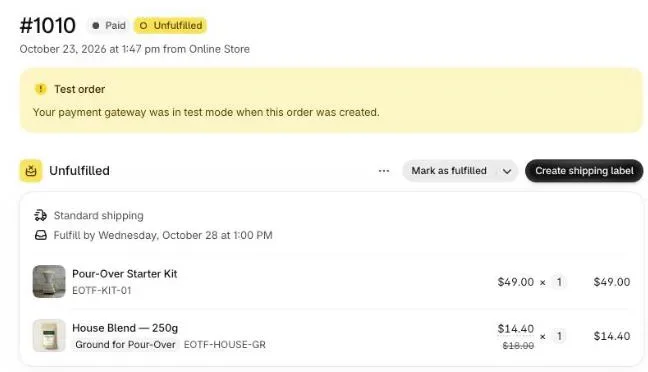
The Christmas shipping cutoff on Shopify is the last day an order can be placed and still reach the buyer by December 25: the carrier’s last ship date minus your handling time. For 2026, USPS recommends December 17 for Ground Advantage, so a store that ships within one business day stops promising Christmas delivery after December 16. Until each parcel actually leaves, a buyer can still add an item to the order they already placed, and that is the window worth selling into.
This article does the date arithmetic for December 2026, then shows how to set thank-you and order status offers in Post Purchase Upsell Abakira so they add to the order only while nothing has shipped, with a deadline counted from the order itself. For the offers themselves (second gift, gift wrap, the missing piece of a set), see Christmas upsell ideas for after checkout.
When is the Christmas shipping cutoff in 2026?
The Christmas shipping cutoff in 2026 starts from the carriers’ recommended dates. USPS published them on September 22, 2026, for delivery before December 25 in the lower 48 states. Christmas falls on a Friday, so the key dates land on the Thursday, Friday and Saturday of the week before.
| Carrier and service | Last recommended ship date (2026) | Weekday |
|---|---|---|
| USPS Ground Advantage | December 17 | Thursday |
| USPS First-Class Mail | December 17 | Thursday |
| USPS Priority Mail | December 18 | Friday |
| USPS Priority Mail Express | December 19 | Saturday |
| FedEx Ground Economy | December 15 | Tuesday |
| FedEx 2Day | December 22 | Tuesday |
| FedEx overnight services | December 23 | Wednesday |
For Alaska, Hawaii, Puerto Rico and the US territories, USPS moves Ground Advantage one day earlier, to December 16. International and military dates come much earlier, some in November. The FedEx dates aim at delivery by December 24, and FedEx Ground and Home Delivery depend on the transit time between the two ZIP codes, from December 17 for a 5-day lane to December 23 for a 1-day lane. These are the carriers’ recommended dates, not guarantees; they’re the best number you have.
How do I work out my own last order date?
Your own last order date is the carrier’s ship date minus the business days you need to pick, pack and hand the parcel over. If you ship USPS Ground Advantage and pack orders the next business day, an order placed on Wednesday, December 16 ships Thursday the 17th and makes it. An order placed on Thursday the 17th misses it.
Do it once per shipping method you offer:
- Take the carrier date for that method from the table above.
- Count back your handling time in business days. Weekends count only if you pack on weekends.
- Pick a cutoff hour, not just a day. “Order by 2 pm ET on December 16” is clearer than “December 16”.
- Give a later date for your fastest paid method. Priority Mail buys one day, Priority Mail Express two.
- Set a separate, earlier date for anything you engrave, personalize or make to order, since its handling time is longer.
The table for a store that packs within one business day and ships USPS:
| Shipping method | Carrier ship date | Last order for Christmas |
|---|---|---|
| Ground Advantage | Thu, December 17 | Wed, December 16 |
| Priority Mail | Fri, December 18 | Thu, December 17 |
| Priority Mail Express | Sat, December 19 | Fri, December 18 |
Write these down before December 1. Every message on the store, and every countdown below, comes out of this table.
Where should the cutoff date appear on the store?
The Christmas cutoff date belongs everywhere a buyer decides: the announcement bar of your theme, product pages for giftable items, the cart, the shipping method names at checkout, the order confirmation email and a short delivery page linked from the footer. Show “Order by December 16 for Christmas delivery” in the header and again next to the shipping rate.
A few habits keep it accurate:
- Name the shipping methods after the date during December. “Standard (order by Dec 16 for Christmas)” says more than “Standard”.
- Change the wording on the morning after each cutoff, not the evening before. A banner that says “too late” a day early costs you that day’s gift orders.
- After the last cutoff, keep selling and say the order will arrive after Christmas. It’s a text change in your theme and your shipping method names, nothing more.
- If you offer local pickup or local delivery in Shopify, push them in the last days. A gift card, which needs no parcel, is the other answer for a buyer who must have something by the 25th.
The part that gets less attention is what happens after the buyer pays.
Why sell after checkout in the last two weeks?
Selling after checkout in the last two weeks works because the parcel hasn’t left yet. The buyer has paid, the order sits in your admin as Unfulfilled, and anything added now rides in the same box, on the same label, under the same Christmas promise. You pay no second shipment, and the buyer doesn’t have to beat the cutoff twice.
The pages where this happens are the ones Shopify shows after payment:
- The one-click post-purchase page, between payment and the thank-you page. Accepting adds the item to the order and charges the card the buyer already used, so it always lands before anything ships. Shopify only shows this page after a credit card payment.
- The thank-you page, which every paying buyer reaches.
- The order status page, which the buyer opens later from the confirmation email or the tracking link.
The thank-you and order status pages are the interesting ones for the cutoff, because the buyer can come back to them hours later. By then the order may have shipped. What the offer does in that case is the setting that matters.
How do I keep the added item in the same parcel?
Post Purchase Upsell Abakira keeps the added item in the same parcel with a per-block setting called Where the purchase goes. It applies to product blocks on the thank-you and order status pages and has three choices. For December, pick Same order, only until the first parcel ships: the item joins the order while nothing has left your warehouse.
The three choices, as the admin words them:
| Setting | What the buyer gets |
|---|---|
| Same order, unless it has fully shipped (default) | Added to the order until every item has shipped. |
| Same order, only until the first parcel ships | Added while nothing has shipped. Once one parcel has left, even for part of the order, a new checkout and a separate order. |
| Always a new checkout | A separate order every time, with your usual shipping rates. |
The default suits most of the year. In December it has one gap: if you split an order and the first box has already left, the default would still add the extra item, and it would travel alone in a second parcel that may arrive after the 25th. The second choice closes that gap.
Here is what the app does with the rule, read from its code:
- When the page loads, it reads the order from Shopify: cancelled, partly shipped, fully shipped, or still waiting.
- If the rule allows an addition, the button carries a signed link that adds the item to that order. The variant, the quantity and the discount are fixed by the server, not by the browser.
- If the order can’t take the item anymore, the button opens a regular checkout instead, so the buyer can still buy it as a separate order.
- When the buyer clicks, the app reads the order again before touching it. A parcel can ship between the page loading and the tap.
That second read is what makes the setting safe on the order status page. If the order shipped in between, nothing is added and the buyer sees “This order has already shipped” with “Nothing was added to your order.” underneath. No half-edited order, no extra line on a box that has gone.
The Sequence block, which chains several offers on the thank-you page, follows the same rule in its own way: once the order can no longer take additions, the sequence isn’t shown at all, and it never opens a new checkout.
How long should the countdown run in December?
A December countdown should close before the order is packed. In Post Purchase Upsell Abakira, a thank-you or order status block can carry a countdown of up to 72 hours, and the admin says how it’s counted: “Counted from the moment the order was placed, not from the moment the page opens — so it shows the same deadline on every visit and every device.”
Because it’s counted from the order, the deadline is the same when the buyer reloads, opens the email link on their phone, or comes back two days later. Nothing restarts. That’s what lets you use a long window honestly.
The length follows your packing rhythm, and it changes as December goes on:
| Period (2026) | Suggested window | Why |
|---|---|---|
| December 1 to 10 | 24 to 48 hours | Fits while you pack a day or more after the order. |
| December 11 to your last order date | 4 to 12 hours | You pack faster, so the window should close before the next packing run. |
| Last order date and after | 1 to 2 hours, or switch the offer off | The parcel leaves soon after the order, and a late addition only works if it makes the box. |
Pair the countdown with Same order, only until the first parcel ships. The countdown says how long the offer is open; the rule makes sure it can’t land in an empty space between two parcels. If the timer is still running when the order ships, the rule wins.
The words on the timer are yours. Countdown wording (optional) takes a sentence with {countdown} where the time goes. The app’s own example is “You have {countdown} left to add these to your order”. For December, name the parcel:
- “{countdown} left to add this to your parcel before it ships”
- “Still packing your order: {countdown} to add one more”
Shopify doesn’t allow countdowns inside the checkout itself, and the app’s admin says so next to the field. They live on the thank-you and order status pages, and on the one-click page, where Show a countdown runs from 30 seconds to 30 minutes and declines the offer when it ends.
What should the buyer see when the window closes?
When the window closes, the buyer should see something true. When the countdown reaches zero has three options in Post Purchase Upsell Abakira: Hide the block, which is the default, Keep the block, at full price, or Keep the block, show a message. For the shipping cutoff, the message is the most useful of the three.
With Keep the block, show a message, your text replaces the button in Message when the offer has ended. Leave it empty and the app shows its own translated sentence. A December version: “Your order is being packed. This one can’t join it now.” It tells the buyer why, and it doesn’t invite a support email.
Keep the block, at full price suits items that don’t depend on the parcel: something the buyer would happily get after Christmas. The discount stops at zero, the product stays.
What happens to buyers who paid by card on the thank-you page?
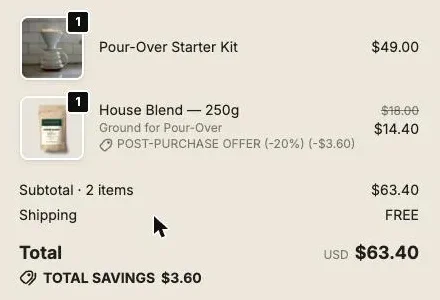
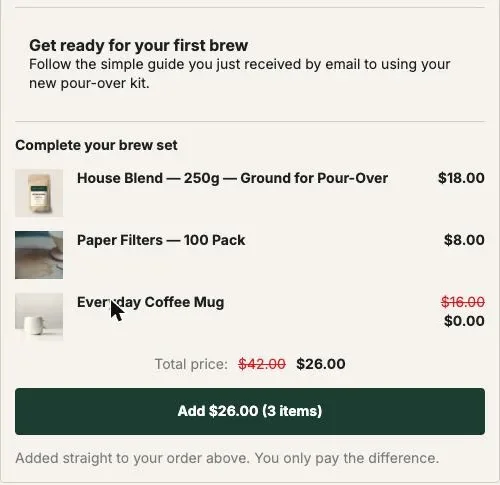
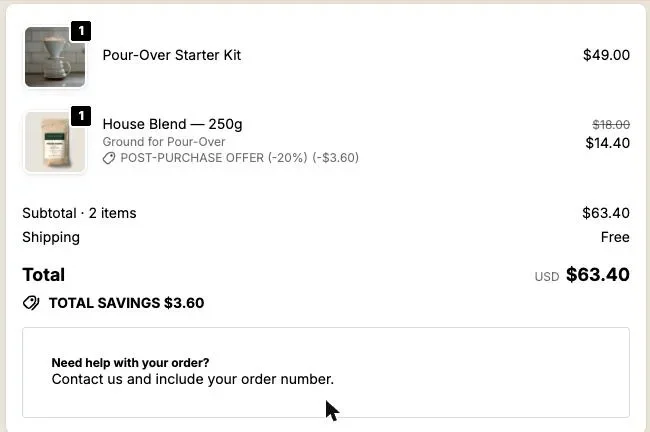
A buyer who paid by card and adds an item from the thank-you or order status page pays only the difference, on Shopify’s own payment page. The line is added to the existing order first, and the order shows a balance until they pay. Post Purchase Upsell Abakira allows one pending addition per order: a second tap before payment gets “An item on this order is waiting to be paid” and “Finish that payment first.”
The buyer pays only for what they added, and your order stays one order with one balance. The one-pending-addition limit protects that in the rush: a buyer who taps twice, or opens the thank-you page and the order status page side by side, can’t stack unpaid lines on an order you’re about to pack. Orders paid on delivery or by bank transfer work differently, since the whole order is still owed; the cash on delivery article explains that path.
The link behind the button is valid for 24 hours. A tab left open since last week can’t edit an order that has long gone out: the button has to be loaded again, and that new load reads the order’s shipping status first.
Should the offer change after the last shipping day?
After the last shipping day, the offer should stop promising Christmas. A buyer who orders on December 20 knows the parcel won’t arrive in time, and an offer that talks about stockings reads as careless. Change the wording the morning after your last cutoff, and keep the add-to-order setting on: the item still saves a second parcel.
A December 2026 plan for a store shipping USPS Ground Advantage and packing within one business day:
| Date | What to change |
|---|---|
| Tue, December 1 | December funnel live. Thank-you block with Same order, only until the first parcel ships and a 24-hour countdown. |
| Fri, December 11 | Countdown down to 8 hours. Check one test order end to end. |
| Wed, December 16 | Last Christmas order day. Countdown down to 2 hours. |
| Thu, December 17 | Rewrite the headline and countdown wording without the Christmas promise. Keep or end the discount. |
| Sat, December 26 | Uncheck Active on the December funnel; the funnel below it takes over. |
The order status page keeps working through all of this. Buyers open it to track their parcel, and as long as the order hasn’t shipped, a block there can still add to it. Order status rules (choosing which buyers see which block) are on a paid plan; the order status page chapter of our guide shows the screens.
What if a warehouse or 3PL ships my orders?
If a 3PL ships your orders, the cutoff for an addition is the moment the warehouse system pulls the order, not the moment the box leaves. With a warehouse system that doesn’t take late changes, a line added after that point may never reach the packer. Post Purchase Upsell Abakira has a warehouse connector for Picqer, on the Scale plan, that holds new orders for a few minutes and sends the added line to the warehouse once the order shows nothing left to pay; the 3PL guide chapter and the article on keeping post-purchase items in one parcel with a 3PL cover the setup.
In December, ask your warehouse two dates: their last pick day for Christmas delivery, and how long an order waits before they pull it. The second number is the longest countdown you should run.
How do I test this before the rush?
Test it in the first days of December, on a live order you cancel, or on a development store. Place an order, add the item from the thank-you page, and check the order in your Shopify admin. A passing test shows one order, both items in the same Unfulfilled shipment and the added line with its discount.
Then test the refusal. Mark the original order as fulfilled, open the order status page, and tap the offer. With Same order, only until the first parcel ships, the button opens a new checkout instead of adding to the shipped order. If you tap a button that was loaded before you fulfilled, you get “This order has already shipped”. Both are the behavior you want on December 16. The thank-you page chapter has the screens for each block setting, and discounts, timers and proof covers every countdown field.
Post Purchase Upsell Abakira has a free plan with 100 offers shown a month on the one-click page; the listing has the current plans.
Set a thank-you offer that adds to the order only until the parcel ships
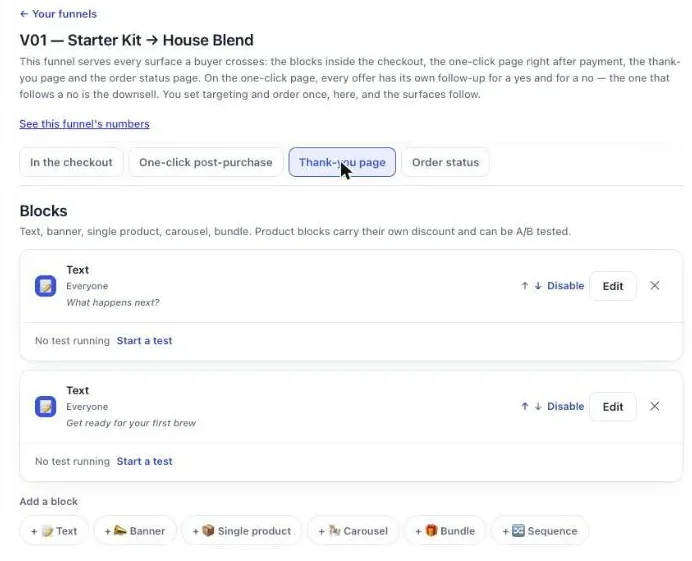
- Open the thank-you tab In Post Purchase Upsell Abakira, open your December funnel and click the Thank-you page tab.
- Add a product block Under Add a block, pick Single product, Carousel or Bundle and choose the products and their discount.
- Keep the item in the parcel Under Where the purchase goes, pick Same order, only until the first parcel ships.
- Set the countdown In Countdown (empty = none), enter the hours and minutes the offer stays open, up to 72 hours, counted from the order.
- Choose what happens at zero Under When the countdown reaches zero, pick Keep the block, show a message, and write the sentence in Message when the offer has ended.
- Test before your busiest week Place a test order, add the item from the thank-you page and check in your Shopify admin that both items sit in the same unfulfilled shipment.
Frequently asked questions
When is the last day to ship for Christmas 2026 in the US?
USPS recommends shipping by December 17 for Ground Advantage and First-Class Mail, December 18 for Priority Mail and December 19 for Priority Mail Express, for delivery before December 25 in the lower 48 states. Subtract your own handling time to get the last day a buyer can order.
Should my store close after the Christmas shipping cutoff?
No. Keep taking orders and say plainly on the store that they will arrive after Christmas. Gift cards and local pickup, if you offer them, still work for buyers who need something by the 25th.
Can a buyer add an item to their order after the Christmas cutoff?
Yes, as long as the order hasn't shipped and the offer's countdown hasn't run out. With Same order, only until the first parcel ships, the item joins the parcel. Once a parcel has left, the buyer gets a new checkout and a separate order instead.
Does the countdown on the thank-you page reset when the buyer reloads it?
No. In Post Purchase Upsell Abakira the countdown on thank-you and order status blocks is counted from the moment the order was placed, so it shows the same deadline on every visit and every device.
How long does the add-to-order link stay valid?
The signed link behind a thank-you or order status offer is valid for 24 hours. The countdown you set can end it sooner, and the shipping check runs again on every click.
Related articles
Written by Abakira. We make small software: Shopify apps, web tools and iPhone apps. This article is about Post Purchase Upsell Abakira.