Mother's Day upsell ideas: one for her, one for you
Mother's Day upsells after payment: offer the gift buyer the same item for themselves, a smaller one if they say no, then a follow-up on the order status page.
2026-11-12 — Abakira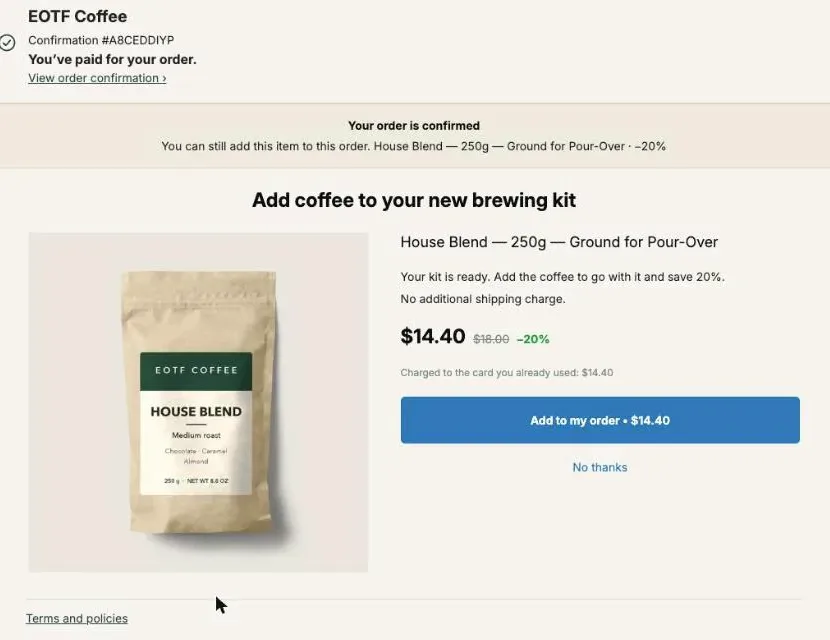
The Mother’s Day upsell idea that sells best after checkout is the gift itself, offered to the person who just bought it: “one for her, one for you”. Right after payment, show the buyer the item they chose for their mother at 15 to 20% off, for themselves, added to the same order with one tap. If they say no, offer a smaller size. In Post Purchase Upsell Abakira this is a One more, any variant offer, and you don’t pick a product: the app reads it from the paid order.
Mother’s Day in the US falls on Sunday, May 9, 2027. The funnel below goes live on Tuesday, April 20, and stays on for the week after the 9th on the order status page. Every idea comes with the exact setting in the app. For the gift-completing offers that run all year (a matching piece, a box, a card), read how to sell more gifts online by completing the gift. This page is about the buyer’s own share.
Why offer the gift buyer one for themselves?
The gift buyer is the one person who has just proved they like the product: they compared, chose a variant and paid for it a minute ago. Offering them the same item for themselves after checkout asks no new decision, only “do you want one too, cheaper?” The usual Mother’s Day add-ons (wrap, card, a second small gift) ask them to keep shopping for someone else.
After checkout, the message reaches the buyer while they are still on your store, with the card already on file and no ad cost.
The offer also works for buyers who are not giving anything. Someone who bought a candle for their own living room in late April sees “one for her, one for you” and reads it as “a second one, cheaper”. That’s a plain same product upsell, and it needs no gift to work. Our article on the same product upsell on Shopify covers the year-round version and the price math in detail.
Products where it fits best:
| Product type | What the buyer gets for themselves |
|---|---|
| Candles, diffusers, scents | Their own scent, picked from the variants |
| Skincare and bath sets | The same set, or the travel size after a no |
| Coffee, tea, chocolate | A second bag or box for their own shelf |
| Jewelry and accessories | The matching piece in their own metal or color |
| Clothing, robes, slippers | Their own size of the same item |
| Plants and flowers | Rarely: mom’s bouquet is not one you keep. Use a vase or a card instead |
Which offer types should a Mother’s Day funnel use?
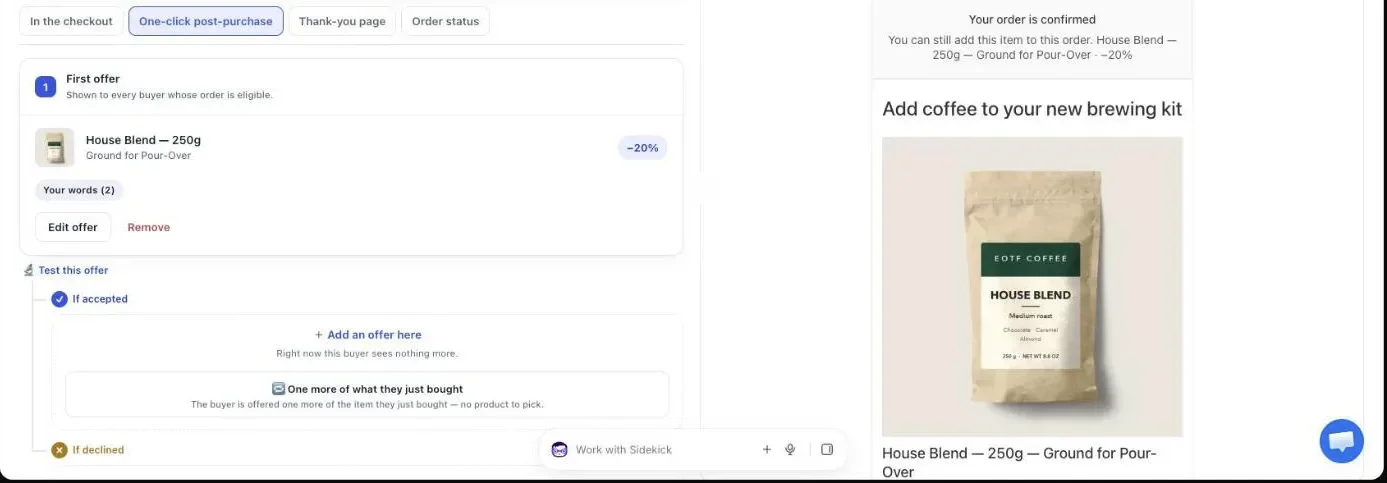
A Mother’s Day funnel in Post Purchase Upsell Abakira uses one of two repeat offer types on the one-click page. One more, any variant re-proposes the product the buyer paid for and lets them pick another variant of it. One more, same variant re-proposes the exact item, with no choice. For gifts, pick any variant.
The reason is simple: what the buyer chose for their mother is rarely what they would choose for themselves. A different scent, another color, their own size. With One more, any variant, the admin help text says it plainly: “The product is decided at checkout, and the buyer can pick another variant of it.” A variant of a different product is refused on the server, so the offer always stays on the product they bought.
When the order holds several items, the app re-offers the one with the highest price per unit. A $49 gift set bought with a $6 card re-offers the set, not the card: the most expensive line is the best hint of what the buyer came for. When two lines cost the same, the first line of the order wins.
Neither repeat type needs a product picked in the admin. The item is read from the order lines Shopify signed at checkout, never from what the browser sends. One offer covers your whole Mother’s Day catalog, and a buyer cannot swap in another product or price.
How much discount should “one for you” carry?
A “one for you” Mother’s Day offer should carry 15 to 20% off the item the buyer just paid for. That cut is enough for a second unit the buyer was not planning to buy, and it keeps margin on an item that joins an order the buyer has already placed. Go deeper only on the smaller item you offer after a no.
Use a Percentage, not a Fixed amount. A repeat offer re-proposes whatever the buyer bought, so the price changes from order to order. A fixed $8 off is 40% of a $20 candle and 8% of a $100 robe. A percentage keeps the cut proportional on every product.
Here’s the math on our demo store, with the Pour-Over Starter Kit at $49 bought as a gift:
| Offer | Discount | Buyer pays | Order total (was $49.00) |
|---|---|---|---|
| The same kit, for the buyer | 15% | $41.65 | $90.65 |
| The same kit, for the buyer | 20% | $39.20 | $88.20 |
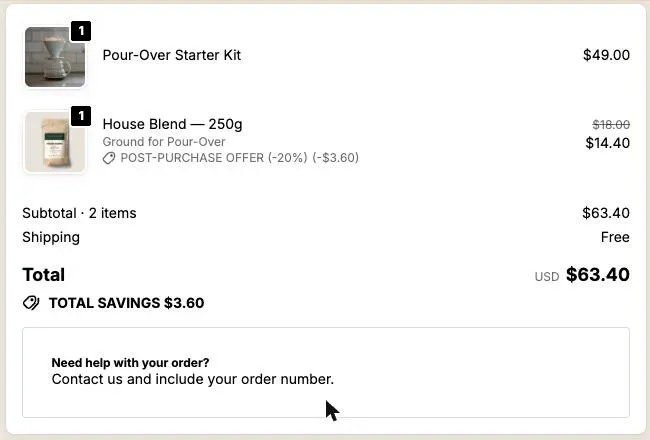
| After a no: a 250g bag of coffee | 20% | $14.40 | $63.40 |
A yes on the first line nearly doubles the order. An offer priced close to what the buyer just spent is usually a new decision and gets refused; a repeat is the exception, because the buyer already decided on that exact product. The guide chapter on what to offer after checkout has the full price-ratio rule. The bag of coffee after a no catches the ones who passed. Before going past 20% on the first offer, run your own landed cost through the method in contribution margin for ecommerce.
What should the downsell be after a no?
The downsell after a no on a Mother’s Day offer is the smaller version of the same thing: the mini candle, the travel-size cream, a single bag instead of the set, a sample of the scent. The buyer has just said they don’t want the full item for themselves. A smaller, cheaper one is a different question, and it keeps the “one for you” idea.
In Post Purchase Upsell Abakira, every offer on the one-click page has two follow-ups: If accepted and If declined. The one under If declined is the downsell. Set it up like this:
- On the first offer, under If declined, click Add an offer here.
- Under What this offer proposes, choose A product and click Choose a product.
- Pick the mini or travel size. If the product has variants, tick the ones the buyer may choose from, up to 25.
- Set a Percentage equal to or deeper than the first offer: 20 to 25% works well after a 15% first ask.
- Write a new Selling headline that names the size, for example “Try it in the travel size”.
Under If accepted, don’t push a third unit of the same thing. Offer a small companion instead (a refill, a wick trimmer, a cleaning cloth for the jewelry) or nothing at all. Shopify takes at most three post-purchase additions per checkout, and the app turns the add buttons off once the third is in. The guide chapter on the accept and decline tree shows how each branch is picked, and how deep to cut after a buyer says no works through the price gap.
Branches after the first offer, If accepted and If declined, come with the paid plans. On the free plan your funnel shows one offer, so make it the “one for you” offer.
How do I show it only on Mother’s Day gift orders?
You show a Mother’s Day offer only on gift orders with a dedicated funnel whose condition is Order contains, set to the products people buy for their mothers. Post Purchase Upsell Abakira checks funnels in the order of the list, and the first funnel whose condition the order meets is the one shown. Put the Mother’s Day funnel above your general one.
- In Your funnels, click Create a funnel and name it, for example “Mother’s Day 2027, one for you”.
- Set the condition to Order contains and click Choose a product. One condition takes up to 300 products, enough for a whole gift guide.
- Use the arrows to move the funnel above any funnel set to Everyone, tick Active, and save.
- Click Try a cart, add one of the gift products, and check that the Mother’s Day funnel is the one marked “This one is shown”.
If Try a cart answers “Turned off” next to the funnel, it isn’t active yet: tick Active, save, and try again. Targeting by product, variant or order total and running several funnels at once are on the Pro plan and above; targeting a whole collection is on Scale. The chapter on multiple funnels and targeting has every condition.
If your Mother’s Day catalog is your whole catalog (a candle or flower store in April), skip the targeting. A single funnel set to everyone, running “one for her, one for you” for three weeks, does the job.
What should a Mother’s Day upsell say?
A Mother’s Day upsell should say three things in a few words: the item is the one they just gave, this one is for them, and it ships in the same parcel. In Post Purchase Upsell Abakira, each one-click offer has its own text under Your words on this page. The Selling headline sits above the product name, which always stays visible.
The fields and their limits:
- Selling headline: up to 90 characters.
- Promise line: up to 140 characters, at the top of the page.
- Your argument: up to 6 lines. A line that starts with a dash becomes a bullet.
- Badges: up to 3, 28 characters each.
Headlines that work, by offer:
| Offer | Selling headline |
|---|---|
| Same product, any variant | ”One for her, one for you” |
| Same product, any variant | ”You picked it for her. Pick yours.” |
| Jewelry, matching piece | ”Make it a matching pair” |
| Downsell, travel size | ”Try it in the travel size” |
| Downsell, single item from a set | ”Keep one for yourself” |
In Your argument, write with tokens, because one repeat offer covers every product. {product} becomes the product name, {save} what the buyer saves, {amount} the price after your discount and {price} the regular price, all filled from the prices Shopify calculates:
- ”- {product} for you, {save} off”
- ”- Arrives in the same parcel as her gift”
That second line is literally true: an item accepted on the one-click page joins the order the buyer just placed, so it goes to that order’s shipping address. When the gift ships straight to mom, the buyer’s item travels with it. Say so in the argument, and if most of your Mother’s Day orders ship to the recipient, keep the one-click offer for the gift side (a card, wrap, a matching piece) and give the buyer their “one for you” on the thank-you page with a new checkout, as shown below.
Shopify does not allow exclamation marks on this page. Write one and the editor answers “Shopify does not allow exclamation marks on this page.” A plain, warm headline reads better anyway. The text you write is shown as you wrote it, in every buyer language, so write it in the language of your store. More examples are in the buyer wording chapter of the guide.
How do I add urgency without faking it?
Urgency on a Mother’s Day upsell comes from the real date, not from a made-up stock count. On the one-click page, Show a countdown runs from 30 seconds to 30 minutes, and when it reaches zero the offer is declined and the buyer moves on. Five minutes is plenty for a decision about a second unit.
The thank-you and order status pages have their own timer: up to 72 hours, counted from the moment the order was placed, so the same deadline shows on every visit and every device. In the last three days before your final shipping day for delivery by May 9, set the thank-you block’s countdown to end before your last packing run. A promise line such as “Add it before Thursday and it ships with her gift” is true, and the timer backs it up. The guide chapter on discounts, timers and proof shows every field.
What do buyers who skip the one-click page see?
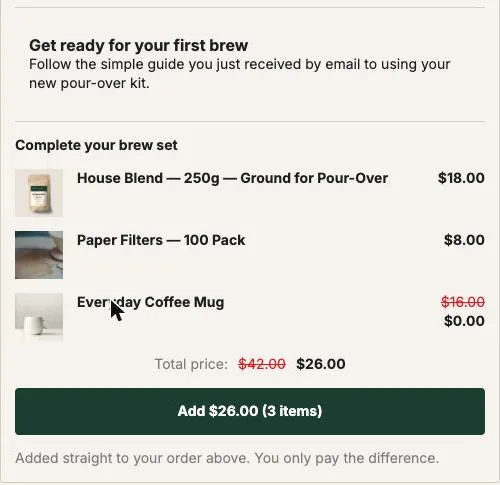
Buyers who skip the one-click page land straight on the thank-you page, and that page reaches every paid order. Put a Single product block there with the same “one for you” idea: a fixed product you choose, since a thank-you block holds the products you pick rather than reading the order. A Bundle block of 2 to 4 products also fits.
Set it up on the funnel’s Thank-you page tab:
- Once, in Shopify’s checkout editor, open the Thank you page and add the “Thank you page offer” block. Nothing shows on that page until it is placed.
- Add a Single product block and pick your best-selling gift product, or its travel size.
- Under Show it to, choose Buyers who did not see the one-click page, so nobody gets the same offer twice. This rule is on Pro and above; on the free plan, the block shows to every buyer, so offer something different from the one-click offer.
- Under Where the purchase goes, choose Same order, only until the first parcel ships if the buyer’s item should join the parcel. Choose Always a new checkout when your gift orders ship to the mother: the buyer pays in a new checkout, enters their own address and gets a separate order with your usual shipping rates. If you use the new-checkout setup for gift orders that ship to the recipient, leave Show it to on Everyone: those buyers did see the one-click page.
- Add a countdown if your shipping deadline is close.
A thank-you block can carry 0% on an item, which a one-click offer cannot; that’s how a free card or sample rides along with a paid item in a bundle. The chapter on the thank-you page covers each block type.
How do I use the week after Mother’s Day?
The week after Mother’s Day is still worth an offer, and its buyers are already on your order status page. That page is the one the confirmation email links to. Keep the Mother’s Day funnel on until Sunday, May 16, and put the “one for you” offer there.
On the funnel’s Order status tab, add a Single product block. Place the “Order status page offer” block once in the checkout editor, on the Order status page. On the Scale plan, Show it to has rules based on what the buyer did on the thank-you page. Choose Buyers who bought nothing on the thank-you page: a buyer who already took the thank-you offer doesn’t see a second one, and everyone else gets a fresh chance to pick something for themselves. On the other plans these rules are paused and every order status block shows to every buyer.
Timing matters on this page. A buyer opening it on May 12 may have an order that has already shipped. With Same order, unless it has fully shipped, the item still joins the order if part of it is waiting; once everything has left, the buyer pays in a new checkout. The chapter on the order status page explains which option fits your warehouse.
When should the Mother’s Day funnel go live?
The Mother’s Day funnel goes live about three weeks before the day and comes down a week after it. Post Purchase Upsell Abakira has no scheduler: switching is the Active checkbox on the funnel list, ticked by you on the morning it starts. Nothing is deleted when a funnel is turned off, so next year is a rename and a tick.
| Date (2027) | What to do |
|---|---|
| By Friday, April 16 | Build the funnel, inactive. Write the headlines. Create the travel-size products if you don’t sell them yet. |
| Tuesday, April 20 | Tick Active, move it above the Everyone funnel, run Try a cart, place one test order paid by card. |
| Your last shipping day for May 9 | Shorten the thank-you countdown so it closes before your last packing run. |
| Sunday, May 9 | Mother’s Day. Leave the funnel on. |
| Sunday, May 16 | Untick Active. Your general funnel takes over. |
On the free plan you have one funnel, so the switch is an edit of its offer instead of a checkbox: change it to One more, any variant with the “one for her, one for you” headline on April 20, and put your usual offer back after May 16. The free plan shows 100 offers a month on the one-click page, counted on that page only. Other dates on the calendar are on the seasonal articles page; the February version of the same build is Valentine’s Day upsell ideas, and the December one is Christmas upsell ideas.
How do I check that the offer works?
A Mother’s Day offer works when a test order with a gift product shows it and ends as one order, with both items in the same shipment. Place one test order with a gift product paid by card before April 20, accept the offer, then open the order in your Shopify admin.
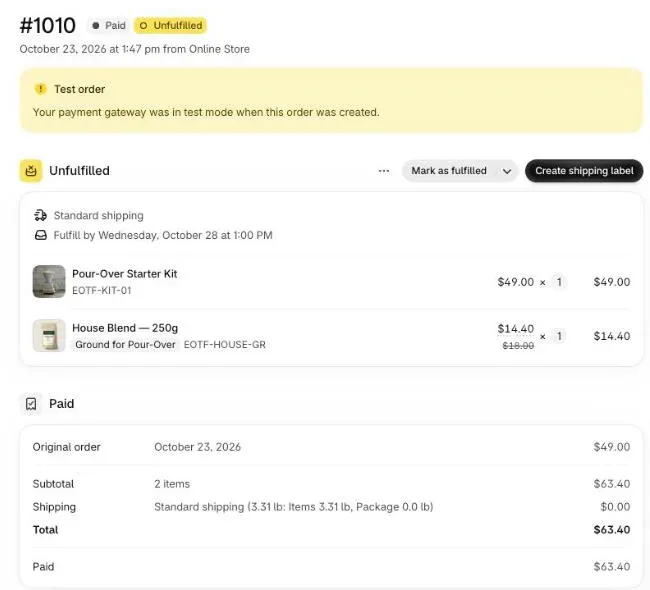
The accepted item sits on the same order as the gift, in the same unfulfilled shipment, at the discounted price. On our demo store, test order #1010 shows the Pour-Over Starter Kit at $49.00 and a House Blend bag at $14.40, crossed from $18.00, in one shipment, for a total of $63.40.
After May 16, open Results and the By product table, which covers the last 30 days: it tells you whether the full item or the travel size earned more. On the Scale plan, Test this offer runs up to 4 versions of an offer; for next year, test “One for her, one for you” against a headline that names the saving. The guide chapter on reading your numbers explains each figure.
Post Purchase Upsell Abakira has a free plan that runs on a live store; the listing has the current plans and what each one includes.
Set up a one for her, one for you Mother's Day upsell in Post Purchase Upsell Abakira
- Create the funnel In Your funnels, click Create a funnel and name it, for example Mother's Day 2027, one for you.
- Target the gift products Set the condition to Order contains, click Choose a product, and pick the products people buy for their mothers.
- Choose the repeat offer On the One-click post-purchase tab, click Start with one more unit, or click Edit offer and set What this offer proposes to One more, any variant.
- Set the discount Set a Percentage discount between 15 and 20 for the first offer.
- Write the words Under Your words on this page, write a Selling headline such as One for her, one for you, and two lines in Your argument.
- Add the smaller offer under If declined Under If declined, click Add an offer here, choose A product, pick the mini or travel size, and give it the same or a deeper discount.
- Place the app blocks in the checkout editor Once, in Shopify's checkout editor, add the Thank you page offer block on the Thank you page and the Order status page offer block on the Order status page. Nothing shows on those pages until the blocks are placed.
- Add the thank-you and order status blocks On the Thank-you page tab, add a Single product block for buyers who did not see the one-click page. On the Order status tab, add a block shown to Buyers who bought nothing on the thank-you page.
- Test, then turn it on Tick Active, move the funnel above your Everyone funnel, click Try a cart with a gift product, then place a test order paid by card.
Frequently asked questions
Should the Mother's Day upsell be another gift for mom?
It can be, and gift wrap or a card are covered in our other gift articles. The offer in this article goes the other way: it proposes the item the buyer just gave, for the buyer. They chose and paid for it seconds ago, so they need no convincing that it is good.
Will the item for the buyer ship to mom's address?
Yes, when it is accepted on the one-click page: the item joins the order the buyer just placed and goes to that order's shipping address, in the same parcel. When your gift orders ship to the recipient, offer the buyer's item on the thank-you page with Where the purchase goes set to Always a new checkout, so they enter their own address.
Can the buyer choose a different scent, color or size for themselves?
Yes. Pick One more, any variant as the offer type. The offer re-proposes the product the buyer paid for, and the buyer can pick another of its variants, such as their own size or a different scent. One more, same variant offers the exact item with no choice to make.
Can I run the Mother's Day offer on the free plan?
Yes, on your one funnel. The free plan runs one funnel with one offer level and shows 100 offers a month on the one-click page, and that funnel is shown to every buyer. Targeting gift products, the downsell after a no and the display rules on the thank-you and order status pages are on the paid plans listed on the App Store page.
Does the same idea work for Father's Day?
Yes. Father's Day 2027 falls on Sunday, June 20. Keep the funnel, rename it, rewrite the Selling headline for him, and tick Active again in early June. Nothing is deleted when a funnel is turned off after May.
What happens to orders placed after the funnel is turned off?
They go through the next funnel in your list whose condition the order meets, usually your general funnel set to Everyone. Turning the Mother's Day funnel off only takes it out of the running; its offers and words stay saved for next year.
Related articles
Written by Abakira. We make small software: Shopify apps, web tools and iPhone apps. This article is about Post Purchase Upsell Abakira.