Same product upsell on Shopify: one more, after payment
Offer one more of the item the buyer just paid for, at a lower unit price, on the same order. Which item to re-offer, how deep to cut, and the exact setup.
2026-10-30 — Abakira, updated 2026-11-12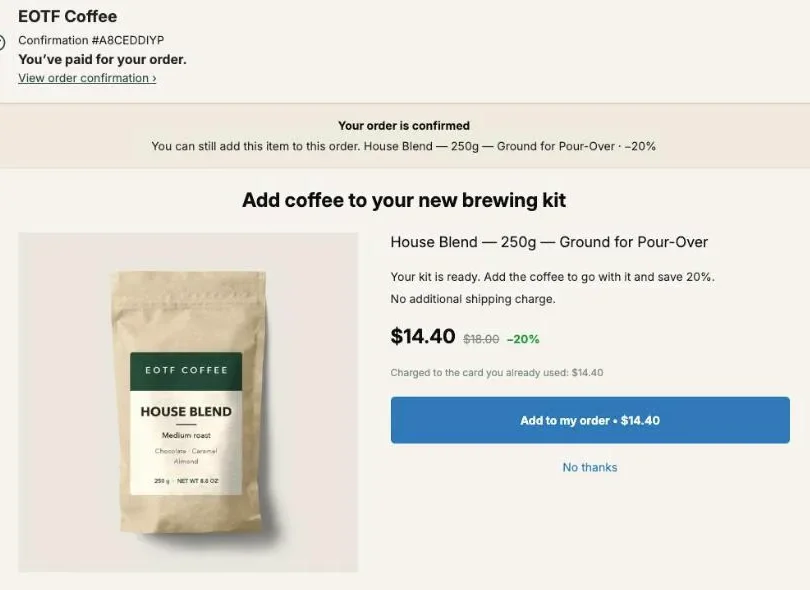
A same product upsell on Shopify offers the buyer one more of the item they just bought, at a lower price per unit, on the page right after payment. The buyer has already picked the product and the variant, so the offer asks one easy question: do you want a second one at this price? Accepted, the unit joins the same order, charged to the same card, in the same parcel.
On an $18 bag of coffee, a second bag at 25% off is $13.50, and a one-bag order goes from $18 to $31.50, a 75% bigger order from one tap. In Post Purchase Upsell Abakira this is an offer type, One more, same variant or One more, any variant, that needs no product picked: the app reads the item from the paid order. This page covers why the same product works, which item gets re-offered when the order holds several, how deep to cut, how to word it, and where it sits in a funnel.
What is a same product upsell on Shopify?
A same product upsell on Shopify is an offer for another unit of an item already in the order, shown after the buyer pays. It differs from a cross-sell, which offers something else (see upsell vs cross-sell after checkout), and from an upgrade, which offers a bigger size instead of the one chosen. The buyer keeps their purchase and adds to it.
Three things set it apart from a product-page quantity discount:
- The decision is already made. The buyer chose the product, the variant and paid for it a few seconds ago. Nothing about the offer asks them to reconsider.
- The price is per added unit. The first unit was bought at full price. The discount only applies to the extra one, which is why it can be deeper than anything you’d show on the product page.
- It ships with the first one. On the one-click page, Shopify adds the accepted item to the existing order. One order, one pick, one label.
It’s also the simplest offer to run across a whole catalog. You don’t build one offer per product. One offer covers every order, because the item comes from the order itself.
Why does the same product beat a complementary product after checkout?
The same product beats a complementary one after checkout because it asks for no new decision. A complementary item (filters for a coffee maker, a case for a phone) makes the buyer judge something new. The same item was judged and paid for seconds ago, so the only new information is the price, and the price is lower.
At scale, more of the same usually wins. The classic version has a name, the bucket upsell: right after the sale, offer the same product again at a much lower unit price, worded “double your order”.
That wording matters. “Double your order” describes a quantity, not a product. The buyer doesn’t have to picture something new in their kitchen or bathroom. They picture twice what they already wanted.
Our own guide makes the same call on the price ratio. An offer priced near what the buyer just spent usually gets refused, because it’s a new decision. A repeat is the exception: a $22 repeat after a $24 order still gets taken, because the buyer is not deciding again. Our chapter on what to offer after checkout has the full ratio rule.
Which products work for a same product upsell?
Same product upsells work on products a buyer uses up or uses several of: coffee and tea, supplements, skincare, pet food and treats, candles, socks and underwear, cleaning refills, phone cables. A second unit has an obvious use, either as stock for later or as a spare, so the lower unit price is the whole argument. For a full set of offers built on a coffee catalog, see coffee shop upsell ideas after checkout. The seasonal version for gift orders is in Mother’s Day upsell ideas: one for her, one for you.
On one-per-person products, put a companion first (the grinder, the gloves) and keep the same product offer for a different funnel.
If your catalog mixes both, two options:
- One funnel, the same product first, a companion as the follow-up. Fine when most of your orders are consumables.
- Two funnels. A funnel for orders that contain your consumables, with the same product offer, and another for everyone else. Targeting a funnel by what the order contains uses the Order contains condition, which comes with a paid plan.
Same variant or any variant: which should I choose?
One more, same variant offers the exact item the buyer paid for, with no choice to make: same flavor, same size, same grind. One more, any variant offers the same product but lets the buyer switch to another of its variants, for example another size for a second person. Pick by whether a second unit is usually for the same use. To offer flavors or colors you choose yourself rather than the item read from the order, see letting the buyer pick the variant in a product offer.
| One more, same variant | One more, any variant | |
|---|---|---|
| What the buyer sees | The item they just bought, no picker | The same product, with a variant picker |
| Admin help text | "The item is decided at checkout. No choice to make: they already picked it." | "The product is decided at checkout, and the buyer can pick another variant of it." |
| Which variants can be added | Only the purchased one; any other variant sent by the browser is ignored | Any variant of the purchased product; a variant of another product is refused |
| Good for | Coffee by grind, supplements by flavor, refills | Clothing sizes, colors, scents for someone else |
| Name on the Results screen | Same item the buyer just bought | Another one from the product just bought |
Our default advice: same variant for consumables. With same variant the page shows one item and one button: no picker to scroll. Any variant earns its place on apparel and gifts, where the second unit is often for someone else and the size is different.
Both types are checked on the server. The item is re-read from the order lines Shopify signed at checkout, never from what the buyer’s browser sends, so nobody can swap the offer for a different product or a different price.
Which item gets re-offered when the order has several products?
Post Purchase Upsell Abakira re-offers the line with the highest price per unit. In an order with a $49 brewing kit and an $18 bag of coffee, that’s the kit. In an order with an $80 serum and a $2 sample, it’s the serum, not the sample. When prices are equal, the first line of the order wins.
The logic is simple: the most expensive item per unit is the best hint of what the buyer came for. Re-offering the $2 sample would spend the one page you get on the cheapest thing in the box.
If your catalog has a high-priced durable product that often sells next to a consumable, the same product offer re-offers the durable one. Two ways to steer it:
- Run a separate funnel for orders that contain the kit, where the first offer is A product (the coffee, chosen by you) and keep the same product funnel for everyone else.
- Accept the re-offer on the kit and use the If declined branch to fall back to the coffee. Branches after the first offer need a paid plan.
How much discount should a same product upsell carry?
A same product upsell should carry a percentage discount, usually between 15% and 30%, set from your margin on one extra unit. Run the discount against the extra unit’s own product and packaging cost, as in the table below: the unit rides in a parcel the first order already paid to ship.
Use a percentage, not a fixed amount. A repeat offer re-offers whatever the buyer bought, so the item changes from order to order. A fixed $5 off is 56% off a $9 refill and 8% off a $60 jar. A percentage keeps the cut in proportion on every product. For the CPA math on a sub-$30 store, see fixing a low AOV on Shopify after the buyer pays.
Here is the math on an $18 bag with a $7 landed cost (product plus packaging):
| Discount on the extra bag | Buyer pays | Margin on the extra bag | Order total (was $18) |
|---|---|---|---|
| 15% | $15.30 | $8.30 | $33.30 |
| 25% | $13.50 | $6.50 | $31.50 |
| 40% | $10.80 | $3.80 | $28.80 |
| 50% ("half price") | $9.00 | $2.00 | $27.00 |
Even at half price, the second bag earns money, and it ships in the box that’s already going out. Where to stop depends on your landed cost: run your own numbers with the method in contribution margin for ecommerce before you go past 30%.
The starter funnel in Post Purchase Upsell Abakira uses 15% on the first offer and 25% on the downsell. That gap is a good template for a same product funnel too: 15 or 20% on the first ask, a deeper cut if the buyer says no. The reasoning behind the gap is in how deep to cut after a buyer says no.
What about buyers who bought two or three?
The offer always starts at one more unit, with the offer’s own discount. On a one-unit order, that’s literally doubling it. A buyer who already bought three bags is adding a fourth.
If you want a real “double” for every basket size, or a stock-up option, add Quantity tiers to the same offer: up to 5 tiers, each from 2 to 20 units, each with its own Discount for this quantity. The buyer then gets a Quantity menu under the product. How to build the ladder itself, and why a top tier changes which tier people pick, is covered in decoy pricing after checkout; the seasonal version with steeper cuts is in Black Friday quantity discounts after checkout.
If the reason to buy more is a price change rather than a discount, see how to turn a price increase into a stock-up offer.
How do I set up a same product upsell in Post Purchase Upsell Abakira?
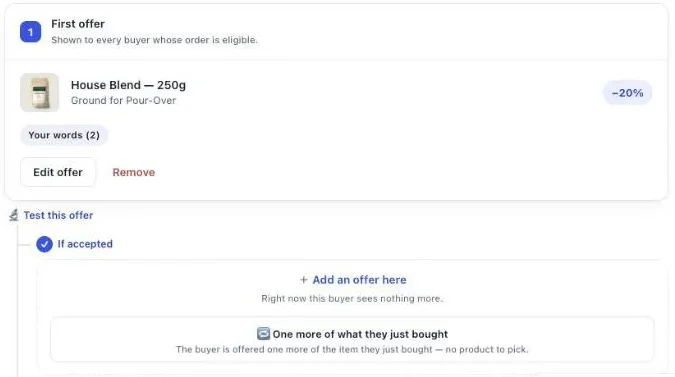
You set up a same product upsell in Post Purchase Upsell Abakira by choosing a repeat offer type on the one-click page. There’s no product to pick: the item is read from the order when the buyer pays. Both repeat types are on every plan, the free plan included.
- Open your funnel and select the One-click post-purchase tab. On a funnel with no offer yet, the admin says “No offer is configured. Buyers currently see nothing after they pay.” Click Start with one more unit.
- On a funnel that already has offers, click Edit offer on the first offer. Under What this offer proposes, choose One more, same variant or One more, any variant.
- Set the discount as a percentage, 20 or 25 to start.
- Optional: under Quantity tiers, click Add a tier and enter a Quantity of 2 with a bigger Discount for this quantity.
- Under Your words on this page, write the headline and the argument (next section).
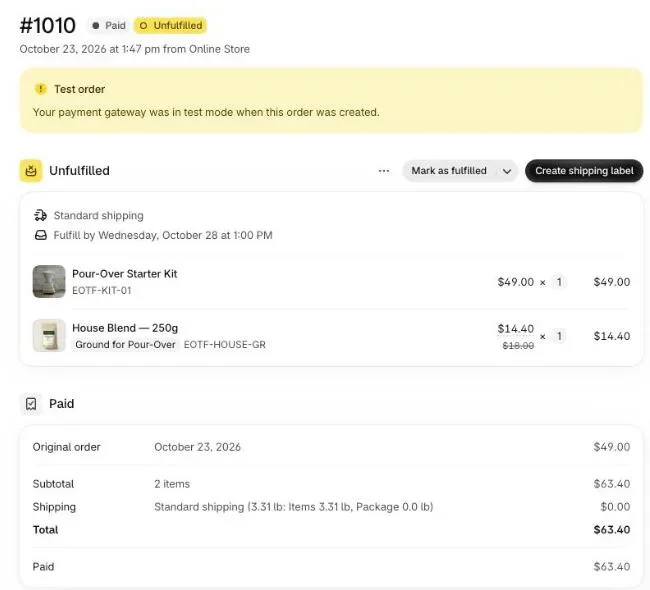
- Click Save. Place a test order with a card, accept the offer, then open the order in your Shopify admin.
In the funnel editor, the offer card is titled “One more of the exact item they just bought” (or “One more of the product they just bought”), and the preview uses “The item they just bought” where a product name would go, because the real item is only known at purchase. On the buyer’s page, it shows the product they actually paid for, with its photo and price.
How do I word a “double your order” offer?
A “double your order” offer is worded as a quantity and a saving, not as a product pitch. The buyer knows the product; they just paid for it. The text has to say three things: it’s the same item, it’s cheaper than the first one, and it goes in the same parcel. In Post Purchase Upsell Abakira that text lives under Your words on this page.
The fields, with their limits:
- Selling headline, up to 90 characters, shown above the product name. The product name always stays visible: Shopify requires the product to keep its store title.
- Promise line, up to 140 characters, at the top of the page.
- Your argument, up to 6 lines. A line starting with a dash becomes a bullet.
- Badges, up to 3, in green, amber or red.
Since one offer covers every product, write with tokens instead of names. {product} becomes the product name, {amount} the price after your discount, {price} the regular price and {save} what the buyer saves. They are filled on the buyer’s page from the prices Shopify calculates, and a line whose figure is unknown is hidden instead of shown with a hole in it.
Wording that works on a same product offer:
- Headline: “Want a second one? It’s {save} cheaper than the first.”
- Argument: ”- Same item, same parcel, no new checkout”
- Argument: ”- {amount} instead of {price}, only on this page”
Two rules from Shopify on this page: no exclamation marks (the editor refuses them with “Shopify does not allow exclamation marks on this page.”) and no hiding of the product’s real name. Write “Double your order” in the headline only if most of your orders are one unit; otherwise “Add another” stays true for every basket.
Where should the same product offer sit in the funnel?
The same product offer belongs first, as the opening offer on the one-click page. It needs no setup per product and fits every order, so it’s the right default for the slot every eligible buyer sees. What comes after it should change depending on the answer.
If accepted: don’t push the same item a third time. The buyer has stocked up. Offer a companion (filters after coffee, a frother after milk powder). Our guide chapter on the accept and decline tree explains the logic for each branch.
If declined: the classic move is the same item at a deeper discount. They passed at 20%; 30% is a different offer. The downsell article works through the gap.
Shopify allows a maximum of three accepted post-purchase offers per checkout. The app counts what’s already been accepted on the order and turns the add buttons off once the third is in, so a buyer never taps into a refusal. Branches after the first offer need a paid plan. For the other shapes an offer can take, bundles, grids, free items and subscriptions, see post purchase upsell examples with their settings.
For the full mechanics of the page itself (who sees it, how the charge works, why the server signs each offer), see how a one click upsell works on Shopify.
How do I reach buyers who skip the one-click page?
The thank-you page reaches every paid order, so a product block there can offer your consumables to buyers who paid with a wallet, an installment service or a gift card. As of October 2026, Shopify shows the one-click page only after a credit card payment on orders of $0.50 or more. Other buyers land straight on the thank-you page.
That page reaches every paid order, and Post Purchase Upsell Abakira can put product blocks there, with their own quantity tiers. For how a thank-you offer joins the same order, see the thank-you page upsell on Shopify; for the payment methods that skip the one-click page, see Apple Pay, PayPal and the post-purchase page.
How do I know if the same product upsell is working?
You know a same product upsell is working when the Results screen shows the step earning money per view, not just being accepted. The app names repeat steps by what they offered, “Same item the buyer just bought” or “Another one from the product just bought”, so you can read them next to your other offers.
Three numbers to watch:
- Net revenue per view. What the offer earns divided by how many buyers saw it. A deeper discount can raise acceptance and lower this number.
- Acceptance rate by discount. If you move from 20% to 25%, check that the extra acceptances pay for the cut.
- Which items get re-offered. If the highest-priced line is often a durable product, split it into its own funnel (see above).
To compare two discounts properly, run an A/B test on the offer with Test this offer, goal Net revenue per view. A/B testing is on the Scale plan. Our chapter on reading your numbers shows where each figure lives. For where this offer sits among the other ways to lift order value, see what raises average order value on Shopify, or browse the other upsell methods on this blog.
Post Purchase Upsell Abakira has a free plan with up to 100 offers shown a month, repeat offers and quantity tiers included. The listing has the current plans.
Set up a same product upsell on Shopify with Post Purchase Upsell Abakira
- Open the funnel In Post Purchase Upsell Abakira, open your funnel and select the One-click post-purchase tab. On an empty funnel, click Start with one more unit. Otherwise click Edit offer on the first offer.
- Pick the repeat type Under What this offer proposes, choose One more, same variant for consumables bought by flavor or grind, or One more, any variant when a buyer may want another size or color of the same product.
- Set a percentage discount Set the discount as a percentage, for example 20 or 25. The item changes from order to order, so a percentage keeps the cut proportional to its price.
- Add quantity tiers if you want a bigger stock-up Under Quantity tiers, click Add a tier, enter a Quantity of 2 or 3 and a bigger Discount for this quantity.
- Write the offer Under Your words on this page, write a Selling headline of up to 90 characters and a few lines under Your argument, using {product}, {amount} and {save} so the text fits every item in your catalog.
- Save and test Click Save, place a test order with a card, accept the offer and open the order in your Shopify admin: the extra unit is a new line on the same order.
Frequently asked questions
Is a same product upsell the same thing as a quantity break?
They use the same lever, a lower price per unit for buying more, but at different moments. A quantity break sits on the product page, before the buyer has decided. A same product upsell comes after payment, when the buyer has already chosen the item and the variant, so the only question left is whether they want a second one at a better price.
Can I stop buyers from switching to a cheaper variant?
Yes. Choose One more, same variant. The app offers the exact item the buyer paid for and ignores any other variant the browser sends, so the buyer can only accept or decline that item.
How do I sell a subscription after checkout?
Pick the product yourself with A product and attach the plan to it. A repeat offer reads its item from the paid order, so the plan goes on an offer where you choose the product.
How many times can a buyer accept a same product offer?
Shopify allows a maximum of three accepted post-purchase offers per checkout, whatever app you use. Post Purchase Upsell Abakira counts the offers already accepted on the order and switches the buttons off once the third one is in, so the buyer never hits a refusal after tapping.
Does a same product upsell work on the free plan?
Yes. Both repeat offer types and quantity tiers are available on the free plan, which shows up to 100 offers a month. The If accepted and If declined branches after the first offer need a paid plan.
Related articles
Written by Abakira. We make small software: Shopify apps, web tools and iPhone apps. This article is about Post Purchase Upsell Abakira.