What to upsell after purchase: sell the next problem
Pick the post-purchase upsell by what the buyer will need right after the item arrives, then name that need in the offer copy. Examples, prices and setup.
2026-11-11 — Abakira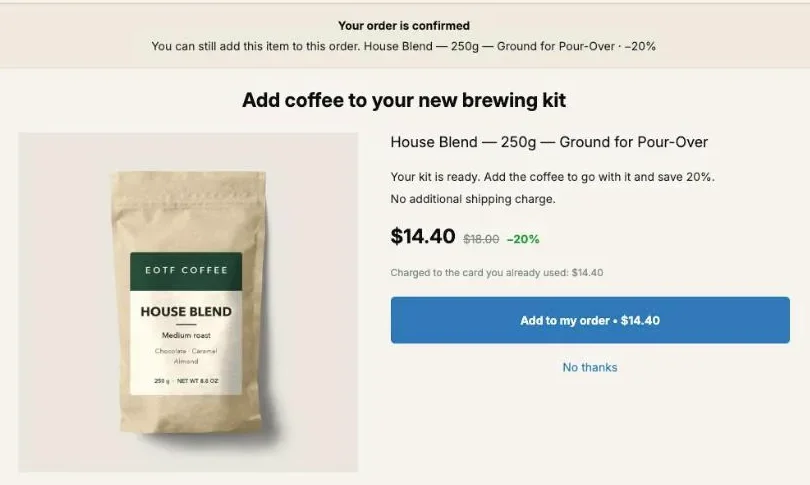
What to upsell after a purchase is the thing the buyer will need right after they start using what they just bought. A brewing kit needs coffee before the first cup, then a scale to get the dose right, then more coffee when the bag runs out. Pick the post-purchase offer by that next problem, and write the problem into the offer.
We build the coffee examples below on our EOTF Coffee demo store, where a $49 Pour-Over Starter Kit order gets House Blend at 20% off for $14.40, and the order becomes $63.40. Each section answers one question a merchant asks while choosing the offer: how to find the next problem, what to charge for the answer, which page it goes on, and how to tell whether it sells.
What should you upsell after a purchase?
A post-purchase upsell should answer the buyer’s next problem: the need that appears once the product they paid for is in their hands. The order already tells you what they bought, so the offer can finish that purchase instead of opening a new one. The usual rule is to pick something complementary. Next is sharper, because it adds a moment.
“Goes with it” lets you pick almost anything. A mug goes with coffee, so does a tote bag with a coffee logo. “What will they need next” leaves far fewer candidates, and they come in an order you can act on.
Take the kit buyer. In the first hour they have no coffee. On the first morning they have coffee and no idea how much to use. A few weeks later the 250 g bag is empty. Three problems, three products (House Blend, a Digital Coffee Scale, more House Blend), and a sequence you can follow in the funnel.
A product that is merely “related” fails the test. So does a second version of the thing they just chose, which reopens a decision they closed thirty seconds ago.
How do I find the next problem for each product?
The next problem for each product comes from walking through the buyer’s first weeks with it, moment by moment, and writing down what they reach for that isn’t in the box. Four moments cover most catalogs: unboxing, first use, regular use and running out. Each one usually points to a different product.
Write this out for your top five sellers. It takes a sheet of paper, not a tool. The last moment is the refill, covered on our page about the same product upsell.
| Moment | The question to ask | On the demo coffee store | On another store |
|---|---|---|---|
| Unboxing | What do they need before they can use it at all? | Coffee for the new kit | Batteries for a kids’ toy |
| First use | What makes the first try go right? | A Digital Coffee Scale to weigh the dose | A test strip with a hair dye kit |
| Regular use | What wears, dirties or needs looking after? | Paper Filters, 100 pack | A leather conditioner after boots |
| Running out | When does it end, and what replaces it? | Another 250 g bag of House Blend | A refill pouch after a soap dispenser |
Three places tell you which of these problems your buyers actually hit:
- Your support inbox. The questions buyers ask after delivery (“how much coffee do I use?”, “my boots are stiff”) are next problems written by the customer.
- Your reviews. A review that says “wish it came with…” names the missing piece.
- Your orders. Products bought together on later orders by the same customer show what they came back for. When Post Purchase Upsell Abakira builds a starter funnel, it reads your last 60 days of orders and fills the If accepted slot with the product most often bought together with the first offer, or with your next best seller when no pair shows up, which is a quick first draft of the same list.
What are next-problem upsells for different kinds of store?
Next-problem upsells change with the product, but the pattern is constant: name the moment, name the need, offer the item that answers it. The table below works through ten stores outside the coffee example, with the problem phrased the way a buyer might put it, so you can see where the offer and the headline come from.
| They bought | The next problem, in a buyer’s voice | The offer | When it hits |
|---|---|---|---|
| Espresso machine | ”The manual says to descale it regularly” | Descaling solution | Regular use |
| Cast iron skillet | ”How do I clean this without ruining it?” | Chainmail scrubber and seasoning oil | First use |
| Acrylic paint set | ”I have paint and nothing to paint on” | A pack of canvas panels | Unboxing |
| Houseplant | ”The nursery pot has no saucer” | A pot with a drainage tray | Unboxing |
| Fountain pen | ”It came with one cartridge” | A box of ink cartridges | Running out |
| Chef’s knife | ”It’s already less sharp than day one” | A honing rod | Regular use |
| Hair dye kit | ”My color fades every time I wash” | A color-safe shampoo | Regular use |
| Yoga mat | ”It slips and it smells after a week” | Mat cleaner spray | Regular use |
| Tent | ”The seams leaked on the first rainy night” | Seam sealer | First use |
| Baby bottles | ”I can’t reach the bottom to clean them” | A bottle brush | First use |
Two things stand out. Most answers are small, cheap items, which suits the price range covered below. And several are consumables (cartridges, cleaner, shampoo), so the next problem after the next problem is the refill, and the same buyer can be offered it again weeks later.
For whole catalogs worked through this way, see our pages on coffee store upsell ideas and skincare upsell ideas.
Which offer goes first, and which comes after a yes?
The first offer answers the earliest problem, and the offer after a yes answers the one that follows it. A buyer who accepted coffee for their kit has just told you they plan to brew soon, so the scale is the natural second step. A buyer who declined gets a cheaper answer to the same first problem.
On our demo store that tree reads:
| Slot | Offer | Problem it answers | Price | Order so far | Share of the order |
|---|---|---|---|---|---|
| First offer | House Blend 250 g, 20% off | Nothing to brew | $14.40 instead of $18.00 | $49.00 | 29% |
| If accepted | Digital Coffee Scale, 15% off | How much coffee per cup | $24.65 instead of $29.00 | $63.40 | 39% |
| If declined | House Blend 250 g, 25% off | Still nothing to brew | $13.50 instead of $18.00 | $49.00 | 28% |
The declined branch keeps the same problem and lowers the price. Switching to an unrelated product after a no throws away the one thing you know: the buyer has a kit and no coffee. Our page on how deep to cut after a no covers that gap, and the one on what to offer on each branch of the funnel covers the third level.
In Post Purchase Upsell Abakira, a funnel’s one-click tree holds up to seven offers on three levels, and one buyer sees at most three of them, one per level. That matches Shopify’s own ceiling: as of November 2026, at most three post-purchase offers can be accepted per checkout. Under If accepted and If declined, every empty slot shows Add an offer here to pick a product, and One more of what they just bought for a repeat.
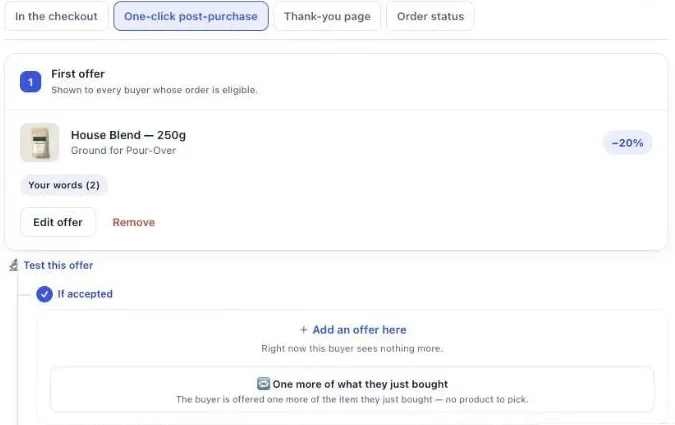
Follow-up offers after a yes or a no come with the paid plans. On the free plan, a funnel shows the first offer only, so put the earliest problem there: it is the one every buyer has.
How much should a next-problem upsell cost?
A next-problem upsell should cost roughly a quarter to a half of the order the buyer just paid. That is the range our guide gives for an offer that gets considered as an impulse. Most next-problem items land there on their own, because the answer to a problem is usually smaller and cheaper than the product that caused it.
In the demo tree from the previous section, all three offers sit inside the range. If the scale were a $120 model, it would be a new purchase decision on a page built for a single tap, and a cheaper answer to the same problem would be the better candidate.
For the discount itself, Post Purchase Upsell Abakira’s starter funnel uses 15% on the first offer, 15% after a yes and 25% after a no, which is a sensible place to begin. On the one-click page, an offer needs a discount above 0% to save. The full reasoning on discount depth is in our page on how to price a post-purchase upsell.
How do I write offer copy that names the problem?
Offer copy that names the problem puts the buyer’s next moment in the headline and the product in the line under it. The headline says what is about to happen to them (“Your first brew needs a dose”), the argument says how this item fixes it, and the price comes from tokens so it never contradicts the real figure.
In Post Purchase Upsell Abakira, each one-click offer has a section called Your words on this page with four fields:
| Field | What it carries in a next-problem offer | Limit |
|---|---|---|
| Promise line | The moment, at the top of the page | 140 characters |
| Selling headline | The problem, or the result once it’s solved | 90 characters |
| Your argument | Why this item, why now, what it costs | 600 characters, 6 lines |
| Badges | Short labels such as “Fits your kit” | 3 badges, 28 characters each |
The product name always shows under your headline, because Shopify requires the offer to keep the title it has in your store. So the headline doesn’t repeat the product. It states the problem the product answers.
A shape that holds for most next-problem offers, three lines of argument:
- The moment: when the problem appears.
- The answer: what this item does about it.
- The price:
{amount}instead of{price}, or “save{save}”.
For the scale on the demo store:
Selling headline: Your first brew needs the right dose
Your argument: Pour-over is weighed, not guessed: 15 g of coffee for 250 g of water. This scale weighs the coffee and the water, so every cup comes out the same. Add it now for {amount} instead of {price}.
For the descaler after an espresso machine:
Selling headline: Your machine will ask for this in four weeks
Your argument: Your manual sets the descaling schedule. This bottle is in the box when the first reminder comes up. Save {save} by adding it to this order.
The app replaces {product} with the product name, {price} with the regular price, {amount} with the price after your discount and {save} with what the buyer saves. A token the app doesn’t know is refused at Save, and so is an exclamation mark, with the message “Shopify does not allow exclamation marks on this page.”
Check every claim in the argument against your own product page before you save it. More headline and argument patterns, sorted by slot, are in our upsell copywriting examples.
Where does each next problem belong: one-click, thank-you or order status page?
Each next problem belongs on the page the buyer is looking at when the problem is closest. The one-click page comes seconds after payment, so it suits the problems the buyer already sees coming. The thank-you page is the same visit, for every buyer. The order status page is where they come back days later, close to delivery.
| Page | When the buyer sees it | Next problem that fits | Who reaches it |
|---|---|---|---|
| One-click post-purchase | Seconds after paying | The missing piece, the getting-it-right tool | Buyers whose payment Shopify allows there, mostly cards |
| Thank-you page | Right after, same visit | The same problems, for buyers who skipped the one-click page | Every buyer |
| Order status page | Days later, from the confirmation email | Care items and refills, the problems that arrive with the parcel | Every buyer who opens it |
The thank-you page catches buyers who never saw the one-click offer, for example because they paid with PayPal. With the Show it to rule set to Buyers who did not see the one-click page, a thank-you block repeats your first problem for them only. That rule comes with the Pro plan and above; on the free plan, a thank-you block shows to every buyer.
The thank-you page can also name the next problem without selling anything. A Text block that tells the buyer what to do first prepares them for the offer that follows it.
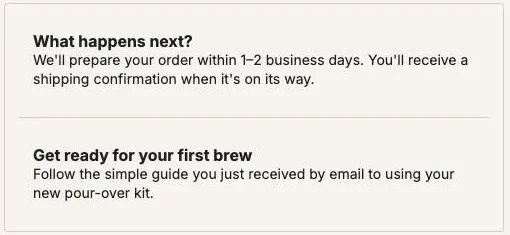
The order status page is the one behind the link in the confirmation email. Our guide describes it as the page people open to check where their parcel is, often more than once and sometimes days after ordering. That timing suits the later problems: the care item, or the refill for something they are about to start using up.
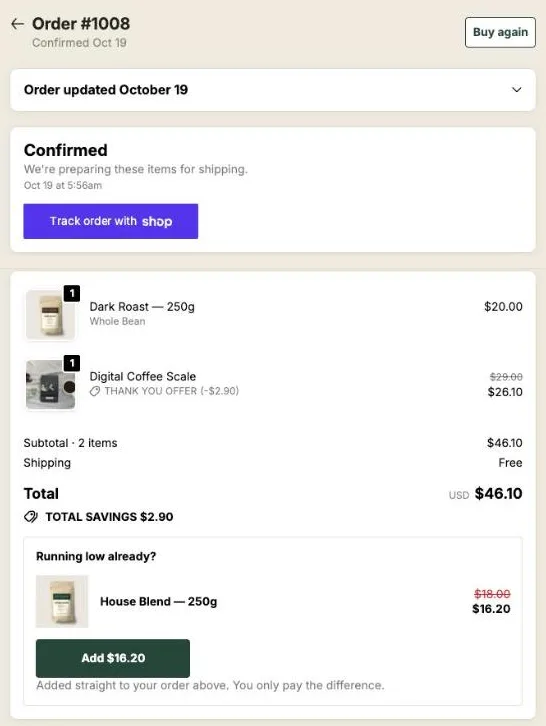
A thank-you or order status block has a Where the purchase goes setting. With Same order, unless it has fully shipped, the item joins the order the buyer already placed, and if everything has already shipped, the buyer pays in a new checkout instead. The full setup of that page is in the guide chapter on the order status page.
How do I show each buyer the right next problem?
Each buyer gets the right next problem when each product family has its own funnel, chosen by what the order contains. A kit buyer needs coffee, a coffee buyer needs a refill or a filter, and one offer for everyone can only be right for one of them. Funnel conditions route each order to its own next problem.
In Post Purchase Upsell Abakira, a funnel can carry the condition Order contains, with up to 300 products, or Order contains a product from, which picks by collection (up to 10 collections and 500 products per funnel). When an order comes in, the app walks the funnel list from the top and serves the first funnel whose condition matches.
A layout for the demo store:
- Kit buyers. Condition: Order contains the Pour-Over Starter Kit. First offer coffee, then the scale after a yes.
- Scale buyers. Condition: Order contains the Digital Coffee Scale. First offer House Blend, the coffee they are about to weigh.
- Everyone else. No condition. First offer: one more of what they just bought, for the running-out problem.
Keep the funnel with no condition at the bottom. The list warns you when it isn’t: “Never shown: a funnel above applies to everyone. Move it down, or give it a condition.”
Targeting by product, variant or order total comes with the Pro plan and above, and targeting by collection with the Scale plan. On the free plan your one funnel shows to every buyer, so its offer should be the next problem most of your orders share. The guide chapter on multiple funnels and targeting walks through the priority list.
How do I check a candidate before making it the offer?
A candidate passes when it answers the next problem, is in stock, ships without eating its margin and doesn’t make the buyer choose all over again. Run these four checks on each product on your list before it goes into a funnel. A product that fails one of them is a weak offer, however well it fits the moment.
- Stock. An out-of-stock offer is hidden by the app rather than sold, so a thin stock quietly earns nothing.
- Weight. The accepted item joins the paid order with no second shipping charge to the buyer. Your carrier cost can still move with the weight, so a heavy answer can cost more to ship than it earns.
- No new decision. A different model of what they just bought is a substitute, not a next step. The buyer starts comparing again.
- Margin after the discount. The scale at $24.65 has to leave you money after its cost and the extra packing.
When two candidates pass, keep both. You’ll need one to test against the other.
Can the next problem be a service or a free item?
The next problem can be a service or a free item when that is what the buyer will actually need. Protection for a fragile product, gift wrap for an order that is a present, a free sample of the refill: each answers a real next moment, and each can be the post-purchase offer in Post Purchase Upsell Abakira.
- A warranty or protection product answers “what if it breaks?” for higher-priced goods. Our page on the extended warranty upsell shows how to set one up as a product.
- Gift wrap answers “how do I give this?” for buyers who bought a present. See the gift wrapping upsell.
- A free item answers the next problem and starts the next purchase. A free sample size of the refill is one example. On the one-click page, set a 100% discount, or a fixed discount equal to the product’s price, and the item joins the order at zero. On the thank-you and order status pages, use a fixed amount equal to the price.
On the one-click page, two shapes let you answer several problems at once. A bundle sells the main offer with other products at a single rate (2 to 3 products in all, the main one included), for example coffee and filters for the kit buyer. A grid stacks up to six extra cards under the main offer, each with its own discount and button.
How do I know the next-problem offer is working?
A next-problem offer is working when it earns more per buyer who saw it than the offer it replaced. Acceptance rate alone misleads, because two offers at different prices can accept at the same rate and bring in very different revenue. Compare revenue per view on the same slot, over the same kind of orders.
Post Purchase Upsell Abakira gives three places to read it:
- The funnel’s own page. Every offer in the tree shows how many buyers saw it, how many accepted and what it earned, so you can see whether the scale after a yes pulls its weight.
- The By product table on the Results screen, with the columns Saw it, Orders, Units, Revenue, Share and Clicks. It shows which next-problem products sell, whatever page they were offered on.
- An A/B test. Click Test this offer on the slot and add up to four versions, for example the scale against the filters after a yes. The default metric is Net revenue per view, and the first verdict comes at 100 views per version. A/B testing is on the Scale plan.
Without the Scale plan, run the two candidates one after the other for the same length of time, keep the discount identical, and divide revenue by the number of buyers who saw each one. Our page on A/B testing a post-purchase upsell covers the setup, and reading your numbers shows where each figure lives.
For how a next-problem offer relates to upsells and cross-sells in general, see upsell vs cross-sell after checkout. For the full list of offer types, the guide chapter on what to offer is the reference, and the other upsell methods on this blog go deeper on each one.
Post Purchase Upsell Abakira has a free plan that shows up to 100 offers a month on a live store. The listing has the current plans and what each one includes.
Set up a next-problem upsell in Post Purchase Upsell Abakira
- Write down the next problem For your best-selling product, write the first thing the buyer will need once it arrives, and the thing after that.
- Set the first offer Open your funnel, select the One-click post-purchase tab, click Edit offer on the first offer, choose A product under What this offer proposes, and pick the product that answers the first problem. Set a discount above 0%.
- Name the problem in the copy In Your words on this page, write the problem in the Selling headline, the answer in Your argument, and use the {amount} and {save} tokens instead of typed prices.
- Add the follow-up offer Under If accepted, click Add an offer here and pick the product that answers the next problem. Follow-up offers come with the paid plans.
- Cover the later problems On the Thank-you page and Order status tabs, add a Single product or Text block for the problem that shows up when the parcel arrives.
- Save and test Click Save, place a test order with a card, accept the offer, and check that the extra item is on the same order in your Shopify admin.
Frequently asked questions
Is a next-problem upsell the same thing as a cross-sell?
Most of the time it is a cross-sell, because the answer to the next problem is a different product: a scale after a brewing kit, a descaler after an espresso machine. It becomes an upsell when the next problem is running out, and the answer is more of the same item at a lower unit price.
Can I run next-problem upsells on the free plan?
Yes, with one offer. The free plan of Post Purchase Upsell Abakira runs one funnel with one offer on the one-click page and shows up to 100 offers a month, to every buyer who reaches that page. Follow-up offers after a yes or a no, several funnels and targeting by what the order contains come with the paid plans.
How many offers can one buyer see in a row?
Up to three: one per level of the funnel tree. In Post Purchase Upsell Abakira a funnel is built to match, and as of November 2026 Shopify accepts at most three post-purchase offers per checkout.
Does the buyer pay shipping again when they accept?
An accepted one-click offer joins the order the buyer already paid and adds no shipping line to it. Your own postage cost can still change with the weight of the extra item, so check heavy candidates before you pick them.
Can the offer copy be in the buyer's language?
The copy you write for an offer is one text, shown to every buyer whatever their language, the same way the product name comes from your catalog untranslated. The fixed texts of the page, such as the buttons and the charge note, are translated by the app.
Related articles
Written by Abakira. We make small software: Shopify apps, web tools and iPhone apps. This article is about Post Purchase Upsell Abakira.