Extended warranty upsell on Shopify, sold after checkout
Sell your own 1-year, 3-year or lifetime warranty right after payment, shown only to buyers of the products it covers, and added to the same order.
2026-10-31 — Abakira, updated 2026-11-10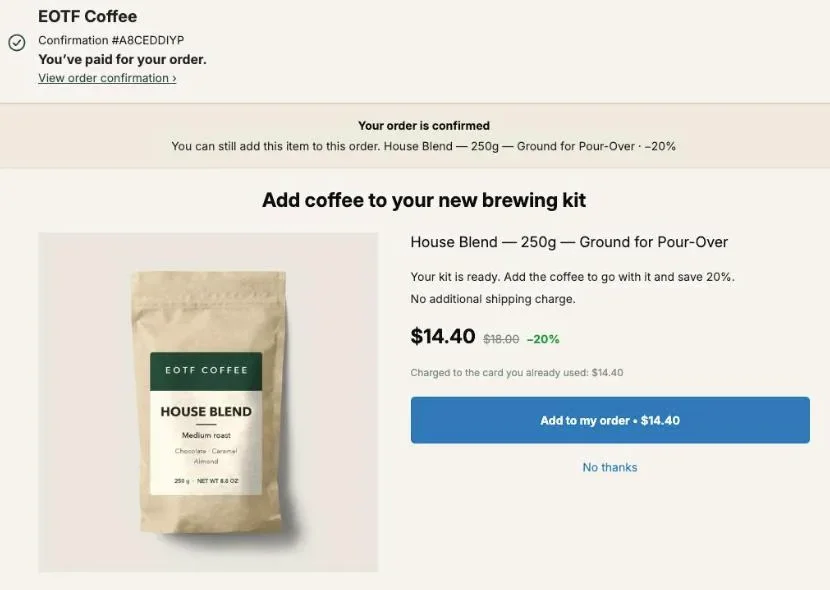
An extended warranty upsell on Shopify works best on the one-click page right after payment: the buyer has just committed to an expensive item and is asked one question, whether to protect it for one year, three years or for good. Create the warranty as your own non-shipping product, show it only on orders that contain the products it covers, and let it join the order that was just paid. Post Purchase Upsell Abakira does the targeting with a funnel condition called “Order contains” on its paid plans.
Why sell an extended warranty after checkout instead of on the product page?
An extended warranty sold after checkout is offered once the main purchase is settled, so it can’t cost you the sale. On the product page, the warranty is one more decision next to the price, the variant and the shipping time. After payment, the order is placed and the only question left is whether to protect it.
After payment, the item is the buyer’s, and the offer is about keeping it working.
There’s also a mechanical reason. On the one-click page, accepting takes one tap and no card details, because Shopify charges the card used for the order. A buyer who taps “No thanks” keeps the order exactly as it was.
What is a store-backed extended warranty, and how is it different from a warranty app?
A store-backed extended warranty is a product you sell and honor yourself: you set the price, keep the full amount, and repair or replace the item when a claim comes in. A warranty app works with an outside company that prices the risk, handles the claims and pays you a share of each plan sold.
| Your own warranty product | Third-party warranty app | |
|---|---|---|
| Who sets the price | You | The provider |
| Who keeps the money | You keep the whole plan price | You get a share of each plan |
| Who handles claims | You, by email or a form | The provider's claims team |
| What it costs you | The repairs and replacements you pay for | Nothing per claim |
| Where it's offered | Anywhere your upsell app can offer a product | Where the app's widget appears |
Running it yourself pays when you know your failure rate. If you have sold the product for a year, you know roughly how many come back broken, and you can price the plan above that cost. If the product is new or the failure rate is a guess, an outside provider takes that risk off you.
Post Purchase Upsell Abakira doesn’t connect to warranty providers. What it offers is any product in your catalog, which is exactly what a store-backed warranty is.
How do I create an extended warranty product in Shopify?
An extended warranty in Shopify is a regular product with the This is a physical product checkbox unchecked, one variant per coverage length, and the terms written in its description. Shopify then leaves it out of shipping, and any app that sells products can offer it, including on the post-purchase page.
- In your Shopify admin, go to Products and add a product. Name it for the buyer, for example “Extended warranty”. On the one-click page the product title always stays visible under your headline, so the title has to make sense on its own.
- Add an option called Coverage with three values: 1 year, 3 years and Lifetime. Each becomes a variant with its own price.
- Open each variant and, in the Shipping section, uncheck the This is a physical product checkbox.
- Give each variant a SKU, such as
WARRANTY-1Y,WARRANTY-3YandWARRANTY-LIFE. Claims are easier to find in your order list when the line says exactly which plan was bought. - Upload an image. A clean photo of the item it protects, with your logo, works better than a stock shield icon.
- Write the terms in the description (next section), then set the product to Active.
You don’t need a separate warranty product for each item you sell. One product with three variants covers the whole catalog, and the funnel condition decides who sees it.
Before you list the product, read the prohibited business list that applies to your payment provider in your country. As of October 2026, the United States list names “Extended warranties”, so a US store on Shopify Payments should ask Shopify support first. Shopify’s payment terms tell you to do exactly that when you’re unsure.
What should the warranty terms say?
Warranty terms on the product page should answer four questions before the buyer pays: what is covered, what isn’t, when coverage starts and ends, and how to make a claim. Put all four where the buyer reads them before paying, and you have something to point to when a claim comes in.
A short structure that works:
- Covered: defects in materials and workmanship, mechanical or electrical failure under normal use.
- Not covered: accidental damage, loss, theft, cosmetic wear, misuse. If you do cover accidents, say so, it’s a selling point.
- Duration: counted from the order date, which is easy because the warranty line sits on the same order as the product.
- Claims: email address or form, the order number, a photo or video of the fault, and what you do next (repair, replacement, or store credit).
Keep it on the product page so the link is the same for every buyer, and have whoever writes your store policies read it before you go live.
How should I price a 1-year, 3-year and lifetime warranty?
Price a store-backed warranty as three clear steps, roughly $15, $30 and $50, and check each one against what a replacement costs you. The middle plan is the one most buyers should take. The lifetime plan is there to make three years look reasonable, and to sell to the buyers who want never to think about it again.
Here’s what the ladder looks like with a 10% post-purchase discount on each plan:
| Plan | Regular price | With 10% off after checkout | Buyer saves |
|---|---|---|---|
| 1 year | $15.00 | $13.50 | $1.50 |
| 3 years | $30.00 | $27.00 | $3.00 |
| Lifetime | $50.00 | $45.00 | $5.00 |
The discount is not optional on the one-click page. Post Purchase Upsell Abakira refuses to save a one-click offer without one and says “The discount must be a number greater than zero.” A small one is enough: the reason to say yes is the protection, and the discount is the reason to say yes now.
Two more points on price. First, a warranty sells on costly products, the ones a buyer would hate to replace: espresso machines, grinders, e-bikes, power tools. On a $29 accessory, a $15 plan is half the price of the item and reads as a joke. The other add-ons that fit those orders, such as assembly sold as a product or a premium accessory, are in high ticket upsells on Shopify. Second, if you’d rather tie the plan to the product price, use a fixed amount per plan instead of three flat prices, and create a second warranty product for your expensive range.
For the reasoning behind discounts after checkout in general, see how to price a post-purchase upsell.
How do I show the warranty only to buyers of the products it covers?
To show a warranty only to the right buyers in Post Purchase Upsell Abakira, put it in its own funnel and give that funnel the condition “Order contains” with the products it covers, or “Order total is at least” with a minimum amount. Buyers whose order doesn’t match never see the offer. Targeting is part of the Pro plan.
The steps, in the app:
- On Your funnels, click Create a funnel and name it, for example “Warranty: machines and grinders”.
- In the condition menu, choose Order contains, then Choose a product. Shopify’s product picker opens. Pick the products the warranty covers, up to 300 of them. You can also tick a single variant, if only the large model should get the offer.
- Or choose Order total is at least and type the amount, for example 150. The app compares it with the order total the buyer pays, in their checkout currency.
- Move the warranty funnel above any funnel that applies to everyone. The app checks funnels from the top, and its rule reads: “The first funnel whose condition the order meets is the one shown.”
- Click Try a cart, add a covered product, and check which funnel the app says is shown.
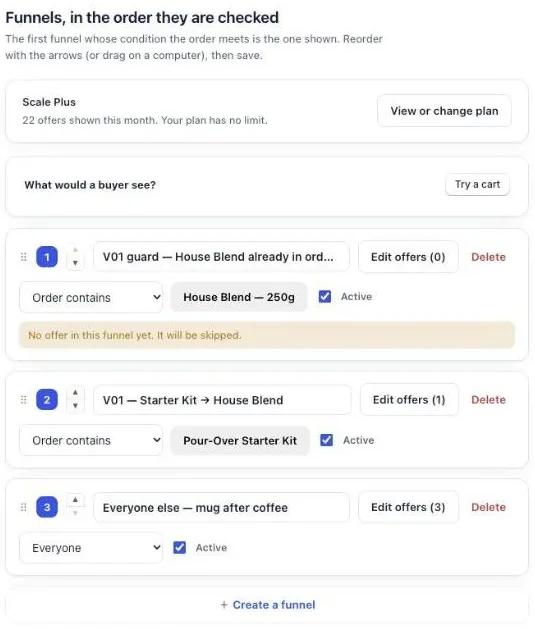
The order matters more than it looks. A funnel set to Everyone takes every order that reaches it, so anything below it is never shown. The app flags that case with the note “Never shown: a funnel above applies to everyone. Move it down, or give it a condition.”
On the free plan, conditions are ignored and the one funnel goes to every buyer. The admin says so: “Targeting comes with Pro. Until then this offer is shown to everyone.” If your whole catalog is expensive equipment, that’s fine and you can start there. The free plan shows 100 one-click offers a month. The chapter on multiple funnels and targeting goes through every case.
How do I set up the warranty offer on the one-click page?
Set up the warranty as the first offer of the funnel: choose “A product”, pick the warranty, and select its three variants so the buyer chooses the coverage length. Then write a headline that names the item being protected, and set the discount.
- In the funnel, click Edit offers. On the One-click post-purchase tab, the first offer is “Shown to every buyer whose order is eligible.”
- Under “What this offer proposes”, choose A product, then pick the warranty.
- Select the 1 year, 3 years and Lifetime variants. The offer then shows “3 options the buyer can choose from”, and the buyer picks one on the page. You can select up to 25 variants, and your discount applies the same way to whichever one they pick.
- Set the Discount: Percentage or Fixed amount.
- In Your words on this page, write the Selling headline. Something like “Keep your grinder covered for 3 years” does the job. Shopify doesn’t allow exclamation marks on this page, and the app flags any text that contains one.
- In Your argument, add two or three short lines: what’s covered, how to claim, and that the plan starts today.
- Save.
A countdown can sit at the top of the page, from 30 seconds to 30 minutes. When it reaches zero, the offer is really refused, not just hidden. For a warranty, a few minutes is plenty.
What should the buyer see if they decline the warranty?
A buyer who declines the 3-year or lifetime plan should see one smaller plan next, usually the 1-year warranty at a lower price. That’s a downsell: the buyer said no to the commitment, not necessarily to the idea of being covered. In Post Purchase Upsell Abakira it goes under the “If declined” branch of the first offer.
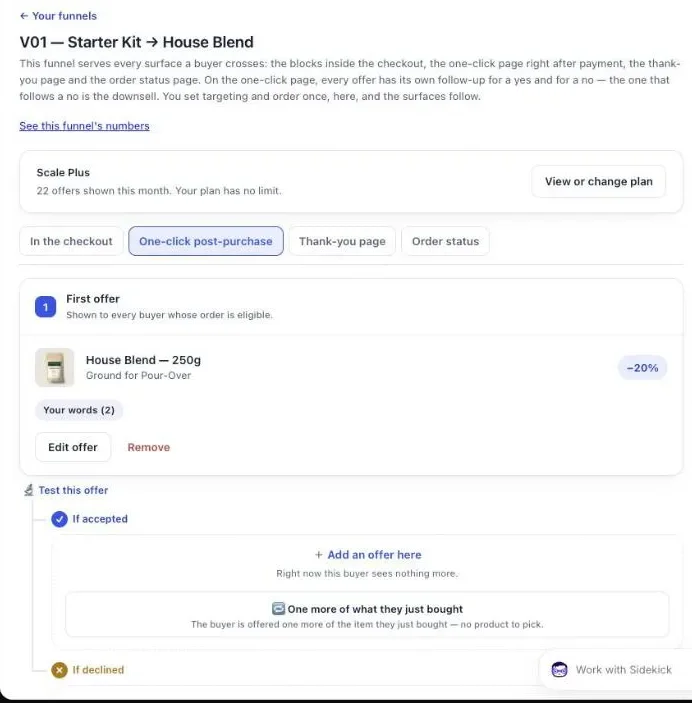
Two ways to set it up:
- Show the bigger plans first, then the small one. First offer: 3 years and Lifetime only. Under If declined: the 1 year variant alone.
- Show all three, then something else. First offer: all three variants. Under If declined: an accessory that goes with the item, such as cleaning tablets for a coffee machine.
Under If accepted you can still add an accessory. Shopify accepts up to 3 post-purchase additions per order, so warranty plus one accessory fits well inside that.
Offers beyond the first one need a paid plan: the free plan serves one level. The downsell guide has more on what to put after a no, and the accept and decline tree explains how the branches work in the app.
Can I sell the warranty with an accessory as a bundle?
Yes. On the one-click page, an offer can be “A bundle”: the main product together with one or two more, sold as a single purchase at a bundle rate. An accessory plus its warranty, or a spare part plus a 3-year plan, both fit. The bundle counts as one addition toward Shopify’s limit of 3 per order.
A bundle works when the accessory and the warranty share a reason to exist. A replacement burr set and a 3-year grinder warranty both say “keep this machine running”. A random product next to a warranty doesn’t.
What about buyers who never see the one-click page?
Shopify only shows the one-click page after a credit card payment. Buyers who pay with Apple Pay, Google Pay, PayPal, an installment service like Klarna, or a gift card skip it. Offer them the warranty on the thank-you page instead.
In the funnel’s Thank-you page tab, add a Single product block with the warranty. Set Show it to to “Buyers who did not see the one-click page”. Sorting buyers by what happened on the one-click page comes with Pro and above; on the free plan the block is shown to every buyer, including those who already saw the warranty on the one-click page. Orders are filtered by the funnel’s condition on Pro and above. Then set Where the purchase goes to “Same order, unless it has fully shipped”. The warranty is then added to the order the buyer already placed. If the whole order has already shipped, the buyer pays in a new checkout instead. The thank-you page chapter shows the block editor.
Where does the warranty appear on the order?
On the one-click page, the warranty is added to the order the buyer just paid. It isn’t a second order. The product and its warranty share one order number, one date and one customer, which is what you’ll want to look up when a claim arrives two years later.
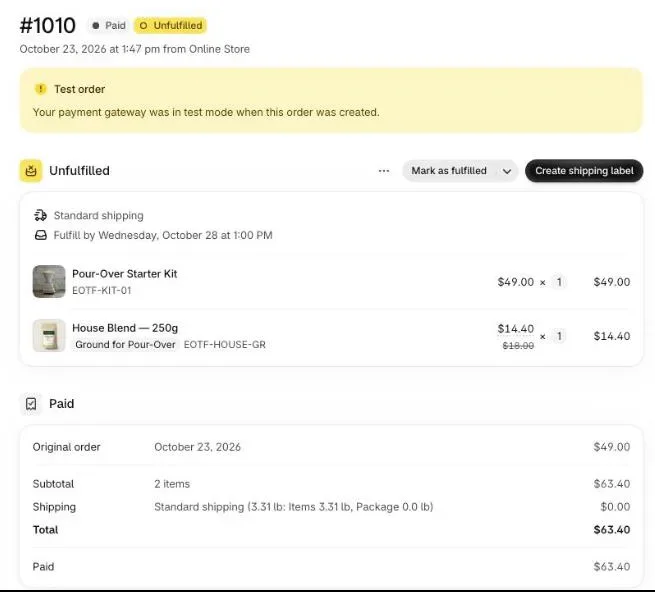
Since the warranty is a non-physical product, it doesn’t go in the parcel. The line stays on the order, next to the item it covers.
When a claim comes in, open the order: the warranty line says which plan was bought, the product it covers is right above it, and the order date is the day coverage started.
How do I know if the warranty offer is working?
A warranty offer works when the share of covered orders that accept it stays steady and the claims you pay stay below the plan revenue. The app’s Results screen gives you acceptances, and your Shopify analytics for the warranty product give you plan revenue to set against claims.
Read three things each month:
- Acceptance rate on the warranty funnel. The Results screen breaks conversions down by funnel, so you can see the warranty funnel on its own.
- Which plan sells. If almost everyone takes 1 year, the gap to 3 years is too big. If nobody takes Lifetime, it is still doing its job of making 3 years look sensible.
- Claims against plan revenue. Add up what repairs and replacements cost you, compare with what the plans brought in. If claims eat most of it, raise the price or narrow what’s covered.
The guide chapter on reading your numbers explains each figure on the Results screen. A warranty is one way to raise order value without discounting what you already sell. The others are in how to increase average order value on Shopify, and more techniques like this one are on the method page.
Post Purchase Upsell Abakira has a free plan that runs on a live store. The listing has the current plans and what each one includes.
Sell an extended warranty after checkout on Shopify
- Create the warranty product In Shopify, create a product such as Extended warranty with three variants: 1 year, 3 years and Lifetime. In the Shipping section, uncheck the This is a physical product checkbox, give each variant a SKU and set it to Active.
- Write the terms on the product page In the product description, say what is covered, what is not, how long it lasts from the order date and how a buyer files a claim.
- Create a targeted funnel In Post Purchase Upsell Abakira, click Create a funnel, set its condition to Order contains and choose the products the warranty covers, or to Order total is at least with your threshold.
- Build the offer Click Edit offers, set the first offer to A product, pick the warranty and select its three variants, set a discount and write a Selling headline that names the item it protects.
- Add the cheaper plan under If declined Under If declined, add a second offer with the 1-year variant only, so a buyer who refused the bigger plan sees a smaller one.
- Check the order Click Try a cart to confirm which funnel a covered cart reaches, then place a card order and accept the warranty. Check that Shopify shows one order with the warranty line on it.
Frequently asked questions
Do I need a warranty app to sell an extended warranty on Shopify?
No. If you cover repairs and replacements yourself, the warranty is a normal Shopify product with the This is a physical product checkbox unchecked. Any upsell app that can offer a product can offer it. A dedicated warranty app makes sense when you want an outside company to price the risk and handle claims, and you earn a share of each plan.
Does the warranty add a shipping charge to the order?
No. A product with the This is a physical product checkbox unchecked is not part of shipping, and on the one-click page the warranty joins the order the buyer already paid, so there is no second checkout and no second shipping fee.
Can the buyer choose between 1 year, 3 years and lifetime on the same screen?
Yes. Create the three plans as variants of one warranty product and select all three on the offer. The one-click page then shows a variant choice, up to 25 variants, and your discount applies to whichever plan the buyer picks.
Can I show the warranty only on orders above a certain amount?
Yes, on a paid plan of Post Purchase Upsell Abakira. Set the funnel's condition to Order total is at least and type the amount. It is compared with the order total the buyer pays, in their checkout currency.
What happens to the warranty if the customer returns the product?
That is your policy to write. The warranty is a line on the same order as the product, so you decide whether it is refunded with the item. Put the rule on the warranty product page so the buyer has read it before paying.
Related articles
Written by Abakira. We make small software: Shopify apps, web tools and iPhone apps. This article is about Post Purchase Upsell Abakira.