Shopify missed calls: what they cost and how to fix them
Our arithmetic for a Shopify store that misses 10 calls a week: $5,616 a year in lost sales, which calls a page can answer, and who picks up the rest.
2026-11-11 — Abakira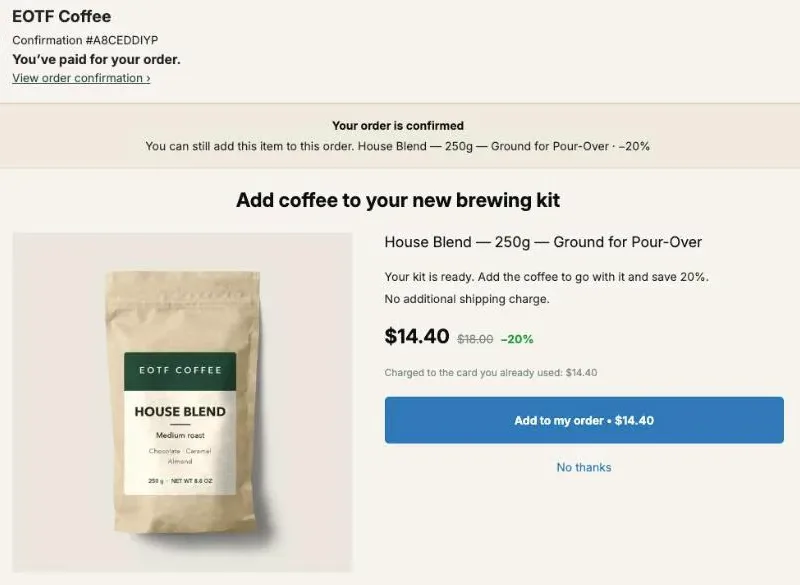
Missed calls cost a Shopify store in two ways: the pre-sale caller who buys somewhere else, and the customer who calls about an order and comes back later as a longer, angrier ticket. On an example store that takes 50 calls a week and misses 10 of them, our arithmetic below comes to $5,616 a year in lost sales and 36 hours of call-backs. The fix has two halves: answer on your order pages every question a page can answer, and put something on the phone line that picks up the rest.
We build Post Purchase Upsell Abakira, which handles one of those calls before it’s ever placed: “Can I add something to my order?” The phone line itself is the job of Ringly, an AI phone agent for Shopify stores and our partner for this article.
Which calls does a Shopify store miss?
A Shopify store misses the calls that come in when nobody is free to pick up: evenings, weekends, lunch, and the minutes when the one person on support is already on another line. Those missed calls fall into four kinds, and each one costs the store something different.
| Call | What the caller wants | What a miss costs | Can a page answer it? |
|---|---|---|---|
| Pre-sale question | Sizing, stock, delivery time, “will this fit my machine?” | The sale, if a competitor picks up | Partly: the caller already read your product page |
| ”Where is my order?” | Tracking, a ship date | A call-back, an email, a worried buyer | Yes: the order status page |
| Order change | Add an item, change the address, cancel | An add-on sale, or a parcel sent to the old address | Adding an item, yes. Address and cancel, no |
| Return or exchange | A label, a different size | An exchange that turns into a refund | Partly: your returns page |
Pre-sale callers are the ones who haven’t paid you yet, and they are the cheapest to lose. Someone asking whether a grinder fits a 58 mm portafilter has the product in a cart somewhere. If your phone rings out, the next store’s doesn’t.
The other three kinds come from people who already bought. They don’t vanish when nobody picks up. They call again, write an email, then write a second one asking why nobody answered the first.
What does a missed call cost a Shopify store?
A missed call costs a Shopify store the sale the caller was about to make, plus the staff time it takes to reach them again. Here is our arithmetic for an example store. The inputs are assumptions, written out so you can swap in the numbers from your own phone log.
The example store:
- takes 50 calls a week and misses 10 of them (after hours, weekends, a busy line);
- the 10 missed calls split into 3 pre-sale questions, 4 “where is my order?”, 2 order changes (one “can I add something?”, one address change) and 1 return;
- has an average order of $60, and half the pre-sale callers would have bought if someone had answered;
- sells the add-on people call about at $18, the list price of a bag of House Blend on our demo coffee store;
- spends 6 minutes of staff time on each post-sale missed call that comes back as a call-back or an email.
| Missed call | Per week | Lost per week | Per year (× 52) |
|---|---|---|---|
| Pre-sale question | 3 | 3 × 50% × $60 = $90 | $4,680 |
| ”Can I add something?“ | 1 | $18 and 6 minutes | $936 and 5.2 hours |
| ”Where is my order?“ | 4 | 24 minutes | 20.8 hours |
| Address change | 1 | 6 minutes | 5.2 hours |
| Return | 1 | 6 minutes | 5.2 hours |
| Total | 10 | $108 and 42 minutes | $5,616 and 36.4 hours |
At a 50% gross margin, the $5,616 is $2,808 of profit a year. That’s the number to hold against the price of any phone tool. To run it for your store, the formula for the pre-sale line is: missed pre-sale calls per week × share who would have bought × average order × 52. Most phone providers export a log with the time of each call, which is enough to count the misses.
What the table leaves out: the buyer who never calls again and takes their next order elsewhere. We don’t put a number on that one. For a store that sells refills, that buyer is worth more than the order they called about.
How do Shopify stores handle phone support?
Shopify stores handle phone support in one of five ways, from the owner’s own mobile to a staffed team. Each one decides which hours of the week go to voicemail. The table compares them by who picks up and when calls are missed.
| Setup | Who picks up | When calls are missed |
|---|---|---|
| The owner’s mobile | The founder, between everything else | Most of the time |
| Voicemail plus call-backs | Nobody, then someone the next morning | Every call, answered hours later |
| In-house support team | Staff during opening hours | Evenings, weekends, busy lines |
| Outsourced call center | Agents working from your scripts | Rarely, at a per-agent or per-minute cost |
| AI phone agent | Software, with a handoff to your team | Rarely: the line answers day and night |
The first two are where most small stores start, and where the 10 missed calls of our example come from. A team covers opening hours and nothing else. If your store gets a steady flow of calls, Ringly’s guide to choosing an ecommerce call center walks through in-house teams, outsourced agencies and AI phone agents side by side, with the call types each one handles.
The split we’d make for the example store: software for the repetitive calls at any hour, a person for the ones that change money or need judgment.
How does Ringly answer the calls a store misses?
Ringly answers a Shopify store’s calls with an AI phone agent named Seth, day or night, so the line never rolls to voicemail. Seth is built for Shopify: during the call it checks the order in your store, so it can answer “where is my order?”, start a return or cancel an order while the caller is still on the line.
What that covers from our table:
- Pre-sale questions. Ringly takes product advice and pre-purchase calls, which are the $4,680 line of our example.
- “Where is my order?” Seth reads the order and its tracking in Shopify and gives the answer on the call, instead of a call-back the next morning.
- Returns and cancellations. It starts the return or cancels the order in Shopify.
- The hard calls. When a call needs a person, Seth hands it to your team by live transfer, a ticket or an email. You decide what gets escalated.
Setup is connecting Shopify and your other tools, and forwarding your existing business number, so buyers keep calling the number they already know. Ringly says most stores are running in under an hour. The current plans and what each includes are on Ringly’s site.
Which calls can your order pages answer before the phone rings?
Your order pages can answer “where is my order?” and “can I add something?” before the buyer thinks of calling, because the buyer opens them from every Shopify order email. The order status page is the one that matters: it’s where the View your order button in the confirmation and shipping emails leads.
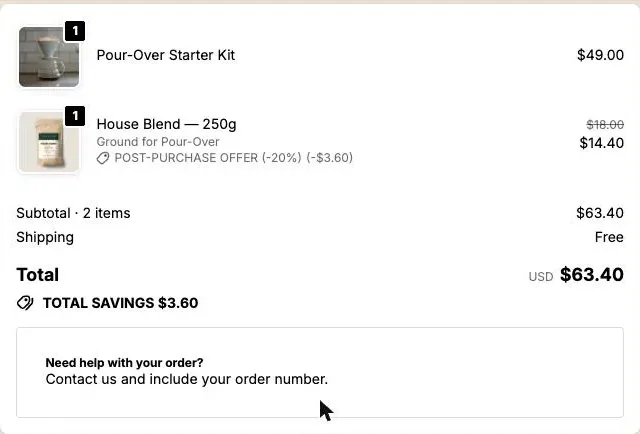
Shopify already draws the tracking on that page. What it doesn’t say is your packing time, your carrier, or how to reach you. In Post Purchase Upsell Abakira, a Text block on the Order status tab of the funnel puts those lines under the order total. Ours reads “Need help with your order? Contact us and include your order number.” Add “We pack orders within one business day” and a good share of the “where is my order?” calls of the first two days have their answer.
The order number line pays off on the phone too. A caller who has it ready takes one lookup, for your team or for an AI agent. Our article on the Shopify post-purchase experience matches each buyer question to the page they’re on when they ask it.
How do buyers add something to their order without calling?
Buyers add something to their order without calling when the page they’re on has a button that does it. Post Purchase Upsell Abakira puts that button in three places: the one-click post-purchase page, the thank-you page and the order status page. Each one adds the item to the order already placed, not to a new one.
The “can I add something?” call comes from a buyer who just remembered the filters, the refill or the second size. Here is what each page does with that moment:
- The one-click post-purchase page, between payment and the confirmation, for buyers who paid by card. It opens on “You’ve paid for your order”, then shows the offer with the line “Charged to the card you already used: $14.40” and one Add to my order button. No card to type again.
- The thank-you page, for every buyer whatever they paid with. The line under the Add button reads “Added straight to your order above. You only pay the difference.”
- The order status page, for the buyer who comes back from a shipping email. The button is built fresh at each visit and its signed link stays valid for 24 hours, so a buyer who returns a week later still gets one that works.
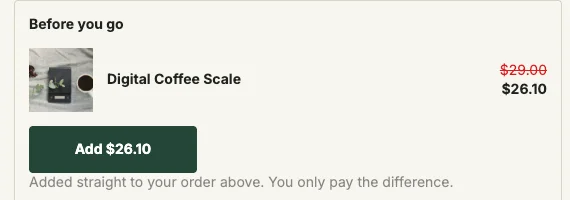
When the item can’t go on the order, for example because it has already shipped, the line changes to “Opens a new checkout. Your order above stays exactly as it is.” The buyer knows before tapping. The block’s Where the purchase goes setting decides the cut-off: Same order, unless it has fully shipped, Same order, only until the first parcel ships for fast warehouses, or Always a new checkout.
A buyer paying cash on delivery isn’t sent to a payment page. After the tap, the page reads “Added to your order” and “You’ll pay for it together with the rest of your order.”
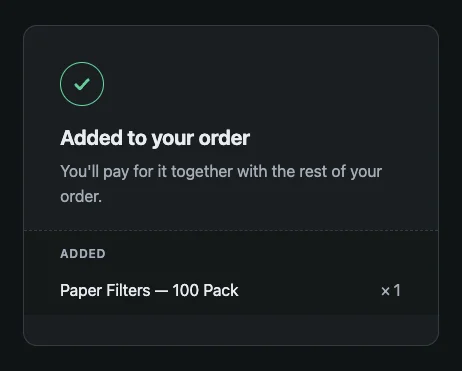
In our arithmetic, that’s the $936 line. The add-on comes back as a sale, and the 6 minutes of call-back go with it.
What happens in the Shopify admin when the buyer adds the item?
The Shopify admin shows one order with one more line when the buyer adds the item, in the same unfulfilled group, with a payment summary that reads “Original order” and the new total. There is nothing for your team to merge and no second parcel to pack. The edit runs through Shopify’s own order editing.
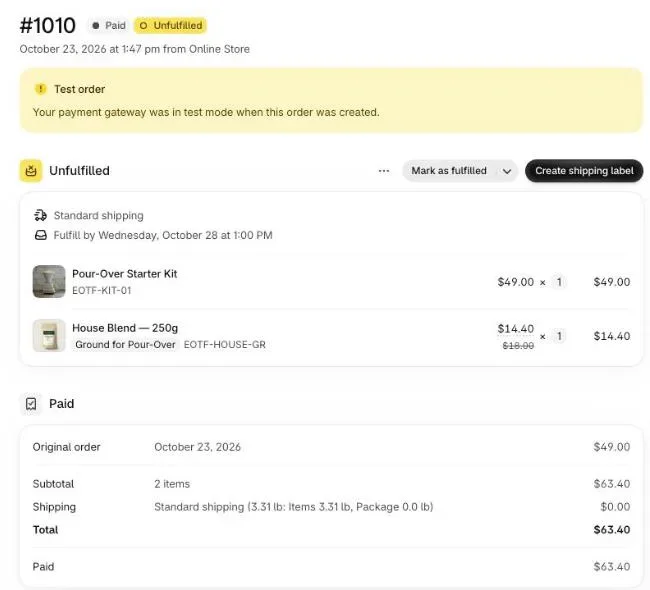
Compare that with the call your team takes today. Someone opens the order, clicks Edit, adds the product, clicks Update order, then sends an invoice from Collect payment > Send invoice and waits for the buyer to pay it. Our guide to adding a product to an existing order on Shopify covers that manual path step by step.
When the item comes from the thank-you page, the edit carries the staff note “Added from the thank you page offer (Abakira Post Purchase Upsell).” Whoever looks at the order later knows where the line came from, which matters the day a buyer calls to ask about it.
How do I cut missed calls on my Shopify store?
Cutting missed calls on a Shopify store starts with your own call log, not a tool. Count the misses by type for four weeks, move every question a page can answer onto the order pages, then cover the phone line for the hours nobody is free. Count again four weeks later.
- Pull your call log. Export four weeks of calls from your phone provider and mark the unanswered ones.
- Sort the missed calls by type. Pre-sale, “where is my order?”, order change, return. The voicemails and follow-up emails tell you which is which.
- Put the answers on the order status page. In the funnel, open the Order status tab and add a Text block with your packing time, your carrier and how to reach you with the order number.
- Let buyers add items themselves. Add a Single product block on the Thank-you page and Order status tabs. In Shopify admin, go to Settings > Checkout, click Edit, and add the Thank you page offer and Order status page offer blocks to their pages.
- Cover the phone line. Forward your business number to an AI phone agent such as Ringly for evenings and weekends, with the handoff to your team set for the calls that need a person.
- Count again. Export the log after four weeks and compare missed calls by type. In the app, the Results screen has a separate tile for the thank-you page, so you see the add-ons that used to be phone calls.
The order status page chapter of our guide shows the editor for step 3 and the display rules you can set per block.
Post Purchase Upsell Abakira runs the one-click page, the thank-you page and the order status page from one funnel. The free plan shows up to 100 offers a month; the listing has the current plans.
Cut missed calls on a Shopify store
- Pull your call log Export the last four weeks of calls from your phone provider and mark which ones nobody answered.
- Sort the missed calls by type Tag each missed call as a pre-sale question, where is my order, an order change or a return, from the voicemail or the follow-up email.
- Put the answers on the order status page Add a Text block on the Order status tab of your funnel with your packing time, your carrier and how to reach you with the order number.
- Let buyers add items themselves Add a Single product block on the Thank-you page and Order status tabs, and keep Where the purchase goes on Same order, unless it has fully shipped.
- Cover the phone line Forward your business number to an AI phone agent such as Ringly for the hours nobody is free, with a handoff to your team for the hard calls.
- Count again in four weeks Export the call log again, compare missed calls by type, and check the thank-you and order status tiles on the Results screen.
Frequently asked questions
Should a small Shopify store show a phone number at all?
Yes, if someone or something answers it. A number that rings into voicemail on evenings and weekends tells the buyer the store is closed at the moment they wanted to buy. If nobody can pick up, either route the line to an AI phone agent or put your email and your order status page link where the number was.
Does a missed call text back fix the problem?
It fixes half of it. A text sent after a missed call tells the buyer you saw the call, but they still don't have their answer, and a pre-sale caller often buys elsewhere while waiting. It is better than silence and worse than an answer during the call.
Can Ringly look up a Shopify order during the call?
Yes. Ringly connects to Shopify and checks the order while the caller is on the line, so it can answer where is my order, start a return or cancel an order, and pass the call to your team by live transfer, ticket or email when it needs a person.
Can a buyer add an item to an order that has already shipped?
Not to the same parcel. With Post Purchase Upsell Abakira, the line under the Add button tells the buyer before they tap: Opens a new checkout. Your order above stays exactly as it is. The item then ships as a separate order.
What if the buyer paid cash on delivery?
The item still goes on the same order. After tapping Add, a cash on delivery buyer sees Added to your order and You'll pay for it together with the rest of your order, and pays the new total at the door.
Related articles
Written by Abakira. We make small software: Shopify apps, web tools and iPhone apps. This article is about Post Purchase Upsell Abakira.