High ticket upsell on Shopify: offers for big orders
Upsell a $1,500 order after payment: a premium accessory, assembly sold as a product, a warranty, in a funnel shown only above an order total you set.
2026-11-09 — Abakira, updated 2026-11-11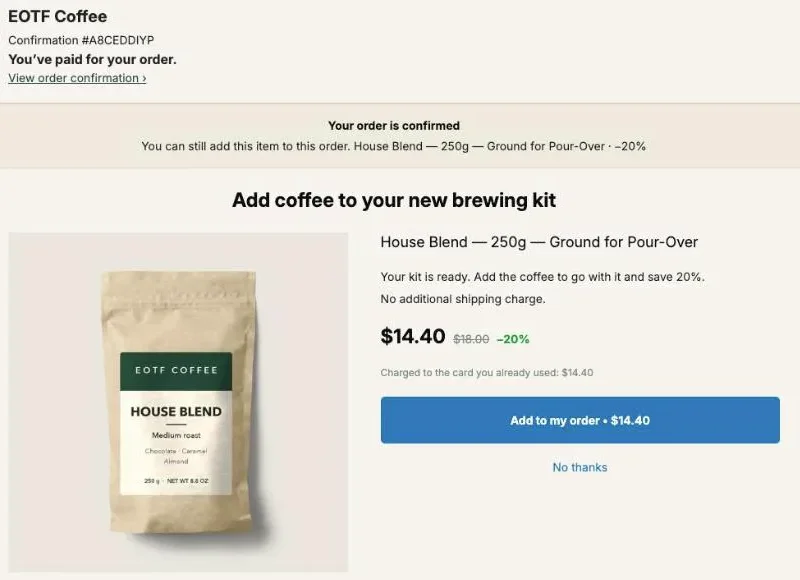
A high ticket upsell on Shopify works after payment, once the $1,500 sofa or the $2,400 e-bike is paid for. Offer one thing that makes the big purchase better: a premium accessory, assembly or installation sold as a product, or your own warranty. Show it only on orders above an amount you choose, so a $40 order never sees a $300 add-on.
In Post Purchase Upsell Abakira, that “only above an amount” part is a funnel condition called “Order total is at least”. It comes with the paid plans. The rest of this page covers which offers fit a big order, how to set the threshold, how to price an add-on when 10% of it is real money, and how to reach the buyers who never see the one-click page.
What sells after a high-ticket purchase?
After a high-ticket purchase, the offers that fit are the ones that protect, complete or set up the item the buyer just paid for. A premium accessory, an installation or assembly service, a store-backed warranty and a care kit all qualify. Pick an add-on that goes with the item.
Four offer types, and what each one needs from you:
| Offer | Example on a big order | What you set up in Shopify | Ships? |
|---|---|---|---|
| Premium accessory | Wall mount for a TV, second battery for an e-bike, fitted cover for an outdoor sofa | A normal product, ideally already in your catalog | Yes, with the order |
| Service sold as a product | In-home assembly, installation, a setup video call | A product with This is a physical product unchecked | No |
| Store-backed warranty | 3-year coverage on a grinder or a bike frame | A non-physical product, one variant per length | No |
| Care or protection kit | Leather care set for a sofa, cleaning kit for a watch | A normal product, or a bundle | Yes, with the order |
The warranty has its own walkthrough in selling an extended warranty after checkout, so this page spends its time on the other three. For jewelry specifically, matching pieces and gift boxes are covered in jewelry upsell ideas.
Start with one offer, not four. On a big order, pick the add-on that goes with that exact item: the mount for the TV, the lock for the bike. That’s the first offer of the funnel.
How do I show an offer only on orders above a certain amount?
To show an offer only on orders above an amount in Post Purchase Upsell Abakira, put it in its own funnel and set that funnel’s condition to “Order total is at least”, then type the amount. Orders below it skip the funnel and go to the next one in the list. Targeting is part of the Pro plan and above.
- On Your funnels, click Create a funnel and give it a name you’ll recognize in a month, for example “Orders over $800: assembly”.
- In the condition menu, choose Order total is at least and type the amount, for example 800. The field refuses zero or text with “The minimum amount must be a number greater than zero.”
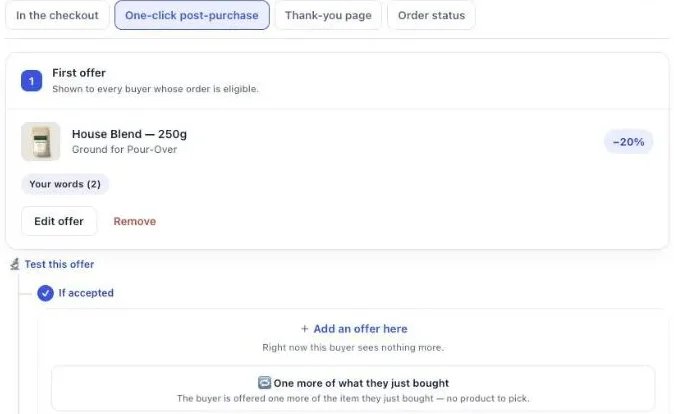
- Click Edit offers and build the first offer on the One-click post-purchase tab.
- Back on Your funnels, move this funnel above any funnel set to Everyone. The list’s rule reads: “The first funnel whose condition the order meets is the one shown.”
- Click Try a cart, type an Order total above and below your threshold, and check which funnel the app marks “This one is shown”.
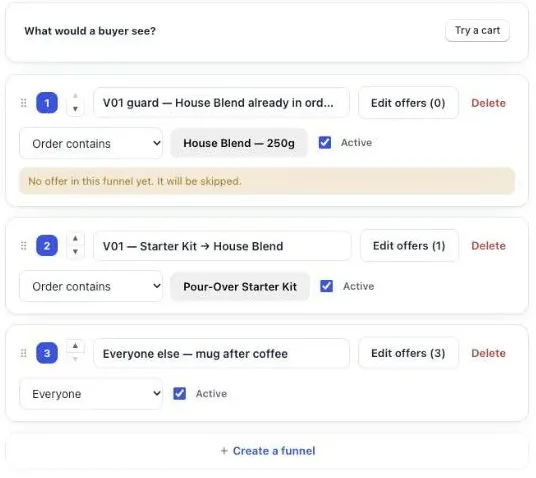
If the Everyone funnel sits above your high-ticket funnel, the high-ticket one never runs, and the app says so next to it: “Never shown: a funnel above applies to everyone. Move it down, or give it a condition.”
The order total doesn’t come from the buyer’s browser. The app reads it from the data Shopify signs for the post-purchase page, so nobody can type their way into your premium funnel.
What order total should I use as the threshold?
The threshold for a high-ticket funnel is the order total above which your premium add-on makes sense, and the cleanest place to set it is just under the price of your cheapest high-ticket product. A store selling $90 throw pillows and $1,200 sofas would set it around $1,000, so every sofa order qualifies and no pillow order does.
Three details decide the exact number.
It’s compared in the buyer’s checkout currency. The help text under the field says it plainly: “Compared with the order total the buyer pays, in their checkout currency.” If you sell in dollars and euros, an 800 threshold means $800 for one buyer and €800 for the other. Pick the number that works in your main currency, and check that it still lands on the right side in the others.
Leave room below your cheapest big item. When Shopify’s total isn’t readable yet, the app adds up the product lines instead, which leaves out shipping and taxes. A threshold well below the price of your cheapest high-ticket product gives the same answer in both cases. A cart of $795 in products plus $40 shipping passes a threshold of 800 on the full total and misses it on the product lines alone.
A doubtful read shows the funnel. If the app can’t read the total at all, it shows the funnel rather than hiding it. That’s deliberate: hiding it by mistake costs you a sale, showing it by mistake costs one extra page.
If your catalog is mostly expensive, you may not need a threshold. On the free plan, conditions are ignored and the one funnel goes to every buyer, which the admin states as “Targeting comes with Pro. Until then this offer is shown to everyone.” For a store where every product is over $500, that’s a fine place to start.
For a seasonal version of the same threshold, see the tax refund season kit upsell.
Can I target by product or collection instead of order total?
You can target by product or collection instead of order total, and a premium accessory often needs it: a wall mount belongs after a TV, not after any $900 order. In Post Purchase Upsell Abakira, “Order contains” picks products or single variants on the Pro plan, and “Order contains a product from” picks collections on the Scale plan.
Use Order contains when the add-on fits a short list of items. You can tick a single variant under a product, so only the 75-inch model gets the bigger mount offer.
Use Order contains a product from when your high-ticket range already lives in a collection, such as “Sofas” or “E-bikes”. You can choose up to 10 collections. The app reads their products when you save, then every hour, and covers up to 500 products, and the admin shows how many products the funnel covers next to the condition. New sofas you add to the collection join the funnel without you touching it.
An order goes through one funnel only. If you have a “Sofas” funnel and an “Orders over $1,000” funnel, the one higher in the list wins when an order matches both, so put the more specific one first. The guide chapter on multiple funnels and targeting walks through the order and the catch-all.
How do I sell installation or assembly as a product?
Installation or assembly sells on the post-purchase page as a regular Shopify product that doesn’t ship. Create it with This is a physical product unchecked, describe what the service covers, and offer it in your high-ticket funnel. It lands on the same order as the item it serves, where your team looks when booking the visit.
- In your Shopify admin, add a product called “Assembly” or “Installation”. The product title stays visible on the one-click page under your headline, so name it for the buyer.
- In Shipping, uncheck This is a physical product. Shopify then leaves it out of shipping.
- If you offer levels, make them variants: “Assembly only”, “Assembly and packaging removal”. The buyer can pick between them on the offer.
- In the description, say what’s included, the area you cover, and how the buyer books a date after the order.
- In Post Purchase Upsell Abakira, open your high-ticket funnel, click Edit offers, choose A product under “What this offer proposes” and pick the service.
- Write the Selling headline around the item, not the service: “Have your sofa assembled for you” reads better than “Add assembly”.
Remote services fit the same mold: a 30-minute setup call for a coffee machine, a fitting session for a bike. If you can’t deliver the service everywhere you ship, keep the high-ticket funnel targeted to the products where you can, or say the coverage area in the argument text.
How should I discount an add-on on a big order?
An add-on on a big order should get a small discount in dollars, set with “Fixed amount” rather than “Percentage” when the add-on itself is expensive. The one-click page requires some discount: the app refuses to save without one and says “The discount must be a number greater than zero.”
Here’s what the two discount types cost you on add-ons of different sizes:
| Add-on price | 20% off | 10% off | Fixed amount of $15 |
|---|---|---|---|
| $49 care kit | $9.80 | $4.90 | $15.00 |
| $149 assembly | $29.80 | $14.90 | $15.00 |
| $299 premium accessory | $59.80 | $29.90 | $15.00 |
On a $49 kit, a percentage is the cheaper choice. On a $299 accessory, 20% gives away $59.80 per acceptance, four times a $15 fixed discount. Pick a fixed amount that reads as a real saving next to the price and stays well inside your margin on the add-on.
Two settings help a big-ticket offer look right. Your argument holds two or three short lines under the headline: what the accessory does for the item just bought, and that it joins this order. And if the accessory comes in sizes or colors, select up to 25 variants on the offer so the buyer picks the right one on the page.
For the reasoning behind judging a price by what it earns per order shown, rather than by how many people say yes, see how to price a post-purchase upsell.
Can I sell the accessory and the service together?
The accessory and the service sell together as one offer when you choose “A bundle” on the one-click page. The app describes it as an offer that “sells the main product together with 1-2 more, in a single purchase at the bundle rate.” A TV mount plus installation is one decision for the buyer.
A bundle works when the items share one job. “Mount it and have it installed” is one job. A mount next to an unrelated cable organizer is two offers pretending to be one. The bundle counts as a single addition toward Shopify’s limit, which the next section uses.
What should come after the first offer?
After the first offer, a high-ticket funnel can branch: one follow-up for buyers who said yes, another for buyers who said no. In Post Purchase Upsell Abakira these are the “If accepted” and “If declined” branches, up to 7 offers over 3 levels. The branches come with the paid plans; the free plan serves one level.
A layout that fits a big order:
- First offer: the premium accessory or the service, with a fixed discount.
- If accepted: the warranty, now covering both the item and the accessory.
- If declined: a cheaper item with the same purpose, such as a care kit instead of the full protection package, or assembly only instead of assembly plus packaging removal.
Shopify sets the ceiling at three: “A customer can accept a maximum of three post-purchase offers for each checkout.” A first offer, one follow-up and a bundle all fit inside that. The guide chapter on the accept and decline tree shows how each branch is built, and the downsell guide covers what to put after a no.
How do I reach buyers who pay with Affirm, Klarna or local delivery?
Buyers who pay with Affirm, Klarna, Apple Pay or Google Pay, and buyers on local delivery orders, get your offer through a thank-you page block. Shopify skips the post-purchase page for installment and wallet services, and its documentation says offers “won’t be surfaced on orders for local delivery.”
- In your high-ticket funnel, open the Thank-you page tab.
- Under Add a block, click Single product (or Bundle, for the accessory plus service) and pick the same product as your one-click offer.
- Set Show it to to “Buyers who did not see the one-click page”. That rule comes with the Pro plan and above; on the free plan, a thank-you block shows to every buyer.
- Set Where the purchase goes to “Same order, unless it has fully shipped”. The app describes it as “Added to the order the customer already placed, in the same parcel.”
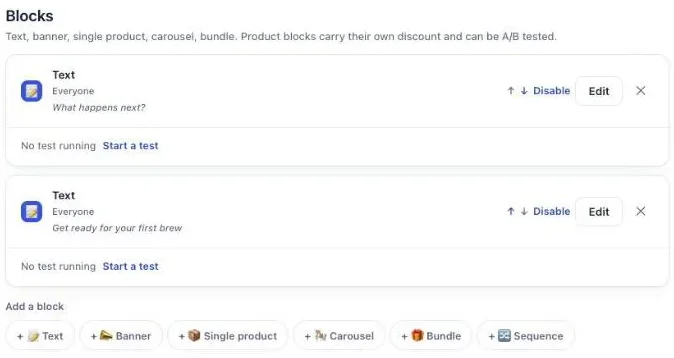
Thank-you blocks follow the funnel the order went through, so a big order still gets the high-ticket block and a small order doesn’t. The thank-you page chapter of our guide covers every block setting.
Does the add-on join the original order?
The add-on joins the original order when it’s accepted on the one-click page. Shopify adds it to the order the buyer just paid, so there’s one order number, one customer record and one fulfillment to plan. An offer accepted on the one-click page always goes to that paid order; nothing to configure.
We placed order #1010 on our demo store on October 23, 2026: a $49 kit, then an add-on accepted at $14.40 on the one-click page. The admin shows one order with both lines, and the payment section keeps the original $49.00 on its own “Original order” line.
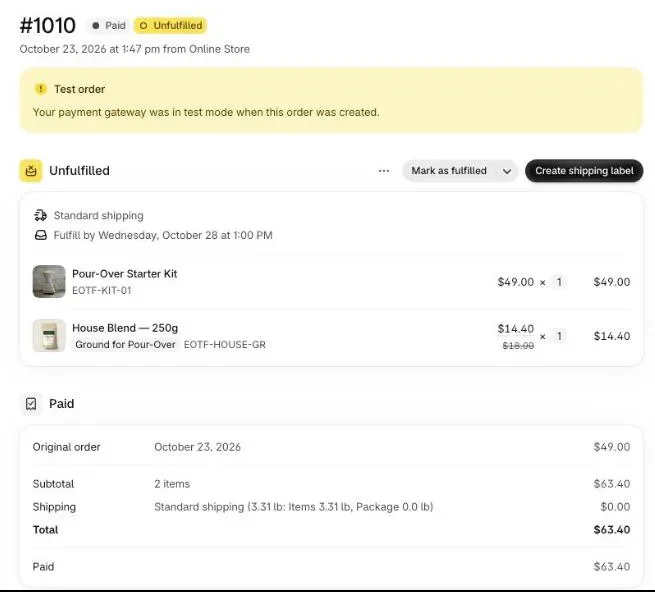
On a high-ticket store this is what your delivery team needs. The mount is on the TV’s order, the assembly line is on the sofa’s order, and whoever schedules the visit sees both in one place.
How do I know which high-ticket upsell earns the most?
The high-ticket upsell that earns the most shows up in the “By product” table of the Results screen, with the columns Saw it, Orders, Units, Revenue, Share and Clicks for each offered product. Compare each add-on’s revenue against how many buyers saw it: a $299 accessory taken rarely can out-earn a $49 kit taken often.
Two ways to compare offers properly:
- Swap and read. Run the accessory for a few weeks, then the service, and compare revenue against “Saw it” for each period. Simple, but the two periods see different buyers.
- A/B test the offer. On the Scale plan, an offer can run up to 4 versions at once. The app gives a first verdict at 100 views per version and compares versions on revenue per view by default, which is the right measure when prices differ this much.
The fewer orders your high-ticket funnel sees, the longer each version takes to reach 100 views. Test the decision that matters (accessory versus service, or two price points) rather than two headlines. The guide chapter on reading your numbers explains each figure.
How is a high-ticket upsell different from a low AOV upsell?
A high-ticket upsell adds one considered item to an order that’s already large, while a low AOV upsell sells a second unit of a cheap product so the order covers its ad cost. The setup differs: big orders get a threshold and a fixed discount, small orders “One more of what they just bought” and a percentage.
If your store has both, run both: the high-ticket funnel on top with its condition, and a catch-all below it set to Everyone with the second-unit offer. The low-order side is covered in raising a low AOV on Shopify. Other situations like this one are grouped on the situations page, and the full list of levers before and after checkout is in what raises average order value on Shopify.
Post Purchase Upsell Abakira has a free plan that runs on a live store and shows up to 100 offers a month. The listing has the current plans and what each one includes.
Show a post-purchase offer only on orders above an amount in Post Purchase Upsell Abakira
- Create a funnel On Your funnels, click Create a funnel and give it a name you'll recognize in a month, for example Orders over $800: assembly.
- Set the order total condition In the condition menu, choose Order total is at least and type the amount, for example 800.
- Build the first offer Click Edit offers and build the first offer on the One-click post-purchase tab.
- Put the funnel above Everyone Back on Your funnels, move this funnel above any funnel set to Everyone. The first funnel whose condition the order meets is the one shown.
- Try a cart Click Try a cart, type an Order total above and below your threshold, and check which funnel the app marks This one is shown.
Frequently asked questions
Does the minimum order total include shipping and taxes?
In Post Purchase Upsell Abakira, the condition Order total is at least is compared with the order total the buyer pays, in their checkout currency, as Shopify reports it for the post-purchase page. When that total cannot be read yet, the app adds up the product lines instead, which leaves shipping and taxes out. A threshold set well below the price of your cheapest high-ticket product gives the same answer in both cases.
Can I sell installation or assembly on the post-purchase page?
Yes, as a product. Create an Installation or Assembly product in Shopify, uncheck This is a physical product so it stays out of shipping, write what the service includes in the description, and offer it like any other product. The buyer pays for it on the same order as the item it goes with.
Can the buyer pick a size or color of the premium accessory?
Yes. Select several variants of the product on the offer and the one-click page shows a choice, with up to 25 variants per offer. Your discount applies to whichever variant the buyer picks.
Can I run a high-ticket funnel next to a funnel for everyone else?
Yes, on a paid plan. Put the high-ticket funnel at the top with its condition, and a funnel set to Everyone below it. Each order goes through the first funnel whose condition it meets, so big orders get the premium offer and the rest get the regular one.
Will an upsell on a big order create a second shipment?
Not from the one-click page: an accepted offer joins the order the buyer just paid, so it's one order number and one fulfillment to plan. On the thank-you page, set Where the purchase goes to Same order, unless it has fully shipped, and the item joins the original order as long as it hasn't fully shipped.
Related articles
Written by Abakira. We make small software: Shopify apps, web tools and iPhone apps. This article is about Post Purchase Upsell Abakira.