Replenishment upsell: the refill on the order status page
Sell the refill, a bigger size or a subscription on the Shopify page buyers reopen from their shipping emails. Exact block settings, timing and test steps.
2026-11-12 — Abakira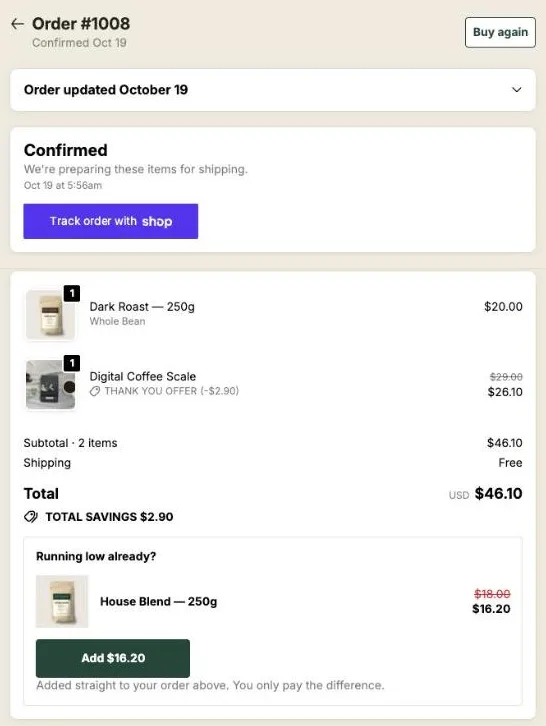
A replenishment upsell sells the buyer the next unit of something they use up: a refill, a bigger size, a stock-up or a subscription. The best place for it on Shopify is the order status page, the page buyers reopen from the confirmation and shipping emails to see where their parcel is. With Post Purchase Upsell Abakira, a Single product block there can add a one-time refill to the order the buyer already placed, or sell the same product on a subscription plan through a new checkout, on every plan including the free one.
Replenishment email works: wait for the product to run out, then send a reminder. The emails you already send can link back to one page, and that page can carry the offer.
What is a replenishment upsell?
A replenishment upsell is an offer for more of a product the buyer consumes, made at a moment when running out is on their mind. It comes in four forms: the same product again, a bigger size, several units at a better unit price, or a subscription that ships it on a schedule. The product is the one they already chose, so there’s no new decision to sell.
The four forms don’t sell the same way. Here’s how they compare when the offer sits on the order status page with Post Purchase Upsell Abakira:
| Form | What the buyer gets | Where the purchase goes | Setting in the block |
|---|---|---|---|
| Refill | One more unit of what they bought | Same order while it can still take it | Single product, Subscription on One-time purchase |
| Bigger size | The larger variant of the same product | Same order while it can still take it | Single product with the large variant picked |
| Stock-up | 2 to 9 units at a falling price | Same order while it can still take it | Quantity tiers, up to 3 tiers |
| Subscription | The product on a recurring plan | Always a new checkout | Subscription set to one of your plans |
The first three are one-time purchases, so they can ride in the parcel that’s already being packed. The fourth is a separate order by design, and that’s the part most merchants get wrong. More on it below.
Why sell the refill on the order status page instead of by email?
The order status page is where the replenishment email lands. Shopify’s order emails reach it through the Liquid variable order_status_url, which returns the link to the order status page; the Order confirmation, Shipping confirmation and Shipping update templates are the ones to check. Buyers open it to check on their parcel, sometimes several times over the days before delivery. An offer placed there costs nothing extra to send.
There are three practical reasons to put the refill on this page:
- The visit is already happening. You don’t need a new flow, a new segment or a new send. The emails you already send bring the buyer there.
- Every buyer reaches it. The one-click post-purchase page only shows for the payments Shopify allows there. The order status page shows for every order, PayPal, wallets and cash on delivery included.
- The refill can still join the parcel. A refill added before the order ships goes out in the same parcel, on the same order. An email sent three weeks later can’t do that.
Keep your replenishment emails. The order status block and the email do different jobs: the block catches the buyer while the first unit is still on its way, the email catches them when it’s nearly gone.
Which products make good replenishment offers?
Good replenishment products are consumables the buyer finishes and buys again: coffee, tea, supplements, skincare, pet food and litter, filters, blades, cartridges, cleaning refills. The test is simple. If the buyer will need the same product again without thinking about it, it belongs in a replenishment block.
Two cases deserve their own offer:
- Hardware that needs a consumable. A buyer who orders a brewer, a razor or a water filter jug hasn’t bought the refill yet. Offer the consumable that goes with it, and the buyer leaves with both.
- A starter size. A buyer who picked the small bag or the trial size is the right buyer for the bigger size. The block shows the large variant, priced against the small one.
Products that are bought once (furniture, a phone case, a gift card) don’t belong here. For those, our article on what to upsell after a purchase has better options.
Should the offer be a refill, a bigger size, a stock-up or a subscription?
The right replenishment offer depends on how often the buyer comes back and how sure they are about the product. A first-time buyer who hasn’t tried the coffee yet is a refill buyer. A buyer of a supplement they will take every day is a subscription buyer. We would put the refill first and keep the subscription for the product people already reorder.
Here’s the order we’d use on a consumables store:
| Buyer | Offer that fits | Why |
|---|---|---|
| First order, product not tried yet | One refill at a modest discount | Low commitment, joins the parcel |
| First order, bought the small size | The bigger size | Same product, better unit price |
| Bought 1 unit of a daily product | Stock-up with 2 or 3 quantity tiers | More units in the same parcel |
| Buys a product people reorder (a daily supplement, a best-selling consumable) | A subscription plan | The plan ships it on a schedule, so they never reorder by hand |
On the free plan you get one funnel, and its order status blocks show on every order. Pick the one offer that suits most of your buyers, usually the refill of your best-selling consumable. Matching the offer to the product they bought takes targeting, covered further down.
How do I set up a replenishment offer on the order status page?
A replenishment offer on the order status page takes two parts in Post Purchase Upsell Abakira: placing the app block once in Shopify’s checkout editor, then building a Single product block in the funnel’s Order status tab. Shopify only shows an app on this page where you placed it, so the first step comes first.
- Place the block. In your Shopify checkout editor, switch to the Order status page and add the Order status page offer block. The app’s own reminder reads: “One time, two minutes.”
- Open the Order status tab. In the app, open your funnel. Its tabs are In the checkout, One-click post-purchase, Thank-you page and Order status.
- Add a Single product block. Pick the refill product. Write a Heading that reads well whether the parcel left yesterday or arrived this morning; “Running low already?” is the one on our demo store.
- Choose one-time or subscription. The Subscription menu appears when the product has plans. Keep One-time purchase for a refill, or pick a plan.
- Set the price. For a one-time refill, set Discount (%). For a stock-up, add Quantity tiers: up to 3 tiers, from 2 to 9 units, each with its own discount.
- Keep Where the purchase goes on its default, Same order, unless it has fully shipped. The next sections explain why.
- Leave the countdown empty. The field is Countdown (empty = none).
- Test it. Place a test order, open its order status page from the confirmation email, and tap the button.
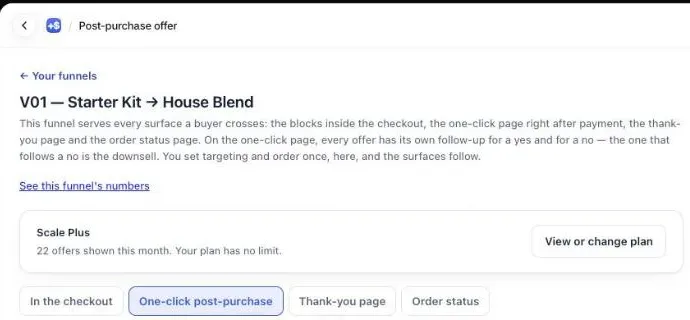
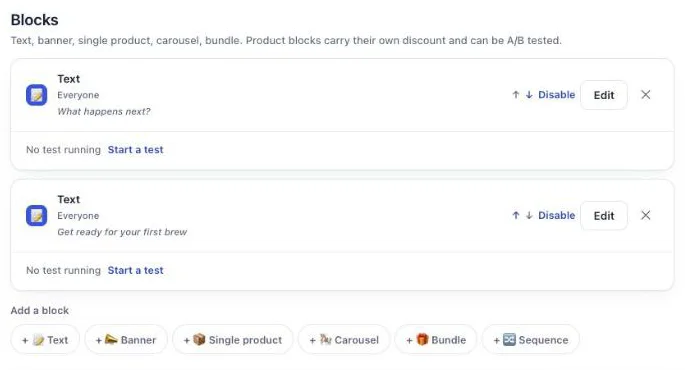
The block editor offers six block types: Text, Banner, Single product, Carousel, Bundle and Sequence. For a replenishment offer, Single product is the one to start with. A Text block above it can answer the question the buyer came with, such as how to reach you about the delivery.
If the funnel’s order status tab shows nothing on the test order, check the placement first. The block’s Placed in the checkout editor setting means it appears wherever you dropped the app block in Shopify’s editor, so that’s where you move it. The full chapter, with the editor screens, is the order status page chapter of our guide.
How does a subscription sold from the order status page work?
A subscription sold from the order status page always goes through a new checkout. Shopify can’t add a subscription to an order that’s already placed, so Post Purchase Upsell Abakira sends the buyer to a fresh cart with the product and its plan, then straight to checkout. The original order stays exactly as it is, and the subscription becomes a separate order.
The admin says it under the block as soon as you pick a plan: “A subscription product always opens a new checkout: Shopify cannot add a subscription to an order that is already placed.” That applies whatever you chose under Where the purchase goes.
What happens in detail, as the code does it:
- The link carries the plan. The button opens a
/cart/addlink with the variant, the quantity and theselling_planid, then returns the buyer to/checkout. We use that form because Shopify’s shorter cart link,/cart/<variant>:<quantity>, drops the plan without an error and would sell a one-time item instead. We tested that on August 6, 2026. - The card says it’s a subscription. Under the product, the buyer sees the plan name from your subscription app (or the word “Subscription”) and the line “This is a subscription. It renews automatically until you cancel it.”
- The note under the button tells the truth. For a subscription it reads “Opens a new checkout. Your order above stays exactly as it is.” It never says the item joins the order.
- The plan comes from your subscription app. The Subscription menu lists the plans that app created for the product. Post Purchase Upsell Abakira never creates a plan and never bills a renewal; your subscription app does both.
- No code to type. The button carries the block’s attribution into the cart, which is what Shopify’s discount function reads.
Put the lasting saving in the plan itself, as a subscribe-and-save discount in Recharge, Loop or whichever app owns the plan. Renewals are billed at the price that plan sets.
Two practical limits shape the build. A Bundle block can’t carry a subscription, because Shopify’s cart link for several products has no place for a plan. And quantity tiers belong on the one-time refill: keep the subscription block on one unit per delivery, and let the plan define the cadence.
How is this different from selling a subscription on the one-click page?
A subscription sold on the one-click post-purchase page is added to the order the buyer just paid, after they tick a consent box, with no new checkout. A subscription sold on the order status page opens a new checkout days later. The first catches the buyer at the moment of payment; the second catches them while the first unit is on its way.
| One-click post-purchase page | Order status page | |
|---|---|---|
| When the buyer sees it | Once, right after paying | Each time they open the link in an order email |
| Who sees it | Card payments, in the cases Shopify allows | Every order |
| How the subscription is added | To the same order, after a consent checkbox | In a new checkout, as a separate order |
| Shipping on the offer | First delivery and renewals set on the offer | Your store’s checkout shipping rates |
| Countdown | 30 seconds to 30 minutes | Up to 72 hours from the order, or none |
The one-click version, with Recharge and Loop and its consent rules, is covered in selling a subscription after checkout with Recharge or Loop. The seasonal version, a subscription and a 6-month stock-up offered one tap after payment in January, is in our January sale ideas. The order status block doesn’t replace either. It’s the later, slower offer for the buyers who didn’t take the first one, or never saw it.
Where does a one-time refill go: the same order or a new one?
A one-time refill added from the order status page joins the original order while that order can still take it, and ships in the same parcel. With the default setting, Same order, unless it has fully shipped, Post Purchase Upsell Abakira switches the buyer to a new checkout only once the whole order has left the warehouse.
The three options under Where the purchase goes, with the help text the admin shows:
- Same order, unless it has fully shipped: “Added to the order the customer already placed, in the same parcel. If the whole order has already shipped, the customer pays in a new checkout instead.”
- Same order, only until the first parcel ships: as soon as one parcel has left, “the customer pays in a new checkout and gets a separate order.”
- Always a new checkout: “The customer always pays in a new checkout and gets a separate order, with your usual shipping rates.”
For a refill, the default is right. A bag of coffee added on day one rides with the first bag. The same bag added after delivery becomes its own order at your normal shipping rate, which is exactly what a reorder would have been anyway.
The app reads the order’s fulfillment status each time the page loads, before it draws the button, so the note under the button always matches what will happen. For the same order it reads “Added straight to your order above. You only pay the difference.”
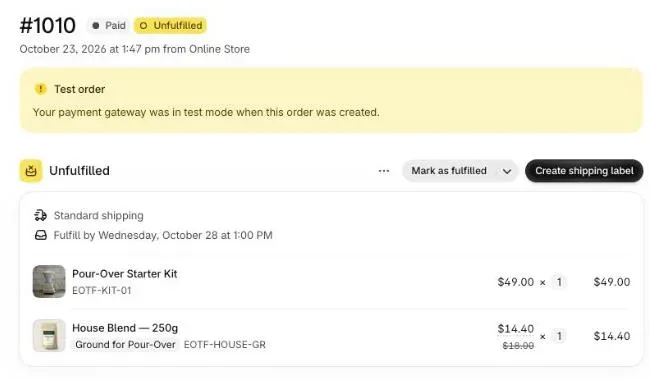
If your orders go to a warehouse system that picks fast, our article on keeping the upsell in one parcel with a 3PL covers the timing on that side.
Should a replenishment offer have a countdown?
A replenishment offer on the order status page works best without a countdown. Countdowns on this page count from the moment the order was placed, up to 72 hours, and every visit shows the same deadline. A refill block is meant to be there when the parcel arrives, so a timer would hide it before the buyer opens the product.
Leave Countdown (empty = none) blank on the refill block. If you want urgency, add a second block with a short window, such as 24 hours, and a different offer, then pick what happens at zero under When the countdown reaches zero: Hide the block, Keep the block, at full price or Keep the block, show a message. The countdown settings are in the guide chapter on discounts, timers and social proof.
How do I match the refill to what the buyer bought?
Matching the refill to the product in the order takes one funnel per product, each with an Order contains condition. A funnel for buyers of House Blend sells the House Blend refill; a funnel for buyers of the brewer sells filters. Funnel targeting by product, variant or order total comes with the Pro plan, which holds up to 20 funnels.
A few numbers to plan with:
- One Order contains condition takes up to 300 products, so a whole coffee range can share one refill funnel.
- Targeting by collection, Order contains a product from, comes with the Scale plan.
- The free plan has one funnel, without targeting. Its order status blocks show on every order.
The order status page also has its own Show it to rules: Buyers who bought on the thank-you page, Buyers who bought from a specific thank-you block and Buyers who bought nothing on the thank-you page. They stop a buyer who took the refill on the thank-you page from seeing it again here. These rules come with the Scale plan; on other plans, every order status block shows to every buyer, so give the thank-you page and the order status page different products. The guide chapter on multiple funnels and targeting shows the conditions.
Before testing a new funnel with Try a cart, check that the funnel is turned on. A funnel that isn’t checked answers “Turned off”, and the test tells you nothing.
What about buyers who already subscribe?
A buyer who already subscribes doesn’t need a second subscription. On the order status page, a product block can make the existing one longer instead: under What the button does, choose Changes their existing subscription. It “sells nothing and charges nothing today” and asks Recharge to move the subscription to the plan or length you picked.
This mode needs a Recharge connection on the Subscription app page, and the connectors come with the Scale plan. Without Recharge connected, a block in this mode sells the product instead, and the editor says so. The one-click side of the same job, through Recharge or Loop, is covered in upgrading a subscription right after purchase.
How do I word a replenishment offer?
A replenishment offer reads best as a question about running out, followed by the product and the price. The buyer opened the page to check on a delivery, so the copy has a few seconds. Name the product they bought, say what the button does, and stop.
Headings that fit any consumable:
- “Running low already?”
- “Add a second bag before it ships”
- “Make it a 3-pack”
- “Never run out: get it every month”
For the subscription block, put the terms in the Subtitle: what arrives and how often, and that they can cancel. The card already adds “It renews automatically until you cancel it”, so don’t contradict it. Our upsell copywriting examples have more headings by store type.
How do I know the replenishment block is selling?
The Results screen of Post Purchase Upsell Abakira groups both pages under “Thank-you and order status pages”, with the revenue behind each. The By product view shows the last 30 days, which is enough to see whether the refill or the subscription is the one buyers take.
Read it after a batch of orders has had time to arrive, since the refill block mostly sells around delivery. If the block earns little, change the product before the discount: a refill of the wrong product won’t sell at any price. The same move, offered to buyers on day zero instead, is in same-product upsells on Shopify. More situations like this one are on our situations topic page.
Post Purchase Upsell Abakira runs the one-click page, the thank-you page and the order status page from one funnel. The free plan shows up to 100 offers a month on the one-click page; the listing has the current plans.
Set up a replenishment offer on the Shopify order status page
- Place the app block In your Shopify checkout editor, switch to the Order status page and add the Order status page offer block from Post Purchase Upsell Abakira, then save.
- Open the Order status tab In the app, open the funnel and click the Order status tab.
- Add a Single product block Click Single product, pick the refill product and write a heading such as Running low already?
- Choose one-time or subscription Under Subscription, keep One-time purchase for a refill, or pick one of the plans your subscription app created for that product.
- Set the discount and Where the purchase goes Set Discount (%) for a one-time refill, add Quantity tiers for a stock-up, and keep Where the purchase goes on Same order, unless it has fully shipped.
- Leave the countdown empty Leave Countdown (empty = none) blank so the block is still there when the parcel arrives.
- Test on a real order Place a test order, open its order status page from the confirmation email, and tap the button: a one-time refill joins the order, a subscription opens a new checkout with the plan in the cart.
Frequently asked questions
Can I sell a subscription from the order status page on the free plan?
Yes. Picking a subscription plan on a product block works on every plan, the free one included. The free plan has one funnel, so its order status blocks show on every order. The free plan's limit of 100 offers shown a month counts the one-click page only, not the order status page.
Does the buyer have to type a discount code in the new checkout?
No. The button carries the block's attribution into the cart, and a Shopify discount function installed by Post Purchase Upsell Abakira applies the block's discount to that product. The buyer lands on the checkout with the product already in the cart.
Can a Bundle block carry a subscription?
No. Shopify's cart link for several products at once has no way to carry a selling plan, so a bundle can't sell a subscription item. Put the subscription on a Single product block and keep bundles for one-time products.
What does the buyer see that tells them it's a subscription?
The product card shows the plan name from your subscription app, or the word Subscription, and the line This is a subscription. It renews automatically until you cancel it. Under the button, the note says a new checkout opens and the order above stays exactly as it is.
Can I offer a larger quantity of the refill on the same block?
Yes, for a one-time refill. A product block on the order status page takes up to 3 quantity tiers, from 2 to 9 units, each with its own discount, under the setting Quantity tiers.
Does the refill block show on orders paid with PayPal or cash on delivery?
Yes. The order status page is shown for every order, whatever the payment method. Only the one-click post-purchase page is limited to the payments Shopify allows there.
Related articles
Written by Abakira. We make small software: Shopify apps, web tools and iPhone apps. This article is about Post Purchase Upsell Abakira.