A/B test a post-purchase upsell: start with the offer
Test the product and the discount before the page design. Setup, the views each version needs before a 95% verdict, and how to read revenue per view.
2026-11-03 — Abakira, updated 2026-11-08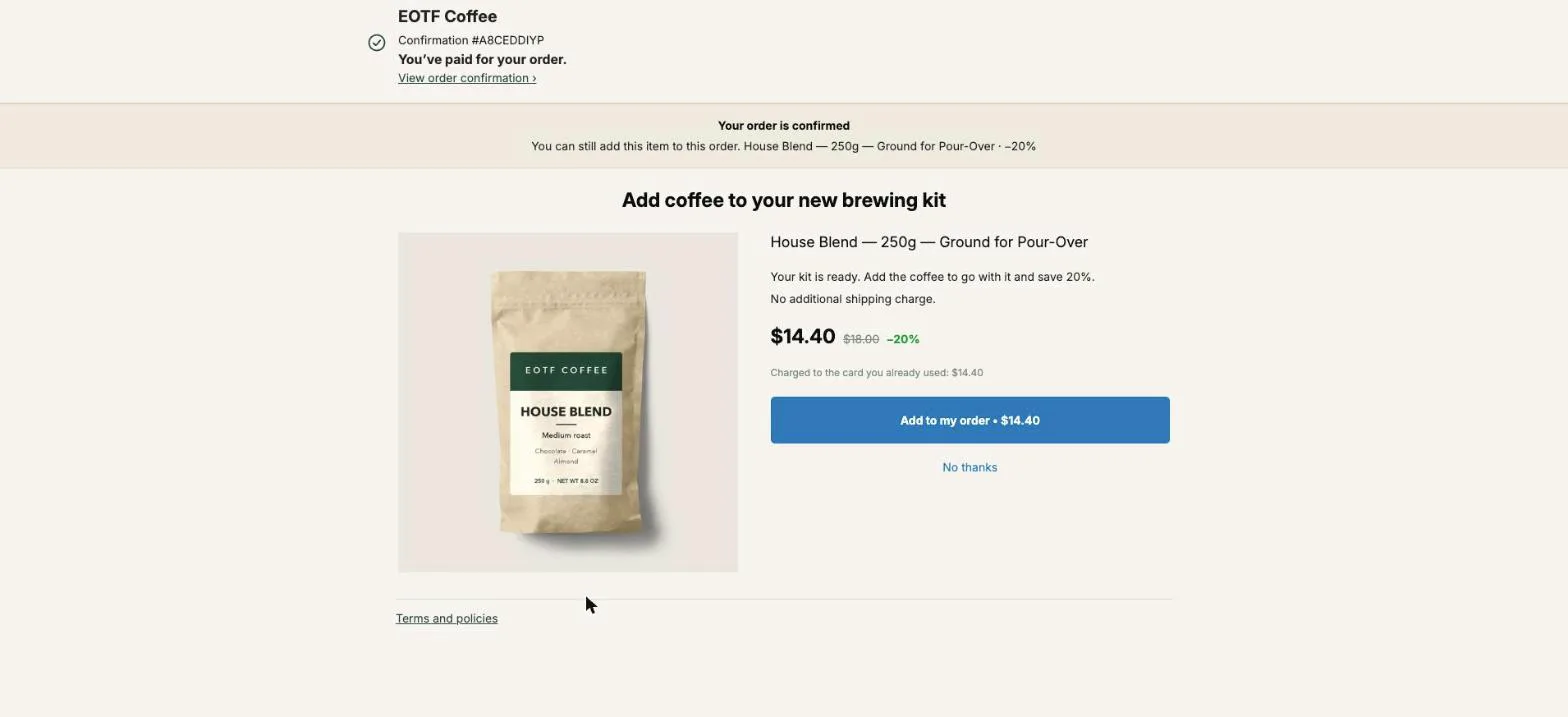
To A/B test a post-purchase upsell, split buyers between two to four versions of the same one-click offer, change one thing between them, and judge the result on net revenue per buyer who saw the offer. Test the offer itself first, meaning the product and the discount, and leave the page design for later. In one published three-version test, the plain page with the strongest discount beat the original by 65%, and the detailed page with a standard discount by 42%.
This page covers what to test in which order, how to set the test up in Post Purchase Upsell Abakira, how many views each version needs before you can believe a winner, and what to do with a tie.
What should I A/B test first on a post-purchase upsell?
The first thing to A/B test on a post-purchase upsell is the strength of the offer: which product you put in front of the buyer, and how big the discount is. Those two decide whether the buyer says yes. Headlines, images and layout change how the offer is read, and they matter less until the offer itself is right.
Here’s the order we recommend, with the reason for each step:
| Order | What to test | Example of version B | Why at this point |
|---|---|---|---|
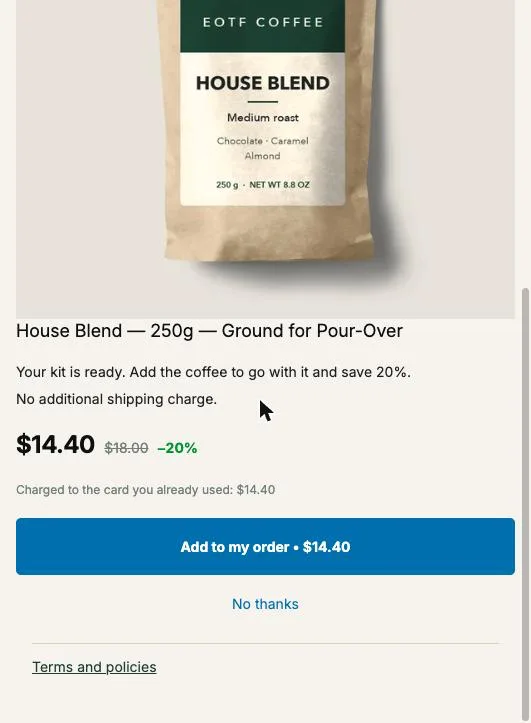
| 1 | The product | The coffee that goes with the kit vs. one more of what they bought | A product the buyer doesn't want can't be saved by a better page |
| 2 | The discount | 20% off vs. 30% off on the same product | In the test from the opening paragraph, the page with the strongest discount won |
| 3 | How much to sell | One unit vs. quantity tiers (2 units at 25%, 3 at 30%) | Raises the order value once the product is known to sell |
| 4 | The words | No argument vs. a selling headline and three bullets | Copy works on an offer that already converts |
| 5 | The layout | Large image beside the text vs. a small thumbnail with the price on the right | The smallest lever, and the slowest to show a gap |
It’s tempting to do it the other way round: pick a product once, set a 10% discount because it feels safe, then spend weeks testing headlines on an offer that was never strong enough. Five tests on the layout of a weak offer teach you less than one test on the discount. When you reach the words, our upsell copywriting examples for the page after checkout give headlines and arguments to put in version B.
Why does a stronger offer beat a better-designed page?
A stronger offer beats a better-designed page because the post-purchase page asks for one decision. It sits between payment and the order confirmation, and it shows one product, one price and one button. What the buyer weighs is whether that product at that price is worth a tap, and the design only frames that question.
The three-version test we mentioned at the top compared:
- the original page,
- a detailed page with a longer argument and a standard discount,
- a short page with the strongest discount of the three.
Both challengers beat the original, so effort on the page does pay. The short page with the strongest discount did best, +65% against +42%. The practical lesson is about sequence: settle the product and the discount first, then use the words and the layout to push a good offer further.
There’s also a structural reason on Shopify’s one-click page. The product keeps the name it has in your catalog, and Post Purchase Upsell Abakira adds your selling headline above it rather than replacing it. The page is a column of text, one image and a button. You have less design to play with than on a landing page, so the offer carries more of the weight.
How do I set up an A/B test on the one-click page?
Setting up an A/B test on the one-click page in Post Purchase Upsell Abakira takes a few minutes inside the funnel editor. You start the test from the offer you want to improve, keep it as version A, add one to three versions, choose the goal, and save. A/B testing is part of the Scale plan.
- Open the funnel and stay on the One-click post-purchase tab.
- Under the first offer, click Test this offer.
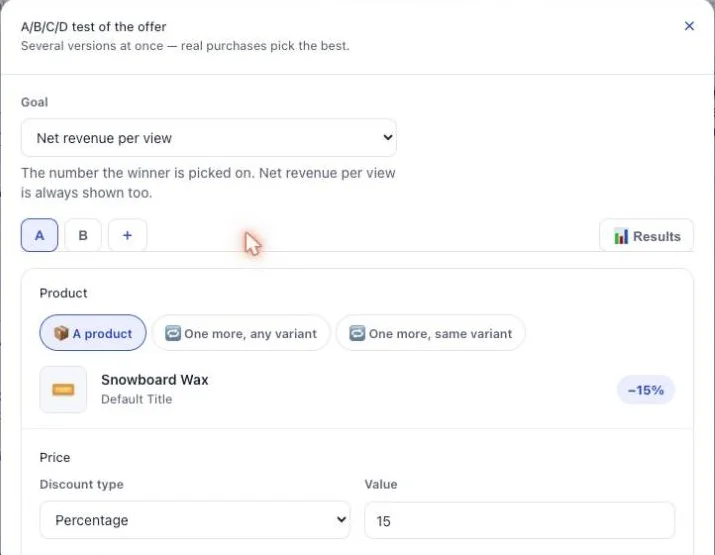
- Leave Goal on Net revenue per view. The two other choices are Acceptance rate and Total revenue.
- Click Add a version. Version B opens as a copy of A.
- Change one thing in version B: the product, or the discount. Nothing else.
- Save the funnel.
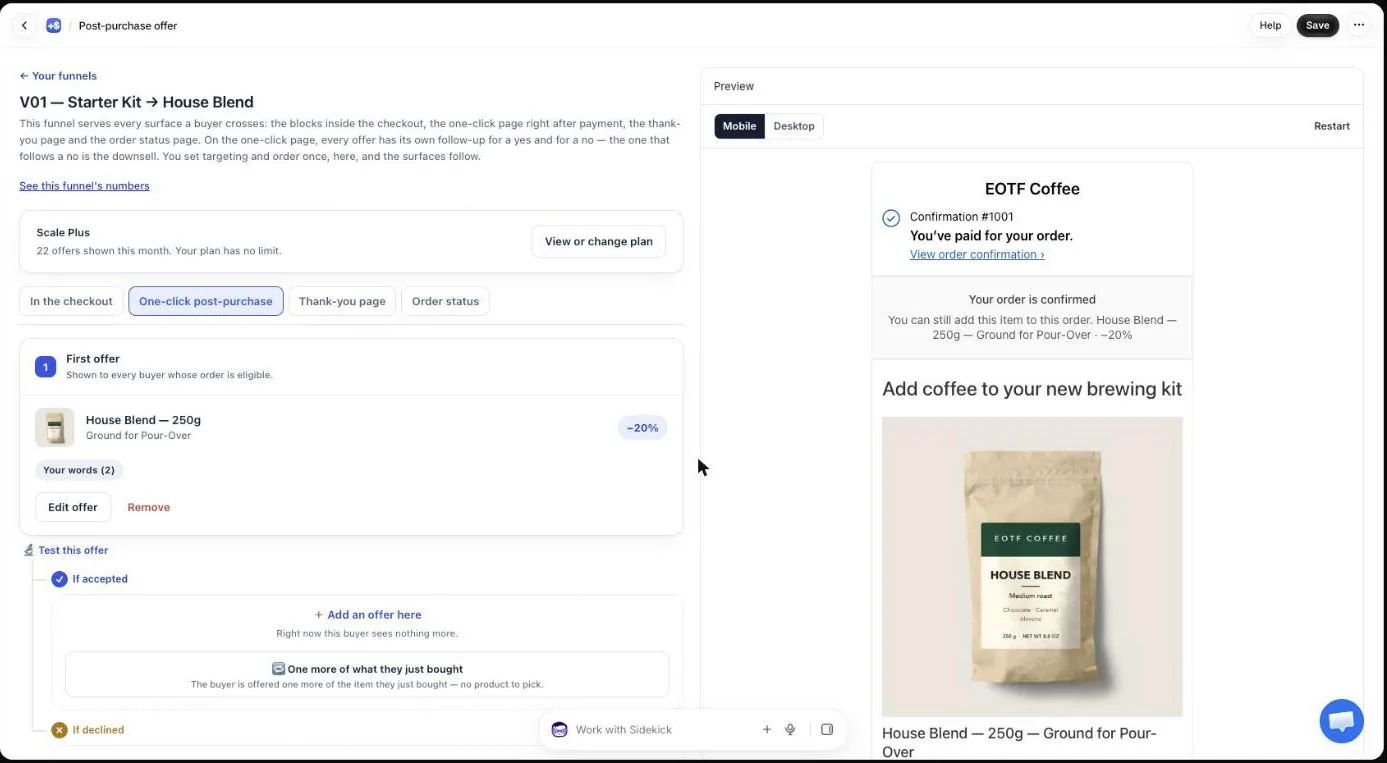
Start with the first offer. It’s the only page every eligible buyer sees, so it collects views fastest and a win there moves the most money. An offer further down the tree, the one after a yes or the downsell after a no, only sees the buyers who took that branch, and its test takes longer to conclude.
Two things stay the same in every version, by design. The branches below the offer (what happens after a yes, what happens after a no) belong to the offer’s place in the tree, not to a version. And only one offer per funnel can be under test at a time: the card of every other offer reads “One test per funnel at a time” until the test ends.
What can each version of the offer change?
Each version of the offer can change everything the buyer sees on the page: the product, the discount, the quantity tiers, the extra products in the grid, the image, the countdown, the social proof line, your words and the page layout. Each version is a complete offer, tested one change at a time.
| What you want to test | Where it lives in the offer |
|---|---|
| The product | What this offer proposes: A product, One more, any variant, or One more, same variant |
| The discount | Discount type (Percentage or Fixed amount) and Value |
| Selling more units | Quantity tiers, from 2 to 20 units, each with its own discount |
| The words | Your words on this page: Promise line, Selling headline, Your argument (up to six lines), Badges |
| The picture | Your visual: your image or the product photo |
| Urgency | Show a countdown, from 30 seconds to 30 minutes |
| Proof | Show how many buyers added it |
| The look | Page layout: image size, promise line style, countdown style |
Everything in that table travels with the version. Version B can say something different from version A, show a different picture or sell a different product at a different price, and the buyer who draws B sees all of B.
The rule that keeps a test useful is to change one row at a time. If version B has a new product and a bigger discount and wins, you know that something worked, and you’ll never know which. Our guide chapter on A/B testing an offer shows the same rule from the admin side.
How are buyers split between versions?
Buyers are split between versions evenly, by a fixed draw on the order and the offer. Post Purchase Upsell Abakira computes the version from the order’s reference and the offer’s ID, so the same buyer always lands on the same version, even when the page reloads or Shop Pay calls the offer a second time for the same order.
That detail matters more than it looks. The discount Shopify applies to the added line is signed separately from the page the buyer sees. In our code the same function picks the version for the page and for the signed discount, so a buyer who saw 30% off is charged with 30% off, never with version A’s 20%. A homemade test that randomizes the page in one place and the price in another can show one discount and charge another.
Each page in the funnel draws on its own. The first offer, the offer after a yes and the downsell after a no each have their own split, so you can test the first offer today and the downsell next month without one test leaking into the other.
Which number should decide the winner?
The number that should decide a post-purchase A/B test is net revenue per view: the revenue the offer brought in, as confirmed by Shopify on the order, divided by the number of buyers who saw it. It’s the default goal in Post Purchase Upsell Abakira, and the results show it for every version even when you pick another goal.
Acceptance rate alone flatters cheaper offers. Here is the arithmetic on our $18.00 House Blend, with acceptance rates picked for the example:
| Version | Discount | Price | Acceptance | Revenue per view |
|---|---|---|---|---|
| A | 15% | $15.30 | 9% | $1.38 |
| B | 30% | $12.60 | 14% | $1.76 |
In this example, B wins on both numbers. But move B’s acceptance down to 10% and it earns $1.26 per view, less than A, while still winning on acceptance. That’s the case the app flags: if a version wins on the goal you chose but earns less per view than another version, the verdict carries the warning “It wins on your goal but earns less per view than another version.” When you see it, keep the version that earns more.
The revenue side counts what the order actually gained, read back from Shopify, not what the buyer clicked. A tap that never turned into a line on the order isn’t counted as money.
To work out the acceptance rate a bigger or cheaper offer needs before you even test it, our article on how to price a post-purchase upsell walks through the calculation.
How long should a post-purchase A/B test run?
A post-purchase A/B test should run until every version has at least 100 views and the gap between the leader and the runner-up reaches 95% confidence. Post Purchase Upsell Abakira won’t name a winner before both are true. Below 100 views per version the verdict reads “Too early: not enough data to decide yet.” To read a single offer’s rate before you test it, see how to set your own upsell take rate baseline.
The 100-view floor is the minimum, not the usual finish line. How many views you really need depends on how far apart the versions are. The app’s test on acceptance is a standard two-proportion test, and here is a planning estimate for a test on acceptance rate: the views per version at which a gap of that size reaches 95% confidence:
| Version A accepts | Version B accepts | Views per version for 95% | Days at 30 views a day, two versions |
|---|---|---|---|
| 5% | 10% | 213 | 15 |
| 10% | 15% | 336 | 23 |
| 8% | 12% | 432 | 29 |
| 10% | 12% | 1,880 | 126 |
The last row is the reason to test the offer first. A layout tweak that moves acceptance from 10% to 12% needs close to 1,900 views per version to reach 95%, which is four months of traffic for a store whose one-click page gets 30 views a day. A discount change that moves it from 10% to 15% reaches 95% in about three weeks. Big levers produce big gaps, and big gaps settle quickly.
While a test is below 100 views per version, the verdict adds how many more views it needs to reach that floor and how many days that is at the current pace. Adding a third and fourth version multiplies the views you need, so on a smaller store, test two versions.
Two habits keep the result honest. Let the test cover at least one full week, so weekend buyers and weekday buyers are both in it. And don’t start a test in the middle of a sale and end it after: the promotion changes who is buying, and the test ends up measuring the promotion.
What do I do when the test ends in a tie?
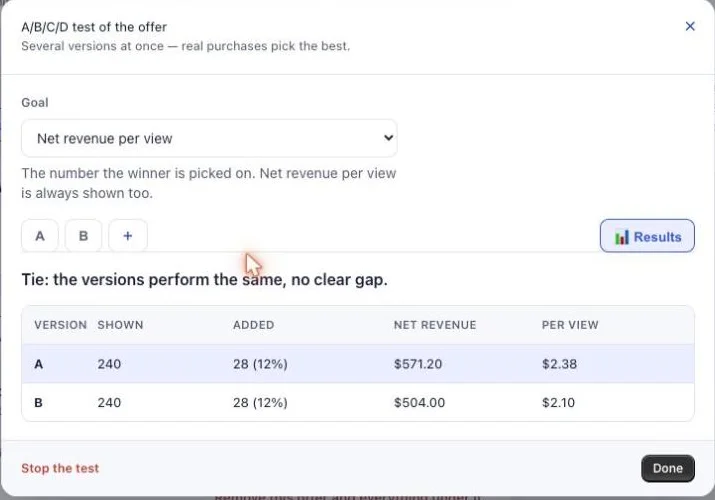
A tie in a post-purchase A/B test means the two versions performed close enough that the gap could be chance. Post Purchase Upsell Abakira says it in one line: “Tie: the versions perform the same, no clear gap.” A tie is an answer too, and it usually tells you the thing you changed was too small to matter.
What to do next depends on the test:
- A discount test ties. Keep the smaller discount. Same revenue, more margin on every order that takes it.
- A product test ties. Keep the product you have more stock of, or the one with the better margin.
- A words or layout test ties. Keep whichever is simpler, and go back to testing the offer.
Then start the next test with a bigger change. If 20% against 25% tied, try 20% against 35%, or a different product altogether.
Can I change a version while the test is running?
You can change a version while the test is running, but the numbers it already collected then mix two different offers. After a significant change, use Restart the test in the A/B tests of the one-click page panel of the funnel. The counts for every version go back to zero, and nothing is deleted.
That panel sits on the funnel page and counts each page under test separately. Its views are distinct buyers, counted only since the test started: buyers who came through before the start all saw version A and are left out. Download raw data (CSV) gives you every row, including the history from before a restart, if you want to run your own analysis.
Small fixes don’t need a restart. A typo in the argument or a corrected image won’t change how buyers decide. A new discount or a new product does.
How do I keep the winner?
You keep the winner by opening the test and clicking Make this version the offer on the winning version. Post Purchase Upsell Abakira copies that version’s content into the live offer and ends the test. The branches below the offer, the next offer after a yes and the downsell after a no, stay exactly as they were.
If you’d rather stop without a winner, Stop the test asks which version to keep and removes the others.
A test that has a clear winner and sits unread for seven days triggers one reminder email, “Your A/B test has a winner”, with the version letter in it. Only one, per offer. Every day a winning test runs, part of your buyers still sees the losing version, so the money is in acting on the verdict.
What should I test after the first offer?
After the first offer has a winner, test the next page that collects the most views. When fewer than half the buyers accept the first offer, that page is the downsell shown after a no, since every buyer who declines reaches it. Then return to the first offer’s words or layout.
A sequence we’d follow on a new funnel:
- First offer, product: two candidates, same discount.
- First offer, discount: the winning product at two discount levels.
- Downsell after a no: a cheaper item, or the same item with a bigger discount. Our article on how to build a downsell on Shopify covers what to put there.
- First offer, quantity tiers: one unit against a 2-unit tier.
- First offer, words: no argument against a selling headline and three bullets.
The thank-you and order status pages can be tested too, with product blocks judged page by page. Those pages reach buyers the one-click page never sees, such as buyers who paid with a wallet. The guide chapter on the thank-you page explains how those blocks work, and the method articles cover the other levers once your offers are tested.
Every test you finish raises the revenue of each order a little, which is the most direct way to increase average order value on Shopify without buying more traffic.
Post Purchase Upsell Abakira has a free plan that shows up to 100 offers a month on a live store, and A/B testing on the Scale plan. The listing has the current plans.
A/B test a post-purchase upsell offer in Post Purchase Upsell Abakira
- Open the funnel Open the funnel in Post Purchase Upsell Abakira and stay on the One-click post-purchase tab.
- Start the test on the first offer Under the first offer, click Test this offer. Version A is the offer as it is today.
- Pick the goal Leave Goal on Net revenue per view, the default, unless you have a specific reason to pick Acceptance rate or Total revenue.
- Build version B Click Add a version and change one thing: the product, or the discount. Leave the words and the page layout identical to version A.
- Save and let it run Save the funnel. Buyers are split evenly between the versions, and the same buyer always sees the same version.
- Read the verdict Open the test and the Results tab. Wait until every version has at least 100 views and the app names a winner or a tie.
- Keep the winner On the winning version, click Make this version the offer. The test stops and the accept and decline branches below it stay as they were.
Frequently asked questions
Does an A/B test on the post-purchase page put the original sale at risk?
No. The one-click page appears after the buyer has paid for the order, so every version of the test is shown to a buyer whose first purchase is already done. A losing version costs you upsell revenue during the test, never the order itself.
How many A/B tests can run in one funnel?
One at a time per funnel. While another offer is under test, the offer card reads 'One test per funnel at a time'. Run the first test to a verdict, adopt the winner, then start the next one.
What happens to a running test if I leave the Scale plan?
The test is paused, not deleted. Buyers all see version A again, the other versions stay saved, and the test serves again as it was if you come back to a plan with A/B testing.
Which offer types can carry versions?
A product, One more, any variant and One more, same variant carry versions, and a version can still add a grid of extra products or quantity tiers. Bundle offers and subscription upgrades have no versions in Post Purchase Upsell Abakira.
Should I test on the thank-you page or the one-click page first?
Start on the one-click page if most of your orders are paid by card, because its first offer is the one every eligible buyer sees. The thank-you and order status pages have their own A/B tests on product blocks, judged per page, and they reach buyers the one-click page skips.
Related articles
Written by Abakira. We make small software: Shopify apps, web tools and iPhone apps. This article is about Post Purchase Upsell Abakira.