Upsell take rate: what counts as seen, and a good number
Upsell take rate is accepted offers divided by offers shown. Why what counts as seen moves it, how to set your own baseline, and revenue per order shown.
2026-11-04 — Abakira, updated 2026-11-08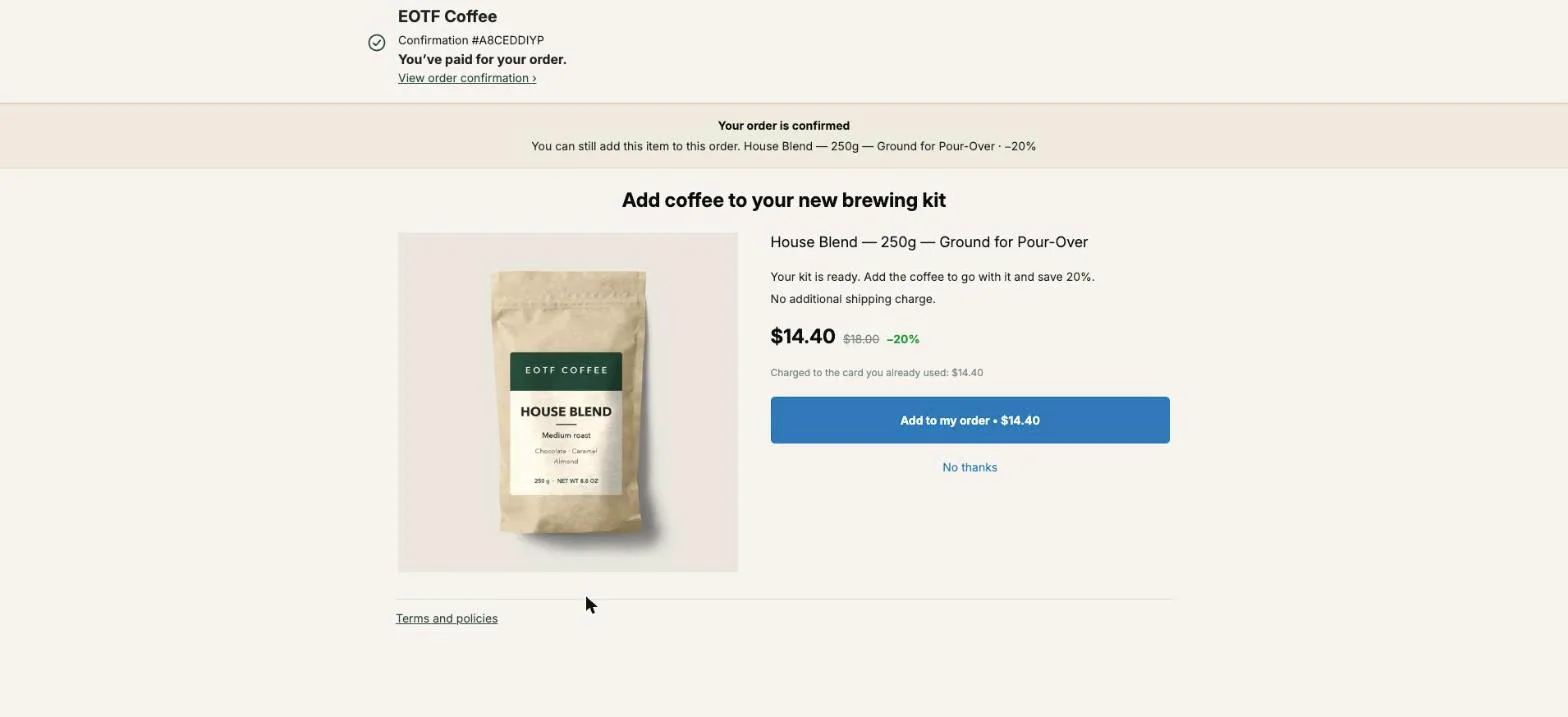
Upsell take rate is the share of buyers who accept an upsell out of the buyers who actually saw it: accepted offers divided by offers shown. The formula is the easy part. What changes the number is the word “seen”. Count an offer when an app requests it instead of when it appears on screen, and the same store reports 7.2% instead of 12%, as the worked example below shows.
This page covers what goes in the numerator and the denominator, why a published “good” take rate can’t be your target, how to set a baseline that means something for your store, and why revenue per order shown is the number to decide on. It uses the Results page of Post Purchase Upsell Abakira to show where each figure comes from.
What is an upsell take rate?
An upsell take rate is the percentage of buyers who accept an upsell offer among the buyers who were shown it. If 600 buyers saw your post-purchase offer this month and 72 tapped the button and paid, your take rate is 72 ÷ 600 = 12%. It measures one offer, on one page, over one period.
take rate = accepted offers ÷ offers shown
It’s sometimes called acceptance rate, upsell rate or upsell conversion rate. In Post Purchase Upsell Abakira, the A/B test goal of that name is Acceptance rate, and on the Results page each step shows its rate next to the raw counts, in the form “7 saw it · 5 accepted”.
Take rate is not your store’s conversion rate. Store conversion is orders divided by sessions, and its audience is every visitor. A post-purchase take rate only looks at people who already bought, which is why the two numbers live in different ranges and shouldn’t be compared.
Why does the definition of “seen” change the take rate so much?
The definition of “seen” changes the take rate because it is the denominator. Any order counted as seen when the buyer never saw the page adds a view with no possible acceptance. On Shopify’s one-click page, that happens to every order paid with a method the page doesn’t support, if the app counts at the wrong moment.
Here’s the mechanism. Shopify asks the post-purchase app for its offer during checkout, before the app knows how the buyer paid, and before the page appears. Shopify then skips the page for many orders. Its developer documentation lists, among others: installment and wallet services such as Klarna, Affirm, Afterpay, Apple Pay, Amazon Pay and Google Pay, gift cards, any payment method other than a credit card, local delivery orders, orders under $0.50, and orders placed outside the Online Store channel. Our article on why Apple Pay, PayPal and Google Pay orders never see the post-purchase offer goes through them.
Now the arithmetic, with numbers picked for the example. A store takes 1,000 orders in a month. The app is asked for an offer on all 1,000. The page actually appears on 600 of them, and 72 buyers accept.
| What you call "seen" | Denominator | Accepted | Take rate |
|---|---|---|---|
| Every order the app was asked about | 1,000 | 72 | 7.2% |
| Every order where the page appeared | 600 | 72 | 12.0% |
Same buyers, same offer, same money. One version tells you the offer is weak, the other that it’s fine. If you change offers based on the first number, you’re optimizing against buyers who never had a chance to say yes.
When does Post Purchase Upsell Abakira count an offer as shown?
Post Purchase Upsell Abakira counts an offer as shown when the one-click page is displayed on the buyer’s screen, never when Shopify requests the offer in advance. The extension sends the “shown” signal from its render step, which only runs if the page appears, and the server records it once per order.
Three details from our code decide what lands in the denominator:
- Display, not service. Since August 6, 2026, the count happens at display. Counting at the offer request would put wallet, iDEAL and cash on delivery buyers in the denominator for an offer they never saw. The display is the only moment that proves a buyer had the choice.
- Once per order. Each offer event is stored once per order, per offer and per kind. Shop Pay can load the page a second time for the same order, and page re-renders can repeat the signal; both fall back on the same row.
- One funnel, one count for the plan. On the Free plan, the limit of 100 offers shown a month counts the one-click page only, and a buyer who goes through three offers in the same funnel uses one, not three.
The same rule runs on the thank-you and order status pages: a block counts as shown for a buyer once it loads on that buyer’s page, and each buyer counts once per block. Post Purchase Upsell Abakira does not measure views in the checkout, so the Results page shows checkout sales as “N orders · views not measured” instead of a take rate built on a guessed denominator.
What counts as accepted, and what doesn’t?
An acceptance is a buyer who tapped the button and for whom the extra item went through. Declines, expired countdowns and failures all stay out of the numerator. In Post Purchase Upsell Abakira, each one is recorded as its own event: shown, accepted, declined, expired or failed.
The distinctions matter when you read the rate:
- Declined means the buyer tapped “No thanks”.
- Expired means the countdown, if you turned one on, reached zero before the buyer decided. It counts as a no for the take rate, and the funnel moves on as it would after a decline.
- Failed means the buyer said yes and the addition didn’t go through.
The take rate is computed from what the offer page reports. Revenue is not. Post Purchase Upsell Abakira reads revenue back from the Shopify order, so an acceptance whose charge was refused, or whose item sold out at the last second, never turns into money on the Results page. When that happens, the page shows a separate notice, “Some acceptances are unconfirmed”, rather than quietly adding money you didn’t receive.
What is a good upsell take rate?
A good upsell take rate is one that beats your own previous offer on the same page, measured on enough views. The same offer can read 7.2% or 12% depending on what you count as seen, so no outside figure tells you whether your offer is working. Your first offer’s measured rate is the baseline to beat.
Published figures don’t settle it either. One upsell app vendor published its own data for offers shown between January 1 and August 31, 2026: across the 190 stores using its one-click post-purchase page, the median take rate was 0.3%, with the middle half of stores between 0.1% and 0.7%. That figure is “upsell sold vs. upsell viewed” on that app, for that app’s merchants and the offers they set up.
A benchmark like that doesn’t tell you whether “seen” means requested or displayed, whether a three-offer funnel is one view or three, or whether an expired countdown counts. You’ve just seen that the first choice alone moves a rate from 7.2% to 12% on the same buyers. A number from another app, measured another way, on other stores’ offers, isn’t a target for yours.
The guide chapter on reading your numbers says the same thing from the admin side: compare against yourself.
How do I set my own take rate baseline?
Your own take rate baseline is the acceptance rate your first offer reaches over a fixed window, once it has enough views to be stable. Run one offer unchanged for at least two full weeks, read its rate with its view count, and treat that pair as the benchmark every later change has to beat.
- Pick the offer and leave it alone. No change of product, discount or wording during the window.
- Cover full weeks. 14 days covers each day of the week twice, so no single weekday weighs more than the others.
- Avoid a sale period. A promotion changes who buys, and a baseline taken during Black Friday measures Black Friday.
- Write down the pair: rate and views. “12% on 300 views” is a baseline. “12%” alone isn’t.
- Read the range, not the point. The table below shows how much room a rate has at each size.
The range is the part most merchants skip. We computed 95% intervals (the Wilson method, a standard way to put error bars on a percentage) for a few take rates:
| Accepted / shown | Take rate | Plausible true rate (95%) |
|---|---|---|
| 5 / 7 | 71% | 36% to 92% |
| 12 / 100 | 12% | 7.0% to 19.8% |
| 36 / 300 | 12% | 8.8% to 16.2% |
| 120 / 1,000 | 12% | 10.1% to 14.2% |
At 100 views, a 12% offer could really be a 7% offer or a 20% one. At 1,000 views, the range is about four points wide. So if your new offer reads 15% on 100 views against a baseline of 12% on 300, you don’t know yet whether anything changed. Post Purchase Upsell Abakira’s A/B tests apply the same caution: no winner is named before every version has at least 100 views and the gap reaches 95% confidence. Our article on how to A/B test a post-purchase upsell covers that process; this page stays on reading the number.

Why is revenue per order shown the number to decide on?
Revenue per order shown is the revenue an offer brought in divided by the orders where the buyer saw it: take rate multiplied by the net amount each acceptance adds. It puts price and acceptance in one figure, so two offers at different prices become comparable. With example take rates on our demo store’s prices:
| Offer | Net price | Take rate | Revenue per order shown |
|---|---|---|---|
| Paper filters | $6.40 | 20% | $1.28 |
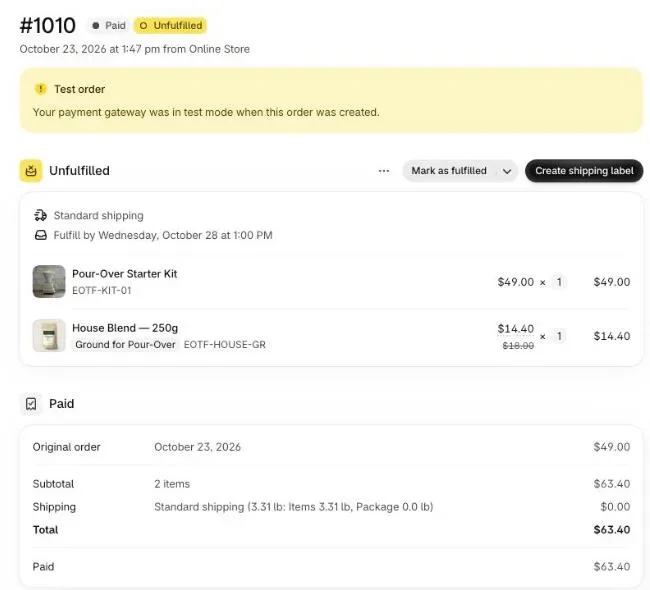
| House Blend 250 g | $14.40 | 12% | $1.73 |
The filters win on take rate and lose on money. That’s the trap of chasing the percentage. Keep two versions apart: per order shown judges the offer, per order placed judges the page. With 1,000 orders, 600 shown and $1,036.80 earned, the offer makes $1.73 per order shown and $1.04 per order placed. The full calculation is in how to price a post-purchase upsell.
How do I read take rate across a funnel with several offers?
A funnel’s take rate counts buyers, not offers: buyers who accepted at least one offer divided by buyers who saw at least one. Each step inside the funnel has its own rate, computed on the buyers who reached that step. Mixing the two levels inflates the denominator and makes a funnel look worse than it is.
On the Results page, each funnel row shows three figures, saw it, accepted and revenue, and the funnel’s own page breaks it down step by step. A buyer who sees the first offer, declines and then sees the downsell is one buyer for the funnel, but one view on each of the two steps.
Each step’s rate is its acceptances divided by its own views. The “dropped off” figure is measured against its parent, not against the line above it. A downsell only reaches buyers who declined the first offer, so its baseline is that group. Post Purchase Upsell Abakira shows the gap as ”↓ N% dropped off”: the share of buyers who declined the parent and never reached the downsell. With our example numbers:
| Step | Reached by | Saw it | Accepted | Step take rate |
|---|---|---|---|---|
| First offer | Every eligible buyer | 600 | 72 | 12% |
| Downsell (after a no) | The 528 who declined | 480 | 48 | 10% |
| Funnel | Buyers who saw any offer | 600 | 120 | 20% |
The downsell shows 9% dropped off (48 of 528 never saw it), takes 10% of those who did, and lifts the funnel from 12% to 20% of buyers. Judged against the 600 buyers of the whole funnel, the same 48 acceptances would read as 8%, which undersells the step. Our article on building a downsell on Shopify covers what to put on that page.
How does take rate compare between the one-click page and the thank-you page?
Take rate on the one-click page and on the thank-you page measure different audiences, so compare each page with itself, not with the other. The one-click page reaches card buyers only, right after payment. The thank-you and order status pages reach every buyer, including wallet and cash on delivery orders.
Post Purchase Upsell Abakira gives each page its own card on the Results page: revenue, the number of orders that bought there, and, on the thank-you and order status pages, the buyers who saw a block. An order that bought on two pages counts once in the chart of orders and once on each page’s card, so the cards can add up to more than the chart.
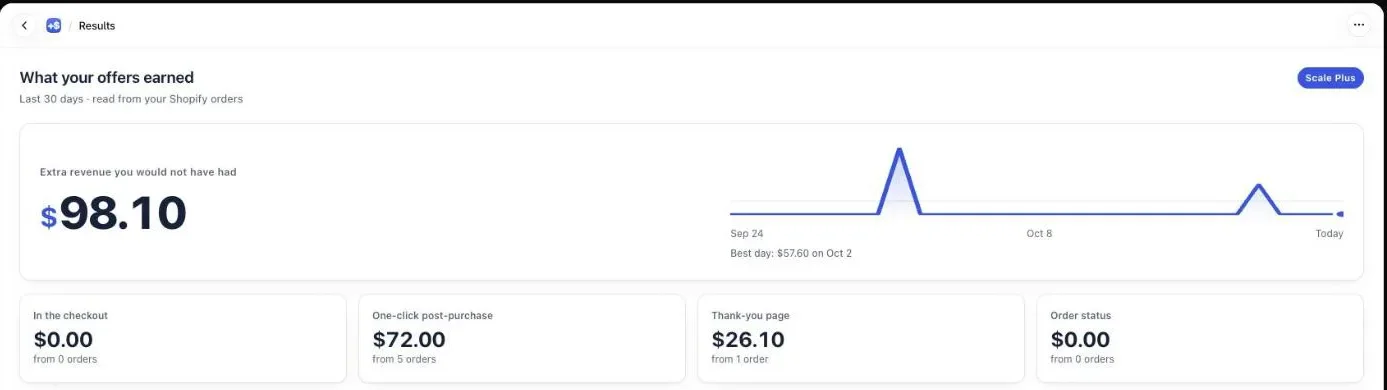
Take a thank-you page block with a lower take rate than your one-click offer. That doesn’t make the block worse. Part of its audience paid with Apple Pay or on delivery and could never see the one-click page, so the thank-you block is the only offer those buyers get. Our article on which page to upsell on after checkout explains who each page reaches.
How long should I wait before reading the take rate?
Read the take rate after at least two full weeks and a few hundred views, and read revenue on the same 30-day window the Results page uses. Acceptances show up instantly, while revenue is confirmed from the Shopify order, which can trail by minutes or, rarely, days.
Post Purchase Upsell Abakira matches pending acceptances to their orders for 30 days, the same span as the Results page. Since September 29, 2026, the two windows are tied together: anything the Results page shows can still be matched to its order, and our code fails a test if one window ever moves without the other. The signed details of each offer (variant, quantity, discount) are kept a week longer than that, so an acceptance at the edge of the window is still credited at the price actually signed.
That’s also why the Results page says where its numbers come from: “Revenue is read from your Shopify orders — never from what the buyer’s browser told us.” Acceptance rates come from the offer pages, so they can move a little faster than revenue on a busy day.
What should I change when the take rate is low?
When the take rate is low on enough views, change the offer before the page: first the product, then the discount, then the words. A rate near zero usually means the product doesn’t fit what the buyer just bought, more than a price problem. Change one thing at a time and compare against your baseline.
A short order of checks:
- Confirm the views are real. Low views on a big store usually means the post-purchase page setting isn’t pointing at the app, or most orders use payment methods that skip the page.
- Check what the buyer just bought. Offer something that completes the order (coffee after a brewing kit), not a bestseller unrelated to it. On a paid plan, targeting lets each funnel match specific orders.
- Try a stronger discount on the same product. Then judge it on revenue per order shown, not on the take rate alone.
- Only then touch the words and layout. Smaller levers, smaller gaps, slower to read.
The method articles cover each lever, and every one of them is judged with the same two numbers: take rate on enough views, and revenue per order shown. Both feed straight into your average order value on Shopify.
Post Purchase Upsell Abakira counts an offer as shown only when the buyer sees it, and its free plan shows up to 100 offers a month on the one-click page.
Frequently asked questions
Is upsell take rate the same as conversion rate?
No. Store conversion rate is orders divided by sessions. Upsell take rate is accepted offers divided by offers shown, and it only covers buyers who already placed an order. A store converting 2% of its visitors can still have one in ten of its buyers accept a post-purchase offer, because the audience is buyers with their card already out.
Does a countdown that runs out count as a decline?
Yes, for the take rate. In Post Purchase Upsell Abakira a buyer whose countdown reached zero is recorded as expired, not accepted, so that view stays in the denominator with no acceptance. The original order is never affected: the buyer already paid for it before the page appeared.
Should I count buyers or offers in the denominator?
Count buyers for a funnel and offers for a single step. A funnel's rate is buyers who accepted at least one offer divided by buyers who saw at least one, so a buyer who goes through three pages counts once. A step's rate is that step's acceptances divided by the orders that reached that step.
Why don't my upsell revenue and my acceptances match for a day or two?
Acceptances are recorded the moment the buyer taps the button, while revenue is read back from the Shopify order. Post Purchase Upsell Abakira keeps matching pending acceptances to their orders for 30 days, the same window as the Results page, so a late order still lands in the revenue figure. An acceptance Shopify never confirms is listed apart instead.
Which pages does the monthly offers-shown counter add up?
It depends on the plan. On the Free plan, the counter reads N of 100 offers shown this month and counts the one-click post-purchase page only, because that is where the limit applies. On a plan with no limit, it adds up every surface: the one-click page plus the blocks on the checkout, thank-you and order status pages, one buyer per page. On the one-click page, a whole funnel counts as one offer per order.
Related articles
Written by Abakira. We make small software: Shopify apps, web tools and iPhone apps. This article is about Post Purchase Upsell Abakira.