Post purchase upsell examples: 10 real setups on Shopify
Ten post-purchase upsells priced on our Shopify demo store: same product, quantity ladder, bundle, free gift, subscription, warranty. Exact settings for each.
2026-11-07 — Abakira, updated 2026-11-08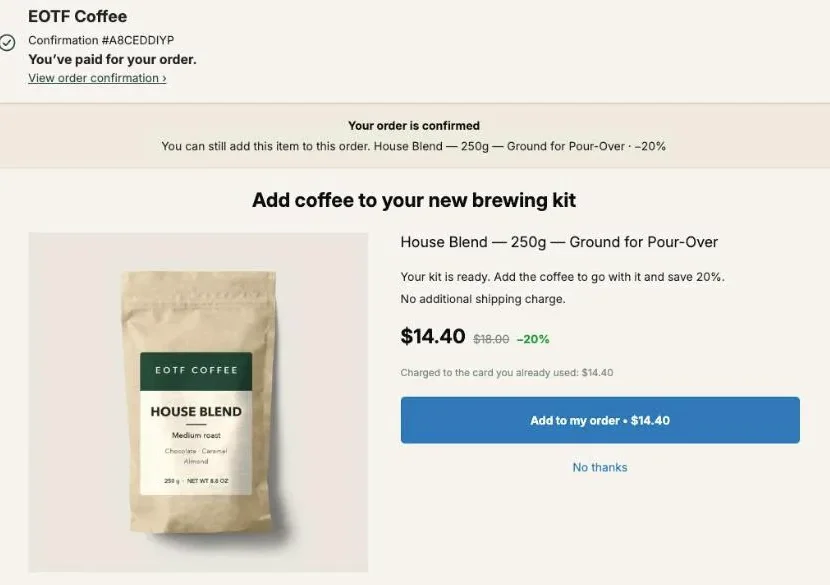
Post purchase upsell examples that hold up on a real Shopify store are tied to what the buyer just paid for: the coffee for a brewing kit, one more of the same bag, a bigger quantity, a set, a free item inside a set, a subscription, a warranty. Each one shows after payment and joins the order already placed.
Below are ten of them, priced with the real products of our demo store, each with its exact settings. Examples 1 and 7 are set up on that store, and example 1 comes with screens. The first one turns a $49 kit order into a $63.40 order with one tap, on one order and in one parcel. Each example says which page it runs on, what the buyer sees, and the setting that makes it.
Which post purchase upsell examples are on this page?
The post purchase upsell examples on this page are ten setups, one per row of the table below. Eight run on the one-click page that Shopify shows between payment and the order confirmation. Two run on the thank-you page, which every buyer reaches. Each row names the setting in Post Purchase Upsell Abakira that builds it.
| # | Example | Page | Setting | Plan |
|---|---|---|---|---|
| 1 | Coffee for a brewing kit | One-click | A product + Order contains | Paid (targeting) |
| 2 | One more of the same item | One-click | One more, same variant | Free |
| 3 | Quantity ladder: up if yes, down if no | One-click | Quantity tiers + If accepted / If declined | Paid (levels 2-3) |
| 4 | Same product, deeper discount after a no | One-click | Starter funnel: 15%, then 15% or 25% | Paid (levels 2-3) |
| 5 | Kit plus refill at one rate | One-click | A bundle + Bundle discount (%) | Free |
| 6 | A small grid of add-ons | One-click | Grid | Free |
| 7 | A set with one item free | Thank-you | Bundle block, one item at 100% | Free |
| 8 | Turn one bag into a subscription | One-click | Sell as a subscription | Free |
| 9 | Your own warranty | One-click | A product + Order contains | Paid (targeting) |
| 10 | Several offers, one payment | Thank-you | Sequence block | Free |
“Free” means the example fits inside the free plan’s single funnel and single offer. The plan column only tells you where to start; the listing has the current plans.
What does the demo store in these examples sell?
The demo store in these examples is EOTF Coffee, a Shopify development store we run with Post Purchase Upsell Abakira, the Dawn theme and Shopify’s test payment gateway. It sells six products: a $49 Pour-Over Starter Kit, two coffees at $18 and $20, filters at $8, a $16 mug and a $29 scale.
Every price below is a catalog price from that store, and every order number and screen comes from test orders placed there between October 23 and October 26, 2026. None of it is a merchant’s result. The catalog is small, which is useful here: gear bought once, coffee that runs out, and small accessories. Almost every post-purchase example is a move from one of those groups to another, and your catalog has the same three groups under other names.
The coffee store upsell ideas article stays on that niche. This page takes the same store and shows the shapes an offer can take, so you can map each one to your own products.
Example 1: what does a companion product upsell look like?
A companion product upsell offers the thing the purchase can’t work without. On the demo store, a buyer who pays for the $49 pour-over kit is offered a bag of House Blend, ground for pour-over, at 20% off: $14.40 instead of $18. The kit has a dripper and a server, and nothing to brew.
The settings, as they sit in the funnel called “V01 — Starter Kit → House Blend”:
- Who sees this offer: Order contains, set to Pour-Over Starter Kit.
- What this offer proposes: A product, House Blend, ground variant only.
- Discount type: Percentage, value 20.
- Selling headline: “Add coffee to your new brewing kit”.
The buyer reads “Charged to the card you already used: $14.40” under the price and a button that says “Add to my order • $14.40”. On test order #1010 the coffee was added and the order came to $63.40.
The price sits at 29% of the kit. Our guide puts the target for a first offer between a quarter and a half of what the buyer just spent; the chapter on what to offer after checkout explains why that ratio matters more than the product.
Example 2: how do I offer one more of the same item?
One more of the same item is set with the offer type One more, same variant, which reads the item from the order the buyer just paid. The admin describes it as “The item is decided at checkout. No choice to make: they already picked it.” One offer then covers every product in the catalog.
On an $18 bag of coffee at 25% off, the second bag costs $13.50 and the order goes from $18 to $31.50. The buyer doesn’t choose anything: same coffee, same grind, lower price.
Its sibling, One more, any variant, keeps the product and lets the buyer switch variant. On a coffee sold whole bean or ground, that means switching grind. Use it when the second unit is often a different size or color.
On a mixed order the app re-offers the item with the highest price per unit. In a kit-plus-bag order, that’s the $49 kit, not the bag. If that’s not what you want, give the kit buyers their own funnel above this one (example 1 does exactly that).
This example fits on the free plan as is. Discount depth, wording and where it sits in a funnel are covered in our article on the same product upsell after payment.
Example 3: what is a quantity ladder upsell?
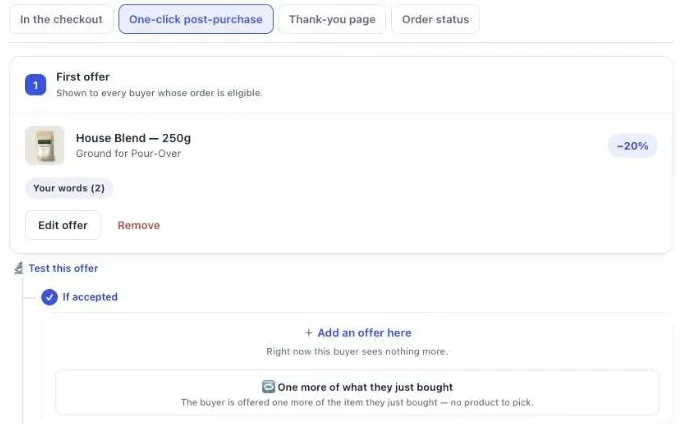
A quantity ladder upsell offers the same product in bulk, then moves the quantity up if the buyer accepts and down if the buyer declines. Only the quantity changes from one step to the next. In Post Purchase Upsell Abakira, each offer carries its own Quantity tiers: up to 5 tiers, each from 2 to 20 units.
Here is that ladder priced on the demo store’s Dark Roast, $20 a bag:
| Step | Shown to | Quantity tier | Discount | Buyer pays |
|---|---|---|---|---|
| First offer | Every buyer of Dark Roast | 3 bags | 20% | $48.00 |
| If accepted | Buyers who took the 3 bags | 6 bags | 30% | $84.00 |
| If declined | Buyers who said no | 2 bags | 15% | $34.00 |
The two follow-up slots sit under the first offer in the funnel editor. The admin labels the declined one plainly: “Shown only to buyers who just declined — this is your downsell.”
The editor flags a ladder that punishes volume. If a tier with more units carries a smaller discount than the one before it, a red line appears under the tiers: “Buyers would pay more per unit for buying more.”
For subscribers, the same logic becomes a plan change rather than a quantity. That’s example 8.
Example 4: what does a downsell after a no look like?
A downsell after a no shows the same product again, cheaper, to the buyer who just declined it. The starter funnel that Post Purchase Upsell Abakira builds from your sales uses this shape: your best-seller at 15% off, a product often bought with it at 15% after a yes, and the best-seller at 25% after a no.
The app picks those products from your last 60 days of orders. With no sales yet, it picks from the catalog: in stock, with a photo, priced around half of a typical order. The funnel is created switched off, and the admin says so: “It’s switched off: buyers see nothing until you turn it on.”
The second price is ten points lower than the first. On an $18 bag that’s $15.30 first, then $13.50. Our article on how deep to cut after a buyer says no works the margin of that gap.
Branches after the first offer come with the paid plans. On the free plan, the follow-ups stay configured and paused, and nothing is lost.
Example 5: how do I sell a bundle right after checkout?
A bundle right after checkout is set with A bundle, which sells the main product together with one or two others in a single purchase at one Bundle discount (%). With the demo store’s prices, House Blend at $18 and Paper Filters at $8 at 15% off become one $22.10 add-on, taken with one tap.
The difference with example 1: one decision for two items. The buyer who needs coffee for a new kit also needs filters soon, and the bundle answers both in a single yes.
Three rules come from the editor:
- A bundle needs at least two products, the main one included, and holds three at most.
- A bundle is always a one-time purchase. The admin is explicit: “A bundle is always a one-time purchase: a subscription would only cover the main product.”
- The discount applies to the whole bundle, so pick it on the total, not on the cheapest item.
Keep the total under half of what the buyer just paid. $22.10 against a $49 kit is 45%, inside the line. A bundle with the $29 scale in it would not be.
Example 6: can I show several add-ons on the post-purchase page?
Several add-ons can share the one-click page through the Grid section of an offer. The admin describes it as “Up to 6 extra products shown under the main offer, each with its own discount and its own button.” On the demo store’s catalog, that’s the coffee as the main offer with the filters and the mug under it as two cards.
Each card is a separate choice. A buyer can take the filters and skip the mug, which a bundle doesn’t allow.
There is a second mode for stores whose add-ons have no clear leader. Tick Show only these cards and “The page skips the main offer and shows just the cards below, each with its own button.” That suits accessory shops: chargers, cases and cables side by side.
A grid card has to save the buyer something. If a card has no discount and no compare-at price, the editor refuses it at Save and asks for a discount or a compare-at price.
Example 7: how do I give a free item in a post-purchase offer?
A free item in a post-purchase offer is a product set to a 100% discount, or a fixed discount equal to its price, so it joins the order at $0.00. On the demo store’s thank-you page, a Bundle block called “Complete your brew set” holds House Blend at $18, Paper Filters at $8 and the Everyday Coffee Mug at 100%.
The buyer sees the mug at $0.00 with $16.00 struck through, a total line of $42 struck through and $26.00, and a button that reads “Add $26.00 (3 items)”. Under it: “Added straight to your order above. You only pay the difference.”
On a Bundle block, each product carries its own Discount (%) from 0 to 100, and the admin adds: “100 means the item is free — that is a decision, so say it here.” On a single-product block of the thank-you page, a percentage stops at 90; use a fixed amount equal to the price to give that product away.
Which item to make free changes the cost. The free mug takes 38% off the set. Free filters instead would take 19% off, $34 for the three. Our Black Friday bundle ideas work the margin of both on this exact set, and the free gift tiers article shows gifts that grow with the order total.
Example 8: how do I turn a one-time buyer into a subscriber after checkout?
A one-time buyer becomes a subscriber after checkout when the offer carries a selling plan from your subscription app. In Post Purchase Upsell Abakira the setting is Sell as a subscription, and it lists “the subscription plans your subscription app already created for this product”. The app never creates plans and never bills a renewal.
The buyer who just paid for one bag of coffee is offered the same coffee on a plan. The order already paid stays as it is; the subscription starts from the offer.
Three settings come with it. Shipping on the first order and Shipping on every renewal are both required, and the offer can’t be saved without them. Length, in charges sets how many times the buyer is billed; empty means no end date. Quantity tiers switch off while a plan is selected, because the plan carries its own pricing.
For buyers who subscribed at checkout, the move is an upgrade rather than a new plan. The Subscription upgrade offer moves their next renewal to a bigger plan with Loop: “Nothing is added to the order and nothing is charged.” It needs the Scale tier. The details for Recharge and Loop are in selling a subscription after checkout.
Example 9: can I sell a warranty as a post-purchase upsell?
A warranty can be sold as a post-purchase upsell when it exists as a product in your Shopify catalog, offered with A product and shown only to buyers of the items it covers. On the demo store’s catalog, a one-year cover on the $29 Digital Coffee Scale would go to orders where Order contains is set to the scale.
Set the warranty up as a product that isn’t physical, so it adds nothing to the parcel.
Price it as a share of the item it covers, and keep the targeting tight. A warranty shown to a buyer who bought filters reads like a system that isn’t paying attention. Targeting by product comes with the paid plans. The full setup, terms included, is in our article on the extended warranty upsell on Shopify.
Example 10: how do I show several offers and take one payment?
Several offers with one payment run through a Sequence block on the thank-you page or the order status page. The admin describes it this way: “The customer sees one offer at a time, and Add or No thanks decides which one comes next. Nothing is charged along the way.” A sequence holds up to 6 offers.
On the demo store, a sequence after a kit order could go: coffee, then filters if the buyer adds the coffee, then the scale. Everything the buyer added goes into their order at the end, and they pay once.
The thank-you page is also where buyers land when the one-click page skipped them. The app lists them: “Apple Pay, Google Pay, PayPal, Klarna, gift cards and cash on delivery never show the post-purchase page.” Set the block’s Show it to to “Buyers who did not see the one-click page” and they get an offer of their own. That rule comes with the Pro plan and above; on the free plan the block shows to every buyer.
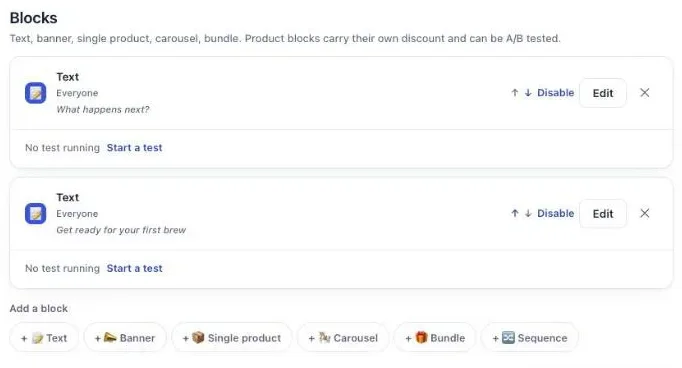
The block-by-block walkthrough is in an upsell sequence on Shopify, up to six offers.
How do I run several of these examples without them colliding?
Several examples run without colliding when each order reaches one funnel only. Post Purchase Upsell Abakira checks funnels from top to bottom and shows the first one whose condition the order meets. A funnel set to Everyone matches every order, so it goes last.
The demo store runs three funnels in this order:
- “V01 guard”, set to Order contains House Blend, with no offer.
- “V01 — Starter Kit → House Blend” (example 1), set to Order contains Pour-Over Starter Kit.
- “Everyone else — mug after coffee”, set to Everyone, with three offers.
The guard is an exclusion. A buyer who already put House Blend in the cart with the kit doesn’t need example 1, so the guard catches that order first and shows nothing. The admin flags an empty funnel in yellow with “No offer in this funnel yet. It will be skipped.”, but when its condition matches, the empty funnel still takes the order and shows nothing. That’s what a guard is for. We placed test order #1003 with the kit and a bag of House Blend: no post-purchase page appeared, and the order stayed at $67.
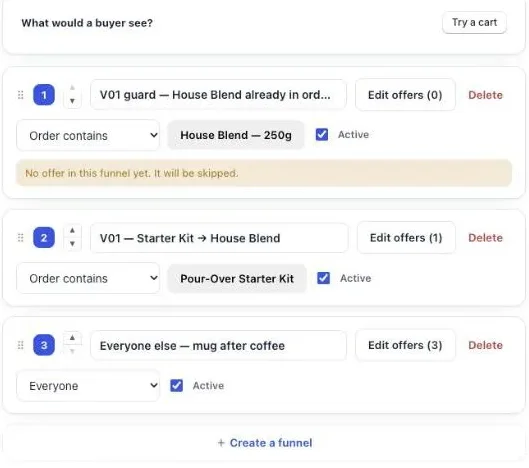
Before going live, click Try a cart under “What would a buyer see?”. It tells you which funnel a cart reaches, with no order placed. Our guide chapter on different offers for different carts explains the order rule.
Where does the extra item go once the buyer accepts?
The extra item goes into the order the buyer already placed. On the one-click page it’s charged to the same card and added as a new line, so the warehouse picks it with the rest. On the thank-you and order status pages, Where the purchase goes defaults to “Same order, unless it has fully shipped”.
Here is test order #1010 in the Shopify admin: the kit at $49 and the House Blend at $14.40, with $18.00 struck through, in the same unfulfilled shipment. Subtotal $63.40, shipping $0.00.
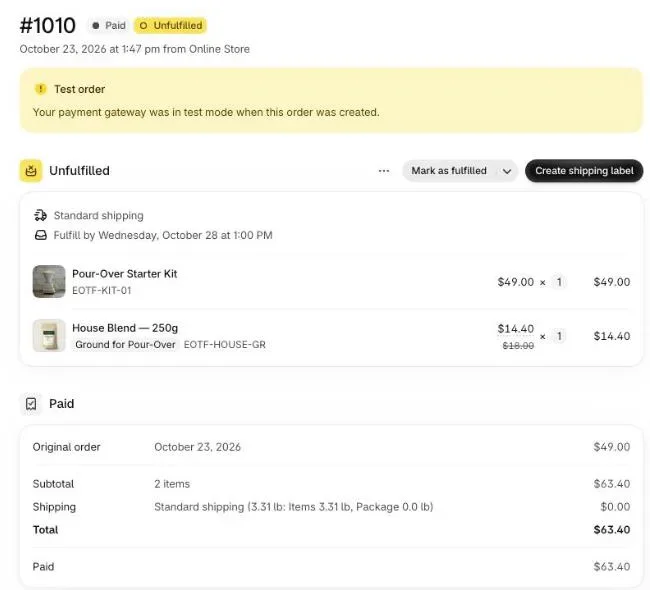
No second shipping charge is the reason to check weight before price. A 250g bag adds little to a parcel; a glass carafe can cost more to ship than its margin. If you ship within hours, “Same order, only until the first parcel ships” is the safer setting for thank-you blocks.
How do I pick which example to keep?
The example to keep is the one that earns the most per order that saw it, not the one with the most yeses. A $26 set taken by fewer buyers can earn more than a $13.50 bag taken by more. The Results screen of Post Purchase Upsell Abakira shows the extra revenue by page and by funnel.
Under By product, each offered product has its own row with Saw it, Orders, Units, Revenue, Share and Clicks. Clicks set against Orders tells you whether buyers tapped and stopped, or never tapped at all, which are two different fixes: the price in the first case, the product or the headline in the second.
Start with two or three examples from the table at the top, the ones with the best margin, and leave each one running for a few weeks before you change it. On the Scale plan you can A/B test two offers in the same slot, for instance the bundle against the second bag. The method is in our article on how to price an upsell, per order and not per yes, and the words on each offer are in upsell copywriting examples.
For how the one-click page itself works, read the one click upsell on Shopify. More method articles are grouped on our method page.
Post Purchase Upsell Abakira has a free plan that shows 100 offers a month on a live store. The listing has the current plans and what each one includes.
Frequently asked questions
Can I copy these examples on the free plan?
Partly. The free plan of Post Purchase Upsell Abakira runs one funnel with one offer on the one-click page and shows up to 100 offers a month, to every buyer who reaches that page. Every example runs in it, except that the targeting in examples 1 and 9 comes with the paid plans: on the free plan the offer shows to every buyer. Targeting by what the order contains, follow-up offers after a yes or a no, and several funnels come with the paid plans.
How many post-purchase offers can one buyer see?
On the one-click page, a funnel holds at most 7 offers across 3 levels, so one buyer sees at most three offers in a row: the first one, then one follow-up, then one more. On the thank-you page, a Sequence block shows up to 6 offers one at a time and the buyer pays once at the end.
Do these examples work for buyers who pay with PayPal or Apple Pay?
Not on the one-click page, which those payments skip. Put a block on the thank-you page set to Buyers who did not see the one-click page. The same examples work there: a product, a bundle, quantity breaks or a sequence. That rule comes with the Pro plan and above; on the free plan the block shows to every buyer.
Should the first example I try be a discount or a free item?
Start with a discount on something tied to the purchase, such as the same product or its refill. A free item is a gift you pay for on every order that takes it, so keep it for sets where it lifts the value of the paid items, like a free mug in a coffee bundle.
Can I change an example without losing what I built?
Yes. Every offer is edited inside its funnel and nothing changes for buyers until you click Save. A follow-up offer your plan doesn't serve stays configured and comes back if you upgrade.
Related articles
Written by Abakira. We make small software: Shopify apps, web tools and iPhone apps. This article is about Post Purchase Upsell Abakira.