Free gift tiers on Shopify - gifts that grow with the order
Free gift tiers on Shopify: a bigger gift at each order level instead of a deeper discount. A $4 mug on 3 bags keeps $17.60 more margin than 40% off.
2026-10-27 — Abakira, updated 2026-11-09
Free gift tiers on Shopify give the buyer a better gift at each order level instead of a deeper discount: samples on a small order, an accessory on a mid-size one, the premium item on the biggest. Each tier costs you the landed cost of the gift, not a percentage of the order. On a $54 order of three coffee bags, a free $16 mug that costs $4 leaves $32.00 of gross margin, where 40% off leaves $14.40.
This page shows the margin arithmetic, how to design the tiers, and two ways to deliver them with Post Purchase Upsell Abakira on the one-click page right after payment: tiers by order total, and a gift that unlocks when the buyer accepts a paid offer. Amounts are in US dollars and the products come from our coffee test store.
Why give a bigger gift instead of a bigger discount at each tier?
A bigger gift at each tier costs a fixed amount, while a bigger discount costs a share of the whole order. As the order grows, a discount ladder hands back more money on every item in the cart. A gift ladder hands back one product, which the buyer values at its shelf price and you pay at landed cost.
Here is the arithmetic on our test store’s House Blend, a 250 g bag at $18. We assume a landed cost of $6 per bag, a 100-pack of paper filters that sells for $8 and costs you $1.50, and an Everyday Coffee Mug that sells for $16 and costs you $4. Swap in your own costs; the shape of the result holds.
| Order | Discount ladder | Your margin | Gift ladder | Your margin |
|---|---|---|---|---|
| 1 bag ($18) | Full price | $12.00 | Free sample ($5 shelf, $0.80 cost) | $11.20 |
| 2 bags ($36) | 20% off, buyer pays $28.80 | $16.80 | Free filters ($8 shelf, $1.50 cost) | $22.50 |
| 3 bags ($54) | 40% off, buyer pays $32.40 | $14.40 | Free mug ($16 shelf, $4 cost) | $32.00 |
Look at the last row of the discount ladder. The third bag at 40% off earns you less margin than two bags at 20% off: $14.40 against $16.80. The buyer bought more and you made less. That is the trap of a steep discount ladder: the top tier rewards the buyer and punishes you. The same logic explains why the second item in the same parcel carries the best contribution margin.
The gift ladder goes the other way. Each step up adds margin, because the gift’s cost stays flat while the order grows. At three bags the gift version keeps $17.60 more per order. Put differently, the discount version needs 2.2 orders to earn what one gift-tier order earns.
The buyer’s side of the trade matters too. The 40% tier saves the buyer $21.60 and costs you $21.60: one dollar of perceived value per dollar spent. The mug shows a $16 price struck down to $0 and costs you $4: four dollars of perceived value per dollar spent. A discount can never beat 1 to 1. Any gift whose shelf price is above its cost does better.
What makes a good free gift tier ladder?
A good gift ladder has two or three tiers, each gift clearly better than the one below, and every gift tied to the product the buyer just bought. The buyer should see what they gain by moving up a step without doing any math.
Rules for building the ladder:
- Start low and cheap. The first tier is a consumable that costs under $2: a sample, a refill, a pack of filters. It rewards the order the buyer was going to place anyway, so keep its cost small.
- Make each jump visible. The next gift should be a different kind of object, not “more samples”. Filters, then a mug. A refill, then a travel case.
- Price the top gift at landed cost, sell it at shelf price. The top gift should have a shelf price of at least a quarter of the tier threshold. A $16 mug on a $54 order reads as generous; a $3 keyring doesn’t.
- Keep everything in one box. Check weight and size before you pick a gift. A mug that pushes the parcel into the next shipping band can wipe out the margin the table above promised.
- Stop at three tiers. Each extra tier is one more funnel to keep in order and one more gift to stock, and the buyer needs to see the next step at a glance.
For the coffee store, the ladder looks like this:
| Tier | Order total | Gift | Shelf price | Your cost |
|---|---|---|---|---|
| 1 | Any order | 50 g sample of a second blend | $5 | $0.80 |
| 2 | $30 and more | Paper Filters, 100 pack | $8 | $1.50 |
| 3 | $50 and more | Everyday Coffee Mug | $16 | $4.00 |
Set the thresholds from your own average order value. Put the middle tier slightly above your current average and the top tier where your best customers already land.
Our guide chapter on what to offer after checkout has more on choosing items that sit well next to the main product.
Why deliver gift tiers after checkout instead of in the cart?
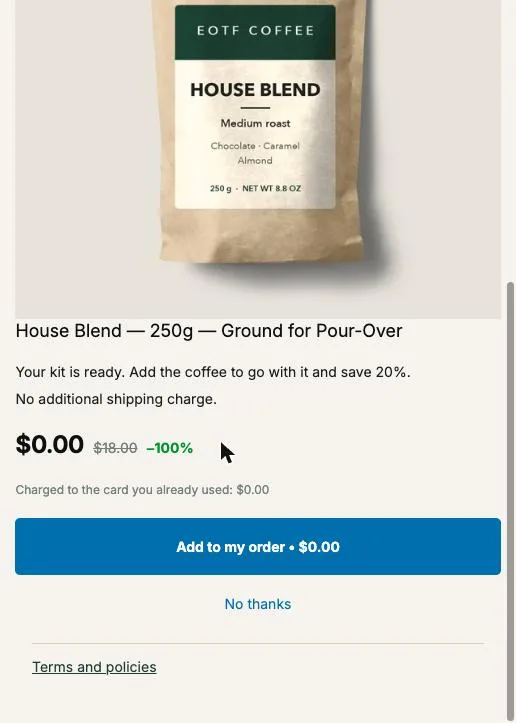
Gift tiers delivered after checkout skip the cart plumbing. On the one-click post-purchase page the buyer has already paid, so the gift can’t be removed by accident, can’t clash with a discount code and doesn’t need to sit in the cart. One tap adds it to the order just paid, at $0, in the same parcel.
In the cart, Shopify’s native tool for gifts is the Buy X get Y automatic discount, where “Customer buys” takes a minimum quantity or a minimum purchase amount and “Customer gets” can be set to Free. As of October 2026, Shopify never adds the free item to the cart by itself: the buyer has to add it, or you install an app that does. With three tiers, you create three discounts.
The post-purchase version has none of that. It adds two things a cart gift can’t do:
- The gift costs you nothing until the buyer taps. A cart gift ships with every qualifying order. A post-purchase gift ships only to buyers who accept it.
- A yes on the gift can lead to a paid offer: the next screen can offer a second bag of coffee.
The two can work together, and for spend tiers they should: announce the ladder on the site (“Free filters over $30, free mug over $50”) so it moves the cart, then hand the gift over after payment.
How do I set up gift tiers by order total in Post Purchase Upsell Abakira?
Gift tiers by order total in Post Purchase Upsell Abakira are separate funnels, one per tier, each with the condition Order total is at least and a gift offer at 100%. The app checks funnels from the top of the list and serves the first active funnel whose condition is met, so you order them from the highest tier down.
Conditions on funnels come with the Pro plan and above; on the free plan, a funnel with a condition is shown to everyone. The steps:
- In Shopify admin, open Settings, then Checkout, then Post-purchase page, and select Post Purchase Upsell Abakira. Without it, the one-click page never shows.
- Create each gift as a Shopify product with its regular price, a photo, a weight and tracked inventory. The regular price is what the buyer sees struck through next to $0.00.
- In the app, create a funnel named “Tier 3 - mug over $50”. On the One-click post-purchase tab, add an offer, choose A product under What this offer proposes and pick the mug.
- Under Discount type, choose Percentage and enter 100 in Value. A Fixed amount equal to the price gives the same $0 line. A percentage above 100 is refused, and so is a fixed amount above the price.
- Set the funnel’s condition to Order total is at least and enter 50. The admin’s help line spells out what is compared: “Compared with the order total the buyer pays, in their checkout currency.”
- Repeat for “Tier 2 - filters over $30” with 30, and create “Tier 1 - sample” with no condition.
- Put the three funnels in that order, highest threshold first. A $90 order matches tiers 3, 2 and 1; it gets the mug because tier 3 is checked first.
- Place one test order per tier with a card on your test gateway and tap Add to my order each time.
On a $90 order the buyer sees only the mug, never the filters as well. If you want the top tier to include the lower gifts, make its offer a bundle card with both items at 100%, as described in the free plan section below.
One currency note. Thresholds are compared in the buyer’s checkout currency. The app compares the number you type with that total as it is, without converting it, so a store selling in euros and dollars should check that 50 makes sense in both.
Our guide chapter on multiple funnels and targeting covers funnel order and conditions in more detail.
How do I make a gift unlock when the buyer accepts a paid offer?
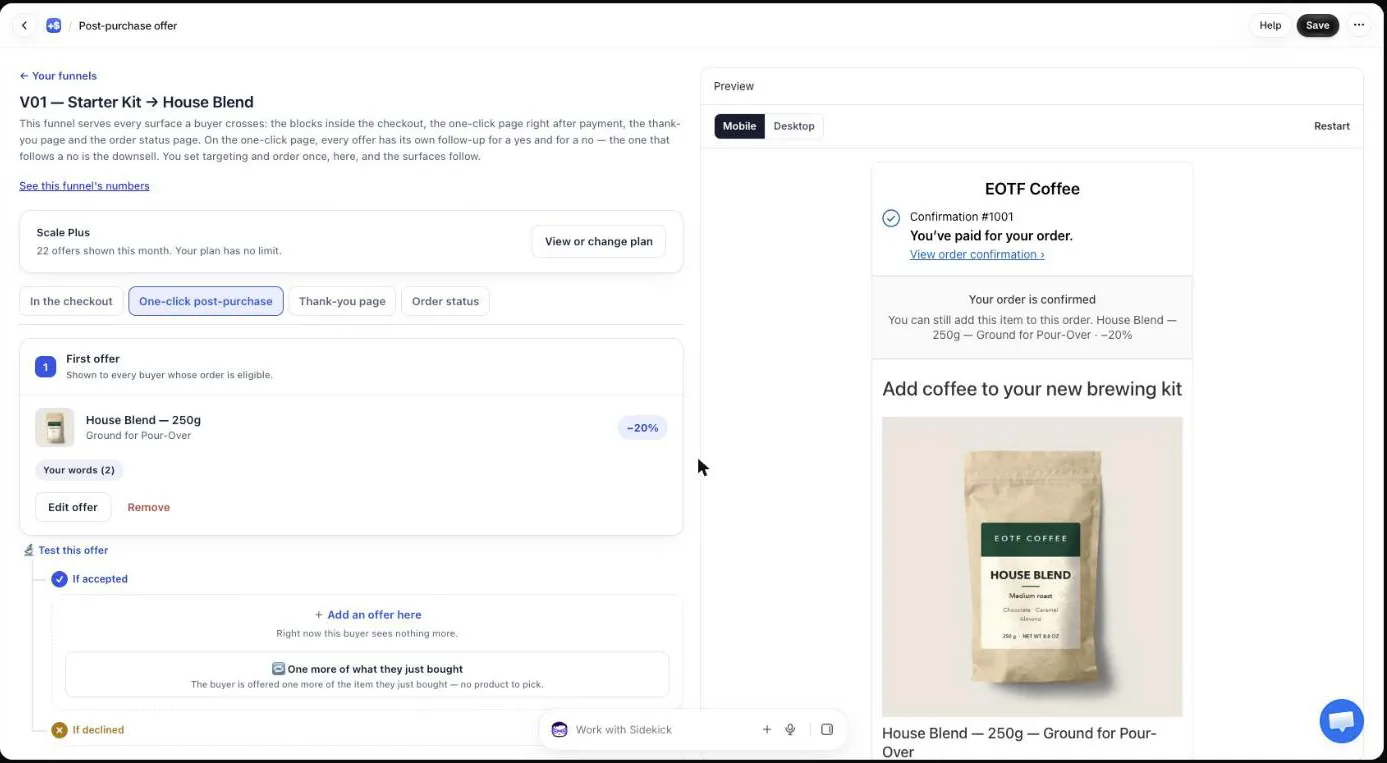
A gift unlocks after a paid offer when you place the gift in that offer’s If accepted branch. The buyer accepts the paid item, and the next screen shows the gift at $0.00. This is the “buy one more, unlock a gift” ladder, built after payment, and every gift is earned by a yes.
The setup, for a store selling the Pour-Over Starter Kit:
- First offer, paid. House Blend at a small discount or full price. Its text announces the gift: “Add a bag of coffee and we’ll put a free mug in the box.”
- If accepted, the gift. The Everyday Coffee Mug at 100%. The buyer sees the mug at $0.00 and taps Add to my order.
- If accepted again, an optional third offer. Something paid and light, like the filters at 20% off. That’s the third and last accepted offer Shopify allows on this page.
- If declined, a cheaper way in. Offer the coffee at a deeper discount, without the gift. Our guide chapter on the accept and decline tree explains how to use the decline branch.
Offers after the first one need a paid plan. The free plan shows one offer per order on the one-click page.
Use the offer text to show the ladder. In the offer’s Your argument field, a line starting with a dash becomes a bullet and ~~text~~ is struck through, so you can write:
Add {product} to your order for {amount}.
- Unlocks a free Everyday Coffee Mug, ~~$16.00~~ free
- Same box, no extra shipping
{product} and {amount} are replaced by the product name and the price after your discount. If a figure is unknown, the app drops that line instead of showing a sentence with a hole in it.
How do I show the ladder as progress steps on the page?
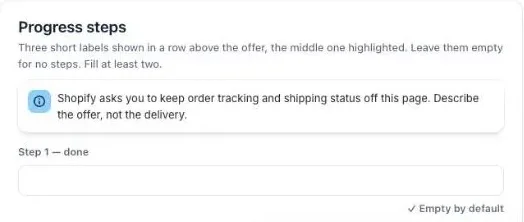
Progress steps in Post Purchase Upsell Abakira are three short labels shown in a row above the offer, with the middle one highlighted. For a gift ladder, they tell the buyer where they stand: what they paid for, the gift in front of them, what’s left. You set them once under Buyer page, in the Progress steps section.
How the labels work, from the code:
- There are three fields: Step 1 — done, Step 2 — where the buyer is now, Step 3 — what comes next.
- Each label holds up to 24 characters. Longer labels overlap on a phone.
- At least two labels must be filled. One label alone isn’t shown, and empty labels are dropped rather than left as a blank box.
- The same labels appear above every offer on the page, whatever the funnel, so write them for the whole ladder: “Your coffee”, “Your gift”, “Enjoy”.
Keep delivery words out. Shopify asks apps to keep order tracking and shipping status off this page, and the admin flags a label that sounds like it with “This label reads like shipping or tracking. Shopify may reject the app over it.” Describe the offer, not the parcel.
Can I run free gift tiers on the free plan?
Free gift tiers fit on the free plan of Post Purchase Upsell Abakira as a single offer with a grid of bundle cards. The free plan serves one funnel and one offer per order on the one-click page, up to 100 offers shown per month.
The idea is to show the ladder side by side, on one screen:
- Open the offer, go to the Grid section and click Add a bundle card to the grid.
- In the picker, tick the paid product first, it carries the card, then the gift. A card takes 2 to 3 products.
- In the Discount column, set the paid product to its tier discount (or leave it at full price) and the gift to 100%.
- Add a second card one step up: the paid product plus a second item and the bigger gift at 100%.
- Tick Show only these cards if you want the page to show just the cards, each with its own button.
A bundle card counts as one accepted offer however many lines it adds, which matters with Shopify’s limit of three per order.
A card whose products save the buyer nothing can’t be saved, but a gift at 100% always counts as a saving, so a full-price bag plus a free mug is a valid card.
What do buyers who pay with PayPal or Apple Pay get?
Buyers paying with a method that skips the one-click page get their gift on the thank-you page. In Post Purchase Upsell Abakira, the thank-you page has a Bundle block where each product carries its own discount from 0 to 100, and 100 makes that item free.
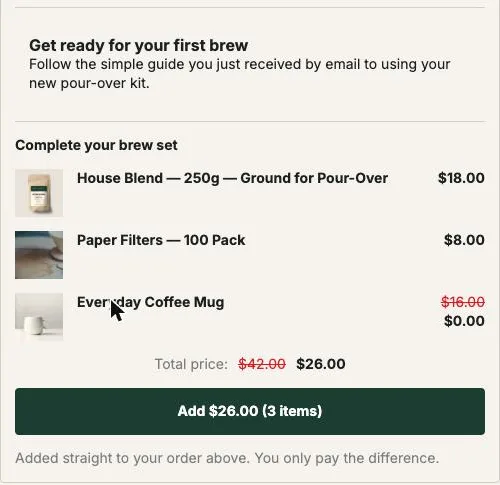
That block is a tier on its own: buy the coffee and the filters, get the mug. The buyer reads “Added straight to your order above. You only pay the difference.” The admin’s help text for the item discount says it plainly: “100 means the item is free — that is a decision, so say it here.”
On the free plan, thank-you blocks are shown to every buyer, wallet and redirect buyers included. Sorting buyers by what they accepted or declined on the one-click page comes with the Pro plan and above. On the free plan, put a gift on the thank-you page that differs from the one on the one-click page, since card buyers see both.
How do I keep gift tiers from hurting margin or stock?
Gift tiers stay profitable when you price each gift at landed cost, watch its weight, and track its inventory. The margin table above only holds if the gift ships in the same box at the same postage, so a heavy gift on a weight-based shipping rate has to be checked before it goes live.
Checks before you switch the ladder on:
- Stock. Track inventory on each gift product. When it runs out, the buyer who taps reads “This item just sold out. Your original order remains confirmed and paid.” and nothing else happens.
- Double taps. A buyer can’t claim the same gift twice: a second tap on an item already added is refused with “This item has already been added to your order.”
- Weight. Give every gift its real weight in Shopify and place a test order per tier to see the shipping line.
- Returns. Decide whether a returned order must send the gift back, and write it in your return policy before the first gift ships.
- Old stock. A gift tier is also a way to sell dead stock on Shopify without a sitewide sale.
- Results. A gift adds no revenue on its own line. On the Results screen, count accepted gifts, then look at the paid offers that follow them. Our guide chapter on reading your numbers explains each figure.
For a Black Friday version with a single gift and a holiday timeline, see giving a Black Friday free gift after checkout. For the levers that raise order value before payment, see what actually raises average order value on Shopify, and the method articles cover what to offer and at what price.
Post Purchase Upsell Abakira can run a gift at $0 from its free plan, within a monthly limit on offers shown. The listing has the current plans.
Set up free gift tiers by order total on the post-purchase page
- Create each gift as a real product In Shopify admin, create every gift with its regular price, a photo, a real weight and tracked inventory, so the buyer sees its value struck through and the warehouse picks it like any item.
- Select the app for the post-purchase page In Shopify admin, open Settings, then Checkout, then Post-purchase page, and select Post Purchase Upsell Abakira.
- Build one funnel per tier In the app, create one funnel per tier. On the One-click post-purchase tab, add an offer, choose A product under What this offer proposes, pick the gift, set Discount type to Percentage and Value to 100.
- Set each tier's condition Give each tier funnel the condition Order total is at least with its threshold, for example 50 for the top tier and 30 for the middle one. Leave the bottom tier without a condition.
- Order the funnels from the highest tier down Move the highest threshold to the top of the funnel list. The first active funnel whose condition is met serves the order, so a $90 order gets the top gift and never the smaller one.
- Test one order per tier Place a test order with a card on your test gateway for each tier, tap Add to my order on the gift, and check in Shopify admin that the gift sits on the same order as a $0 line.
Frequently asked questions
Can a buyer collect several gift tiers on the same order?
With spend tiers built as separate funnels, no. Post Purchase Upsell Abakira serves one funnel per order, the first active one whose condition is met, so the buyer gets the gift of their tier and nothing below it. If you want the lower gift included, put both items in the higher tier's offer as a bundle card.
Does the buyer need a discount code to get the free gift?
No. On the one-click post-purchase page the gift is an offer with its own 100% discount. The buyer taps Add to my order, the line joins the paid order at $0, and nothing is typed.
What happens if a gift tier runs out of stock?
The buyer who taps the offer reads This item just sold out. Your original order remains confirmed and paid. Nothing is added. Track inventory on every gift product and swap the gift in the offer when stock runs low.
Can I run free gift tiers on the free plan of Post Purchase Upsell Abakira?
Partly. The free plan serves one funnel and one offer per order on the one-click page, up to 100 offers shown per month. That offer can be a grid of bundle cards, each with its own gift at 100%. Spend conditions on funnels and a gift shown after a yes need a paid plan; the App Store listing has the current plans.
Do buyers who pay with PayPal or Apple Pay see the gift?
The one-click page appears only for payment methods Shopify allows there, mostly cards. For everyone else, add a Bundle block to the thank-you page with the gift item set to 100%. On the free plan, thank-you blocks are shown to every buyer, so give that page a gift different from the one on the one-click page.
Should I announce the gift tiers before checkout?
Announce spend tiers, because a threshold only moves the cart if the buyer knows it exists. Put the ladder in your announcement bar and product pages, then deliver each gift after payment on the one-click page.
Related articles
Written by Abakira. We make small software: Shopify apps, web tools and iPhone apps. This article is about Post Purchase Upsell Abakira.