BFCM thank you page on Shopify: offers every buyer sees
Every Black Friday order lands on the Shopify thank-you page, PayPal and Apple Pay included. Give those buyers their own block, added to the same order.
2026-10-25 — Abakira, updated 2026-11-08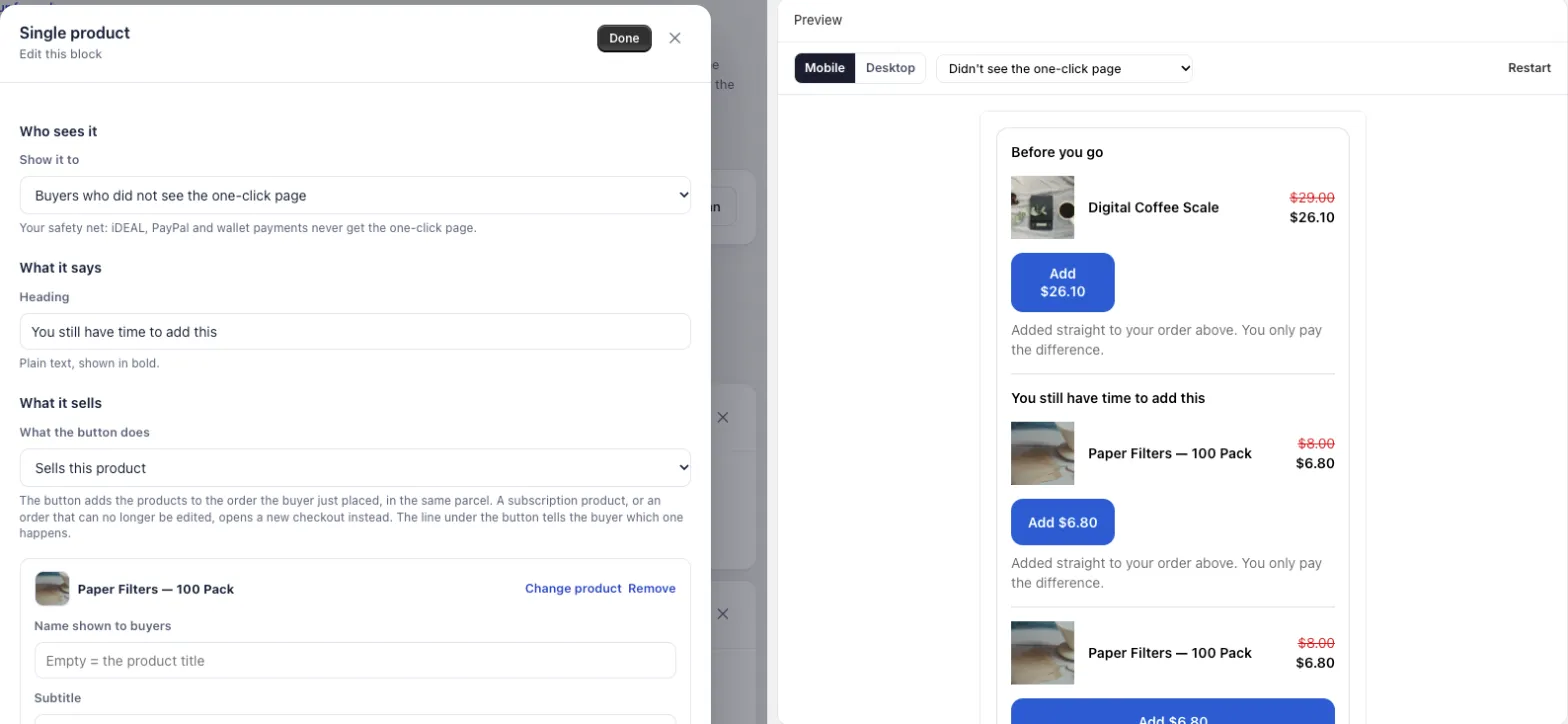
The BFCM thank-you page is the one page every Black Friday buyer sees, whatever they paid with. The one-click post-purchase page only follows credit card payments, so PayPal, Apple Pay, Google Pay, Klarna and gift card buyers go straight to the thank-you page. Give them a product block of their own, set to Buyers who did not see the one-click page, and add the item to the order they already placed.
Black Friday 2026 falls on November 27 and Cyber Monday on November 30. In Post Purchase Upsell Abakira, a thank-you page holds up to 6 blocks per funnel, each block decides who sees it with one of 5 rules, and a countdown can run up to 72 hours from the moment the order was placed. Below is how to set the page up for the weekend, what to put on it, and how to test it before November 27.
What is the thank-you page during Black Friday?
The thank-you page is the order confirmation page Shopify shows after payment, the one that says “Thank you” with the confirmation number and the order summary. During Black Friday it is the only post-payment page that every buyer reaches, including those paying with wallets, PayPal, buy now pay later, gift cards and cash on delivery.
Two pages can sit between the checkout and the end of the purchase. The one-click post-purchase page comes first and charges the card the buyer just used, with no new details to type. Shopify only shows it after a credit card payment. Then comes the thank-you page, which nobody skips.
So the thank-you page carries two very different crowds on Black Friday:
- buyers who already went through the one-click page and either took an offer or said no;
- buyers who never saw it, because of how they paid.
The setup that earns the most treats these two crowds separately.
Why does the thank-you page matter more over BFCM?
The thank-you page matters more over BFCM because every order the one-click page skips still lands there: Apple Pay, Google Pay and PayPal orders, buy now pay later orders, gift card orders, and some card orders when Shopify is under heavy load. On a sale weekend, that page carries your only post-payment offer for a large share of buyers.
Shopify also skips the one-click page when order creation is delayed under extreme platform load, as happens during large flash sales. On those orders, the thank-you page is the only place your offer can appear, card payments included.
You can measure your own share before the weekend without any app. Export last November’s orders, read the payment gateway column, and count everything that isn’t a card. That number is the share of your Black Friday buyers who will only ever see the thank-you page. On a store selling in the Netherlands, most buyers pay by iDEAL, a bank redirect, so the thank-you page is their main surface, not a backup. Our article on why Apple Pay, PayPal and Google Pay orders never see the post-purchase page lists every case Shopify excludes.
Who should see which block on the Black Friday thank-you page?
Each block on the thank-you page in Post Purchase Upsell Abakira has a Show it to setting with five rules, read from what the buyer did on the one-click page a few seconds earlier.
On Black Friday, the rule matters more than the product: the same coffee scale is a good offer for a PayPal buyer and a repeat for a buyer who just declined it.
| Rule in the admin | Who it reaches | Black Friday use |
|---|---|---|
| Everyone | Every buyer who reaches the page | Shipping times, holiday cutoff, a thank-you note |
| Buyers who did not see the one-click page | PayPal, Apple Pay, Google Pay, iDEAL, gift cards, cash on delivery, and card orders the one-click page skipped | Your main Black Friday offer, the one card buyers saw on the one-click page |
| Buyers who accepted a specific offer | Buyers who took the offer you pick | The accessory that goes with what they just added |
| Buyers who accepted at least one offer | Buyers who took anything on the one-click page | A small extra, or nothing at all |
| Buyers who refused everything | Buyers who saw the one-click page and took nothing | A cheaper item, or the same item at a better price |
The help text under the last rule says it plainly: “Not seeing it is not refusing.” A PayPal buyer who never saw the one-click page is never treated as someone who said no. The app only counts an offer as accepted when the server signed it and Shopify confirmed it was applied, so a payment that failed on the one-click page does not land a buyer in the “accepted” group.
Each block checks its own rule, so several blocks can show at once. A buyer who refused everything can see a text block set to Everyone and, under it, a product block set to Buyers who refused everything.
On the free plan, thank-you blocks are shown to every buyer. Sorting buyers by what happened on the one-click page (did not see it, accepted, refused) comes with the Pro plan and above. On the free plan, give the thank-you page an offer different from the one-click offer, since card buyers see both.
How do I set up a thank-you block for buyers who skipped the one-click page?
The block for buyers who skipped the one-click page is a product block on the Thank-you page tab of your funnel, with Show it to set to Buyers who did not see the one-click page. The help text under that rule calls it “Your safety net: iDEAL, PayPal and wallet payments never get the one-click page.” Setup takes about ten minutes.
- Place the app block in Shopify. In Shopify admin, open Settings, then Checkout, click Edit on your configuration, switch the page selector to Thank you, click Add block, choose Thank you page offer, and save. You do this once. Skip it and nothing you build in the app appears, with no error to tell you why.
- Open your funnel. In Post Purchase Upsell Abakira, open the funnel that matches your Black Friday orders and click the Thank-you page tab.
- Add a product block. Under Add a block, click Single product, Carousel or Bundle.
- Choose who sees it. Under Who sees it, set Show it to to Buyers who did not see the one-click page.
- Write the heading and pick the product. The heading is plain text shown in bold. “You still have time to add this” works well on a sale weekend. Pick the product and set its discount.
- Choose where the purchase goes. Leave Same order, unless it has fully shipped, or pick Same order, only until the first parcel ships if your warehouse ships within hours (more on that below).
- Check the preview. In the preview on the right, pick Didn’t see the one-click page. That is exactly what a PayPal or Apple Pay buyer will get. Click Done, then Save.
- Place a test order with a payment that skips the one-click page, as described in the testing section.
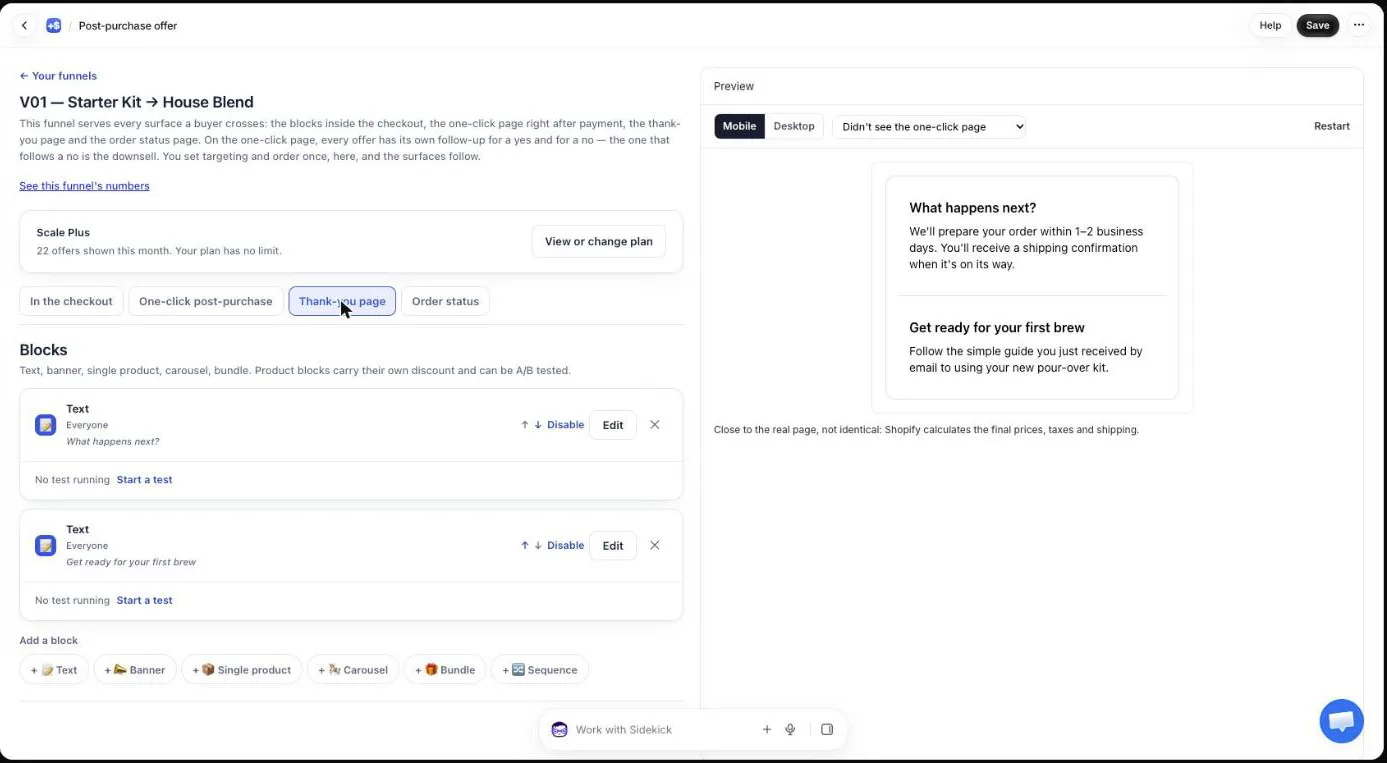
If your Black Friday offer on the one-click page is a deeper price on more of what the buyer just bought, copy that offer into this block. Card buyers and wallet buyers then get the same deal, each on the page they can actually see.
What should the Black Friday thank-you offer be?
The best Black Friday thank-you offer is a cheap, obvious add-on to what the buyer just bought, priced so the decision takes one look. The thank-you page is read on a phone, between a “Thank you” and a confirmation email, so the offer has to be understood from the product photo and the two prices.
Pick by block type:
- Single product for one clear add-on: refills, filters, a second unit of a consumable, a charger. One product, one button, the price with the original crossed out.
- Carousel, up to eight products, when your catalog is wide and one product can’t fit every order. Keep the cheapest items first.
- Bundle, two to four products bought together at one rate. Each item in a bundle can carry its own discount from 0 to 100, and 100 means that item is free. “Add the filters, get the scoop free” fits there.
- Sequence when you want a short path: the buyer sees one offer at a time, and Add or No thanks decides which one comes next. Nothing is charged along the way. Everything added goes into the order at the end, and the buyer pays once.
For gift orders, which spike from Black Friday onward, a gift wrap product or a greeting card sold as a regular product works in a Single product block. It has nothing to ship separately and it rides in the same parcel.
Match the offer to the order with the funnel itself. Funnels in Post Purchase Upsell Abakira are matched on what the order contains and on its total, so a buyer who bought a grinder and a buyer who bought a bag of beans can get different thank-you pages. The guide chapter on who will see your offers covers how funnels are picked.
How deep should the thank-you discount be during a sitewide sale?
The thank-you discount during a sitewide sale should beat the sale price the buyer just paid, not the regular price. A buyer who paid 25% off on Black Friday reads a 20% offer on the next page as a step back, even if it’s on a different product.
Set the add-on 5 to 10 points deeper than your sitewide rate, on a product with the margin to carry it.
Single product and carousel blocks take a percentage up to 90, or a fixed amount. A fixed amount reads better on cheap items (“$5 off” beats “17% off” on a $29 product).
Watch one thing if you run a sitewide code. When an item is added to an existing order, Shopify can apply the order’s discount code to the new line again, if that code is a percentage on all products. The buyer then pays less than the price shown on the block. Our article on Black Friday discount codes and upsell prices has the full test and the setting that keeps the price paid equal to the price shown.
Does the item go on the same order or a new one?
A product added from a Post Purchase Upsell Abakira thank-you block goes on the same order by default. The app edits the order the buyer already placed, adds the line with its discount, and sends a card buyer to Shopify’s payment page for the difference only.
One order in Shopify, one picking list, one shipping label, which matters when your warehouse is running at Black Friday volume.
The buyer reads this under the button, word for word: “Added straight to your order above. You only pay the difference.”
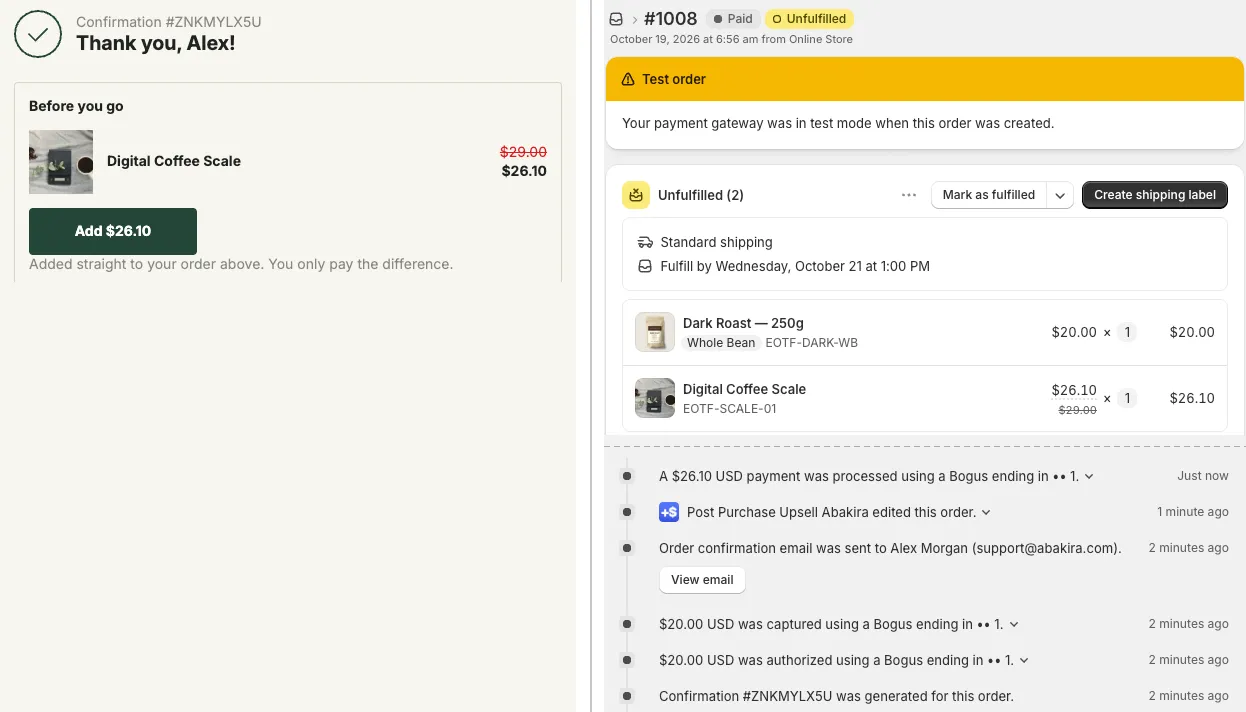
That screenshot is our test order #1008, placed on October 19, 2026. The buyer paid $20.00 for a bag of Dark Roast, then tapped Add $26.10 on the thank-you page for a Digital Coffee Scale listed at $29.00. Shopify’s order shows both lines under one unfulfilled shipment, the timeline entry “Post Purchase Upsell Abakira edited this order”, and a separate payment of $26.10 for the difference.
Each product block has a Where the purchase goes setting with three choices:
| Setting | What happens | Pick it when |
|---|---|---|
| Same order, unless it has fully shipped | Added to the existing order, same parcel. If the whole order has already shipped, the buyer pays in a new checkout instead. | The default. Fits most stores. |
| Same order, only until the first parcel ships | Added while nothing has shipped. As soon as one parcel leaves, the buyer pays in a new checkout and gets a separate order. | Your warehouse ships Black Friday orders within hours and you split shipments. |
| Always a new checkout | The buyer always pays in a new checkout and gets a separate order, with your usual shipping rates. | You want every add-on as its own order. |
A few cases always open a new checkout, whatever you choose: a product sold as a subscription and a cancelled order. A buyer also can’t stack unpaid lines on a Black Friday order by tapping twice.
On a cash on delivery order, the item joins the order and the amount is added to what the buyer pays at the door. The article on upselling cash on delivery orders on Shopify covers that case. Outside the sale weekend, the thank you page upsell that adds to the same order covers the setup step by step.
Can I put a countdown on the Black Friday thank-you page?
A countdown on a Post Purchase Upsell Abakira thank-you block runs up to 72 hours and is counted from the moment the order was placed, not from the moment the page opens. A reload, a second device or a return visit two days later shows the same deadline.
That makes it a real Black Friday window: an order placed Friday night with a 72-hour timer ends Monday night, at the end of Cyber Monday weekend. The same blocks carry into December with a 72-hour deadline: see Christmas upsell ideas for after checkout.
You set it on the product block, under the countdown field (“Countdown (empty = none)”), in hours and minutes. Three more settings shape it:
- Countdown wording (optional), with
{countdown}where the time goes. The placeholder reads “You have {countdown} left to add these to your order”. - When the countdown reaches zero: Hide the block, Keep the block, at full price, or Keep the block, show a message.
- Show a progress bar under the countdown, ticked or not.
For BFCM, Keep the block, at full price is the one to consider. The deadline stays honest, the discount really ends, and a buyer who comes back on Tuesday can still add the item at its normal price. The guide chapter on discounts, timers and proof says when a timer helps and when it hurts.
The checkout itself takes no countdown: Shopify forbids timers there. On the thank-you and order status pages they are allowed.
What else should the BFCM thank-you page say?
The BFCM thank-you page should also answer the questions sale buyers send to support: when will it ship, when will it arrive, and will it be there before the holidays. Text and Banner blocks set to Everyone do that job, above or below the offer.
Useful Black Friday lines:
- “Black Friday orders ship within 3 business days.” Use your real figure.
- “Order by December 15 for delivery before Christmas.” Again, your carrier’s real cutoff.
- A Cyber Monday code for the next order, typed into a text block, for buyers who paid early on Friday.
A Text block takes a heading and a body; wrap words in **stars** to make them bold. A Banner comes in four colors (Information, Success, Warning, Critical) and can be closed by the buyer if you tick Let the buyer close this banner.
Keep the count low. Six blocks is the limit per page and per funnel, and on a phone each block pushes the next one further down. One text block, one offer block for buyers who skipped the one-click page, and one block for buyers who refused everything is a full Black Friday page.
What do buyers who took the one-click offer see next?
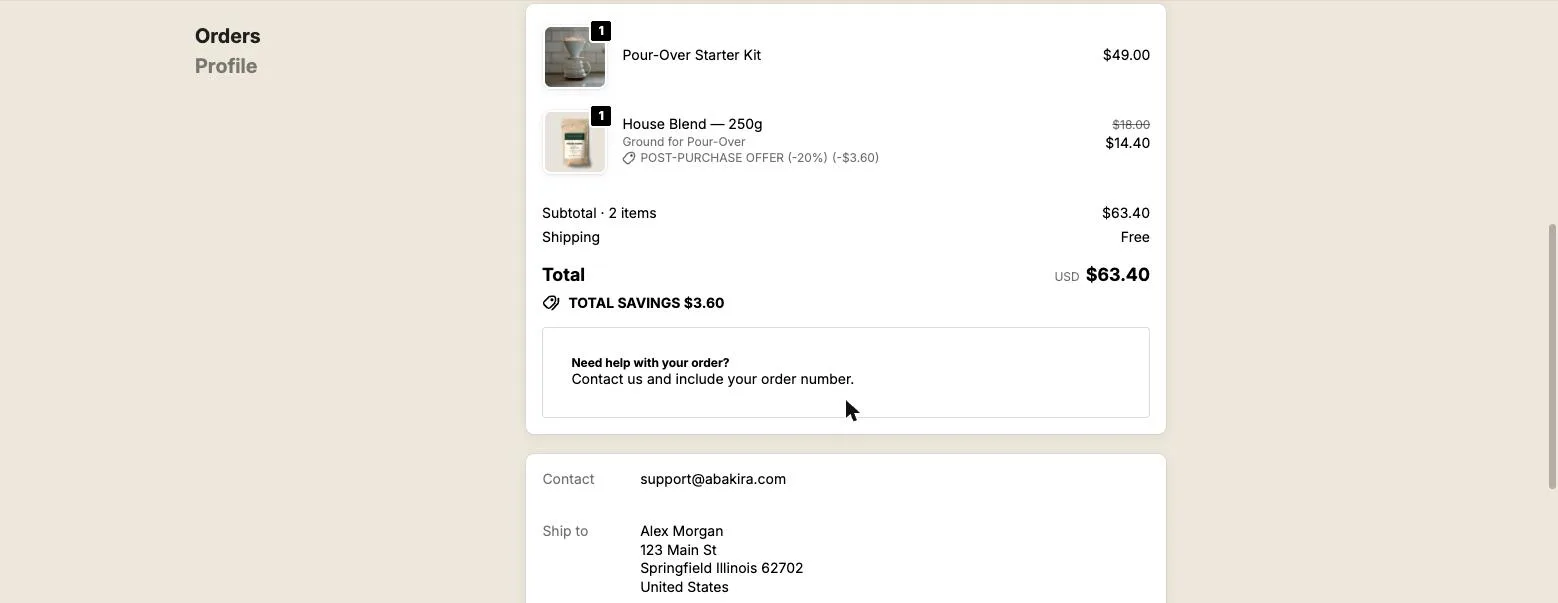
Buyers who accepted an offer on the one-click page arrive on the thank-you page with that item already on their order. Their order summary lists both lines, the added one tagged with its discount, and the total already includes it. Showing them the same product again wastes the space.
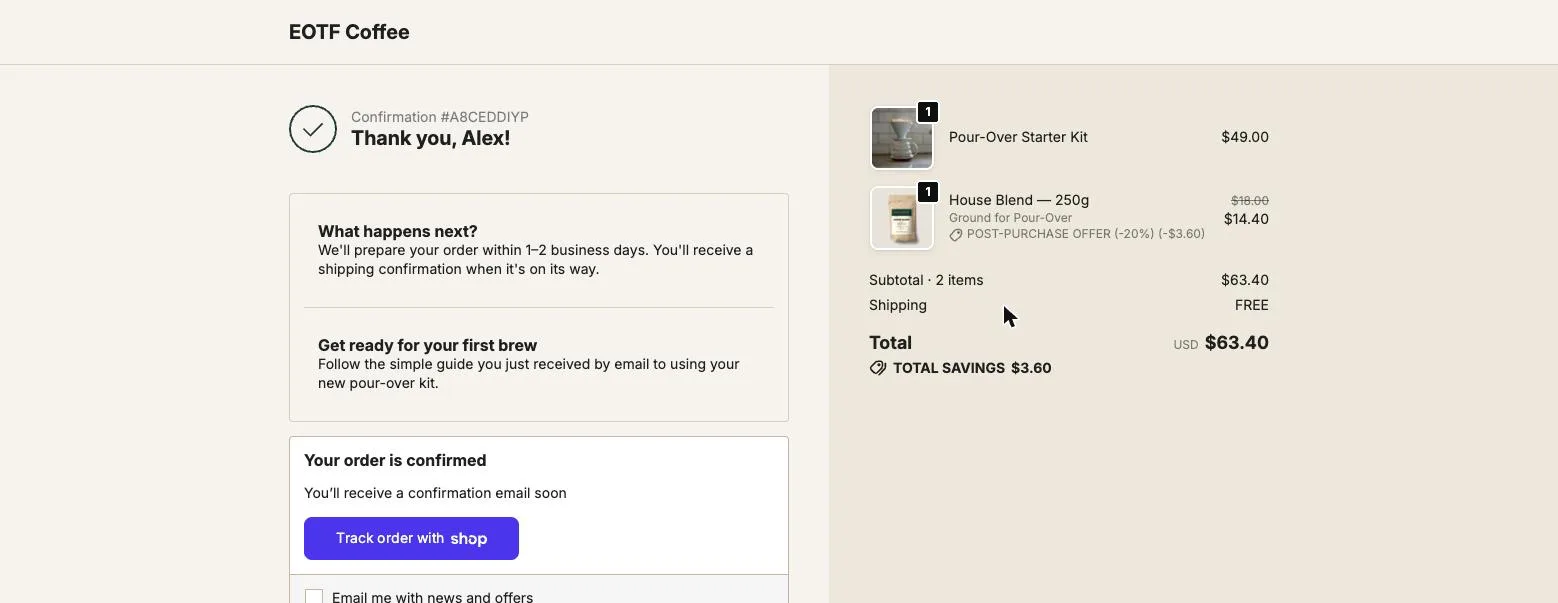
For these buyers, use Buyers who accepted a specific offer and sell what goes with the item they added: filters after a pour-over kit, a case after a phone, a refill after a starter. Or show them nothing but a text block. They already said yes twice in two minutes.
For Buyers who refused everything, the thank-you page is a second chance at a lower price point. A buyer who declined a $40 add-on on the one-click page gets a $12 one here. The app doesn’t stop you from offering the same item again at a better price; that call is yours.
What about buyers who come back to the order status page?
The order status page is the page behind the link in the confirmation email, and Black Friday buyers open it again and again while they wait for a delayed parcel. Post Purchase Upsell Abakira puts the same kinds of blocks there, with the Order status page offer block placed once in the checkout editor.
The countdown works there too, counted from the same order time, so a thank-you offer with 72 hours and an order status offer with 72 hours end at the same moment. On the Scale plan, order status blocks also take rules based on the thank-you page of the same order: Buyers who bought on the thank-you page, Buyers who bought from a specific thank-you block and Buyers who bought nothing on the thank-you page. The last one is how you show a second offer only to people who passed on the first. The guide chapter on the order status page covers the setup.
How do I test the BFCM thank-you page before November 27?
Test the BFCM thank-you page with two orders, because a card test order shows you the one-click page and hides the case you most need to check. Do it in the second week of November, before your sale prices go live, so you test the real page and not a draft.
- Check the editor preview first. In the Thank-you page tab, switch the preview between Didn’t see the one-click page and the other cases. Each block shows only under the rule you set.
- Order one: a payment that skips the one-click page. Use a manual payment method or a gift card on your store. You should land directly on the thank-you page with the block for buyers who did not see the one-click page.
- Tap Add on that block. A card or wallet buyer is sent to Shopify’s payment page for the difference. A manual payment buyer is not, since nothing was paid yet.
- Open the order in your Shopify admin. You should see one order, the added line with its discount, and the entry “Post Purchase Upsell Abakira edited this order” in the timeline.
- Order two: a test card. Decline the one-click offer and check that the thank-you page shows the block for Buyers who refused everything, and not the one meant for wallet buyers.
- Read the countdown on a second device. Open the order status page from the confirmation email on your phone. The deadline should match the one on the thank-you page.
Then freeze the page. Changing blocks in the middle of the weekend means you can’t tell which version earned what. If you want to compare two offers, run an A/B test on the block from the start (Scale plan) instead of switching by hand on Saturday.
How do I read the results after Cyber Monday?
The Results screen of Post Purchase Upsell Abakira, under “What your offers earned”, reads your Shopify orders over the last 30 days. It has a Thank-you page tile with the revenue from that page and the number of orders behind it, separate from the one-click page. Read it on December 1 and the window covers the whole BFCM period.
Two comparisons tell you whether the thank-you setup worked. Put the revenue on the Thank-you page tile next to the one-click total, and put the number of orders behind that tile next to your share of non-card orders from November.
If the thank-you page earned a small share while most of your orders were wallets or PayPal, the offer was wrong, not the page. Change the product before Christmas, while gift traffic is still running. Our Black Friday upsell ideas and the article on Black Friday quantity discounts after checkout give offers to try, and every Black Friday article sits on our seasonal topic page.
The thank-you page chapter of the guide has the full reference for blocks, rules and delivery settings. Post Purchase Upsell Abakira runs the one-click page, the thank-you page and the order status page from one funnel, and its free plan already includes thank-you blocks.
Set up a Black Friday thank-you block for buyers who skipped the one-click page
- Place the app block in Shopify In Shopify admin, open Settings, then Checkout, and click Edit on your checkout configuration. In the top bar, switch the page selector to Thank you, click Add block, choose Thank you page offer from Post Purchase Upsell Abakira, and save.
- Open the Thank-you page tab of your funnel In Post Purchase Upsell Abakira, open the funnel that matches your Black Friday orders and click the Thank-you page tab.
- Add a product block Under Add a block, click Single product, Carousel or Bundle.
- Choose who sees it Under Who sees it, set Show it to to Buyers who did not see the one-click page.
- Write the heading and pick the product Write a Heading such as You still have time to add this, pick the product and set its discount.
- Choose where the purchase goes Set Where the purchase goes to Same order, unless it has fully shipped, or Same order, only until the first parcel ships if your warehouse ships within hours.
- Check the preview and save In the preview, pick Didn't see the one-click page to see what a PayPal or Apple Pay buyer will get, click Done, then Save.
- Place a test order Pay a test order with a method that skips the one-click page, such as a manual payment method or a gift card, tap the offer and check the order in your admin.
Frequently asked questions
Do I need Shopify Plus to add offers to the thank-you page?
No. App blocks on the thank-you page and the order status page work on every Shopify plan. Only blocks inside the checkout itself, before payment, are reserved for Shopify Plus stores.
What if a buyer taps Add twice on the thank-you page?
While a first addition is still waiting for payment on that order, Post Purchase Upsell Abakira does not edit the order again. A second tap on the same page shows "Finish that payment first.", and when the buyer reopens the page the button opens a new checkout. The order never carries two unpaid lines from the thank-you page.
How long does the Add button on a thank-you block keep working?
The link behind the button is signed by the app with the order, product, quantity and discount, and it expires after 24 hours. Reopening the page builds a fresh link; a link copied from an old browser history is refused.
Can I A/B test a thank-you block over Black Friday?
Yes, on the Scale plan: each product block can run several versions, and each buyer sees a stable one. Start the test before November 27 and leave it alone until December 1, so the weekend traffic is split evenly between versions.
Does the thank-you block work for cash on delivery orders during BFCM?
Yes. A cash on delivery buyer never sees the one-click page, so the block for buyers who did not see it reaches them. The added item joins the order and is paid at the door with the rest.
Related articles
Written by Abakira. We make small software: Shopify apps, web tools and iPhone apps. This article is about Post Purchase Upsell Abakira.