Supplement upsell ideas: stock-ups, flavors, subscriptions
Supplement upsells after checkout: a 3- or 6-month stock-up, a 2-month downsell, a quarterly plan for subscribers, a new flavor. Exact settings and prices.
2026-11-06 — Abakira, updated 2026-11-08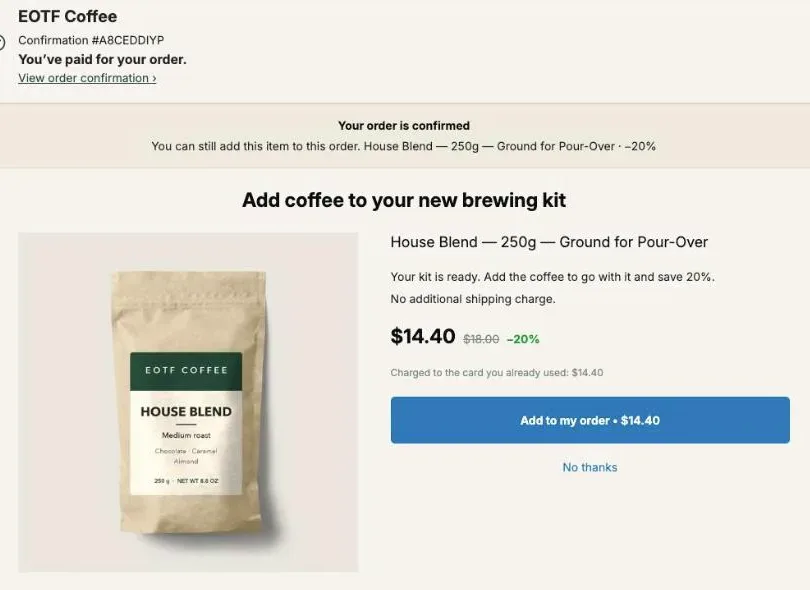
Supplement upsell ideas after checkout are about quantity and time: offer a 3- or 6-month supply to the buyer who just bought one bottle, drop to a 2-month supply if they say no, move subscribers to a quarterly plan, and offer another flavor or a companion product. Each offer sits on the page right after payment and joins the order the buyer already paid.
Take a $40, 30-day bottle. A 3-bottle pack at 20% off is $96, $32 a bottle, and the order goes from $40 to $136 with one tap. The rest of this page goes through each idea with the exact settings in Post Purchase Upsell Abakira, the prices at each step, and how to keep subscribers and one-time buyers on the right offer.
Why does a stock-up offer suit supplements?
A stock-up offer suits supplements because the product runs out on a date anyone can work out from the label. A 30-day bottle covers 30 days, so the question “do you want the next 60 days now, cheaper?” is about money and timing, not about trying something new. The buyer has just decided to buy this exact product.
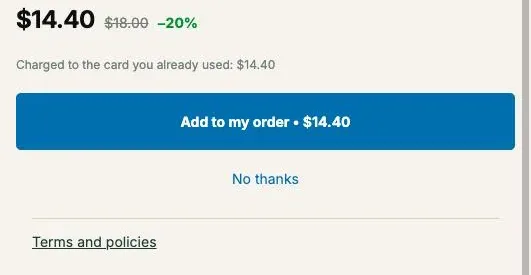
The one-click post-purchase page asks that question at the cheapest moment. The buyer has paid, the card is on file, and there’s nothing to type. In Post Purchase Upsell Abakira the offer shows the price, the struck-through regular price and the line “Charged to the card you already used”, then one button.
Shopify gives you three pages after payment, and a supplement store can use each one for a different job:
| Page | Who sees it | Best supplement offer there |
|---|---|---|
| One-click post-purchase page | Card buyers, before the confirmation | The stock-up ladder and the subscription offer |
| Thank-you page | Every buyer, any payment method | A stock-up for PayPal and wallet buyers, a companion product |
| Order status page | Buyers who come back to track the parcel | A last add-on before the box leaves |
Our guide chapter on what to offer after checkout explains how to pick the first offer for any catalog. For supplements, the answer is almost always more of the same bottle.
What should the first supplement upsell be?
The first supplement upsell should be a bigger supply of the product just bought: three or six months instead of one. It’s the offer with the least to explain. The buyer already chose the product, the flavor and the size, so the only new information is the price per bottle, which goes down as the quantity goes up.
There are two ways to build it in Post Purchase Upsell Abakira, depending on how your catalog is set up.
If you sell packs as variants or products (1 bottle, 3 bottles, 6 bottles), set What this offer proposes to A product and pick the pack. The offer is then a fixed quantity with one price.
If you only sell single bottles, use One more, same variant. The admin describes it as “The item is decided at checkout. No choice to make: they already picked it.” It reads the bottle from the paid order, so one offer covers every product and flavor in the store. Then open Quantity tiers and add the bigger quantities. Each tier is a quantity and a discount; the app takes up to 5 tiers, each from 2 to 20 units.
With a $40 bottle, here is what a buyer sees in the Quantity menu of that offer:
| Menu line | Units added | Price | Per bottle | Supply with the bottle already bought |
|---|---|---|---|---|
| 1 unit | 1 | $34.00 (15% off) | $34.00 | 2 months |
| 2 units · −20% | 2 | $64.00 | $32.00 | 3 months |
| 5 units · −25% | 5 | $150.00 | $30.00 | 6 months |
The menu always starts at 1 unit with the offer’s own discount, and each tier line shows its own discount, which is what the buyer compares. Keep the discount rising with the quantity. If a bigger tier has a smaller discount, the admin warns you: “A tier with more units has a smaller discount than the one before it. Buyers would pay more per unit for buying more.”
The price the buyer pays is checked on our server against your saved tiers. A buyer can’t send “7 units” and get the 5-unit price: anything that isn’t exactly one of your tiers is refused. That matters on an offer where the quantity moves real money.
What do I offer if the buyer turns down the big supply?
A buyer who turns down the 3- or 6-month supply gets a smaller one: a single extra bottle, which makes two months with the one they bought. In a Post Purchase Upsell Abakira funnel, that offer goes in the slot under If declined, which the editor describes as “Shown only to buyers who just declined — this is your downsell.”
This is where a funnel becomes a ladder. The quantity moves up after a yes and down after a no, and nothing else changes: same product, same flavor, same page. The buyer only answers one question at each step.
Here is a full three-level ladder for the $40 bottle, using a 3-bottle pack for the fixed steps:
| Step | Shown to | Offer | Price |
|---|---|---|---|
| 1 | Every card buyer of the bottle | 3-bottle pack, 20% off | $96.00 |
| 2 (If accepted) | Took the 3-pack | A second 3-bottle pack, 25% off | $90.00 |
| 2 (If declined) | Said no to the 3-pack | One more, same variant, 15% off | $34.00 |
| 3 (If declined, then declined) | Said no twice | The same bottle as a subscription | Your plan’s price |
| 3 (If declined, then accepted) | Took the single bottle | Another flavor, 15% off | Depends on the flavor |
A funnel holds at most 3 levels and 7 offers, and a buyer sees 3 of them at most, one per level. The best-case order on this ladder is $40 + $96 + $90 = $226 for seven bottles. The worst case that still converts is $40 + $34 = $74 for two.
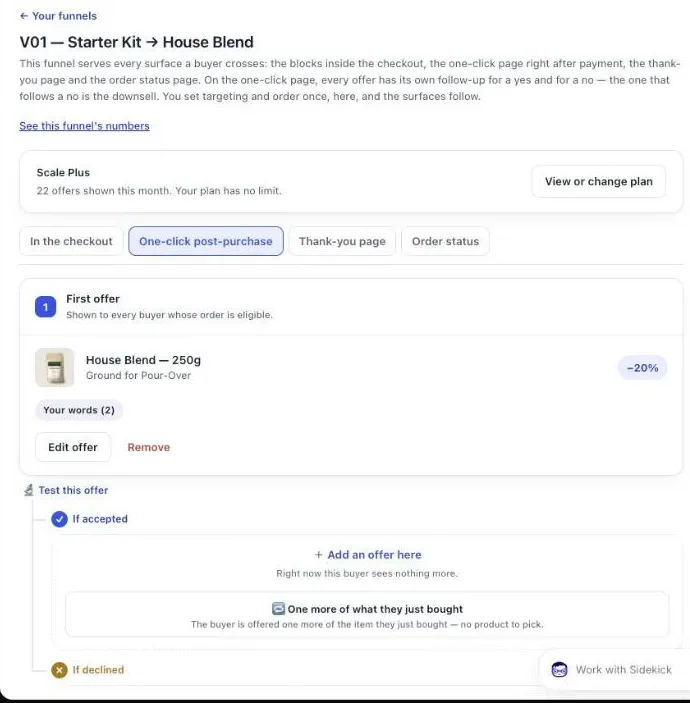
The levels after the first one come with the Pro plan. On the free plan, the single-offer version is the tiered One more, same variant offer above, which puts 1, 2 and 5 extra bottles on one screen. Our article on downsells after checkout goes deeper into how far to drop the price on the declined path, and the guide chapter on the accept and decline tree shows how branches are built and copied.
Should I sell a prepaid supply or a subscription?
A prepaid supply and a subscription solve different problems, and a supplement store should offer both, in that order. The stock-up brings the money in today and ships in the same parcel. The subscription brings smaller amounts every month for as long as the buyer stays. Lead with the stock-up and keep the subscription for buyers who said no to it.
The order matters for a practical reason: in Post Purchase Upsell Abakira, an offer can’t be both. When you pick a plan under Sell as a subscription, the admin shows “Quantity tiers are off while a subscription plan is selected. The plan carries its own pricing.” So the stock-up and the subscription are two offers, and the ladder above places the subscription at the end of the declined path.
| 6-month stock-up | Monthly subscription | |
|---|---|---|
| Money in today | $150 for five extra bottles | The first charge |
| Ships | In the same parcel as the order | On the plan’s schedule |
| Set up in | Post Purchase Upsell Abakira alone | Your subscription app, then the offer |
| Discount | Per tier, set in the offer | First charge from the offer, renewals from the plan |
| Plan needed in the app | Every plan | Every plan |
The subscription closes the declined path: it asks for one bottle a month, with no prepayment.
How do I sell a subscription right after checkout?
A subscription is sold right after checkout with an offer set to A product that carries a selling plan from your subscription app. In Post Purchase Upsell Abakira, the setting is Sell as a subscription, and it lists “the subscription plans your subscription app already created for this product.” It is available on every plan.
What you set on that offer:
- The plan. The app never creates a plan and never bills a renewal. Recharge, Loop or whichever subscription app created the plan does.
- Shipping, twice. Fill in Shipping on the first order and Shipping on every renewal. Shopify requires both, and an offer without them is never shown. Enter 0 if shipping is free.
- The discount. It applies to the first charge only. The admin says it plainly: “Renewals are billed at the price set by the plan” in your subscription app.
- The length, if you sell a fixed number of deliveries. Three months on a monthly plan is three charges.
The buyer has to tick a consent box before the button works, as Shopify requires. And one rule decides who sees it: “Buyers who already have a subscription in their order will not see this offer.” Shopify doesn’t allow adding a subscription to an order that already has one. That makes the subscription offer a one-time-buyer offer by design.
The details of consent, shipping and fixed-length plans are in selling a subscription after checkout with Recharge or Loop, and the guide chapter on subscriptions has the full set of settings.
How do I move a new subscriber to a quarterly plan?
A buyer who subscribed at checkout is moved to a quarterly plan with the Subscription upgrade offer on the one-click page. It works with Loop only, connected on the Subscription app page, on the Scale plan. Nothing is added to the order and nothing is charged that day: the next renewal of the same subscription switches to the new variant and plan.
This is the one offer in the app shown only to subscribers. The admin says it is “Shown only to buyers who just subscribed to this product, or to the product in this funnel’s condition.” A one-time buyer never sees it.
On the buyer’s side, the card shows “Due today” next to $0, then the renewal price. That renewal price is read live from Shopify when the page loads: the variant’s price with your plan’s discount. If the app can’t read it at that moment, the offer isn’t shown. A subscription offer without its price is one we don’t serve. Under the button, a legal line states the renewal price, that it runs until cancelled, and how to cancel; that line is always shown and can’t be edited.
To build it:
- Connect Loop on the Subscription app page with an API token from your Loop account.
- Create an offer and set its type to Subscription upgrade.
- Under Variant they move to, pick the bigger variant, for example the 3-bottle pack. Under Plan they move to, pick the quarterly plan.
- Write the headline around the renewal. The placeholder in the editor reads “e.g. Free upgrade to a quarterly subscription”.
One thing to plan: funnels are chosen by what the order contains, not by whether a line is a subscription, so the first funnel whose condition matches wins. A funnel that opens on a Subscription upgrade shows nothing to the one-time buyers it catches. If your subscription is sold as its own product (a “subscribe and save” pack, for instance), give it its own funnel with Order contains set to that product, and the one-time buyers flow down to the stock-up funnel below it.
If you use Recharge, the same move happens on the thank-you and order status pages: a product block whose What the button does is set to Changes their existing subscription. Our article on upgrading a subscription right after purchase covers both apps and what must not move during the switch.
How do I offer another flavor of the same supplement?
Another flavor is offered with One more, any variant, or with A product and several variants ticked. Either way the buyer gets a “Choose an option” menu on the offer and picks the flavor; the price and photo follow the pick. It’s the natural step for a buyer who has just bought one flavor and gone through the stock-up.
Which one to pick:
- One more, any variant reads the product from the paid order and lets the buyer switch variant. On a powder sold in three flavors, that means switching flavor. One offer covers every product in the store.
- A product with chosen variants lets you decide which flavors appear. Tick only the ones you want, and leave out a flavor you’re short on.
Use a percentage discount rather than a fixed amount when flavors are priced differently, so the cut stays proportional. One trap on a mixed order: the “one more” offers repeat the line with the highest price per unit. If a buyer bought a tub of powder and a cheaper shaker, the offer picks the tub, which is what you want. If they bought a starter bundle and a single bottle, it picks the bundle. The full setup is in letting the buyer choose the variant after checkout.
Which companion products sell with a supplement order?
The companion products that sell with a supplement order are the ones used with it: a shaker or scoop for a powder, a travel pouch or pill case for capsules, a sample size of another product in your range. They are cheap next to the main order and need no explanation. Keep them to items you already stock.
On the one-click page, there are two places for them:
- As the next offer. The slot under If accepted after the stock-up is a good spot for a $10 to $15 accessory.
- In a grid under the main offer. The Grid section shows “Up to 6 extra products shown under the main offer, each with its own discount and its own button.” A shaker and a pouch under the 3-bottle pack, each with its own button.
On the thank-you page, the Bundle block holds 2 to 4 products, each with its own discount from 0 to 100%, so one item in the set can be free. Make the free item the cheapest one, a scoop rather than a second tub.
What do buyers who pay with PayPal or a wallet see?
Buyers who pay with PayPal or a wallet skip the one-click page and land straight on the thank-you page. A block there with Show it to set to “Buyers who did not see the one-click page” gives them their own offer (that rule is on the Pro plan and above; on the free plan, thank-you blocks show to every buyer); the admin calls it “Your safety net: iDEAL, PayPal and wallet payments never get the one-click page.”
For a supplement store, put the stock-up in that block. Product blocks on the thank-you page have their own Quantity breaks, so the 2-bottle and 5-bottle steps work there too. The button adds the products to the order the buyer just placed, in the same parcel. A subscription sold from that page opens a new checkout instead, because order editing adds a product, not a subscription.
The list of payments the one-click page skips is worth reading if a large share of your orders come through wallets.
Where do the extra bottles go once the buyer accepts?
The extra bottles go into the order the buyer just paid. Shopify recalculates the total, the new line sits next to the original one with its regular price struck through, and everything ships in one parcel. Here is a test order from our demo store in the Shopify admin: the original item, the accepted offer at $14.40 instead of $18.00, one shipment.
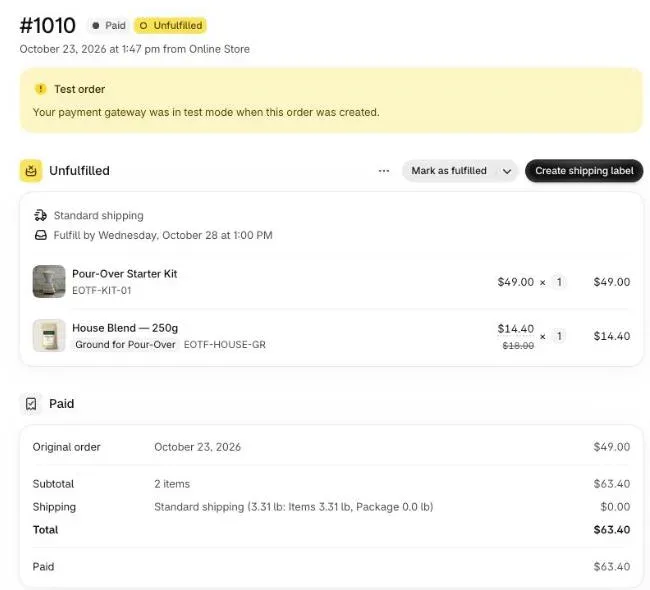
Six bottles weigh more than one, so check your shipping rates before you make the 5-unit tier an offer.
How do I word a supplement upsell?
A supplement upsell is worded around time and price per bottle: “Make it a 3-month supply” and “$32 a bottle instead of $40” say everything the buyer needs. In Post Purchase Upsell Abakira the text sits under Your words on this page, with a Selling headline above the product name and a few lines of argument.
Lines that fit each offer on the ladder:
- Stock-up: “Make it a 3-month supply. $32 a bottle on this page.”
- Bigger step: “Going for six months? The second pack is 25% off.”
- Downsell: “One more bottle for $34, in the same parcel.”
- Flavor: “Try another flavor with this order.”
- Subscription: “Get this bottle every month, first delivery 15% off.”
Leave health out of it. The offer is about how many bottles and how often, and that’s all it needs to say. Two rules come from Shopify: the editor refuses exclamation marks with “Shopify does not allow exclamation marks on this page.”, and the product’s real name stays visible next to your headline.
How do I know which supplement upsell works?
The supplement upsell that works is the one that earns the most per order that saw it, not the one with the most yeses. A $96 pack taken by fewer buyers can beat a $34 bottle taken by more. The Results screen of Post Purchase Upsell Abakira shows the extra revenue by page and by funnel, and each step of the funnel with how many saw it and accepted.
Run the ladder for a few weeks before changing a price. On the Scale plan you can A/B test two versions of the same step, for instance the 3-pack at 15% against 20%. The method for reading the numbers is in how to price an upsell, per order and not per yes. The same stock-up ladder runs on litter and treats in pet store upsell ideas. If you run several product lines, the guide chapter on different offers for different carts explains how funnels are ordered and targeted. Other store types are grouped on our situations page, including coffee store upsell ideas. Beauty brands can run the same tree around the routine; see skincare upsell ideas.
Post Purchase Upsell Abakira has a free plan that shows 100 offers a month on a live store. The listing has the current plans and what each one includes.
Build a supplement stock-up ladder on the one-click page
- Create the funnel In Post Purchase Upsell Abakira, click Create a funnel. Under Who sees this offer, choose Order contains and pick the supplement (a condition that comes with the paid plans), or leave Everyone if it is your only product.
- Set the first offer to the bigger supply On the One-click post-purchase tab, choose A product and pick the 3-bottle pack of the same supplement. Set a 20% discount and a Selling headline such as Make it a 3-month supply.
- Add the bigger step under If accepted Click Add an offer here under If accepted and offer a second 3-bottle pack at 25%, for a buyer who wants six months or more.
- Add the smaller step under If declined Under If declined, add an offer with What this offer proposes set to One more, same variant at 15%: one extra bottle, a 2-month supply in total.
- Close the declined path with a subscription Under the second If declined, add the same supplement as A product and pick a plan under Sell as a subscription. Fill in Shipping on the first order and Shipping on every renewal.
- Test before going live Click Save, then Try a cart on the funnel list to check which funnel a cart reaches, and place a card test order to walk both branches.
Frequently asked questions
Can I run a supplement stock-up offer on the free plan?
Yes. The free plan of Post Purchase Upsell Abakira runs one funnel with one offer on the one-click page and shows up to 100 offers a month. Quantity tiers work on every plan, so a single One more, same variant offer with tiers at 2 and 5 units gives buyers the 3-month and 6-month choice on one screen.
Can a supplement upsell be a subscription and a quantity offer at the same time?
No. When an offer carries a subscription plan, its quantity tiers are switched off, because the plan carries its own pricing. Run the stock-up and the subscription as two separate offers, for example the subscription after a declined stock-up.
Does the Subscription upgrade offer work with Recharge?
The one-click Subscription upgrade offer works with Loop only, connected on the Subscription app page, on the Scale plan. With Recharge, the equivalent lives on the thank-you and order status pages: a product block set to Changes their existing subscription.
Is the buyer charged when they accept a subscription upgrade?
No. The card shows $0 due today and the renewal price. Nothing is added to the order; the next renewal of the same subscription switches to the new variant and plan.
What do buyers who pay with PayPal or a wallet see?
They skip the one-click page. A thank-you page block whose Show it to setting is Buyers who did not see the one-click page gives them their own offer, and the thank-you page product blocks have their own quantity breaks.
Related articles
Written by Abakira. We make small software: Shopify apps, web tools and iPhone apps. This article is about Post Purchase Upsell Abakira.