Travel size upsell: test the mini against the full size
A travel size upsell has to earn more per buyer, not just win more yeses. The acceptance ratio a mini needs to beat the full size, and how to test it.
2026-11-14 — Abakira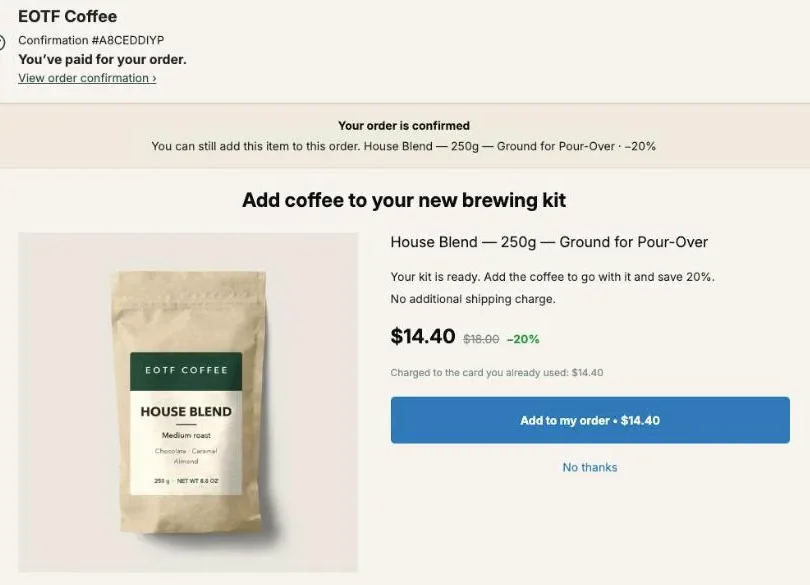
A travel size upsell can earn more than the full size, but only if the mini is accepted often enough to make up for its lower price. The rule is simple: the mini wins when its acceptance rate, divided by the full size’s, is higher than the full-size price divided by the mini price. A $14.40 full size against a $6.40 mini needs the mini accepted 2.25 times as often just to tie.
That ratio is different on every store. Your mini might sit at a third of the full price or at two-thirds, and it might carry a thinner margin. This page gives you the arithmetic to call the result before you run it, the setup of a mini-against-full test in Post Purchase Upsell Abakira, and how to read the verdict in dollars of profit as well as revenue. For the general A/B method on the post-purchase page (what to test first, sample sizes, ties), see our guide to A/B testing a post-purchase upsell. This page is about one decision: which size to offer.
Should my upsell be the travel size or the full size?
A travel size upsell and a full-size upsell are judged on the same number: revenue per buyer who sees the offer, which is the acceptance rate times the price. The mini asks for less on each yes, the full size earns more on each yes, and the ratio between the two decides which brings in more.
That’s the reason to set it up as a test rather than pick a size on instinct. The price ratio tells you the bar the mini has to clear; only your own buyers tell you whether it clears it. The next section turns the ratio into a target acceptance rate.
The full size has its own case. Each yes is worth more, and when your full size carries a much better margin per unit, it can earn more profit even while it brings in less revenue. Both sides of that are arithmetic you can do before spending a single view.
How much more often does the mini need to be accepted?
The mini needs to be accepted more often than the full size by at least the ratio of their prices. Divide the full-size offer price by the mini offer price: that number is the minimum acceptance multiple for the mini to tie on revenue. A $14.40 full size against a $6.40 mini needs the mini accepted 2.25 times as often.
Here’s that example worked through. The full size is the House Blend from our demo store, a 250 g bag at $18.00, offered at 20% off. The mini is a 100 g sample bag priced at $8.00 for the example, same 20% off.
| Offer | Regular price | Offer price (20% off) | Acceptance needed to tie |
|---|---|---|---|
| Full size, 250 g | $18.00 | $14.40 | Your current rate, say 10% |
| Mini, 100 g | $8.00 | $6.40 | 22.5% (2.25 × 10%) |
Three quick checks before you test:
- Price ratio under 1.5. The mini sells for two-thirds of the full price or more. The bar is low: the mini wins on revenue once its acceptance passes that ratio, which is under 1.5 times the full size’s.
- Price ratio between 1.5 and 3. The mini needs between 1.5 and 3 times the acceptance. This is where the test earns its keep.
- Price ratio above 3. A $5 sachet against an $18 bag needs 3.6 times the acceptance. Possible, but at that ratio the mini fits better under If declined, after the full size has been offered.
Keep the discount percentage identical in both versions. If the mini gets 30% off and the full size 20%, you’re testing two things at once, and the price ratio you calculated no longer matches what buyers saw.
Does the mini still win once margin is counted?
The mini can win on revenue and still lose on profit, whenever it keeps a smaller share of its price than the full size does. Before you adopt a mini that won on revenue, compare profit per view: the acceptance rate times what’s left of the offer price once the product’s cost is taken out.
Same example, with product costs added. We picked these costs for the illustration, and the acceptance rates too:
| Version | Offer price | Cost per item | Profit per sale | Acceptance | Revenue per view | Profit per view |
|---|---|---|---|---|---|---|
| A, full size | $14.40 | $6.00 | $8.40 | 10% | $1.44 | $0.84 |
| B, mini | $6.40 | $3.40 | $3.00 | 25% | $1.60 | $0.75 |
The mini wins on revenue, $1.60 against $1.44 per buyer who saw it. It loses on profit, $0.75 against $0.84. On profit, the mini would need to be accepted 2.8 times as often as the full size ($8.40 ÷ $3.00), not 2.25 times.
Post Purchase Upsell Abakira does this comparison in the test results. Above the results table, switch the amounts from Revenue to Profit. The app takes what each version sold for and subtracts the product’s Cost per item from Shopify, for the whole test. Shipping, taxes and payment fees aren’t included. When the winner on your goal is not the one that makes more profit per view, the results say so: “Version B makes more profit per view than version A. The winner is picked on your goal, not on profit.” (with your letters in place of B and A).
Two things to do before the test starts:
- Fill in Cost per item in Shopify for both sizes. The app reads costs from Shopify only, never from a field in the app. A product with no cost counts as 0, which inflates its profit, and the results mark that amount with an asterisk and name the product.
- Decide now which number settles it. If you’re using the mini to bring new buyers into a product line, revenue may be enough. If the upsell is there to pay for ads, profit is the honest number.
How do I set up a mini vs full size test in Post Purchase Upsell Abakira?
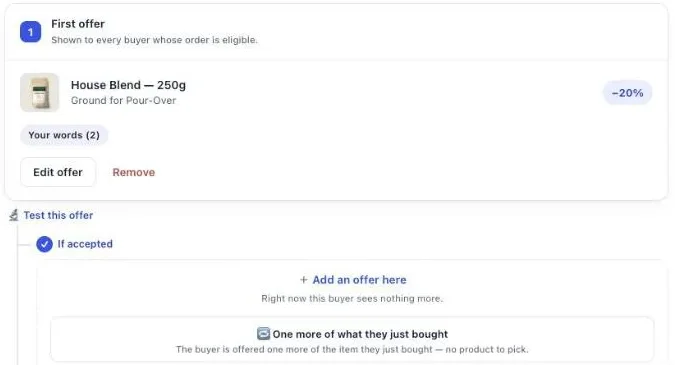
A mini vs full size test in Post Purchase Upsell Abakira is one offer with two versions: version A sells the full size, version B the mini, everything else identical. You start it from the offer card, keep the goal on revenue, and change only the product in version B. A/B testing comes with the Scale plan.
- Open the funnel and stay on the One-click post-purchase tab.
- Make the full size the First offer. Under What this offer proposes, keep A product, and in Shopify’s product picker tick only the full-size variant.
- Under the offer card, click Test this offer. Version A is the offer you just set.
- Leave Goal on Net revenue per view.
- Click Add a version. Version B opens as a copy of A. You can add up to four versions in total.
- In version B, change the product and tick only the mini, either the travel-size variant of the same product or a separate travel-size product.
- Leave the discount, the words and the image as they are in version A. Then save the funnel.
Buyers are split evenly between the versions, and the same buyer always lands on the same version, even if the page reloads. The discount Shopify applies is signed for the version the buyer saw, so a buyer shown the mini at 20% off is charged for the mini at 20% off.
One detail on step 7: the image. Changing the product in version B doesn’t reset the visual. If version A uses your own image instead of the product photo, version B keeps it until you change it in B’s tab, and buyers would see a full-size bag while paying for a sample. The same goes for your words: a headline that says “250 g” has to be edited in B.
Should buyers choose the size themselves?
Give each version a single variant. In Post Purchase Upsell Abakira, the variants you tick in Shopify’s product picker are exactly the ones the buyer can choose from, up to 25 per offer. Tick one variant and the page shows no size menu; tick two sizes and the buyer gets one.
With one size per version, Per view compares the sizes themselves, not what buyers picked from a menu. A size menu has its place on a clothing store, where the buyer needs the size that fits. In a pack-size test, it blurs the answer you’re paying views for.
What should versions C and D test?
Versions C and D should test the other ways of selling small: several minis, or the full size at a deeper discount. Each should differ from A or B by a single change. Add them only if your one-click page gets enough views: every extra version adds at least 100 views to wait for.
| Version | Offer | Compare it with | What it answers |
|---|---|---|---|
| A | Full size, 20% off | - | Your baseline |
| B | Mini, 20% off | A | Does the smaller ask earn more? |
| C | Mini, 20% off, with a quantity tier: 3 units at 30% off | B | Do mini buyers take a multipack when it's offered? |
| D | Full size, 35% off | A | Was it the size or the price that mattered? |
Each new version starts as a copy of the last tab, not of A. So C opens as a copy of the mini, which is what you want, and D opens as a copy of C: pick the full size again, remove the tier, then set 35%.
Version D is the control that keeps you honest. If the mini wins against A but loses against D, buyers were reacting to the price, not the format, and a deeper discount on the full size might earn more profit than a mini ever will.
Version C uses Quantity tiers, which go from 2 to 20 units, each tier with its own discount, up to five tiers per one-click offer. Make sure each tier has a bigger discount than the one before. The editor warns you if a tier with more units has a smaller discount, because buyers would pay more per unit for buying more.
On a store with a small one-click audience, stick to A and B. Our article on setting your own upsell take rate baseline shows how to read your first offer’s rate together with its view count, which tells you whether you have enough views to add versions.
How do I read the result of a mini vs full size test?
You read a mini vs full size test in the Results tab of the test window. Each version has a row with Shown, Added, Net revenue and Per view. The highest Per view earned the most, and the app names a winner only once every version has 100 views and the gap reaches 95% confidence.
Four things to look at, in this order:
- The verdict line. “Too early: not enough data to decide yet.” means keep waiting; the line under it estimates how many more views are needed and how many days that is at the current pace. “Tie: the versions perform the same, no clear gap.” means the size didn’t matter enough to show, and you can keep whichever has the better margin.
- Per view, not Added. A higher Added count says nothing about money on its own: compare the Per view column.
- The warning line. If you set the goal to Acceptance rate, the mini can win it while earning less. The app flags that case: “It wins on your goal but earns less per view than another version.”
- Profit. Switch the amounts to Profit and check that the winner still leads. If it doesn’t, you’ll see the profit note described above, and you decide which number matters for this offer.
Net revenue counts what Shopify confirmed on the order, not what was tapped. A buyer who tapped the mini and whose line never made it onto the order isn’t counted as money.
Is the mini a better first offer or a better downsell?
The mini can be the first offer, or the downsell shown after a buyer declines the full size. The test above tells you which size works better as the first offer. A downsell sequence gets both: the full size first, then the mini for buyers who said no. The two set-ups answer different questions.
| Set-up | Who sees the mini | Best when | Plan |
|---|---|---|---|
| A/B test, mini as first offer | Half the buyers, straight away | You don't know which size sells better first | Scale |
| Full size first, mini under If declined | Only buyers who said no to the full size | The full size wins the test, and you want a second chance with the rest | A paid plan (the free plan has one offer level) |
In the editor, the If declined slot is shown only to buyers who just declined, and the app calls it your downsell. A funnel can hold up to seven offers on three levels, so the full size, the mini after a no, and a third offer after the mini all fit in one funnel. Our article on how deep to cut a downsell after a buyer says no covers what discount to put on that second offer.
A good order of work: run the A/B test first. If the full size wins, adopt it and put the mini under If declined. If the mini wins outright, adopt it as the first offer and test what follows a yes.
What do I do once the test has a winner?
Once the test has a winner, click Make this version the offer on the winning version. The app copies that version into the live offer and ends the test, and the branches below the offer stay as they were. Once a test with a clear winner has been running for seven days, the app sends one reminder email.
Then plan the next test from what you learned:
- The mini won. Test the mini’s discount next, 20% against 10%. If the smaller discount ties, every point you keep is margin.
- The full size won. Put the mini under If declined and let the full size keep its place.
- It was a tie. Keep the size with the better profit per sale and move on to testing a different product.
The By product table on the Results screen shows paid orders for each product over the last 30 days, across every page. After you adopt a winner, it’s where you check that the size you picked keeps selling.
If you sell in sizes across a whole range, the same test applies to each product line. Our skincare upsell ideas show where a mini fits in a skincare catalog, our coffee shop upsell ideas cover the weight check on a coffee store, and the method articles cover the other levers that raise average order value on Shopify. The admin side of every screen above is in our guide chapter on testing one offer against another.
Post Purchase Upsell Abakira has a free plan that shows up to 100 offers a month on the one-click page, and A/B testing on the Scale plan. The listing has the current plans.
Test a travel size against the full size as a post-purchase upsell
- Make the full size the first offer In Post Purchase Upsell Abakira, open the funnel on the One-click post-purchase tab and make the full-size product the first offer, with only the full-size variant ticked in Shopify's product picker.
- Start the test Under the first offer, click Test this offer. Version A is the full size as it is today.
- Keep the goal on revenue Leave Goal on Net revenue per view.
- Build the mini version Click Add a version, change the product in version B and tick only the travel-size variant. Keep the same discount percentage as version A.
- Save and wait for the verdict Save the funnel and let the test run until each version has at least 100 views and the Results tab names a winner or a tie.
- Check profit before you adopt Switch the amounts from Revenue to Profit, make sure both products have a Cost per item in Shopify, then click Make this version the offer on the version that earns more.
Frequently asked questions
Which plan do I need to test a mini against the full size?
A/B testing is part of the Scale plan. On the free plan you run one funnel with one offer on the one-click page, shown up to 100 times a month, so run the full size first and bring in the mini as a downsell under If declined on a paid plan.
What discount should the mini carry?
The same percentage as the full size, so the test isolates the size. A mini at 20% off next to a full size at 20% off keeps the price ratio you calculated.
My travel size is a separate product, not a variant. Does the test still work?
Yes. A version can sell a different product from version A. In version B, change the product and pick the travel-size product in Shopify's picker. The variant you tick there is the one the buyer gets.
Does the mini ship in the same parcel as the original order?
Yes. An offer accepted on the one-click page is added to the order the buyer just paid, charged to the same card, so it ships with the rest of the order.
Can I test the mini on the thank-you page instead?
Yes. Product blocks on the thank-you and order status pages can carry up to three versions next to the block itself. Those blocks only appear once you have placed the Thank you page offer or Order status page offer app block in Shopify's checkout editor.
Related articles
Written by Abakira. We make small software: Shopify apps, web tools and iPhone apps. This article is about Post Purchase Upsell Abakira.