Cart upsell vs post-purchase upsell: test it on your store
Keep the cart upsell, move it after payment, or run both? A two-window test with Shopify's conversion rate, sales per session and our Results page.
2026-11-04 — Abakira, updated 2026-11-08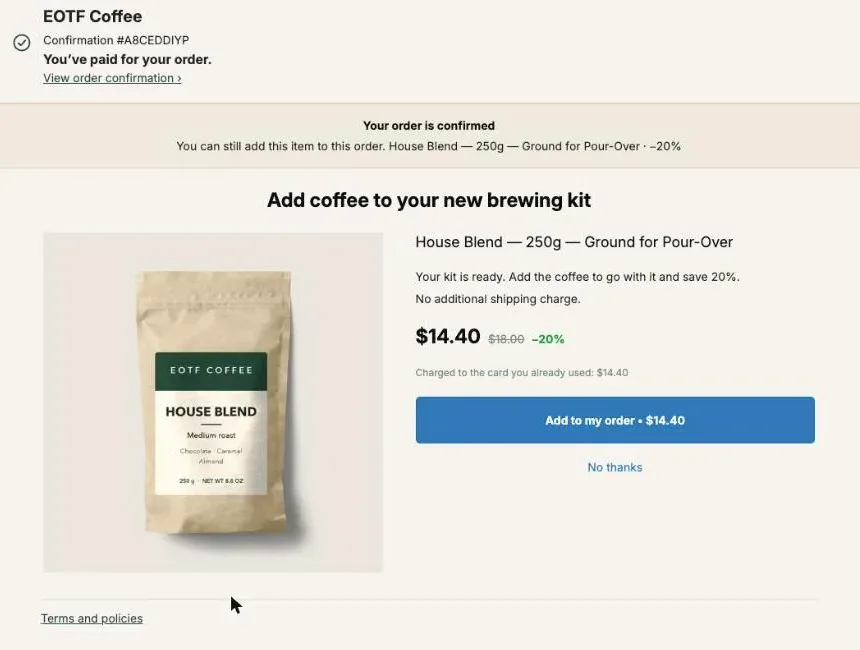
A cart upsell is shown before payment, so it can raise the order value but it also sits between the shopper and the Pay button. A post-purchase upsell is shown once the order is paid, so it can’t cost you the order. Which one to keep depends on your store, and the way to settle it is a before/after test: 28 days with the cart upsell on, then 28 days with the same offer moved after payment, compared on conversion rate and on sales per session.
This page covers what changes between the two, which offers belong where, the test step by step, which Shopify figures to read (and the one figure that will mislead you), and how to rebuild a cart offer after payment in Post Purchase Upsell Abakira.
What is the difference between a cart upsell and a post-purchase upsell?
A cart upsell and a post-purchase upsell can offer the exact same product at the exact same discount. What differs is the moment. The cart upsell appears in the cart page, cart drawer or a pop-up, before the buyer has paid. The post-purchase upsell appears after payment, on the one-click page, the thank-you page or the order status page.
That one difference changes everything else:
| Cart upsell | Post-purchase upsell | |
|---|---|---|
| When the buyer sees it | Before checkout | After the order is paid |
| What's at stake if the offer annoys | The whole order | Only the extra item |
| How the buyer says yes | Adds to cart, then pays everything together | One tap on the one-click page, charged to the card already used; or a button on the thank-you page that adds the item to the same order |
| Who sees it | Every shopper who opens the cart, buyers or not | Only people who bought; the one-click page only for orders Shopify allows there, mostly card payments |
| Typical apps | Cart drawer apps such as UpCart or iCart | Post-purchase apps such as AfterSell or Post Purchase Upsell Abakira |
| Where you read its effect | Conversion rate and order value in Shopify Analytics | The app's own figures, plus total sales in Shopify |
If you want the full map of what you can sell after payment, page by page, start with which page to build first after checkout. For the levers that raise order value at every stage, product page included, see what raises average order value on Shopify. And if your upsells run on Rebuy today, our Rebuy alternative page compares what each app does on the pages after checkout.
Can a cart upsell cost you orders?
A cart upsell can cost you orders because it adds a decision before the shopper has paid. Every pop-up, every extra card in the drawer, every “you may also like” row is something to read or close on the way to the Pay button. A post-purchase offer can’t do that: it only reaches people whose order already went through.
That’s the whole argument for moving upsells after payment, and it’s a strong one. You can’t lower your conversion rate with an offer that is shown only to people who already converted. Some operators go as far as removing every pre-purchase upsell from their stores for that reason.
The argument doesn’t tell you how much your own cart upsell costs, though. On one store the drawer offer may slow nobody down and add real revenue. On another it may be the reason a share of shoppers leave at the cart. Nobody can tell you which store you have without looking at your numbers, and that’s what the test below is for.
Which offers belong in the cart, and which after payment?
Offers that change the first order’s decision belong before payment, because they only make sense while the buyer is still choosing. Offers that add something to a decision already made can move after payment without losing their logic. Sort your current cart offers into those two groups before you test anything.
| Offer | Where it fits | Why |
|---|---|---|
| "Add $12 to get free shipping" | Cart | It changes what the first order costs. After payment the shipping is already charged |
| Bigger size or premium version of the item in the cart | Cart | It replaces the item rather than adding one |
| Accessory or consumable for the item bought (coffee for a brewer, filters, a case) | After payment | The buyer has committed to the main item; the add-on completes it |
| One more of the same item, at a discount | After payment | The decision is "more of what I just chose", the easiest yes there is |
| Quantity tiers (2 for 25% off, 3 for 30% off) | After payment | Post Purchase Upsell Abakira can show them on the one-click offer |
| Bundle of related products | Either | Test it: on the thank-you page a Bundle block adds the whole set to the same order |
A store with only cart-type offers in its drawer (shipping thresholds, size upgrades) has little to move. A store whose drawer is full of add-ons is the one that should run the test.
How do I run a before/after test on my own store?
A before/after test on a Shopify store compares two windows of the same length: one with the cart upsell on, one with the same offer moved after payment. Keep the product, the discount and everything else identical, change only the moment of the offer, and compare conversion rate and sales per session between the two windows.
- Write down the cart offer. Product, variant, discount, and what triggers it (a product in the cart, a cart total). You’ll copy it exactly.
- Measure window A. With the cart upsell on, take 28 days of figures from Shopify Analytics: conversion rate, sessions, orders and total sales. If you already have 28 clean days behind you, those count.
- Recreate the offer after payment. Same product, same discount, as the first offer on the one-click page, plus a block on the thank-you page. The section below shows how in Post Purchase Upsell Abakira.
- Turn off the cart upsell. In your Shopify admin, go to Online Store, click Edit theme, click the App embeds icon in the sidebar, find the cart app, toggle it off and click Save. If the app also added a section or block to your cart template, hide that too.
- Measure window B. Run 28 days with the cart upsell off and the after-payment offer on. Take the same Shopify figures, plus the extra revenue from the app.
- Compare and decide, with the table further down.
Three rules keep the comparison honest. Both windows have the same length and start on the same weekday. No sale, launch or ad push runs in one window and not the other. And neither window straddles September 21 to 23, 2026: Shopify updated how it measures sessions on those days, and warns that session-based figures such as conversion rate can move without any change in your traffic or orders.
Which numbers should I compare, and where are they in Shopify?
The numbers to compare are conversion rate and sales per session. Conversion rate is in Shopify Analytics, defined by Shopify as the percentage of sessions that resulted in a purchase. Sales per session is total sales divided by sessions, two figures from the same reports. Average order value is the one figure to leave out of the verdict.
Here’s what each figure tells you:
| Figure | Where to find it | What it answers |
|---|---|---|
| Conversion rate | Conversion rate over time report | Did removing the cart upsell let more sessions finish an order? |
| Sessions with cart additions, sessions that reached checkout, sessions that completed checkout | Conversion rate breakdown report | Where in the path the change shows up |
| Total sales | Reports, Total sales over time | All the money, including items added to orders after payment |
| Sales per session | Total sales ÷ sessions | The single figure that weighs both effects at once |
| Extra revenue after payment | Post Purchase Upsell Abakira, Results | How much the moved offer earned on its own |
Why sales per session and not average order value? Shopify calculates average order value as gross sales minus discounts, excluding post-order adjustments such as edits. An item added after payment is added to an order that already exists. So a store that moves its add-ons after payment can watch its average order value dip while it makes more money. Total sales doesn’t have that blind spot: an order edited after the day it was placed shows up as a separate entry in the Total sales over time report.
Sales per session also catches the trade-off the test is about. If the cart upsell was adding $3 to every order but costing you a few orders, conversion rate goes up in window B, order value after the first payment goes down, and sales per session tells you which effect won.
How do I recreate my cart offer after payment with Post Purchase Upsell Abakira?
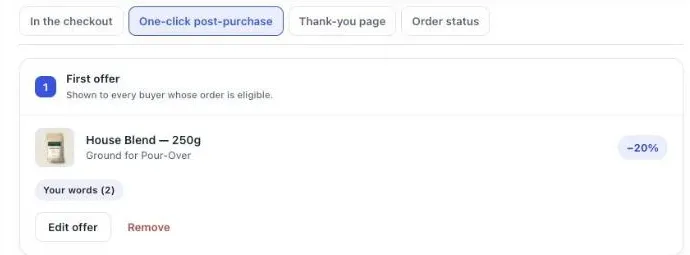
Recreating a cart offer after payment in Post Purchase Upsell Abakira takes one funnel. You put the cart offer’s product and discount as the first offer on the one-click page, then add the same product as a block on the thank-you page, which reaches the buyers the one-click page skips. Both live in the same funnel editor.
- In the app, click Create a funnel. The funnel editor opens.
- On the One-click post-purchase tab, set the first offer: the same product, the same discount (percentage or fixed amount) as in the cart.
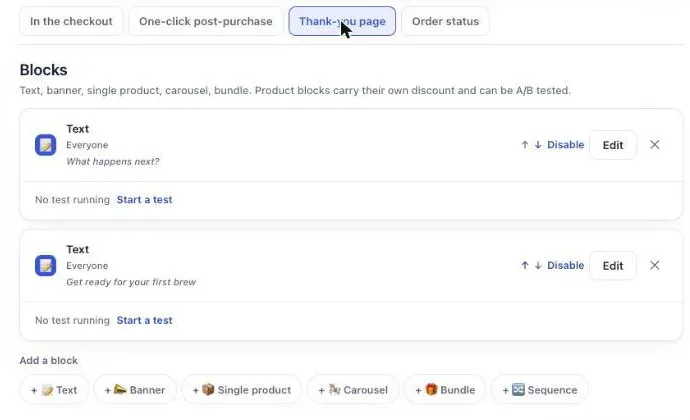
- Open the Thank-you page tab. Under Add a block, click Single product (or Bundle if the cart offered a set) and pick the same product and discount.
- Set the block’s Show it to to Buyers who did not see the one-click page. On the Pro plan and above, the block reaches only the buyers Shopify kept away from the one-click page. On the free plan, it reaches every buyer, including those who already accepted on the one-click page, so give the thank-you block a different product from the one-click offer.
- Leave Where the purchase goes on Same order, unless it has fully shipped, so the item joins the order the buyer already placed. Save.
- Back in Your funnels, change the funnel’s condition from Everyone to Order contains and choose the product that triggered the cart offer. Targeting is part of the paid plans; on the free plan the card reads “Targeting comes with Pro. Until then this offer is shown to everyone.”
- Save, then click Try a cart and describe the cart that should trigger the offer. The simulator tells you which funnel that buyer goes through.
On the free plan, the one-click page shows up to 100 offers a month. A store with more card orders than that should size the test accordingly, because once the quota is reached the offer stops until the 1st of the month and window B would measure a partial offer. The listing has the current plans.
Why does the moved offer need the thank-you page too?
The moved offer needs the thank-you page because the cart upsell reached every shopper, whatever they paid with, and the one-click page doesn’t. Shopify skips the one-click page for wallets, PayPal, cash on delivery and bank redirects such as iDEAL. Without a thank-you block, window B would compare a full audience against a partial one.
On a store where most orders are paid by card, the one-click page carries the test and the thank-you block is the safety net. On a store where most buyers pay with a wallet or a local method, it’s the other way round: the thank-you page is the main place the moved offer lives. Our article on which page to build first after checkout shows how to read your payment mix from your last orders before you decide.
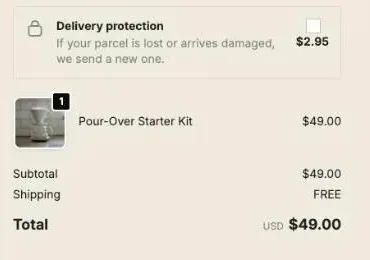
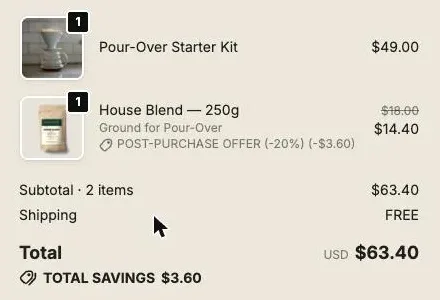
The thank-you block doesn’t open a second checkout when it adds to the same order. The item lands on the order the buyer just placed, in the same parcel:
How do I read the after-payment side in Post Purchase Upsell Abakira?
The after-payment side is read on the Results page of Post Purchase Upsell Abakira, headed “What your offers earned”. It covers the last 30 days and its revenue is read from your Shopify orders, so it matches your Shopify reports. The headline figure is “Extra revenue you would not have had”, split into one card per page.

A few details make the page fit a before/after test:
- One card per page. The cards are In the checkout, One-click post-purchase, Thank-you page and Order status, so you see whether the moved offer earns on the one-click page, on the thank-you page, or both.
- Orders are counted once. The chart “Orders where a buyer added something” counts an order once even if the buyer bought on two pages, while each page’s card counts it for itself.
- “Shown” means the buyer saw it. A view is counted when the offer is displayed on the buyer’s screen, not when Shopify prepares the page in advance. A wallet or iDEAL buyer who never reaches the one-click page is never counted as shown there.
- Money that never arrived stays out. When a buyer accepts but Shopify doesn’t show the item on the order (the item sold out, or the bank declined the extra charge), the page flags it under “Some acceptances are unconfirmed” and leaves it out of revenue.
The 30-day window lines up with a 28-day window B: open the page on the last day of the test and the whole window is inside it. Our guide chapter on reading your numbers without fooling yourself goes through each figure.
Should I keep the cart upsell, move it, or run both?
Keep, move or run both depends on two results from the test: whether conversion rate rose once the cart upsell was off, and whether sales per session rose. Conversion rate tells you what the cart offer was costing; sales per session tells you whether the after-payment version earns more than it did. Read them together:
| Window B vs window A | What it means | Decision |
|---|---|---|
| Conversion rate up, sales per session up | The cart offer was costing orders, and the moved offer more than replaces its revenue | Move it after payment |
| Conversion rate flat, sales per session up | The cart offer wasn't costing orders, but it earns more after payment | Move it, or run both and test again |
| Conversion rate up, sales per session flat | More orders, less added per order: the two effects cancel out | Keep the after-payment offer and test a stronger one there |
| Conversion rate flat, sales per session down | The cart offer was free money, and moving it lost it | Put the cart upsell back and keep the post-purchase offer as an extra |
“Run both” is a real option and often the end state: a cart drawer that only carries cart-type offers (shipping threshold, size upgrade) and a post-purchase funnel that carries the add-ons. If you choose it, don’t show the same product in both places, or the after-payment offer only reaches buyers who already said no to it once.
Once the offer lives after payment, the next gains come from the offer itself, not from where it sits. The product and the discount move results more than the page design, which is why our A/B test guide for post-purchase offers starts there.
What changes on Shopify Plus?
Shopify Plus adds a third place between the cart and the post-purchase page: the checkout itself. An offer can sit in the order summary as a block or a checkbox, after the shopper has started paying but before they press Pay. It’s a middle ground, and it deserves its own test rather than being folded into this one.
Run the cart-versus-after-payment test first, then compare a checkout block with the same offer after payment, one change at a time. Our articles on the checkout upsell on Shopify and the order bump on Shopify cover what a Plus checkout can show and how to set it up. More methods like this one are collected on the method topic page.
Post Purchase Upsell Abakira has a free plan that runs on a live store, which is enough to run window B on a smaller store. The listing has the current plans and what each one includes.
Test a cart upsell against the same offer after payment
- Write down the cart offer Note the product, the variant, the discount and the condition that triggers your current cart upsell.
- Measure window A With the cart upsell on, record 28 days of conversion rate, sessions and total sales from Shopify Analytics.
- Recreate the offer after payment In Post Purchase Upsell Abakira, create a funnel with the same product and discount as the first offer on the one-click page, and add the same product (on the free plan, a different product) as a Single product block on the thank-you page.
- Turn off the cart upsell In Online Store, click Edit theme, open App embeds, toggle the cart app off and click Save.
- Measure window B Run 28 days with the cart upsell off and the after-payment offer on. Record the same Shopify figures and the extra revenue on the Results page of the app.
- Compare and decide Compare conversion rate and sales per session between the two windows, then keep the cart upsell, move it after payment, or run both.
Frequently asked questions
Can I run a cart drawer app and a post-purchase upsell app at the same time?
Yes. A cart drawer app works before checkout, in your theme, and a post-purchase app works after payment. They don't touch the same pages. The only page that takes a single app is the one-click post-purchase page, which you pick in Shopify under Settings > Checkout, in the Post-purchase page section.
Do I have to uninstall my cart upsell app to run the test?
No. If the cart app loads through an app embed, open Online Store, click Edit theme, click the App embeds icon in the sidebar, toggle the app off and save. Toggling it back on restores it, so the app and its settings stay in place during the test.
Why did my average order value drop after I moved the upsell after payment?
Shopify calculates average order value as gross sales minus discounts, excluding post-order adjustments such as edits. An item added after payment joins an order that already exists. Judge the test on sales per session and on the revenue added after payment, not on average order value alone.
Can the post-purchase offer keep the same discount as my cart offer?
Yes. Each offer in Post Purchase Upsell Abakira has its own discount, as a percentage or a fixed amount. Copy the cart discount exactly for the test, so the only thing that changes between the two windows is when the buyer sees the offer.
How long should each window of the test last?
Four weeks each is a good default: 28 days covers every weekday four times, so a slow Monday or a busy Saturday weighs the same in both windows. Shorter windows work on stores with a lot of orders, as long as both windows have the same length and no promotion runs in only one of them.
What if I'm on Shopify Plus?
On Plus you have a third place to sell: inside the checkout itself, with blocks in the order summary. Treat it as its own test. Compare a checkout block against the same offer after payment, one change at a time, and don't move the cart offer and add a checkout block in the same window.
Related articles
Written by Abakira. We make small software: Shopify apps, web tools and iPhone apps. This article is about Post Purchase Upsell Abakira.