Best upsell app for Shopify: six post-purchase apps compared
Six Shopify upsell apps compared on their own sites in November 2026: pages covered, how each one bills, free plan, and whether the item joins the same order.
2026-11-02 — Abakira, updated 2026-11-10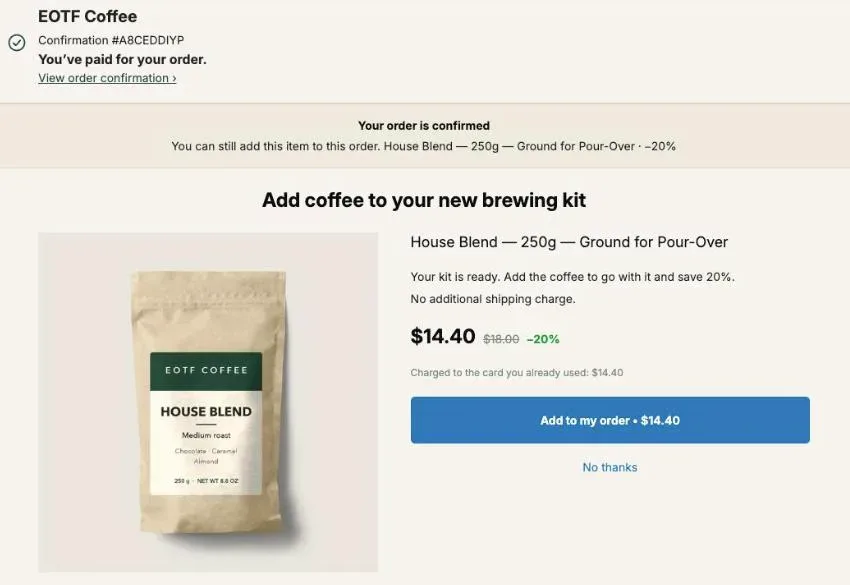
The best upsell app for Shopify is the one built for the page you want to sell on, billed in a way that doesn’t grow faster than what it sells. Product page and cart apps raise the order before payment; post-purchase apps add an item after payment, to the order the buyer just placed, on the card already charged. The table below compares six apps on those points, read on each vendor’s own site in November 2026.
We build one of the six, Post Purchase Upsell Abakira, so read this as a comparison by an interested party. Every line about another app comes from that app’s own pricing or product page, and anything we couldn’t read there is left blank rather than guessed.
Which Shopify upsell apps are worth comparing?
Shopify upsell apps worth comparing sell on the pages your buyers reach and publish how they charge. These six all cover the one-click post-purchase page, and differ on three things that change your bill and your shipping: which other pages they cover, how the fee is calculated, and whether a free plan runs on a live store.
| App | Pages it sells on | How it bills | Free plan |
|---|---|---|---|
| AfterSell | product page, cart, post-purchase page, thank-you page, checkout (Plus) | monthly fee by order-volume tier | upsell plans start with a 30-day trial; the free plan shows partner brands’ offers |
| CartHook | post-purchase page | order-volume tier plus 1% of post-purchase revenue | none named on its pricing page; 1% of post-purchase revenue on every tier |
| Upsell.com (formerly ReConvert) | product page, cart, cart drawer, checkout (Plus), post-purchase page, thank-you page, order status page | tier set by monthly orders or upsell revenue, whichever is higher | Growth tier starts free |
| Rebuy | cart, checkout (Plus), post-purchase page; thank-you page for partner brands’ offers | monthly fee by order tier | the free option shows partner brands’ offers; paid packages have a 14-day trial |
| Selleasy | checkout (Plus), post-purchase page | monthly tiers that rise with order volume | yes |
| Post Purchase Upsell Abakira | checkout (Plus), post-purchase page, thank-you page, order status page | flat monthly price per plan, no commission, not tied to order count | yes: 1 funnel, 100 offers shown a month on the post-purchase page |
Checked November 2026 on each vendor’s own pricing and product pages. Plans change; the listing on the Shopify App Store is the reference on the day you install.
We left out apps whose own site didn’t give us a pricing page we could read on the day we checked. Each app in the table has its own side-by-side page on this blog, linked further down, with what it does that we don’t.
Where can a Shopify upsell app show an offer?
A Shopify upsell app can show an offer in five places: the product page, the cart, the checkout, the one-click post-purchase page, and the thank-you and order status pages. Before payment the buyer can still drop the cart. After payment the order exists, and the offer can only add to it.
Shopify sets the rules for each place, and they matter more than any app feature:
- The checkout itself (information, shipping and payment steps) takes app blocks only on Shopify Plus.
- The one-click post-purchase page appears after the order is confirmed and before the thank-you page. Shopify adds the accepted item to the initial order. It shows only when the first payment was made by credit card through the online store, on orders of $0.50 or more, and never on local delivery or on orders with duties and multiple currencies. Our article on why Apple Pay, PayPal and Google Pay orders never see the post-purchase offer covers the wallets in detail.
- Only one app can be selected for the post-purchase page. You choose it in your checkout settings, as explained in the Shopify post-purchase page setting.
- The thank-you and order status pages take app blocks on Basic Shopify and above. Every paying buyer reaches the thank-you page, card or not.
So the question to ask an app is not “does it do post-purchase” but “which of these pages does it cover, and what does it do on each”. A store where half the orders come through PayPal gets half its post-purchase traffic from the thank-you page, whatever the app.
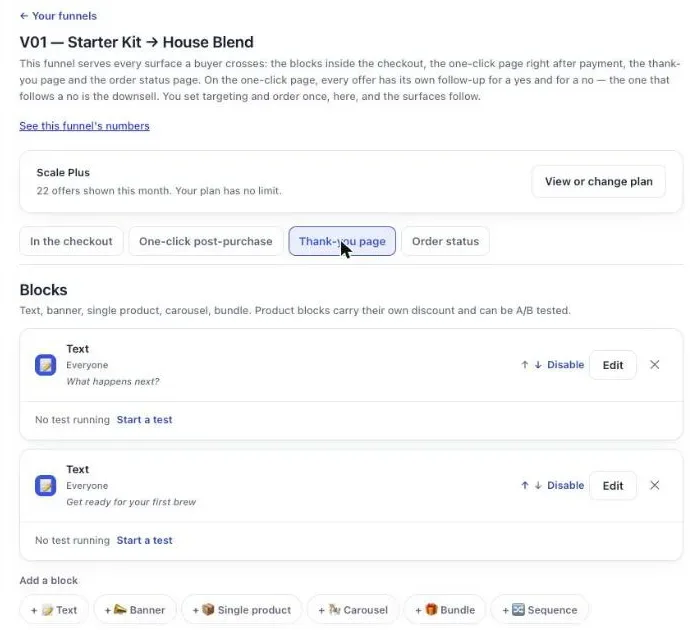
The guide chapter on what the app does and where your offers appear ranks those four pages by what each one is worth in a typical store.
How do Shopify upsell apps charge?
Shopify upsell apps charge in one of four ways: a flat monthly price, a fee that climbs with your order count, a share of the revenue the app generates, or nothing at all because other brands pay to show their offers to your buyers. Most apps in the table combine two of them.
Order-volume tiers. AfterSell, Rebuy and Selleasy set the fee by how many orders your store takes each month. The price follows your growth, whether or not the upsells sell. A month with a big ad push and a weak offer still moves you up a tier.
Orders or upsell revenue. Upsell.com caps each tier by monthly store orders or upsell revenue, “higher of the two” in its own words. Whichever grows first sets the bill.
Revenue share. CartHook adds 1% of post-purchase revenue to its order tier. That’s the model to price at the revenue you hope for, not at zero:
| Post-purchase revenue in the month | 1% share on top of the tier fee |
|---|---|
| $1,000 | $10 |
| $5,000 | $50 |
| $10,000 | $100 |
| $25,000 | $250 |
Paid by other brands. AfterSell’s free plan runs Rokt offers on the order confirmation page, and Rebuy’s free option shows offers from other brands on the post-purchase and thank-you pages. AfterSell says it pays $0.30 to $0.80 per transaction; Rebuy says its free option “pays you”. You earn something, and your buyer, on the page right after paying you, sees another company’s product.
Flat. Post Purchase Upsell Abakira charges one monthly price per plan, with no commission on your revenue and no order-count tier. Plans differ by feature: more funnels, more offer levels, A/B testing, connectors. Prices are on the plan chapter of our guide and on the App Store listing. We also never show another brand’s offer to your buyers, on any plan.
None of these models is wrong in itself. A store with 300 orders a month and an offer that converts poorly pays little on a tier and little on a share. A store with 5,000 orders and an offer that converts well pays the most on both, and that’s the store a flat price was written for.
Does the upsell end up in the same order and the same parcel?
An upsell accepted on the one-click post-purchase page always joins the same order: Shopify adds it to the initial order and charges the card already used. On the thank-you and order status pages, an app either edits the order or opens a new checkout; a new checkout creates a second order and a second shipment.
A second order isn’t a disaster for a store that ships itself. It is one for a store whose warehouse has already picked the first order, or that pays per parcel. The buyer gets two boxes, you pay two labels, and your support inbox gets two order numbers for one purchase.
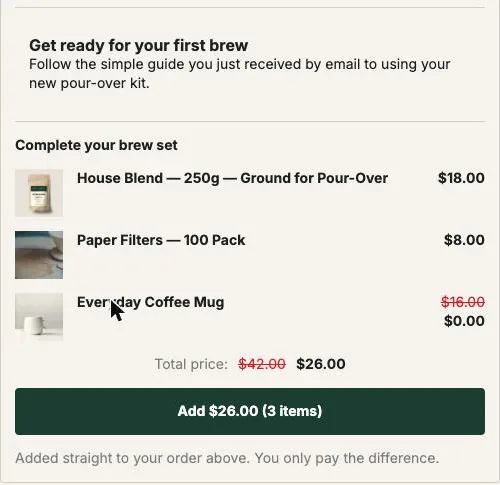
Shopify lets an app edit an order after it’s been placed, and that’s how Post Purchase Upsell Abakira handles its thank-you and order status blocks. Each block has a setting called Where the purchase goes, with three choices, word for word from the admin:
- “Same order, unless it has fully shipped” (the default)
- “Same order, only until the first parcel ships”
- “Always a new checkout”
With the default, the buyer who taps the offer sees “Added straight to your order above. You only pay the difference.” A buyer who paid by card pays only the added item on Shopify’s payment page. A cash on delivery buyer pays nothing online: the line waits for the courier with the rest, as covered in how to upsell cash on delivery orders. The app refuses to add to an order that is cancelled or fully shipped, and allows only one unpaid addition per order.
We checked the result on test order #1010 on our demo coffee store on October 23, 2026: a $49.00 pour-over kit, then House Blend accepted at $14.40 instead of $18.00. The admin shows one order of $63.40, two lines, one shipment.
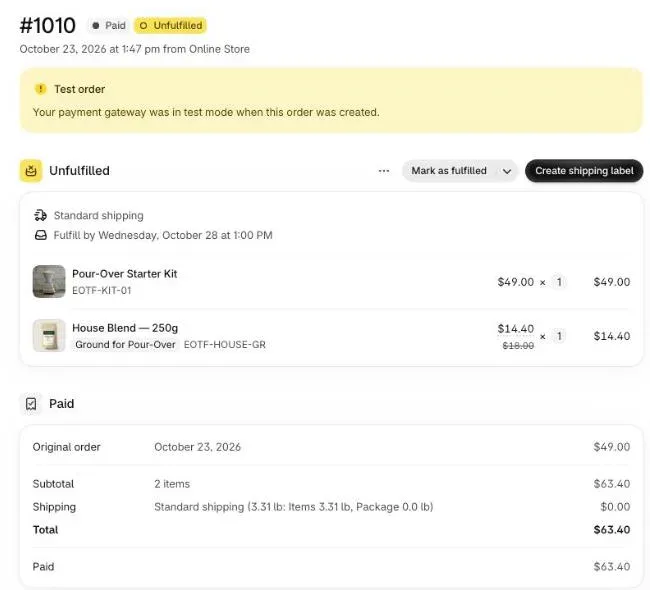
When you trial any app, do the same check. Accept the offer on a real test order, open the order in your admin, and count the orders and the shipments.
Can you run a free plan on a live store?
A free plan on a live store lets you see whether your buyers accept an offer at all before you pay. In the table, Upsell.com, Selleasy and Post Purchase Upsell Abakira list a free tier; AfterSell and Rebuy’s free options are the partner-offer programs; CartHook’s pricing page names no free plan, and every tier carries the 1%.
Read the limit on each free tier, because it decides how long the test lasts. Ours is one funnel, one offer per order on the one-click page, and 100 offers shown a month there. An offer counts once per order, when the buyer actually sees it on screen, not when the app prepares it. The thank-you and order status blocks don’t count toward the 100, and on the free plan they show to every buyer. The app warns you at 50, 70 and 90% of the limit, in the admin and by email. At 100 the one-click offer stops until the 1st of the next month, and your orders carry on as normal.
A hundred shown offers is a small sample, but it answers the first question: does anyone take this offer at this price? If the answer is zero out of a hundred, the offer needs changing before any paid plan will help.
What does each app do best?
Each app in the table was built around a different starting point, and the best upsell app for a given Shopify store is usually the one whose starting point matches the store. Here is what each one leads with on its own site, and where we compare it with our app in detail.
AfterSell sells three plans: Pre-Purchase for the product page and cart, Post-Purchase for one-click offers and thank-you page offers, and Complete for both, with checkout add-ons on Shopify Plus. AfterSell is a Rokt product, which is where the partner-offer plan comes from. Compared in our AfterSell alternative page.
CartHook builds post-purchase funnels and charges an order-volume tier plus 1% of post-purchase revenue. It’s the only app in the table with a revenue share on top of the tier. Compared in our CartHook alternative page.
Upsell.com is the app many merchants still know as ReConvert. It covers the longest list of pages in the table, including the cart drawer and the order status page, with checkout upsells for Plus stores on its higher tier. See what the ReConvert rename changes and the ReConvert comparison.
Rebuy is built around the cart: a smart cart and product recommendations, with post-purchase offers and checkout extensions for Plus. Its free option pays you to show other brands’ offers. Compared in our Rebuy alternative page.
Selleasy leads with bundles, add-ons and similar-product widgets, then funnels, checkout offers and one-click upsells after purchase. Its tiers rise with your order volume. Compared in our Selleasy alternative page. Every side-by-side page is grouped under post-purchase upsell apps compared.
Post Purchase Upsell Abakira covers only the pages after the buyer starts paying: checkout blocks on Plus, the one-click page, the thank-you page and the order status page. It doesn’t do product page widgets or a cart drawer. If your plan is to raise the cart before payment, one of the apps above fits that job better.
Where does Post Purchase Upsell Abakira fit?
Post Purchase Upsell Abakira fits stores that already convert their checkout and want more revenue from the order that just happened, without paying more as they grow. It sells on the four pages Shopify opens after payment starts, adds thank-you items to the same order, and charges a flat price with no commission.
What we built that you can check in the app:
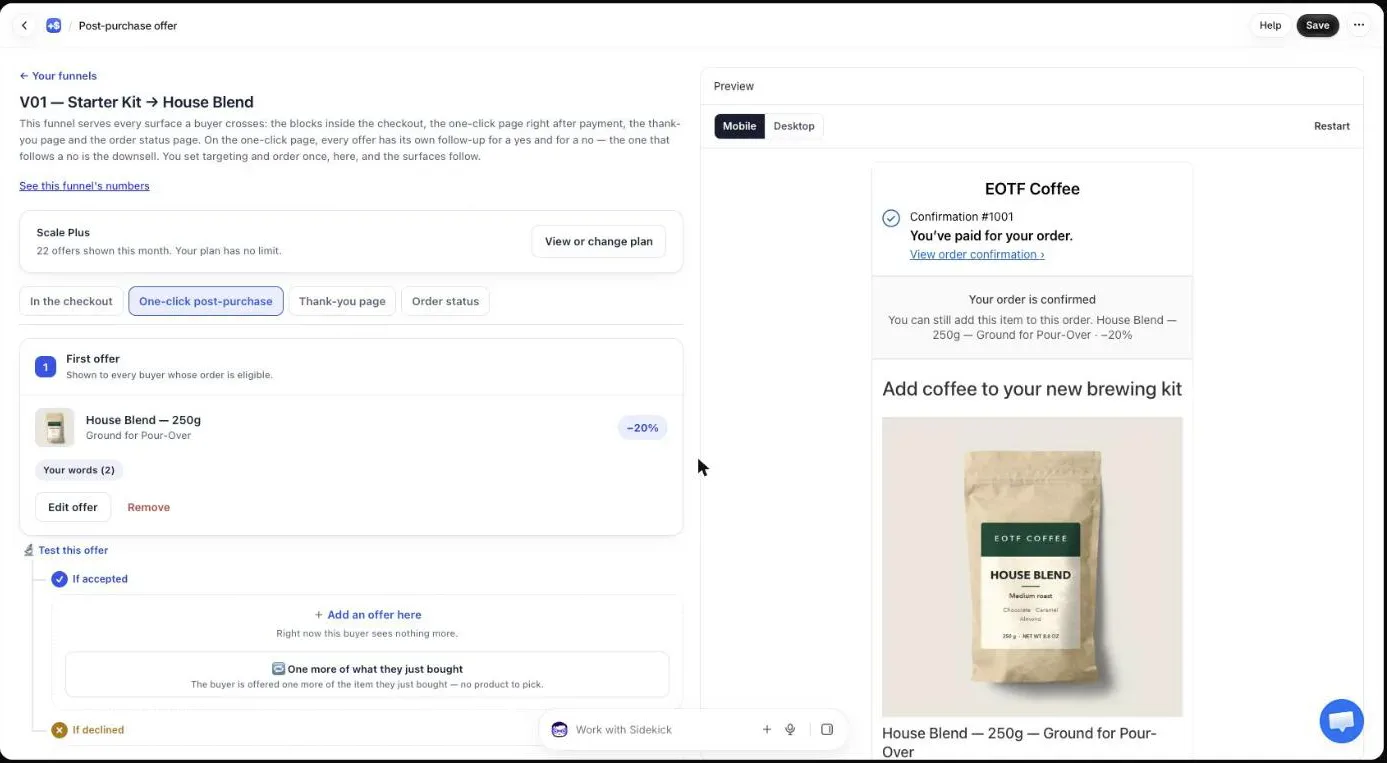
- A funnel tree on the one-click page. Every offer has its own follow-up for a yes and for a no, so a buyer who declines sees a different offer, often a cheaper one, rather than leaving. A funnel holds up to 7 offers across 3 levels, and a buyer sees at most 3, the most Shopify allows per order. The free plan serves the first offer; the next two levels are on Pro.
- Several funnels with conditions. Up to 20 funnels on paid plans, each with a condition on order total or on the products in the cart; the first active funnel whose condition matches wins. Targeting is a paid feature.
- Social proof that is measured, never typed in. Turn on “Show how many buyers added it” and the offer shows a percentage followed by “of buyers added it”, calculated from your own orders. It stays hidden until the offer has at least 50 views and an acceptance rate of at least 10%, and the admin tells you which of the two is missing.
- A real countdown. When it reaches zero, the offer is declined and the buyer moves on. The discount really ends.
- A/B/C/D testing of offers and pages, on the Scale plan.
- Checkout blocks for Shopify Plus stores, on the Scale Plus plan.
Which upsell app should your store pick?
The upsell app a Shopify store should pick follows from three facts about the store: whether it is on Shopify Plus, how its buyers pay, and how many orders it takes against how much the upsells sell. Read them off your admin before reading any app’s feature list.
You want to raise the cart before payment. Pick an app that leads with the product page and cart: Rebuy, AfterSell’s Pre-Purchase plan or Upsell.com, or Selleasy for bundles and add-ons. A post-purchase app won’t touch that part of the order.
You’re on Shopify Plus and want offers inside the checkout. Every app in the table that sells checkout blocks restricts them to Plus, because Shopify does. Check which plan of the app includes them before you install.
Many of your buyers pay with PayPal, Apple Pay, Shop Pay Installments or cash on delivery. Those orders never see the one-click page. The thank-you page is where you reach them, so pick an app that sells there, and check whether the item joins the same order or opens a new checkout.
You have high volume and modest upsell revenue. Order-volume tiers charge you for orders the app never touched. Price each app at your real monthly order count.
You expect strong upsell revenue. A revenue share grows with every sale. Price it at the revenue you’re aiming for, as in the table above.
You don’t want other brands on your thank-you page. Skip the free partner-offer plans, or check that the paid plan you pick doesn’t include them.
How do you test an upsell app without breaking your current setup?
Testing an upsell app on Shopify takes one setting, because only one app at a time can be selected for the post-purchase page. Install the new app, build one offer, select it in your checkout settings, place a card order and check the result in your admin. Your current app stays installed, and switching back is the same setting.
- Install the app you want to try and keep your current one.
- Build one offer for the post-purchase page: a product that goes with your best seller, at a discount your margin can carry.
- In your checkout settings, select the new app in the post-purchase page section and save.
- Place an order paid by card and accept the offer.
- Open the order in your Shopify admin. Check that the item is in the same order, under the same shipment, at the discounted price.
Run the same offer you run today, so you compare the app and not the offer. Thank-you and order status blocks are placed separately, in Shopify’s checkout editor. Our guide to switching post-purchase upsell apps lists what carries over and the order to move the pages in.
If you want to start with the pages after payment, Post Purchase Upsell Abakira is on the Shopify App Store, with a free plan that runs on your live store.
Test a Shopify upsell app on your own orders
- Install the app and keep your current one Install the app you want to try. Your current upsell app can stay installed while you compare.
- Build one offer Create one offer for the post-purchase page, using a product that goes with your best seller and a discount your margin can carry.
- Select the app for the post-purchase page In your Shopify checkout settings, select the new app in the post-purchase page section and save. Only the selected app shows its page.
- Place a test order and accept the offer Place an order paid by card, accept the offer, then open the order in your Shopify admin.
- Check the order Confirm the accepted item sits in the same order as the original purchase, under the same shipment, with the discount you set.
Frequently asked questions
Can I run two post-purchase upsell apps at the same time on Shopify?
Not on the one-click post-purchase page. Shopify lets a store select only one app for post-purchase product offers, in its checkout settings. Two apps can stay installed while you compare them, but only the selected one shows its page to buyers.
Do I need Shopify Plus for an upsell app?
Only for offers inside the checkout itself, on the information, shipping and payment steps. App blocks on the thank-you and order status pages work on Basic Shopify and above, and the one-click post-purchase page is open to every plan once the app has Shopify's access.
Why don't some buyers see my post-purchase offer?
Shopify only shows the one-click post-purchase page when the first payment was made by credit card through the online store, on orders of $0.50 or more. Wallets such as PayPal, gift cards, local delivery and orders with duties and multiple currencies skip it. Those buyers still reach the thank-you page.
Is an upsell app that charges a percentage of revenue more expensive?
It costs more in exactly the months the app sells well. A 1% share on $5,000 of upsell revenue adds $50 to that month's fee, and $100 at $10,000. A flat price stays the same whatever the app sells, so compare both at the upsell revenue you expect, not at zero.
Does a thank-you page upsell create a second order?
It depends on how the app builds the button. An app that opens a new checkout makes a second order and a second shipment. Post Purchase Upsell Abakira can instead edit the order the buyer just placed, so the item joins the same order and the same parcel.
Related articles
- AfterSell alternative: $19.99 flat, 50 orders or 50,000
- A CartHook alternative that takes 0% of what it sells for you
- A Kaching alternative you can run on your live store without paying first
- A Rebuy alternative for merchants who want the page after checkout selling their own products
- A Selleasy alternative for stores past 1,000 orders that only need the pages after payment
Written by Abakira. We make small software: Shopify apps, web tools and iPhone apps. This article is about Post Purchase Upsell Abakira.