Part 1. Get live and earn your first upsell
3 Turn the one-click page on in Shopify
A setting inside Shopify, not inside the app. Skip it and nothing you build will ever appear.
This is the step everyone misses, and it fails in the worst possible way: silently. You build a funnel, you place a test order, nothing shows up, and you conclude the app is broken.
Shopify keeps the post-purchase page switched off until you name which app is allowed to use it. Only one app can hold it at a time.
Do it now, it takes a minute
The app has a setup page that walks you through it and then checks the result. Open Set up your post-purchase offers in the app menu and follow the two steps.
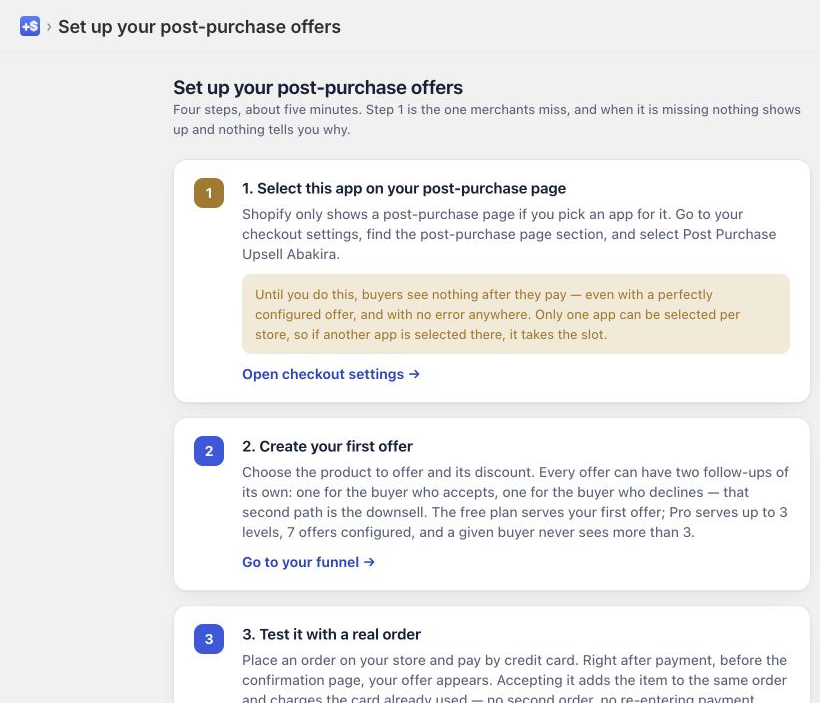
In Shopify the setting lives under Settings, then Checkout, in the checkout configuration you are using. Look for the post-purchase page section and select Post Purchase Upsell Abakira.
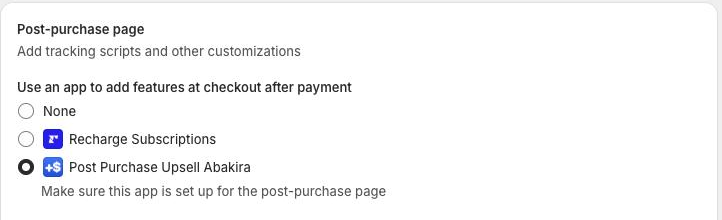
If another upsell app is selected here, it holds the page. Switching it to us switches it away from them. That is Shopify's rule, not a conflict between the apps, and it is worth knowing before you wonder why two apps cannot run side by side.
Check it, do not assume it
Go back to the setup page. It reads the setting back from Shopify and tells you whether the page is yours. A green state there means a real check passed, not that you clicked something.
The thank-you page needs none of this. If you only ever use that surface, you can skip this chapter entirely.
What you should have now
The post-purchase page assigned to the app, confirmed by the app itself. Nothing is being offered yet, because you have not built an offer. That is the next chapter, and it is short.
Last updated