Your thank-you page scripts stopped running on August 26, 2026
Non-Plus Shopify stores lost Additional Scripts, checkout.liquid and ScriptTag apps on the Thank you and Order status pages. Here is what broke, what didn't, and what to check now.
2026-07-28 — Abakira, updated 2026-10-07If you ever pasted anything into Settings → Checkout → Additional Scripts, a conversion pixel, an affiliate tag, a survey snippet, a review widget, it stopped running on August 26, 2026.
Plus stores already went through this on August 28, 2025. Non-Plus stores went through it next, and the date was not a soft one: if you hadn’t upgraded your Thank you and Order status pages yourself by then, Shopify upgraded them for you, and anything that depended on the old system was removed in the process.
If you’re in a hurry, the ten-minute check is at the bottom of this page. And the question everyone asks first has a short answer: the post-purchase page is a different surface, and August 26 did not touch it.
What exactly stops working
Three things end on the Thank you and Order status pages:
- Additional Scripts. The free-text box in checkout settings where merchants have been pasting tracking code for a decade.
- checkout.liquid customizations. Anything a developer edited in that template.
- ScriptTag apps. Apps that injected JavaScript into those pages rather than using a supported extension point.
The pages themselves don’t disappear. They’re rebuilt on the new checkout and accounts foundation and edited in the checkout and accounts editor instead.
What this actually costs you if you ignore it
The failure is quiet, and that is the problem. Nothing errors. Your store keeps taking orders. What happens is that a tag stops firing, and you find out weeks later when a channel’s reported conversions have quietly gone to zero and you’ve been optimising ad spend against a number that stopped moving.
The three that bite hardest:
Conversion pixels. Google Ads, Meta, TikTok, anything you pasted by hand. If your only purchase event lived in Additional Scripts, your attribution went dark on August 26.
Affiliate and referral tags. Same mechanism, and worse consequences, because a partner who doesn’t get credited eventually stops sending traffic and doesn’t tell you why.
Post-order widgets. Surveys, review prompts, “how did you hear about us” boxes, order-tracking embeds. These simply vanish from the page.
What replaces each one
There is a supported answer for every case, and all three already exist:
- Analytics and pixels move to web pixels, which run in a sandbox and listen to checkout events. Most ad platforms ship an official app that installs one for you, which is the shortest path.
- Visible widgets move to app blocks in the checkout and accounts editor, or to checkout UI extensions.
- Anything that must never be missed should be server-side. An event that only fires when a browser renders a page was always going to lose a few percent to ad blockers and closed tabs. A webhook on the order doesn’t have that problem.
What does not break
Two things get confused with this change often enough to be worth stating plainly.
The post-purchase page is a different surface. That’s the page shown between the payment and the order confirmation, where one-click offers appear. It runs on post-purchase checkout extensions, not on Additional Scripts, and August 26 did not touch it.
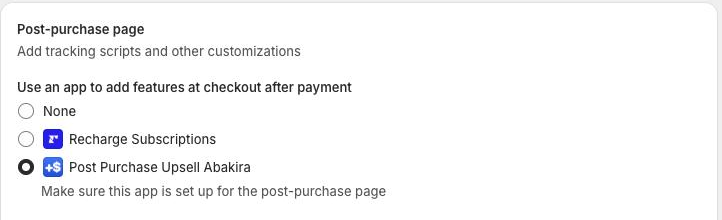
Shopify gives that page its own setting in Settings → Checkout, and its own list of apps. One store, one app, and it is off until you pick one.
Apps built on supported extension points are unaffected. If an app installed itself through app blocks or checkout extensions, nothing changes for it. The apps at risk are the ones still injecting script tags, and the honest way to find out is to ask each vendor directly rather than guess from the outside.
The ten-minute check
- Open Settings → Checkout and look at the Additional Scripts box. If it is empty, you’re mostly clear, and it’s worth confirming with anyone who has touched your theme.
- Copy whatever is in it into a document before anything is upgraded. It will be gone afterwards, and it is the only record of what you were tracking.
- Go line by line and sort each snippet into: replaced by an official pixel app, needs an app block, or move server-side.
- In the checkout and accounts editor, upgrade the Thank you and Order status pages yourself rather than waiting for the automatic upgrade. Doing it on your own schedule means you can compare the pages side by side before you commit.
- Place a test order after the upgrade and confirm each pixel fires. Use a card, not a wallet, so nothing is skipped for an unrelated reason.
One thing worth knowing while you’re in there
If you’re rebuilding what happens after checkout anyway, this is the moment to look at the post-purchase page rather than only the thank-you page. It’s the screen between payment and confirmation, and it’s the one place a customer can accept an extra item on the card they already used, with no second checkout.
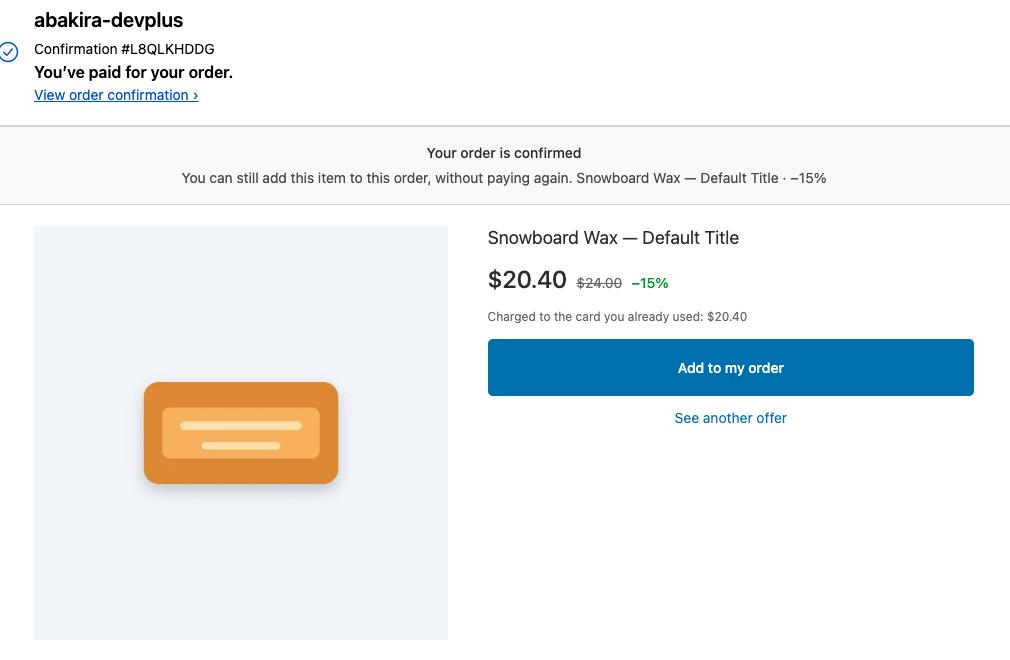
What the buyer sees. The order is already placed, and the extra item goes on the card that just went through.
It has a hard ceiling that nobody advertises, and you should know it before you count on it: Shopify does not render that page at all on Apple Pay, Google Pay, PayPal, gift-card orders or POS. On some stores that’s a small slice of orders. On others it’s most of them. We wrote the whole list down in the chapter on who actually sees your offers, including the cases nobody can detect from the outside. To find your own share, count last month’s orders that weren’t paid by card.
We build Post Purchase Upsell Abakira for that page. A buyer who accepts gets the item on the order they just placed, charged to the card that just went through, and you ship one parcel instead of two. The free plan runs on a live store with no card, so you can find out whether your buyers say yes before you pay anyone.
Sell one more item on the order they just placed
Sources: Shopify Help Center, Upgrading and replacing your Thank you and Order status pages and the non-Plus upgrade guide. Checked on July 28, 2026. Dates and mechanics can change; verify against Shopify’s own pages before acting.
Written by Abakira. We make small software: Shopify apps, web tools and iPhone apps. This article is about Post Purchase Upsell Abakira.